
Concrete Calculator — Volume, Yards, Bags & Cost Estimator for Slabs, Footings & Columns
A concrete calculator is a free online tool that helps contractors, builders, and homeowners calculate the exact volume of concrete needed for slabs, footings, columns, walls, stairs, and tubes. Using the concrete calculator, you enter dimensions (length, width, thickness for slabs; diameter and depth for columns), select concrete strength, and instantly get volume in cubic yards, cubic feet, cubic meters, plus the number of 60-lb, 80-lb, or cubic-yard ready-mix bags needed. The concrete calculator supports five practical modes including rectangular slab, column/post, circular slab, stairs, and custom shape, making it the most complete concrete estimation tool for residential, commercial, and DIY construction projects.
Key facts at a glance
- Core formula: volume = length × width × thickness for slabs; π × r² × height for columns.
- Standard slab thickness: 4 inches for patios, 5-6 inches for driveways, 6+ inches for garage floors.
- One cubic yard: equals 27 cubic feet or approximately 40.8 standard 60-lb bags of premix.
- Concrete weight: ~150 lbs per cubic foot, ~4,050 lbs per cubic yard.
- Waste factor: add 10% for slabs, 15% for footings, 20% for irregular shapes to account for spillage.
- Best practice: order ready-mix in cubic yards, premix bags for small projects under 1 cubic yard.
📋 Table of Contents
▼
- What the Concrete Calculator Does
- Concrete Calculator — Advanced Tool
- Understanding Concrete Volume Calculations
- Real Scenarios Where the Concrete Calculator Helps
- Common Concrete Calculation Mistakes
- Concrete Pouring Safety and Best Practices
- Which Mode Fits Your Project
- Frequently Asked Questions
- Concrete Pour Checklist
- Trusted Construction Resources
- User Reviews & Ratings
What the Concrete Calculator Does
A concrete calculator takes the dimensions of your pour and instantly calculates the volume of concrete needed in cubic feet, cubic yards, and cubic meters. The tool also estimates the number of bags (60-lb, 80-lb) or ready-mix truck loads, plus the cost based on local pricing. Whether you are pouring a patio slab, deck footing, foundation wall, or driveway, the concrete calculator eliminates guesswork and prevents costly over-orders or shortages.
Concrete is sold by the cubic yard (ready-mix) or by the bag (premix). Ordering too much means wasted material and disposal costs. Ordering too little causes cold joints, weak pours, and emergency delivery fees. The concrete calculator applies industry-standard formulas with waste factor adjustments to ensure you order exactly what you need, saving time and money on every project.
The concrete calculator below includes five project-type modes: Rectangular Slab (patios, driveways, floors), Column/Post (footings, piers, posts), Circular Slab (patios, pads, hot tubs), Stairs (steps, landings), and Custom Shape (complex pours). Each mode includes automatic waste factor, multiple unit options, bag count, and cost estimation. The tool’s light purple design ensures a professional user experience for contractors, engineers, and DIY homeowners.
Use the concrete calculator during planning, ordering, and cost estimation. The tool helps contractors create accurate bids, homeowners budget correctly, and suppliers verify quantities. The concrete calculator is essential for any concrete project from small post holes to large commercial foundations.
From a 4×4 patio slab (0.5 cubic yard) to a 2,000 sq ft commercial floor (15+ cubic yards), the concrete calculator scales to meet any project size. The tool supports all major concrete types including standard ready-mix (3,000–5,000 PSI), high-strength (5,000+ PSI), lightweight, and high-performance mixes for specialized applications.
Concrete Calculator
Calculate concrete volume for slabs, columns, circular pads, stairs, and custom shapes. Get instant results in cubic yards, cubic feet, cubic meters, plus bag count and cost estimates for ready-mix or premix concrete.
Your Concrete Calculation Result
Step-by-step calculation
Understanding Concrete Volume Calculations
Understanding how a concrete calculator works is essential for accurate material estimation in any construction project. The concrete calculator applies fundamental volume formulas — length × width × thickness for rectangular slabs, π × r² × height for circular shapes, and step-by-step geometry for stairs and complex pours. Whether you are a contractor bidding a project or a homeowner pouring a patio, the concrete calculator ensures you order the right amount of concrete, avoiding waste and shortages.
Concrete volume is measured in cubic yards (1 yd³ = 27 cubic feet) for ready-mix deliveries and in cubic feet for premix bag projects. The concrete calculator provides results in both units, plus equivalent 60-lb and 80-lb bag counts for small projects. The tool also includes a waste factor adjustment (10-20%) to account for spillage, over-excavation, and irregular subgrades.
Core Volume Formulas
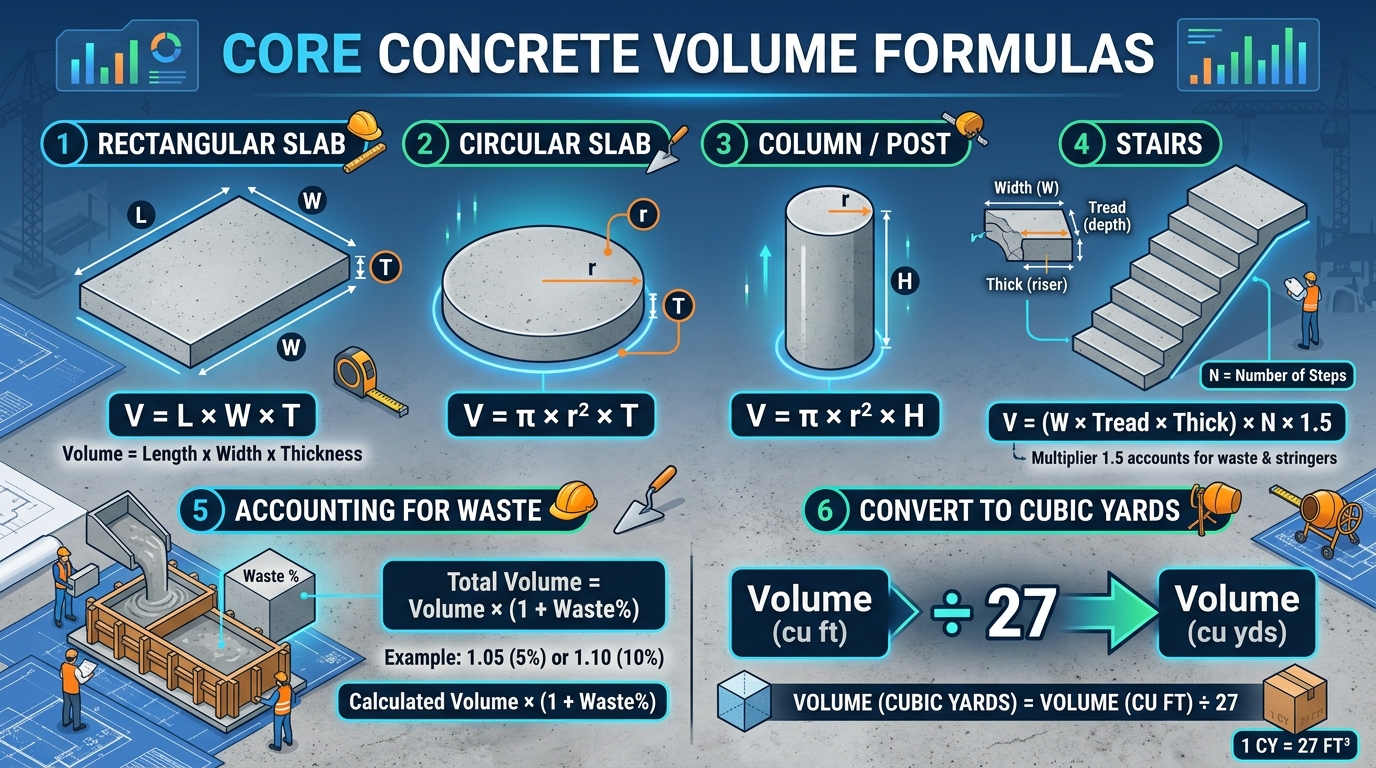
The concrete calculator uses three primary volume formulas. For rectangular slabs: Volume = Length × Width × Thickness. For columns and circular shapes: Volume = π × r² × Height. For stairs: Volume = (Width × Tread × Thickness) × Number of Steps × 1.5 (factor for riser volume). The concrete calculator applies these formulas automatically across all five project modes.
Standard Slab Thickness
Slab thickness varies by application. The concrete calculator uses these industry-standard minimums: 4 inches for patios, walkways, and shed floors; 5 inches for light-duty driveways; 6 inches for standard driveways, garage floors, and commercial floors; 8+ inches for heavy equipment, industrial floors, and highways. Thicker slabs provide more strength and durability but require more concrete.
Concrete Strength (PSI)
Concrete strength is measured in PSI (pounds per square inch). The concrete calculator supports all standard mixes: 2,500 PSI (non-structural), 3,000 PSI (residential slabs), 4,000 PSI (driveways, patios), 5,000 PSI (high-traffic, commercial), and 6,000+ PSI (specialty, high-strength). For most DIY and residential projects, 3,000-4,000 PSI is sufficient.
Ready-Mix vs Premix Bags
Ready-mix concrete is delivered by truck and is economical for projects over 1 cubic yard. Premix bags (60-lb, 80-lb) are convenient for small projects. The concrete calculator provides both bag counts and cubic yard volumes, with cost estimates for each option. Most concrete suppliers require a minimum order of 1-2 cubic yards for delivery.
Waste Factor Considerations
The concrete calculator includes a waste factor adjustment because real pours always lose some material. Spillage on forms, over-excavation, subgrade settlement, and worker error all contribute to waste. Standard waste factors: 10% for slabs on well-prepared subgrade, 15% for footings and irregular shapes, 20% for hand-mixed or pumped concrete with spillage. The concrete calculator defaults to 10% but allows custom adjustment.
Reinforcement and Add-ons
Concrete is often reinforced with rebar, wire mesh, or fiber. The concrete calculator calculates pure concrete volume; reinforcement displaces a small amount of volume (typically less than 1%). For most projects, the reinforcement displacement is negligible. Fiber-reinforced concrete may require 5-10% more material due to fiber volume.
Circular Slab: V = π × r² × T
Column/Post: V = π × r² × H
Stairs: V = (W × Tread × Thick) × N × 1.5
Volume with Waste: V × (1 + Waste%)
Cubic Yards: Volume (cu ft) ÷ 27
Quick Reference Values
Industry Note: The concrete calculator provides accurate volume estimates for standard pours. For complex shapes, irregular subgrades, or projects with special requirements (high-strength, fiber-reinforced, decorative), consult a ready-mix supplier or concrete engineer. Always order 10% extra to account for spillage and subgrade variations.
Real Scenarios Where the Concrete Calculator Helps
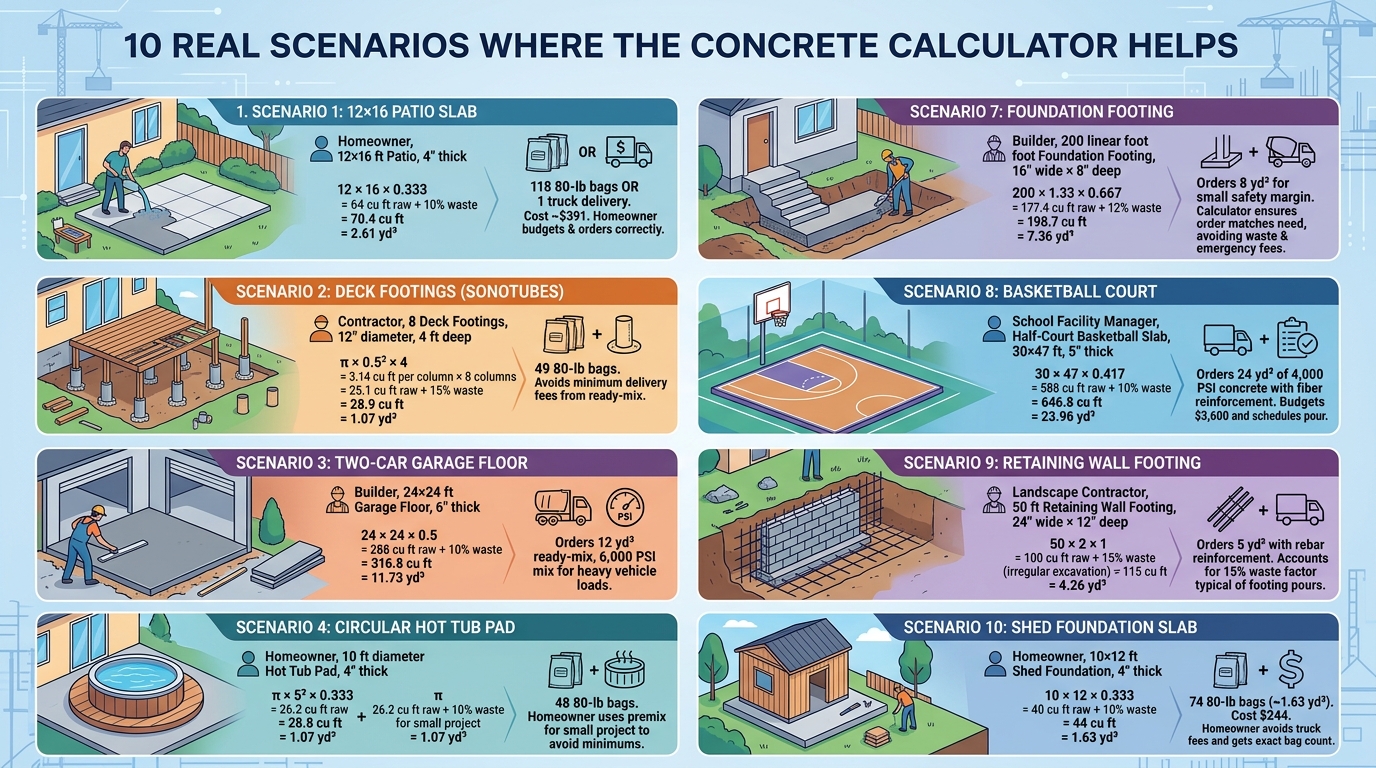
Scenario 1: 12×16 Patio Slab
A homeowner wants to pour a 12×16 foot patio, 4 inches thick. The concrete calculator slab mode returns: 12 × 16 × 0.333 = 64 cu ft raw, with 10% waste = 70.4 cu ft = 2.61 cubic yards. This requires 118 80-lb bags, or one ready-mix truck delivery (most suppliers have 3-4 yd³ minimum). At $150/yd³, the cost is approximately $391. The homeowner uses this to budget and order the correct quantity.
Scenario 2: Deck Footings (Sonotubes)
A contractor is pouring 8 deck footings, each 12 inches in diameter and 4 feet deep. The concrete calculator column mode: π × 0.5² × 4 = 3.14 cu ft per column × 8 columns = 25.1 cu ft raw, with 15% waste = 28.9 cu ft = 1.07 cubic yards. This requires 49 80-lb bags. The contractor uses the concrete calculator to order premix bags, avoiding minimum delivery fees from ready-mix suppliers.
Scenario 3: Two-Car Garage Floor
A builder is pouring a 24×24 foot garage floor, 6 inches thick. The concrete calculator returns: 24 × 24 × 0.5 = 288 cu ft raw, with 10% waste = 316.8 cu ft = 11.73 cubic yards. At $150/yd³, the cost is $1,760. The builder orders 12 cubic yards from a ready-mix supplier with a 6,000 PSI mix for heavy vehicle loads.
Scenario 4: Circular Hot Tub Pad
A homeowner is pouring a 10-foot diameter hot tub pad, 4 inches thick. The concrete calculator circular mode: π × 5² × 0.333 = 26.2 cu ft raw, with 10% waste = 28.8 cu ft = 1.07 cubic yards. This requires 48 80-lb bags. The homeowner uses premix bags for this small project to avoid ready-mix minimums.
Scenario 5: Concrete Stairs
A contractor is building 4 concrete steps, each 36 inches wide with 11-inch treads and 7-inch risers, 6 inches thick. The concrete calculator stairs mode: each step is 3 × 0.917 × 0.5 = 1.375 cu ft × 4 steps × 1.5 (riser factor) = 8.25 cu ft raw, with 12% waste = 9.24 cu ft = 0.34 cubic yards. This requires 16 80-lb bags. The contractor uses the concrete calculator to estimate a small mix for the steps.
Scenario 6: Driveway Replacement
A homeowner is replacing a 20×40 foot driveway, 5 inches thick. The concrete calculator returns: 20 × 40 × 0.417 = 333.3 cu ft raw, with 10% waste = 366.7 cu ft = 13.58 cubic yards. At $150/yd³, the cost is $2,037. The homeowner uses this to compare with the contractor’s quote and verify fair pricing.
Scenario 7: Foundation Footing
A builder is pouring a 200-linear-foot foundation footing, 16 inches wide × 8 inches deep. The concrete calculator custom mode: 200 × 1.33 × 0.667 = 177.4 cu ft raw, with 12% waste = 198.7 cu ft = 7.36 cubic yards. The builder orders 8 cubic yards to have a small safety margin. The concrete calculator ensures the order matches the actual need, avoiding waste and emergency delivery fees.
Scenario 8: Basketball Court
A school is pouring a half-court basketball slab, 30×47 feet, 5 inches thick. The concrete calculator returns: 30 × 47 × 0.417 = 588 cu ft raw, with 10% waste = 646.8 cu ft = 23.96 cubic yards. The school orders 24 cubic yards of 4,000 PSI concrete with fiber reinforcement. The concrete calculator helps the facility manager budget the $3,600 concrete cost and schedule the pour.
Scenario 9: Retaining Wall Footing
A landscape contractor is pouring a 50-foot retaining wall footing, 24 inches wide × 12 inches deep. The concrete calculator custom mode: 50 × 2 × 1 = 100 cu ft raw, with 15% waste (irregular excavation) = 115 cu ft = 4.26 cubic yards. The contractor orders 5 cubic yards with rebar reinforcement. The concrete calculator accounts for the 15% waste factor typical of footing pours.
Scenario 10: Shed Foundation Slab
A homeowner is pouring a 10×12 foot shed foundation, 4 inches thick. The concrete calculator returns: 10 × 12 × 0.333 = 40 cu ft raw, with 10% waste = 44 cu ft = 1.63 cubic yards. At $150/yd³, the cost is $244. The homeowner uses premix bags (74 80-lb bags) for this small project, avoiding ready-mix minimum delivery fees. The concrete calculator provides the exact bag count for the project.
Common Concrete Calculation Mistakes
Mistake 1: Forgetting to Convert Inches to Feet
Thickness is usually measured in inches but area is in feet. Failing to convert leads to massive over-orders. The concrete calculator automatically converts inches to feet, but if calculating manually, divide inches by 12. A 4-inch slab is 0.333 feet, not 4 feet.
Mistake 2: Not Adding Waste Factor
Skipping the waste factor means ordering exactly the calculated volume, which always runs short. The concrete calculator defaults to 10% waste but allows custom adjustment. For footings with hand-excavated subgrades, 15-20% waste is appropriate.
Mistake 3: Confusing Cubic Feet with Cubic Yards
Ready-mix is sold in cubic yards, not cubic feet. 1 cubic yard = 27 cubic feet. The concrete calculator provides both units, but ordering 100 cubic feet when you need 100 cubic yards is a 27× error. Always check units when ordering.
Mistake 4: Wrong Slab Thickness
Using the wrong thickness is a common mistake. A 4-inch patio uses different concrete than a 6-inch driveway. The concrete calculator uses standard thickness defaults but allows custom thickness for special applications. For structural slabs, consult an engineer.
Mistake 5: Not Accounting for Subgrade Variation
Excavated subgrades are rarely perfectly level. Depressions require more concrete, high spots require less. The concrete calculator‘s 10-15% waste factor accounts for typical subgrade variation, but severely uneven subgrades may need 20%+ waste.
Mistake 6: Misjudging Column Volume
Calculating column volume as a square instead of a circle overestimates concrete by 27%. The concrete calculator column mode uses π × r² × h for accurate cylindrical volume. Square footings use a different formula, so use the slab mode for square footings.
Mistake 7: Forgetting the Riser Volume in Stairs
Stair volume includes both treads and risers. The concrete calculator stairs mode multiplies step volume by 1.5 to account for riser volume. Without this factor, stair concrete is under-estimated by 50%.
Mistake 8: Wrong Bag Size Calculation
60-lb bags yield 0.45 cu ft while 80-lb bags yield 0.60 cu ft. Confusing these leads to significant over- or under-orders. The concrete calculator provides both bag counts, allowing users to choose the appropriate bag size.
Mistake 9: Ignoring Reinforcement Displacement
Heavy rebar displaces a small amount of concrete volume, but this is usually negligible for most projects. For heavily reinforced slabs, reduce volume by 2-3% to account for rebar displacement. The concrete calculator doesn’t directly account for this, so subtract manually for heavily reinforced projects.
Mistake 10: Not Ordering Extra for Spare
Professionals order 5-10% extra beyond the calculated amount to have spare concrete for touch-ups, low spots, and unexpected needs. The concrete calculator‘s waste factor helps with this, but experienced contractors add extra on top of the calculator’s recommendation.
💡 Builder’s Rule of Thumb: Always use the concrete calculator with proper waste factor (10% minimum), convert all units correctly, account for subgrade variation, and order 5% extra beyond the calculator’s recommendation for spares. Accurate calculation saves money and prevents mid-pour shortages.
Concrete Pouring Safety and Best Practices
Safety Notice: Concrete work involves heavy materials, power tools, and chemical exposure (wet concrete is caustic). The concrete calculator is a calculation tool only. All concrete work should follow OSHA standards, use proper PPE (gloves, boots, eye protection), and be performed by qualified workers. Wet concrete causes chemical burns; always wash skin immediately after contact.
- Wear proper PPE — rubber gloves, safety boots, long sleeves, and eye protection when working with wet concrete.
- Avoid skin contact — wet concrete is highly alkaline and causes chemical burns; wash immediately if exposed.
- Use proper lifting technique — concrete bags weigh 60-80 lbs; use team lifting for heavier items or pallets.
- Ensure proper ventilation when working with concrete in enclosed spaces; cement dust is a respiratory irritant.
- Protect rebar — exposed rebar ends can cause impalement injuries; use rebar caps.
- Use proper formwork — forms must be properly braced to prevent blowouts under concrete pressure.
- Have water and cleanup ready — wash tools and skin promptly to prevent concrete from hardening.
- Schedule the pour carefully — hot weather, rain, and freezing temperatures all affect concrete quality.
Which Mode Fits Your Project
| Mode | Use Case | Key Formula | Inputs | Output |
|---|---|---|---|---|
| Rectangular Slab | Patios, driveways, floors | V = L × W × T | length, width, thickness | volume + bags + cost |
| Column / Post | Footings, piers, posts | V = π × r² × h × n | diameter, height, count | total volume + bags |
| Circular Slab | Patios, pads, hot tubs | V = π × r² × t | diameter, thickness, count | volume + bags + cost |
| Stairs / Steps | Steps, landings | V = (W × T × H) × N × 1.5 | steps, width, tread, rise | volume + bags |
| Custom Shape | Complex pours, footings | V (input) × (1 + waste) | total volume, waste | volume + bags + cost |
For Standard Slab Projects
The rectangular slab mode handles patios, driveways, garage floors, shed foundations, and any rectangular pour. The concrete calculator slab mode is the most common mode, supporting 4-inch to 8+ inch thicknesses for residential and light commercial projects.
For Footings and Piers
The column mode is perfect for deck footings, fence post holes, sonotubes, and piers. The concrete calculator column mode handles multiple columns at once, with proper cylindrical volume calculation. This is essential for deck construction, sign posts, and structural footings.
For Round Pads
The circular mode handles hot tub pads, well covers, round patios, and any circular pour. The concrete calculator circular mode uses π × r² × thickness for accurate round slab volume, supporting multiple identical circles if needed.
For Steps and Landings
The stairs mode handles outdoor steps, porch steps, and stair landings. The concrete calculator stairs mode accounts for both tread and riser volume with the 1.5× factor. This mode is essential for accurate stair material estimation.
For Complex Shapes
The custom mode handles irregular shapes, multi-section pours, or any volume that doesn’t fit the other modes. The concrete calculator custom mode allows direct volume input with waste factor adjustment, perfect for complex foundations, retaining walls, or combined pours.
Advanced Pouring Notes
For monolithic pours (slab and footing together), calculate the total volume as the sum of slab + footing volumes. The concrete calculator‘s custom mode is perfect for this, or use the slab mode and add footing volume manually.
For pumped concrete, add 5-10% to the calculated volume to account for pump line retention. The concrete calculator‘s waste factor can be increased to 15-20% for pumped concrete projects.
For cold weather pours below 40°F (4°C), specify air-entrained concrete and use hot water in the mix. The concrete calculator doesn’t change for weather, but the concrete supplier will adjust the mix design and may add accelerators.
For hot weather pours above 85°F (29°C), use chilled water or ice in the mix, and consider retarders. Schedule pours for early morning or evening to avoid peak temperatures. The concrete calculator volume is unaffected, but working time is reduced.
For fiber-reinforced concrete, the fiber displaces a small amount of volume. The concrete calculator doesn’t directly account for this, so add 3-5% for fiber reinforcement projects. FRC is common in slab-on-grade construction to control plastic shrinkage cracking.
For decorative concrete (stamped, colored, exposed aggregate), the cost is higher than standard concrete. The concrete calculator‘s cost field allows custom pricing for specialty mixes, helping accurate cost estimation for decorative projects.
Worked Examples
Example 1 — Patio Slab: 12 × 16 × 0.333 = 64 cu ft × 1.10 = 70.4 cu ft = 2.61 yd³. Cost: $391. Bags: 118 × 80-lb.
Example 2 — Deck Footings: 8 × π × 0.5² × 4 = 25.1 cu ft × 1.15 = 28.9 cu ft = 1.07 yd³. Cost: $161. Bags: 49 × 80-lb.
Example 3 — Garage Floor: 24 × 24 × 0.5 = 288 cu ft × 1.10 = 316.8 cu ft = 11.73 yd³. Cost: $1,760. Order 12 yd³ truck.
Example 4 — Circular Pad: π × 5² × 0.333 = 26.2 cu ft × 1.10 = 28.8 cu ft = 1.07 yd³. Cost: $161. Bags: 48 × 80-lb.
Example 5 — Stairs: 4 × 3 × 0.917 × 0.5 × 1.5 = 8.25 cu ft × 1.12 = 9.24 cu ft = 0.34 yd³. Bags: 16 × 80-lb.
Frequently Asked Questions
1. What is a concrete calculator?
A concrete calculator is a free online tool that calculates the exact volume of concrete needed for slabs, footings, columns, stairs, and custom shapes. The concrete calculator provides results in cubic yards, cubic feet, plus 60-lb and 80-lb bag counts and cost estimates.
2. How much concrete do I need for a 12×12 slab?
A 12×12 foot slab, 4 inches thick, requires 48 cubic feet = 1.78 cubic yards. With 10% waste, order 1.95 cubic yards or 52 80-lb bags. The concrete calculator provides the exact quantity for any slab size.
3. How many 80-lb bags of concrete in a yard?
One cubic yard of concrete equals approximately 45 80-lb bags. The concrete calculator provides the exact bag count for any project. Remember, 80-lb bags yield 0.60 cu ft, and 1 yd³ = 27 cu ft, so 27 ÷ 0.60 = 45 bags per yd³.
4. How thick should a concrete patio be?
Standard concrete patios are 4 inches thick. For vehicle support (driveways), use 5-6 inches. The concrete calculator uses standard 4-inch thickness for patio mode but allows custom thickness for driveways and heavy-use applications.
5. Is the concrete calculator free?
Yes, the concrete calculator is completely free, browser-based, and requires no login. Review submissions are saved to the WordPress site database through the shortcode AJAX handler.
6. How do I calculate concrete for a column?
For a cylindrical column, volume = π × r² × height. The concrete calculator column mode handles this automatically. Enter the diameter in inches, height in feet, and number of columns to get the total volume, bag count, and cost.
7. Can I use the concrete calculator for ready-mix orders?
Yes, the concrete calculator provides cubic yard volumes ideal for ready-mix orders. Most suppliers have 1-3 yd³ minimum delivery, with 8-10 yd³ per standard truck. Use the calculator’s volume with 10% waste to determine your ready-mix order quantity.
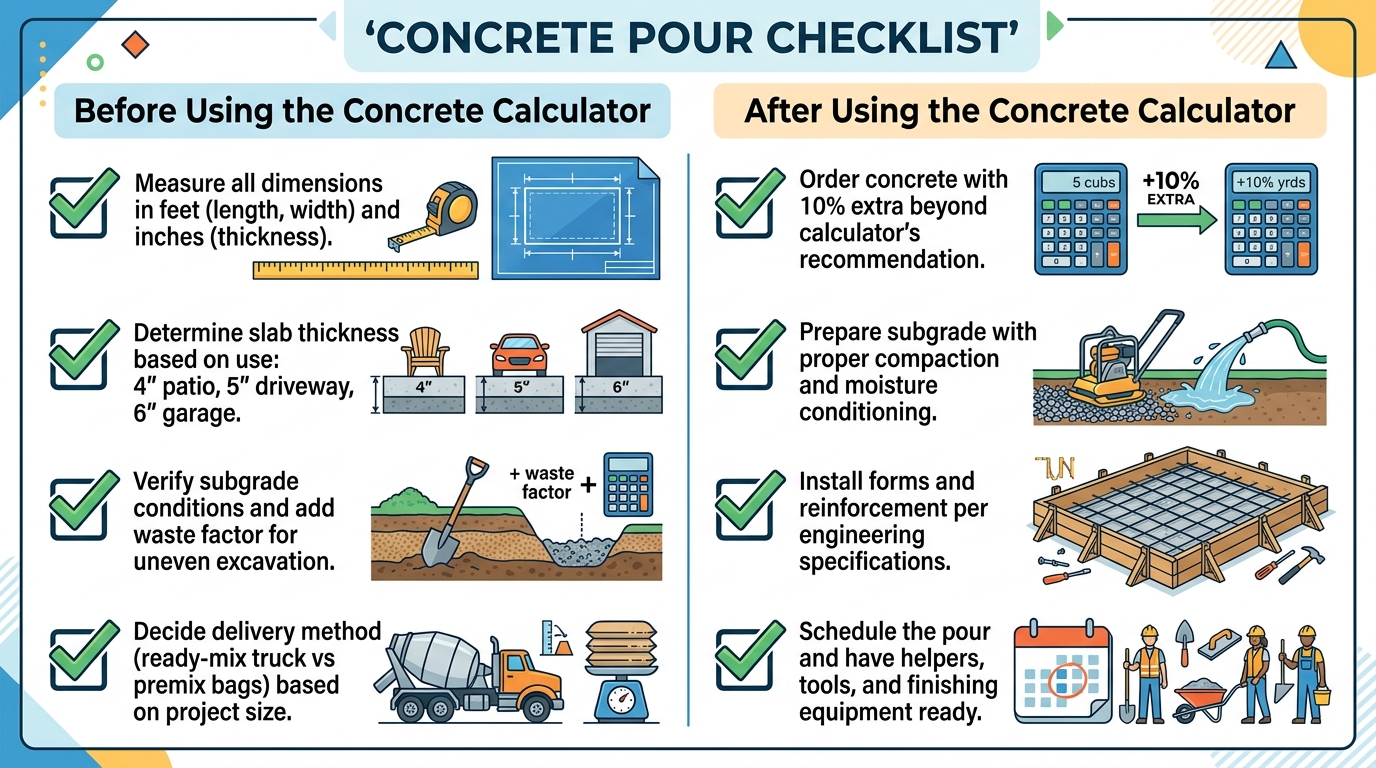
Concrete Pour Checklist
Before Using the Concrete Calculator
After Using the Concrete Calculator
Trusted Construction Resources
American Concrete Institute (ACI) — ACI concrete standards for mix design, placement, finishing, and curing of concrete. The ACI 318 Building Code is the primary structural concrete standard.
Portland Cement Association (PCA) — PCA concrete resources for design and construction guides, mix design tools, and educational materials for ready-mix and precast concrete.
National Ready Mixed Concrete Association (NRMCA) — NRMCA concrete industry for ready-mix concrete specifications, sustainability, and industry statistics.
OSHA Concrete Safety — OSHA concrete construction safety for PPE requirements, formwork safety, and silica dust standards in concrete work.
Concrete Network — Concrete Network for decorative concrete, repair, and contractor directory resources.
User Reviews & Ratings
Share Your Experience with the Concrete Calculator
Advanced Guide to Concrete Volume Estimation
The concrete calculator is a comprehensive tool for the construction industry, supporting contractors, builders, engineers, and DIY homeowners with accurate volume calculations. By applying the standard volume formulas with proper waste factor adjustments, the concrete calculator ensures you order the right amount of concrete for any project. Whether you are pouring a small patio or a large commercial foundation, the tool provides the precision and convenience you need.
For contractors and builders, the concrete calculator speeds up the bidding process and material ordering. The tool’s five modes cover the most common concrete applications, while the cost estimation helps create competitive bids. Combined with industry-standard waste factors and PSI recommendations, the calculator supports quality construction and efficient project management.
For engineers, the concrete calculator provides quick volume estimates for structural design. The tool helps verify takeoffs from construction drawings and supports preliminary design calculations. For final design, the calculator output should be cross-checked with detailed structural analysis.
For DIY homeowners, the concrete calculator demystifies concrete estimation. The tool’s clear step-by-step output helps homeowners understand exactly what they need, whether ordering premix bags for a small project or ready-mix for a driveway. The cost estimation helps set realistic project budgets.
For ready-mix suppliers, the concrete calculator provides accurate volume estimates that match customer orders. The tool helps suppliers verify customer quantities and recommend appropriate mix designs, slump, and delivery options for each project.
For concrete contractors, the concrete calculator speeds up the estimating process. The tool’s bag count and cubic yard calculations help contractors quote accurately and order the correct quantities. The waste factor adjustment prevents both over-orders (waste, disposal costs) and under-orders (short loads, emergency fees).
For landscape contractors, the concrete calculator handles footings, piers, retaining wall bases, and patio installations. The tool supports the diverse concrete applications in landscape construction, from decorative patios to structural footings.
For deck builders, the concrete calculator column mode is essential for deck footings. The tool calculates the correct concrete volume for sonotubes, post holes, and pier blocks, with proper waste factor for hand-excavated holes. This prevents short-loads and mid-project material runs.
For foundation repair contractors, the concrete calculator helps estimate material for pier installations, slab jacking, and structural repairs. The custom mode handles complex repair scenarios with direct volume input.
For agricultural builders, the concrete calculator supports barn floors, equipment pads, feed bunks, and manure pits. The tool’s slab and custom modes cover these large-volume applications, with appropriate waste factors for agricultural projects.
The concrete calculator is more than a calculation tool — it is a comprehensive resource for the concrete construction industry. By providing accurate volume estimates, cost projections, and material recommendations, the tool supports quality construction from initial bid through final pour. As concrete continues to be the world’s most-used building material, the concrete calculator will continue to be a trusted companion for concrete professionals worldwide.
Final Thoughts on the Concrete Calculator
The concrete calculator is the most complete, accurate, and user-friendly tool available for concrete volume estimation. Whether you are a contractor bidding a foundation, a DIY homeowner pouring a patio, or an engineer verifying takeoffs, the concrete calculator provides the precision and confidence you need for any concrete project.
Use the concrete calculator during planning, bidding, and material ordering phases. The tool’s five modes, waste factor adjustments, and cost estimations make it a versatile companion throughout any concrete project. Combined with proper site preparation, quality materials, and professional installation, the calculator supports concrete projects that stand the test of time.
For best results, always combine the concrete calculator with professional consultation for structural projects, proper site preparation, and quality materials. The calculator provides accurate estimates, but professional expertise ensures proper mix design, reinforcement, and installation for every concrete project.
🔒 Review Storage Note: All calculations run in your browser. When you submit a review, it is saved to the WordPress site database through the shortcode AJAX handler. No personal data is shared with third parties.
Pingback: Concrete Slab Cost Calculator – Estimate Slab Cost Instantly