
Your Daily Calorie Goal
Enter Your Foods
Total Nutrition
Total Calories
0 kcal
Total Protein
0 g
Total Carbs
0 g
Total Fat
0 g
Macros vs. Goal
Your Ultimate Guide to the Subway Nutrition Calculator
Navigating the world of fast food while trying to stay on track with your health goals can feel like walking a tightrope. On one hand, you crave convenience and flavor. On the other, you’re committed to your wellness journey. For over fifteen years, I’ve guided clients through this exact challenge, and I’ve found that knowledge is the most powerful tool in your arsenal.
This is especially true when it comes to popular spots like Subway, where “eating fresh” can mean very different things depending on your choices. That’s precisely why having a reliable subway nutrition calculator is a game-changer. It transforms guessing into an exact science, empowering you to build a meal that truly aligns with your body’s needs.
So many of my clients come to me feeling overwhelmed. They want to make smart choices but are bombarded with options. Is the turkey breast better than the roast beef? What happens when you add chipotle southwest sauce? How much of a difference does switching the bread make? These are valid questions, and the answers lie in the numbers—the calories, protein, carbs, and fats.
This is where a well-designed subway nutrition calculator becomes your best friend. It’s not just about getting a final calorie count; it’s about understanding the nutritional architecture of your meal. Throughout this guide, I’m going to walk you through how to use this incredible tool, step-by-step, just as I would with one of my private clients. We’ll explore how to personalize your meals, compare different sandwich options, and make your Subway run work for you, not against you.
Getting Started: Understanding the Calculator’s Purpose
When you first land on the subway nutrition calculator page, you’re greeted by a clean, simple interface. At the top, you’ll see a clear title and a friendly 🍎 icon, immediately signaling that this tool is all about food and nutrition. The purpose is straightforward: to help you calculate the precise nutritional breakdown of any Subway meal you can imagine. Whether you’re grabbing a pre-designed sandwich or building your own custom creation from scratch, this tool is designed for you.
The core idea is personalization. As a nutrition coach, I preach that there is no one-size-fits-all diet. Your needs are unique, and your meals should reflect that. The subway nutrition calculator champions this philosophy. It allows you to move beyond the standard menu board and see the direct impact of every single ingredient. Do you want extra cheese? Add it in and watch the numbers change.
Curious about the difference between 9-Grain Wheat and Italian Herbs & Cheese bread? The calculator will show you instantly. This level of detail is what separates mindful eating from restrictive dieting. You’re not just blindly following rules; you’re making informed decisions that fit your lifestyle. This is the foundational power of a great subway nutrition calculator.
Step 1: Setting Your Personal Calorie Target
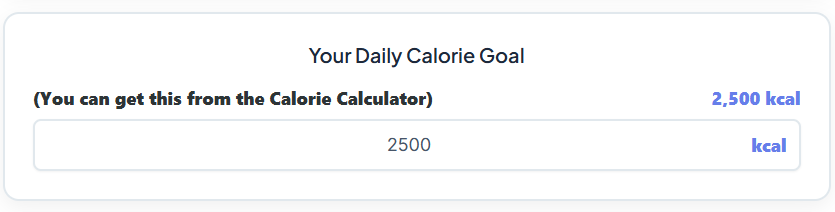
The very first interactive element you’ll encounter is a section labeled “Daily Calorie Goal.” This is your starting point, your nutritional north star for the day. Here, you’ll find a field where you can input your personal daily calorie target. Whether you’re aiming for 1,800, 2,200, or 2,500 calories, you simply type that number into the box.
This feature is more than just a data entry point; it’s a crucial step in contextualizing your meal. One of the most common questions I get is, “Is this meal ‘good’ or ‘bad’?” My answer is always the same: it depends on your goals. A 600-calorie sandwich might be perfect for someone with a 2,500-calorie target, but it might be too much for another person aiming for 1,500 calories. By entering your goal at the outset, the subway nutrition calculator helps you see your meal as part of a bigger picture.
As you add food items later on, you’ll see a live update showing how your meal’s calories stack up against your daily budget. This immediate feedback is incredibly motivating and educational. It’s a simple yet profound feature that connects your single meal choice to your overall daily energy balance, a core principle of effective nutrition management. This simple input makes the subway nutrition calculator a personalized planning tool rather than just a simple counter.
Step 2: Building Your Meal in the Food Entry Section
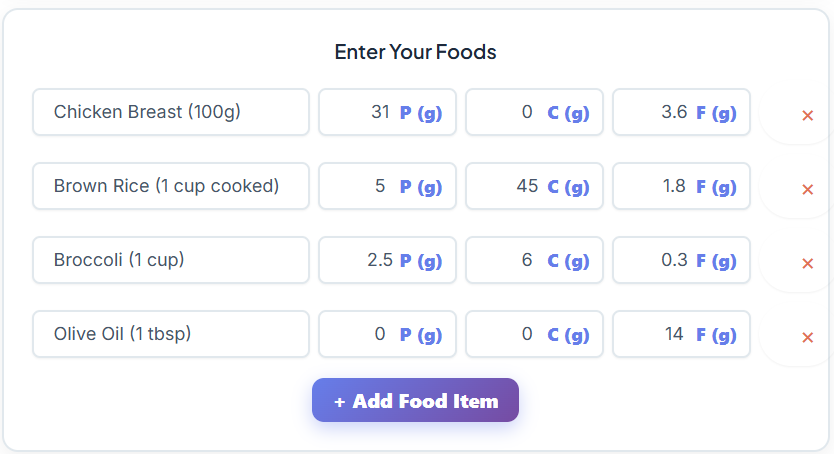
This is where the magic really happens. The “Enter Your Foods” panel is the heart of the subway nutrition calculator. It’s designed to be incredibly intuitive, allowing you to deconstruct any Subway item into its basic components or add entire sandwiches at once.
Let’s say you want to figure out the nutrition for your go-to order. You’d start by typing the name of the first ingredient into the food entry field. For example, you can type “Italian Bread,” and then you’ll be prompted to enter its corresponding protein, carbohydrate, and fat values, which you can typically find on Subway’s official website or other nutritional databases.
After entering the macros for your bread, you click the “+ Add Food Item” button. A new line appears, ready for your next ingredient. You can continue this process for every single component of your meal: the meat, the cheese, the vegetables, and the sauce. If you make a mistake or change your mind, a simple click on the “×” delete button next to any item removes it instantly.
This modular approach is brilliant because it gives you complete control. You can see precisely how much fat that extra scoop of mayonnaise adds or how much protein is in that double portion of steak. This granular control is what makes the subway nutrition calculator so effective for anyone serious about their diet.
It also allows you to answer common questions with precision. For instance, if you’re wondering about how many calories in a subway sandwich, you can build it piece by piece to find the exact answer for your specific combination. This process empowers you to become your own nutrition detective, uncovering the details of your favorite meals. Using the subway nutrition calculator this way removes all the guesswork.
Step 3: Analyzing the Instant Nutrition Output
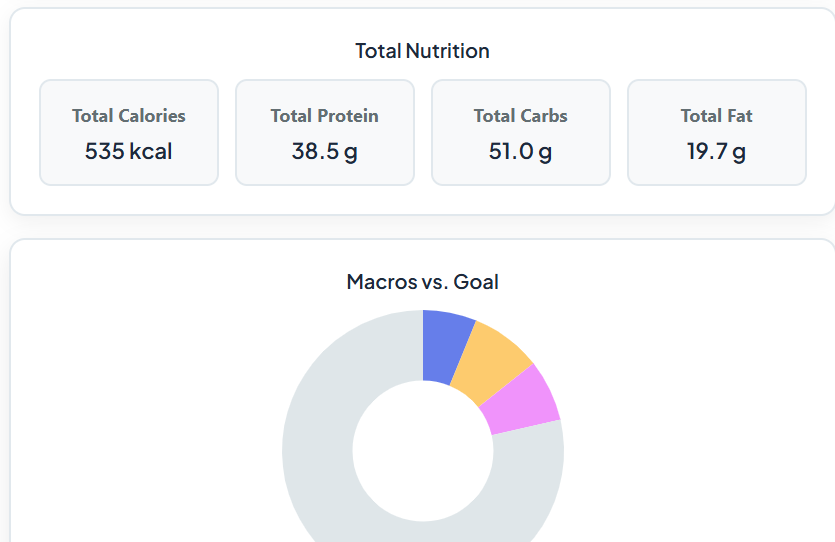
As you add or remove items, you’ll notice the “Total Nutrition” section updates in real-time. This is my favorite feature, and the one my clients find most illuminating. Four key numbers are displayed: Total Calories, Total Protein, Total Carbs, and Total Fat. There’s no delay and no need to press a “calculate” button; the results are instantaneous.
This immediate feedback loop is a powerful learning tool. You can experiment and see cause and effect right before your eyes. What happens to the total calories if you swap provolone for American cheese? How does choosing a wrap instead of a footlong impact the carbohydrate count? The subway nutrition calculator gives you the answers in a split second. This is where you can perform direct comparisons. For example, you can build a standard six-inch turkey breast sandwich to see the baseline subway six inch calories, and then customize it to see how your preferences alter that baseline.
Let’s take a classic example. Many people are curious about subway tuna sandwich calories. Using the calculator, you can enter the components: the bread, the tuna salad, your choice of cheese, and your veggies. You’ll get a precise number. Then, you can duplicate that entry and swap the tuna for grilled chicken to see the difference. This allows for an apples-to-apples comparison that goes beyond vague assumptions.
You might find that the subway tuna sandwich calories are higher than you thought due to the mayonnaise content in the salad. This insight, brought to you by the subway nutrition calculator, can guide you toward a choice that better fits your goals. The same goes for anyone looking for subway high protein options. You can build a sandwich with double meat and compare its protein content directly to a standard build, helping you maximize your protein intake effectively. This kind of hands-on, interactive planning is what makes the subway nutrition calculator an indispensable resource.
Step 4: Visualizing Your Macros with the Doughnut Chart
Numbers are essential, but for many of us, visuals make the information click. Below the total nutrition output, you’ll find the Macro Chart section, which features a colorful doughnut chart. This chart provides a visual breakdown of your meal’s composition and its relation to your daily calorie goal. It’s an elegant and incredibly effective way to understand the balance of your meal at a glance.
The chart is divided into four segments:
- Protein Calories: Shows the portion of your meal’s calories that come from protein.
- Carbs Calories: Shows the portion derived from carbohydrates.
- Fat Calories: Shows the portion from fat.
- Remaining Calories: This is perhaps the most useful part. It visually represents how many calories you have left to reach your daily goal, as set in the first step.
Seeing your macros as percentages of a whole circle makes it easy to assess balance. Is your meal predominantly carbohydrates? Is it well-balanced with a good amount of protein? As a coach, I often teach clients about the importance of macronutrient ratios.
A meal designed for post-workout recovery might look very different from a light lunch on a rest day. The subway nutrition calculator’s chart helps you see this. For example, someone aiming for a subway high protein meal would want to see a larger blue (protein) segment. Conversely, an endurance athlete carbo-loading before a race might aim for a larger green (carbs) segment.
This visual aid reinforces the numbers. You’re not just seeing “40 grams of protein”; you’re seeing a visual representation of how that protein contributes to your meal’s total energy. This helps you internalize the concepts of macronutrient balance far more effectively than just looking at a list of numbers.
It’s another example of how the subway nutrition calculator is designed to educate, not just calculate. Just as a good Pace Calculator (https://swiftcalcu.com/pace-calculator) helps a runner visualize their race strategy, this chart helps you visualize your meal strategy. The subway nutrition calculator makes complex nutritional data simple and actionable.
Step 5: Saving, Sharing, and Starting Over
The final section of the subway nutrition calculator focuses on utility and convenience. Once you’ve built and analyzed your perfect meal, you have several options to save and use that information. The “Download CSV” button allows you to export your meal’s nutritional data into a spreadsheet. This is fantastic for clients who like to keep a detailed food log or track their intake over time. You can save different meal combinations and build your own personal database of go-to Subway orders.
If you prefer a physical copy, the “Print” button generates a clean, printable summary of your nutrition report. You can tack it to your fridge as a reminder or take it with you. I have clients who plan their weekly lunches this way; they use the subway nutrition calculator to create a few balanced options and print the summaries for easy reference. This takes the mental load off of making healthy choices during a busy work week. Finally, the “Reset” button clears all the fields, allowing you to start a new calculation from scratch instantly. It’s a small but essential feature that makes experimenting with different meal ideas quick and easy.
This tool also comes pre-loaded with an example—Chicken, Rice, Broccoli, and Olive Oil—to show new users how the system works. This thoughtful touch helps onboard people who might be unfamiliar with tracking macros, giving them a clear template to understand the process. The entire subway nutrition calculator is built for a seamless user experience, from initial input to final output. It’s a practical tool for daily life. Much like how a Blood Pressure Calculator (https://swiftcalcu.com/blood-pressure-calculator) can help you monitor a key health metric, this tool helps you proactively manage your diet. The simple yet powerful functions of the subway nutrition calculator make it an essential asset.
Practical Application: A Coach’s Perspective
Now that we’ve walked through the mechanics, let’s talk about how to apply this in the real world. The ultimate goal of using a subway nutrition calculator is to build intuition. Over time, you’ll start to internalize the information. You’ll begin to automatically recognize which ingredients are driving up the calorie count or which choices boost the protein.
Let’s run through a scenario. A client tells me they love Subway but are worried it’s derailing their fat-loss goals. Their go-to is a footlong tuna sandwich on Italian Herbs & Cheese bread with provolone and extra mayo. The first thing we do is plug it into the subway nutrition calculator. The numbers come back, and they are often shocked by the total calories and fat, a common surprise when looking at subway tuna sandwich calories.
But we don’t stop there. This isn’t about food shaming; it’s about finding solutions. We use the subway nutrition calculator to build a better alternative. We start by asking, “What do you love most about this sandwich?” If it’s the tuna, we keep it. But we switch the footlong to a six-inch, immediately cutting the bread-related calories in half. We look at the subway six inch calories for different breads and find that the 9-Grain Wheat is a more fiber-rich option.
We swap the extra mayo for a lighter sauce like mustard or a splash of vinegar. We load it up with nutrient-dense veggies. The result? A sandwich they still love, but one that is hundreds of calories lighter and far more balanced. The subway nutrition calculator facilitated this entire process of discovery and modification.
This same logic applies to any dietary goal. Trying to build muscle? Use the subway nutrition calculator to find the highest-protein combinations. Maybe that’s a steak and cheese on wheat with no sauce, focusing on maximizing that subway high protein count. Managing blood sugar? Use the calculator to compare the carbohydrate content of wraps versus salads. The tool’s flexibility is its greatest strength.
It adapts to your personal context, making it a sustainable part of your health journey. It’s not about restriction; it’s about informed substitution. Understanding how many calories in a subway sandwich you design is the first step toward mastering your diet. And a great subway nutrition calculator is your key to unlocking that knowledge.
The path to wellness isn’t always linear, and it can be stressful. Taking control of what you can, like your nutrition, can have a profound positive impact on your overall well-being. It can even help mitigate feelings of anxiety around food choices. If you’re interested in other ways to manage your well-being, a tool like a Stress Calculator (https://swiftcalcu.com/stress-calculator) can offer valuable insights into your daily stressors. But starting with your plate is always a powerful first step.
In conclusion, a tool like this subway nutrition calculator is more than just a calorie counter. It is a personalized nutrition coach in your pocket. It empowers you to navigate fast-food menus with confidence and precision. It demystifies nutrition by breaking it down into understandable, manageable parts. Whether you’re trying to understand the nuances of how many calories in a subway sandwich, comparing the subway six inch calories of different options, or investigating the reality of subway tuna sandwich calories, this calculator provides clear, immediate answers.
My most successful clients are the ones who feel empowered, not restricted. They use tools like the subway nutrition calculator to build knowledge and create habits that last a lifetime. They learn that making healthy choices doesn’t have to mean giving up the foods and convenience they enjoy. It simply means making smarter, more informed decisions. So next time you’re heading to Subway, take a moment to use the subway nutrition calculator. Experiment, build, and analyze. You’ll be amazed at how a few minutes of planning can completely transform your meal and, ultimately, help you crush your health and wellness goals.
FAQs
What is the Subway Nutrition Calculator, and how does it work?
The Subway Nutrition Calculator is a tool designed to help you calculate the nutritional breakdown of your Subway meals. It allows you to input individual ingredients or entire menu items, providing instant updates on total calories, protein, carbs, and fat. You can also set your daily calorie goal to see how your meal fits into your overall nutrition plan. It’s perfect for customizing meals, comparing options, and making informed dietary choices.
Can I use the Subway Nutrition Calculator to find high-protein meal options?
Absolutely! The Subway Nutrition Calculator is ideal for identifying high-protein options. You can build your meal by adding ingredients like double meat, egg whites, or lean proteins like chicken breast. The tool instantly calculates the protein content, helping you create a meal that aligns with your fitness or muscle-building goals.
How accurate is the Subway Nutrition Calculator for calorie tracking?
The Subway Nutrition Calculator is highly accurate when you input the correct data. It uses nutritional information from Subway’s official menu and allows you to customize your meal down to the smallest detail, like sauces and toppings. However, keep in mind that portion sizes and preparation methods can vary slightly, so it’s always a good idea to use the calculator as a close estimate rather than an exact measurement.

