
Enter Your Run Details
Your Result
This is your average pace.
Race Time Predictions
| Race | Time |
|---|---|
| — | |
Unlocking Your Potential with a Race Pace Calculator
As a running coach for over fifteen years, I’ve seen one thing separate good runners from great ones: pacing. It’s the invisible thread that weaves together your training, endurance, and mental grit on race day. Get it right, and you’ll feel like you’re flying. Get it wrong, and the final stretch can feel like running through wet cement. This is where a race pace calculator becomes the most valuable tool in your arsenal.
It’s not just a fancy stopwatch. It’s your personal race strategist, your training partner, and your reality check all rolled into one. When you first encounter a tool like this, you’ll see the title “Pace Calculator” and the subtitle “Calculate running pace for races and training.” This simple description unlocks a world of potential.
A well-designed race pace calculator is built to demystify the numbers, whether you’re a beginner aiming for your first 5K or a seasoned marathoner chasing a new personal best. It helps you establish a rhythm, create a sustainable effort, and cross the finish line with nothing left in the tank but pride. For any athlete, learning to use a race pace calculator is a fundamental step toward smarter, more effective running.
Choosing Your Focus: Pace, Time, or Distance
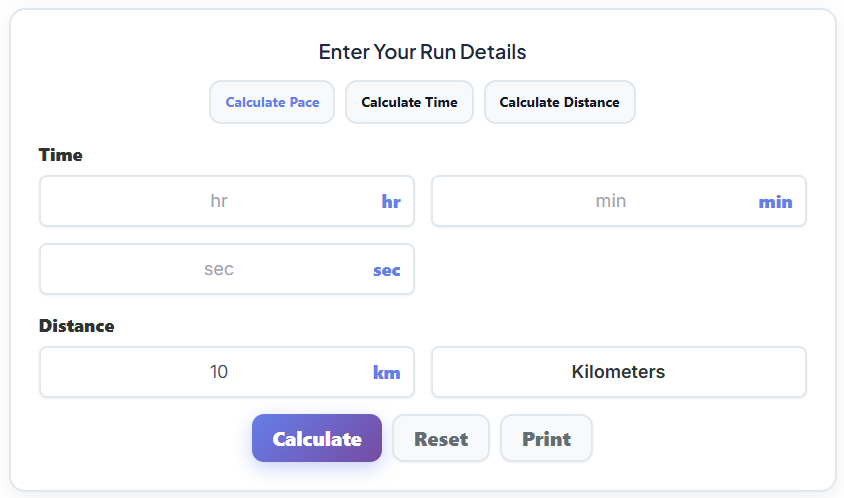
Every run has a goal. Sometimes you want to hold a specific pace. Other times, you need to know how long it will take to cover a set distance. A versatile race pace calculator understands this and lets you choose your mode: Pace, Time, or Distance. This flexibility is what makes it such a powerful instrument for both planning and analysis.
Calculate Pace
This is the most common use of a race pace calculator. You know the distance you ran and how long it took. Now, you need to find your average pace. Let’s say you just completed a 5K race in 28 minutes and 30 seconds. You’d enter the distance (5K) and your time (00:28:30), and the calculator will instantly tell you your pace per kilometer and per mile. This isn’t just a number; it’s a performance metric. It tells you the reality of your current fitness and gives you a benchmark for future training. This mode is the heart of any effective race pace calculator, turning raw data into actionable insight.
Calculate Time
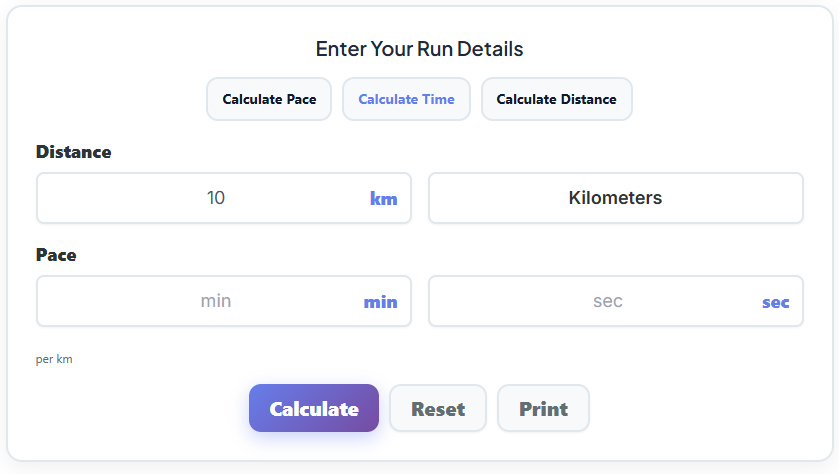
This mode flips the equation. Here, you set the distance and the target pace, and the tool predicts your finish time. This is invaluable for race day strategy. Imagine you’re training for a half marathon and your goal is to hold a 9-minute mile pace. You can use the race pace calculator to see that this translates to a finish time of just under two hours (1:57:54). Seeing that final time makes the goal tangible. It also works for interval training. If your workout calls for 800-meter repeats at a 7:30-minute/mile pace, you can calculate that each rep should take exactly 3 minutes.
Calculate Distance
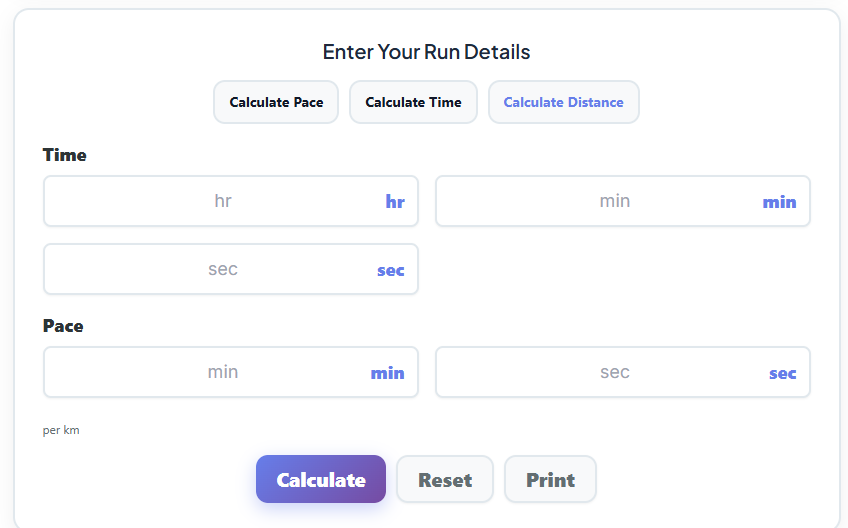
This mode is perfect for exploring your limits. You have a set amount of time and a target pace you want to maintain. How far can you go? For example, you have a 45-minute window for a tempo run and want to hold an 8:30-minute/mile pace. The race pace calculator will tell you that you can cover approximately 5.3 miles. This helps you plan your route and ensures you get back in time, all while hitting your training objectives. It’s a fantastic way to structure your runs when time is your primary constraint.
These modes work together to answer every runner’s fundamental questions. The tool can even help you understand different speed metrics. A runner on a treadmill might wonder what an 8 mph mile time translates to in terms of pace. A quick calculation shows that 8 mph is a 7:30 minute/mile pace, a common target for intermediate runners. Having a reliable race pace calculator removes the guesswork from these conversions.
Dialing in Your Time: The Foundation of Accurate Pacing
At the core of any performance analysis is time. In the time input section of the race pace calculator, you’ll typically find three boxes: Hours, Minutes, and Seconds. This precision is not just for show; it’s crucial for accurate calculations. Shaving seconds off your time inputs can be the difference between a realistic pace and one that sets you up for failure.
I once coached an athlete, Sarah, who was aiming for her first sub-4-hour marathon. She had been using a basic race pace calculator but kept rounding her training run times to the nearest minute. A 5-mile run that took her 45 minutes and 48 seconds became just “46 minutes” in her log. It seems small, but over 26.2 miles, these tiny inaccuracies add up. When we started using a more precise race pace calculator and input her exact times, we discovered her true tempo pace was about 10 seconds per mile faster than she thought.
This revelation changed everything. We adjusted her marathon goal pace to be slightly more aggressive but still achievable. On race day, she trusted the new pacing strategy, ran a beautifully consistent race, and finished in 3:58:11. She cried at the finish line, not just from exhaustion, but from the relief of hitting a goal she almost miscalculated. That’s why I always tell my runners: respect the seconds. Every single one of them matters. When you enter your time, whether it’s for a 1-mile time trial or a full marathon, be honest and exact. The race pace calculator can only be as accurate as the data you provide.
Defining Your Course: Nailing the Distance
Just as crucial as time is distance. A good race pace calculator offers a simple way to input your distance, usually with a numerical field and a unit dropdown menu for KM, Miles, and sometimes Meters. This flexibility is essential, as the running world operates in a mix of metric and imperial units. A track workout might be in meters, a local 5K in kilometers, and a marathon in miles.
The automatic conversion is a game-changer. Let’s say your training plan, written by a European coach, calls for a tempo run at 6 minutes per kilometer. As an American runner, you’re used to thinking in miles. Instead of doing clumsy mental math, you can use the calculator. By setting the pace to 6:00/km, the tool instantly shows you the equivalent pace in minutes per mile. This is a common query—runners often need to convert 6 mins per km to minutes per mile. A quality race pace calculator handles this for you, showing it’s approximately a 9:39 min/mile pace. This feature prevents costly errors in training intensity.
This function also acts as a powerful mile time calculator. If you know your 5K time, for instance, but want to see what that pace would look like over a single mile, the tool can calculate that for you. It bridges the gap between different race formats and measurement systems, allowing you to build a cohesive training plan. This is especially useful when preparing for a race in a different country. A properly designed race pace calculator ensures you’re always speaking the right language, whether it’s kilometers or miles.
When I work with athletes, we often toggle between units to strategize. For a marathon, we might analyze mile splits, but for sharpening speed with intervals on the track, we’ll switch to meters. A robust race pace calculator that handles these conversions seamlessly is an indispensable coaching aid. Some athletes even find their performance varies by their physical build, and you can learn more about how you’re built with a Body Type Calculator. Understanding your own metrics is key to personalization.
Setting Your Target: The Art of Entering Pace
The pace input section is where your goals become concrete. Here, you can enter your desired pace with fields for Minutes and Seconds, and select whether that pace is per kilometer or per mile. This is the part of the race pace calculator that you’ll use most often for planning.
When an athlete tells me they want to run a 10K in under 50 minutes, the first thing we do is go to the race pace calculator. We select the “Calculate Pace” mode, enter the distance (10K) and time (49:59), and hit calculate. The tool will show them the exact pace they need to hold: an 8:03 min/mile or 5:00 min/km. Suddenly, the goal isn’t just a finish time; it’s a specific, tangible effort they can practice in training.
This feature is critical for setting training paces across different distances:
- 5K Training: A runner aiming for a 25-minute 5K needs to train at or around an 8:03 min/mile pace. We would use the race pace calculator to plan interval sessions and tempo runs based on this target.
- 10K Training: For a sub-50-minute 10K, the pace is the same, but the endurance required is greater. We would structure longer tempo runs holding that 8:03 pace.
- Half Marathon Training: If a runner wants to finish a half marathon in 1 hour and 55 minutes, the race pace calculator reveals they need to average an 8:46 min/mile pace. This becomes their long-run target pace.
- Marathon Training: For a 4-hour marathon, the magic number is a 9:09 min/mile pace. This consistent effort is what we drill into the athlete’s legs and mind for months.
Using the race pace calculator to define these paces removes ambiguity. It helps runners connect their desired outcomes with the daily effort required to achieve them. It transforms a vague wish into a structured plan.
Putting It All Together: Calculate, Reset, and Print
Once your inputs are set, three simple buttons drive the functionality of the race pace calculator: Calculate, Reset, and Print. Each has a distinct and important purpose in a runner’s workflow.
Calculate
This is the magic button. After you’ve entered your time, distance, or pace, clicking “Calculate” executes the formula and delivers your result. An athlete I coach, Mark, was training for his first marathon. He was constantly anxious about his pacing. We used the race pace calculator after every long run. He would input his distance and time, hit “Calculate,” and see his average pace instantly. That immediate feedback was incredibly reassuring. It showed him his progress week after week, building his confidence. He saw his pace slowly but surely drop closer to his goal, turning a source of anxiety into a source of motivation.
Reset
The “Reset” button is deceptively simple but vital for efficiency. It clears all the input fields, allowing you to start a new calculation from scratch. When you’re comparing scenarios—like the finish time for an 8-minute mile versus an 8:15-minute mile—the reset button makes it quick and easy. My runners use this constantly when we’re game-planning for a race, exploring different pacing strategies. A good race pace calculator should feel fluid and fast, and a reset button is key to that user experience.
The “Print” button is for runners who love having a physical plan. After calculating your goal pace or predicted splits, you can print the results. I encourage my athletes to print their target paces and pin them somewhere visible—on the fridge, by their desk, or inside their training log. For a marathoner, we might print out the pace chart for their goal time and laminate it to carry on long runs. It serves as a constant, tangible reminder of what they are working toward. It takes the digital output of the race pace calculator and integrates it into their physical training environment.
The Big Reveal: Understanding the Output
After you hit “Calculate,” the result appears, often in a big, bold result box. It’s the moment of truth. The interface is designed for clarity: a large number showing the calculated pace, time, or distance, with a sub-caption to explain it. For example, if you calculated your pace for a 10K, it might display “8:15” in large font, with “minutes per mile” written just below.
This result is more than just data; it’s a decision-making tool. If the calculated pace from your last long run is slower than your goal race pace, it’s a signal. It tells you that you may need to adjust your training intensity or reconsider your race goal. It’s a neutral, objective piece of feedback that helps you stay honest. For instance, converting treadmill speed to a running pace, like figuring out an 8 mph mile time, gives you a clear target of 7:30 per mile. If you’re struggling to hold that, the output from the race pace calculator is telling you to focus on speed work.
This is also where you can connect your pacing to training intensity zones. A 9:30 min/mile pace might be your Zone 2 recovery pace, while an 8:15 pace is your Zone 3 tempo effort. By using the race pace calculator to quantify these paces, you can structure your training with physiological precision. This also ties into your caloric needs; a harder pace means you’ll need more fuel. It can be helpful to use a Nutrition Calculator to align your diet with your training output. Knowing your numbers is the first step toward optimizing every aspect of your performance. It’s the reason a good race pace calculator is so fundamental.
Looking Ahead: The Power of Race Time Predictions
One of the most powerful features of an advanced race pace calculator is the Race Time Predictions table. Based on a single race performance you input, the tool generates estimated finish times for other standard race distances: 1 Mile, 5K, 10K, Half Marathon, and Marathon. This feature essentially builds a personalized marathon time chart based on your current fitness.
How does it work? It uses established formulas, like the Riegel model, which predict how your pace degrades over longer distances. It’s not a perfect prophecy, but it’s an incredibly insightful estimate. Let’s say you run a 24-minute 5K. You can input this into the race pace calculator, and it might predict the following:
- 1 Mile: 7:15
- 10K: 50:15
- Half Marathon: 1:53:00
- Marathon: 3:55:00
Seeing these numbers is a massive confidence booster. It shows you what you’re capable of. When I worked with a runner named Jessica, she had only ever run 10Ks. Her best time was 52 minutes. She dreamed of running a marathon but thought a sub-4-hour finish was impossible. We used a race pace calculator with her 10K time, and it predicted a marathon time of around 4:05.
That was the spark she needed. For the first time, her dream felt within reach. The prediction table created a roadmap. We knew that to get under 4 hours, we needed to improve her 10K time to under 50 minutes. This targeted approach guided her training for six months. The prediction table on the race pace calculator became her north star. When she finally ran her marathon, she finished in 3:59:02, achieving a goal that started as a simple calculation. A custom marathon time chart gives you a data-driven path to follow.
These predictions help you set realistic yet ambitious goals. They prevent runners from overreaching and getting injured, or underestimating themselves and leaving potential on the table. Of course, running burns a lot of energy, and checking how many calories your run burns with a tool like a Calories Burned Calculator can help you refuel properly for these efforts.
The predictions from the race pace calculator are a starting point, not a guarantee, but they provide the strategic direction every runner needs. It’s the difference between hoping for a result and planning for one. And as a coach, I know that planning is everything. Using a race pace calculator is the first step in that plan. The journey from your first calculation to the finish line is where the real magic happens.
FAQs
What is a race pace calculator, and how does it help runners?
A race pace calculator is a tool designed to help runners determine their pace, time, or distance for training and races. By inputting specific details like your race time, distance, or target pace, it provides accurate calculations to guide your training. It’s especially useful for setting realistic goals, planning race strategies, and ensuring consistent pacing during runs.
Can a race pace calculator predict my marathon time?
Yes! Many race pace calculators include a prediction feature that estimates your finish times for various distances, including marathons. By inputting a recent race result (like a 5K or 10K), the tool uses established formulas to predict your marathon time. While it’s not a guarantee, it’s a great way to set achievable goals and fine-tune your training.
How do I use a race pace calculator for interval training?
To plan interval workouts, use the calculator’s “Calculate Time” mode. Input your interval distance (e.g., 800 meters) and your target pace (e.g., 7:30 per mile). The calculator will show how long each interval should take, helping you structure your workout with precision. This ensures you’re training at the right intensity to improve speed and endurance.

