
UAF CGPA Calculator — Smart GPA, CGPA, Target & Planning Tool
UAF CGPA Calculator is built for students who want a fast, clean and practical way to estimate semester GPA, cumulative CGPA, grade impact, target marks pressure and improvement strategy without opening spreadsheets again and again.
This page combines a calculator, a planning guide, examples, grade-scale notes and FAQs so every student can understand the result clearly.
Beautiful Table of Contents — click to open
What is this UAF CGPA Calculator?
The UAF CGPA Calculator is a practical online academic tool designed to help University of Agriculture Faisalabad students and similar semester-system students estimate their GPA and CGPA with less confusion. Instead of manually multiplying credit hours by grade points and then dividing totals, the UAF CGPA Calculator lets you enter subjects, credit hours and expected grades to see the result immediately.
Many students only check their performance after the result card arrives. That is late. A smarter approach is to plan before exams, revise your target before midterm, and understand how every course can change the final number. This UAF CGPA Calculator supports that mindset by combining a semester GPA calculator, previous CGPA merger, target CGPA planner, grade impact preview and printable summary in one page.
The main purpose of this UAF CGPA Calculator is not to replace official results. Official results always come from the university portal, department or controller examination office. The purpose is to give students a dependable estimate, so they can plan study time, compare grade scenarios and avoid basic calculation errors.
Why this UAF CGPA Calculator is different
A normal GPA tool usually asks for credit hours and grades only. This UAF CGPA Calculator is designed like a complete decision assistant. It helps you answer more useful questions: What will my CGPA become if I score A in two courses and B+ in the rest? How many quality points do I need to reach a target? Which course has the biggest impact? What happens if a high-credit course drops by one grade? Can I print or export my plan for later?
1. Live semester GPA
Rows update instantly. Add subjects, credit hours and grades, then the UAF CGPA Calculator calculates total credits, total quality points and GPA automatically.
2. Previous CGPA merger
If you know your previous CGPA and completed credits, the tool estimates updated CGPA after adding current semester quality points.
3. Target CGPA planner
Set a dream CGPA and remaining credits. The UAF CGPA Calculator estimates the average GPA required in upcoming credits.
4. Impact analyzer
The tool highlights high-credit subjects because one grade change in a 4-credit or 3-credit course often impacts CGPA more than a 1-credit lab.
5. Save, print and export
Students can save data in the browser, print the plan, or export a CSV-style summary for personal records.
6. Mobile friendly design
The page uses a light purple theme, responsive cards and readable spacing so the UAF CGPA Calculator feels smooth on mobile.
Who can use the UAF CGPA Calculator?
This UAF CGPA Calculator is especially helpful for UAF students, but the same logic can help many semester-system students where grade points, credit hours and quality points decide GPA. It can be used by undergraduate students planning a scholarship target, postgraduate students tracking coursework, parents trying to understand academic progress, tutors guiding weak students, and department societies sharing an academic resource with juniors.
- BS students checking semester GPA
- MSc/MS/MPhil coursework students
- Students planning scholarship thresholds
- Students comparing grade scenarios
- Academic advisors explaining credit impact
- Repeat-course students estimating improvement
If your official grade scale differs, you can still use the UAF CGPA Calculator as a planning framework by selecting grade points close to your official policy. The final official CGPA should always be confirmed from official records.
GPA, CGPA and quality points explained simply
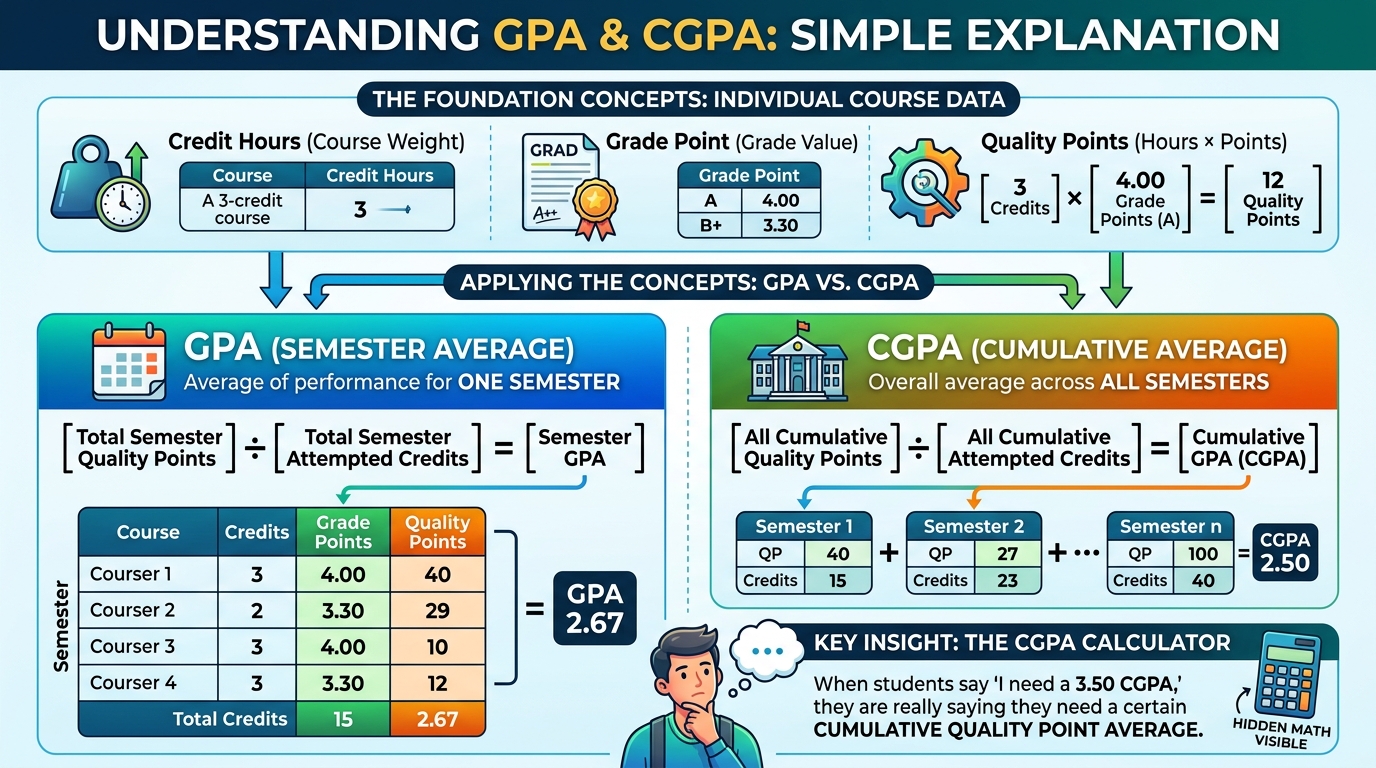
To understand any UAF CGPA Calculator, you need three ideas: credit hours, grade points and quality points. Credit hours show the weight of a course. Grade points show the performance value of the grade. Quality points are calculated by multiplying credit hours with grade points. GPA is total quality points divided by total attempted credits for a semester. CGPA is cumulative quality points divided by cumulative attempted credits across semesters.
| Term | Meaning | Example |
|---|---|---|
| Credit Hours | Course weight | A 3-credit course affects GPA three times more than a 1-credit course |
| Grade Point | Numeric value of grade | A may be 4.00, B+ may be 3.30 depending on policy |
| Quality Points | Credit hours × grade point | 3 credits × 4.00 = 12 quality points |
| GPA | Semester average | Total semester quality points ÷ semester credits |
| CGPA | Cumulative average | All quality points ÷ all attempted credits |
When students say “I need a 3.50 CGPA,” they are really saying they need a certain cumulative quality point average. The UAF CGPA Calculator makes that hidden math visible.
Use the UAF CGPA Calculator below
Use the interactive UAF CGPA Calculator below to add subjects, credit hours and grades. The result updates quickly and helps you understand semester GPA, cumulative CGPA and target planning in one clean place.
Clean CGPA Tool
Simple steps: course add karein, credits likhein, grade select karein, result foran dekhein.
1 Courses / Subjects
2 Result
| Highest impact courses | Credits | QP |
|---|
1 Previous record add karein
Use this when you know previous completed credits and previous CGPA. The UAF CGPA Calculator adds the current semester result from the first tab.
2 Updated CGPA
1 Target Planner
Plan future performance. This part of the UAF CGPA Calculator estimates what average GPA you need over remaining credits.
2 Target Result
Editable grade scale preview
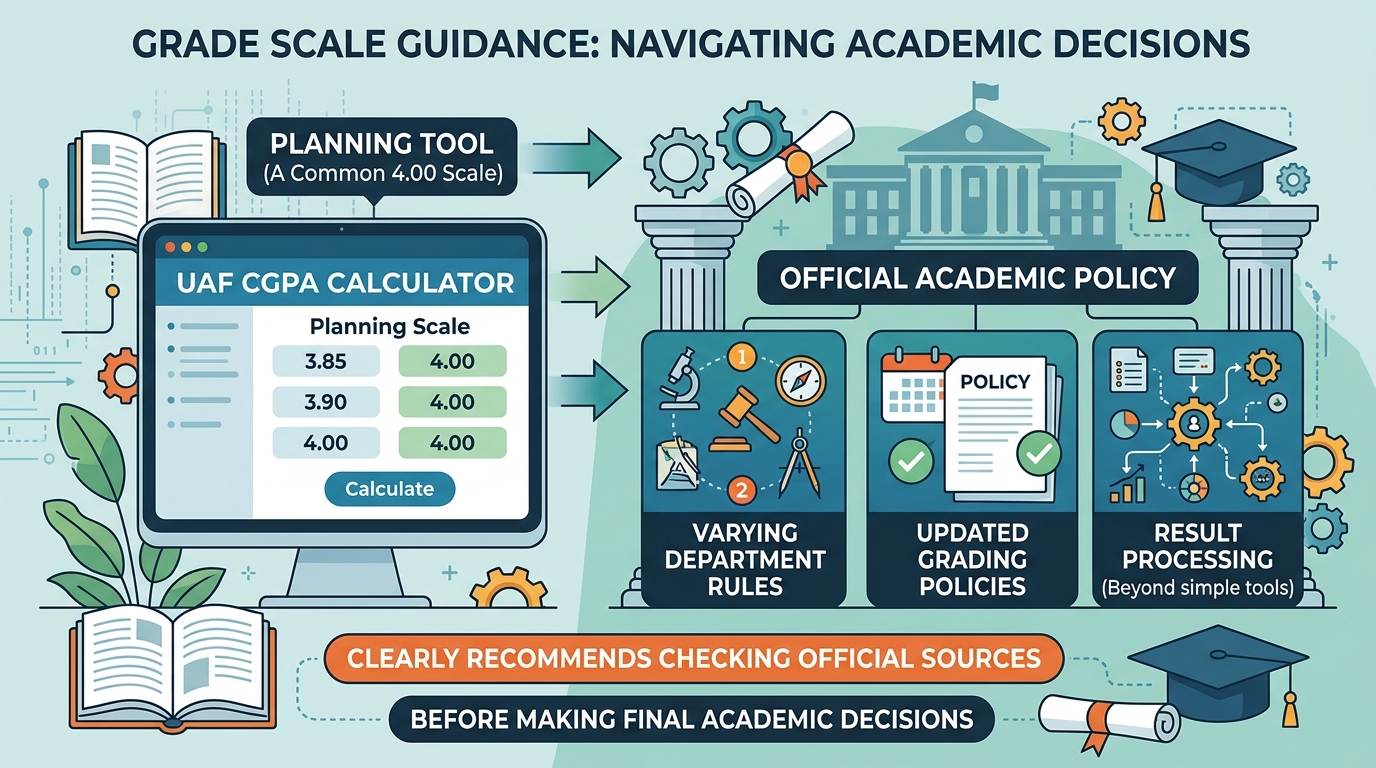
The UAF CGPA Calculator includes a common 4.00 scale for planning. Always confirm official scale from your department or university notification.
| Grade | Point used by this calculator | Planning note |
|---|
How the UAF CGPA Calculator works
The UAF CGPA Calculator uses the standard weighted-average method used in most credit-hour systems. Each course has credit hours. Each grade has a grade point. The tool multiplies both values to create quality points. After all quality points are added, the total is divided by total credit hours. That gives semester GPA. For cumulative CGPA, previous quality points are added to current semester quality points, then divided by total cumulative credits.
For best results, the UAF CGPA Calculator should be used with accurate credit hours, realistic grades and official record values. The UAF CGPA Calculator result should be treated as a planning estimate rather than an official transcript.
Formula for semester GPA: GPA = total quality points ÷ total semester credits. Formula for cumulative CGPA: CGPA = cumulative quality points ÷ cumulative attempted credits. The UAF CGPA Calculator automates these formulas and also explains the result in student-friendly language.
Example: if a 3-credit course has 4.00 grade points, it contributes 12 quality points. If a 2-credit course has 3.30 grade points, it contributes 6.60 quality points. If a 1-credit lab has 4.00 grade points, it contributes 4 quality points. The total quality points become 22.60 and total credits become 6. GPA is 22.60 ÷ 6 = 3.77. This is exactly the type of calculation the UAF CGPA Calculator performs instantly.
Grade scale and official policy notes
The grade scale inside this UAF CGPA Calculator is a common 4.00 planning scale. However, universities may update grading policies, departments may issue special instructions, and result processing can include rules that a simple public tool cannot know. Therefore, this page clearly recommends checking official sources before making final academic decisions.
For official verification, students should check reliable academic sources such as the official University of Agriculture Faisalabad website, the Higher Education Commission Pakistan, and the relevant department notice board or student portal.
Examples: using the UAF CGPA Calculator for planning
Example 1: A student wants to protect a scholarship CGPA
A student with a strong previous record may only need to avoid a sudden drop. In this case, the UAF CGPA Calculator helps the student enter previous completed credits, previous CGPA and current semester expected grades. If the estimated updated CGPA stays above the required scholarship number, the student can focus on maintaining consistency. If it falls below the line, the student can test better grade scenarios and identify high-impact courses.
Example 2: A student wants to recover from one weak semester
Recovery is possible, but it depends on remaining credits. A weak early semester can be improved because many credits are still left. A weak final-year semester is harder to repair because fewer credits remain. The target planner in this UAF CGPA Calculator shows required average GPA over remaining credits. If the required GPA is above 4.00, the target is mathematically impossible on a 4.00 scale unless official repeat or improvement rules change the record.
Example 3: A student compares A and B+ in a 4-credit course
In a 4-credit course, A at 4.00 produces 16 quality points. B+ at 3.30 produces 13.20 quality points. The difference is 2.80 quality points from one course. In a 1-credit lab, the same grade change produces only 0.70 quality point difference. The UAF CGPA Calculator makes this weight difference easy to see.
How to improve CGPA after checking the UAF CGPA Calculator
After using the UAF CGPA Calculator, do not only look at the final number. Look at the pattern behind it. Which courses carry the most credits? Which courses are realistic A or A- opportunities? Which subjects are risky because attendance, quizzes or practical files are weak? A calculator gives direction, but daily study discipline creates the result.
Start with high-credit courses. If a 4-credit course is difficult, divide it into weekly goals: lecture notes, past papers, assignment marks, quiz preparation and teacher consultation. Then review medium-credit courses. Finally, do not ignore labs and practical work. Labs may have fewer credits, but they can protect your GPA because consistent effort often produces stable marks.
The UAF CGPA Calculator can also reduce stress. Many students overestimate how much one bad course will damage them, while others underestimate the impact of multiple average grades. By testing scenarios, you can replace fear with a plan. For example, if target CGPA requires 3.60 average in remaining credits, you can build a subject-wise target: two A grades, three A- grades and no grade below B+.
- Use the UAF CGPA Calculator before midterm to set realistic subject targets.
- Use it after midterm to adjust effort according to remaining marks.
- Use it before finals to identify courses where one grade improvement matters most.
- Use it after result to plan the next semester and long-term CGPA target.
Common mistakes students make while calculating CGPA
The first common mistake is using simple average instead of weighted average. If a student gets A in a 1-credit lab and B in a 4-credit theory course, both grades are not equal in weight. The UAF CGPA Calculator avoids this mistake by multiplying every grade point with credit hours.
The second mistake is entering previous semester credits instead of total completed credits. For cumulative CGPA, you need all previously completed credits, not only the last semester. If you enter the wrong value, the updated CGPA estimate can become misleading.
The third mistake is assuming all grade scales are identical. Some universities and sessions may use different cutoffs or grade-point mappings. The UAF CGPA Calculator is a planning tool, so official verification remains necessary.
The fourth mistake is ignoring repeated courses, withdrawals, freeze rules or special academic regulations. If official policy replaces an old grade, averages it, or treats a course differently, a public calculator may not reflect that. Students should ask the department office or examination branch for official interpretation.
Official links and verification notes
A helpful UAF CGPA Calculator page should clearly explain the formula, the grade-point method and the limits of the estimate. Students should understand that the tool supports planning, while official results and transcripts remain the final source of truth.
Complete academic planning guide for students
Good academic planning is not only about entering numbers. It is about understanding what those numbers are telling you, then changing your weekly routine before the semester ends. A student may feel satisfied after seeing a strong GPA estimate, but the better question is whether that estimate is protected by quizzes, assignments, attendance, practical files and final exam preparation. Another student may feel worried after seeing a low estimate, but the better question is which course still has enough marks left to create improvement. A calculator becomes powerful only when it leads to action.
Start by writing every course with credit hours. Put theory courses, labs, seminars and practical components separately if your transcript treats them as separate credit entries. Then add your realistic grade expectation. Do not enter only your dream grade; enter a conservative grade first. Conservative planning keeps you safe because it shows the result if the semester becomes slightly harder than expected. After that, create a second version with an optimistic grade plan. Compare both versions and note the difference. If the optimistic plan changes the result significantly, you know that those particular subjects deserve extra effort.
The next step is to connect the calculation with a timetable. High-credit subjects should receive more study time, especially if the current grade expectation is weak. A 4-credit course normally deserves deeper preparation than a 1-credit course because it carries more weight. This does not mean labs are unimportant. It means time should be distributed according to both difficulty and credit impact. If a low-credit course is easy to improve, it may still be worth quick effort because easy quality points protect the overall average.
Students should also review assessment style. Some courses are memory based, some are numerical, some depend on diagrams, some require lab performance, and some depend heavily on assignments. If a student studies every subject in the same way, the result may not improve. For numerical courses, practice past problems. For theory courses, prepare outlines and short notes. For practical courses, complete files early and understand procedures. For presentation courses, rehearse before the deadline. CGPA planning is most effective when each course receives the right preparation method.
Midterm marks are a useful checkpoint. After midterm, update your expected grades honestly. If a subject went better than expected, it may become a strong-grade opportunity. If a subject went worse, you need to know whether the final exam can still recover the grade. Many students stop trying after a weak midterm, but sometimes the final carries enough weight to recover one grade level. Other times, the grade may be difficult to recover and the student should protect other subjects instead. This decision is easier when the student can see credit impact clearly.
Attendance should not be ignored in planning. Even if a student understands the course, attendance shortage can create exam eligibility problems or internal marks loss depending on rules. Assignments and quizzes also matter because they can create a cushion before finals. A student who enters finals with strong sessional marks needs less pressure to maintain grade level. A student who ignores sessional marks may need unrealistically high final marks to reach the same grade. Therefore, CGPA improvement is built throughout the semester, not only during final week.
For final-year students, target planning needs extra care. When only a few credits remain, the cumulative average becomes harder to change. This is not because improvement is impossible; it is because completed credits already carry heavy weight. If a student has completed many credits at 3.00, even a perfect final semester may move the final number only by a limited amount. That is why early semesters are important. First-year and second-year students should not treat early grades casually, because early credits become the foundation for the final transcript.
For first-year students, the best strategy is to learn the system quickly. Understand credit hours, grade points, quality points, attendance rules, assignment style and teacher expectations. Do not wait until the first result card to learn how GPA works. Use a planning sheet from the first month. Ask seniors about course difficulty, but do not copy their expectations blindly because every student’s strengths are different. A subject that is easy for one student may be difficult for another.
For students aiming for scholarships, hostel merit, internships, assistantships or postgraduate admission, CGPA is only one part of the profile, but it is an important part. A strong CGPA can open doors, while a weak CGPA can create extra pressure. Along with CGPA, students should build skills, projects, communication ability, research exposure and practical experience. Still, because CGPA is measured formally, it deserves structured monitoring.
For students who are already below their target, the most important thing is to avoid panic. Panic wastes time and often leads to random study. Instead, list all remaining credits, identify subjects where grade improvement is possible, meet teachers during office hours if available, solve past papers, and form a serious study group. A small group of disciplined students is better than a large group that only discusses stress. Every week, review progress and adjust expectations.
Parents and guardians can also use this page to understand academic progress, but they should avoid using the number as a pressure tool. Students perform better when guidance is practical. Instead of asking only “why is your CGPA low,” ask which courses are difficult, which resources are missing, whether attendance is safe, and whether the student has a weekly plan. Academic support works better than emotional pressure.
Finally, remember that no calculator can replace official records, teacher feedback or consistent study. The value of the UAF CGPA Calculator is that it turns confusing arithmetic into a clear academic map. Once the map is visible, the student still has to walk the path with discipline, time management and honest self-review. Use the UAF CGPA Calculator as a planning partner, then verify final outcomes through official university channels.
Semester checklist after calculating your CGPA
After you calculate your estimate, create a simple checklist for the next four to six weeks. First, confirm every course credit hour from your course outline or official registration slip. A wrong credit value creates a wrong weighted average. Second, write the current status of every subject: safe, medium risk or high risk. Safe subjects are those where attendance, quizzes and preparation are already strong. Medium-risk subjects need regular revision. High-risk subjects need immediate action, teacher guidance or a study partner.
Third, decide the minimum acceptable grade for each course. This is different from the dream grade. The minimum acceptable grade is the lowest grade you can allow without damaging the semester target too much. When students define this line early, they can make better decisions. For example, if a 3-credit subject must not fall below B+, the student should not delay preparation until the last week. If a 1-credit lab is already safe, it still needs maintenance but not the same pressure as a weak theory course.
Fourth, review your weekly study hours. Many students say they study all day, but the actual focused time is much lower. Count only focused sessions where the phone is away, the topic is clear, and output is produced. Output can be solved questions, revised notes, diagrams, summaries, flashcards or completed assignments. Passive reading often feels comfortable but does not always create exam performance. Active recall and practice usually work better.
Fifth, use teacher feedback. If a teacher has marked an assignment or quiz, do not only look at marks. Look at comments, repeated mistakes and missing concepts. A small correction early can prevent a large loss in finals. If office hours or consultation time is available, prepare two or three specific questions before meeting the teacher. Specific questions show seriousness and usually receive better guidance than vague complaints.
Sixth, protect health and sleep. CGPA planning fails when students create impossible schedules. A sustainable timetable with daily revision, short breaks and proper sleep is better than extreme study for two nights followed by burnout. Students often underestimate how much sleep affects memory and exam confidence. Academic performance is not only intelligence; it is also energy management.
Seventh, keep records. Save your calculation, export a CSV if needed, and compare it after each assessment. If the estimate improves, continue the routine. If it declines, identify the reason quickly. Was it attendance? Was it a quiz? Was it a concept gap? Was it lack of practice? The faster you identify the reason, the easier it is to repair the semester.
Finally, share the tool responsibly. If juniors or classmates are confused about GPA, explain the formula and remind them that official policy is final. A helpful calculator should reduce confusion, not create false certainty. The UAF CGPA Calculator is best used as an estimate, a planning guide and a conversation starter with advisors. The UAF CGPA Calculator should never be presented as an official transcript generator or guaranteed result predictor.
A strong semester review should include three documents: the official course registration record, the current assessment record and a personal action plan. The registration record confirms credits. The assessment record shows what has already happened. The action plan shows what will happen next. When these three documents match, students stop guessing and start managing. This simple habit is especially useful before finals because it prevents last-minute confusion about which subject needs more attention. It also helps students discuss progress with seniors, advisors or family members in a mature way. Instead of saying “I am worried,” the student can say “these two courses carry the most weight, these marks are already secure, and these topics need daily practice.” That level of clarity can change the entire semester experience.
Quick answer: what does this tool do?
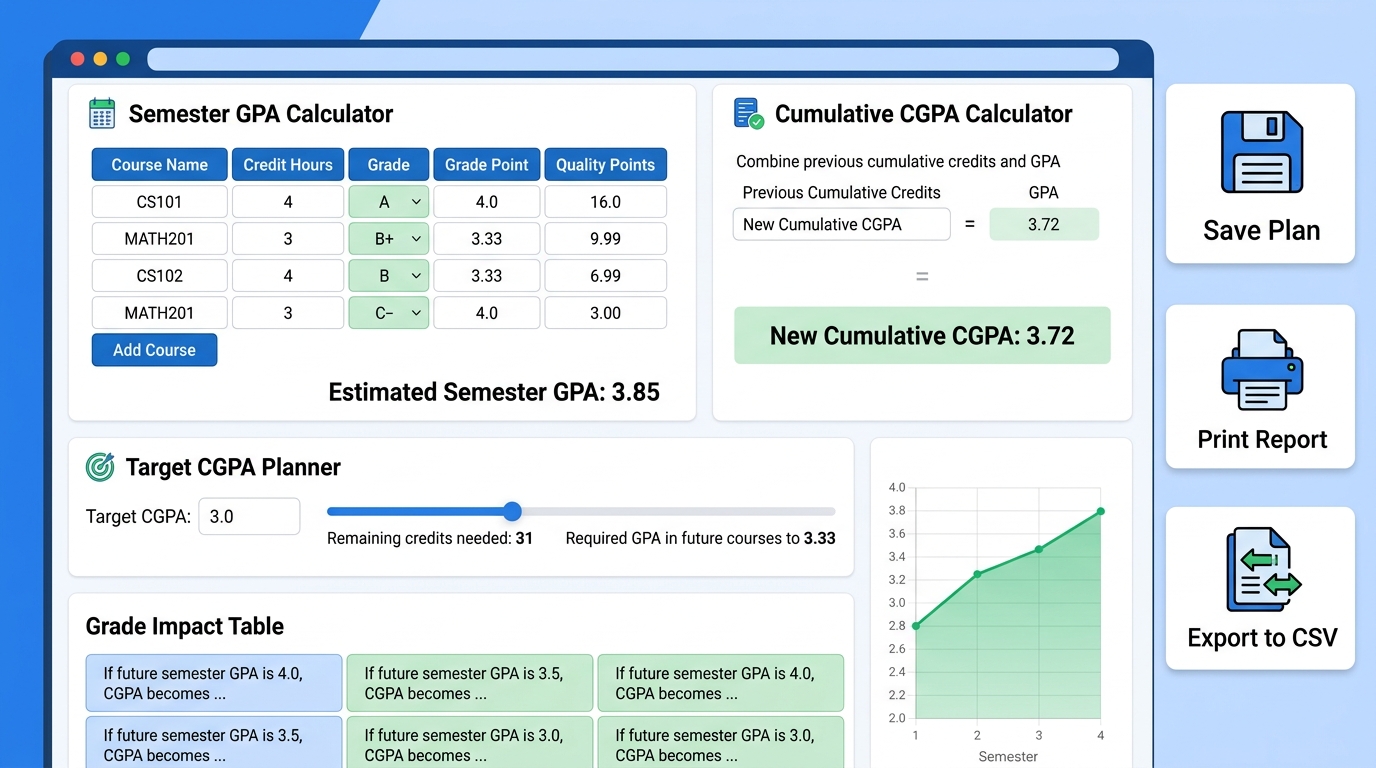
This calculator estimates semester GPA and cumulative CGPA by multiplying each course credit hour with its grade point, adding all quality points, and dividing by total credits. It also includes a target planner, grade impact table, save option, print option and CSV export for student planning.
Frequently Asked Questions about UAF CGPA Calculator
Is this UAF CGPA Calculator official?
No. This UAF CGPA Calculator is an unofficial planning tool. Official CGPA, transcript and result decisions come from the university.
How accurate is the UAF CGPA Calculator?
It is accurate for the values you enter and the grade scale used in the tool. If your official grade points, credit hours or repeat-course rules are different, your official result can differ.
Can I calculate semester GPA only?
Yes. Enter current semester courses, credits and grades. The UAF CGPA Calculator will show semester credits, quality points and GPA.
Can I calculate cumulative CGPA?
Yes. Add previous completed credits and previous CGPA, then the UAF CGPA Calculator combines them with the current semester estimate.
What is a quality point?
A quality point is credit hours multiplied by grade points. For example, 3 credits × 4.00 points = 12 quality points.
Why do high-credit courses matter more?
High-credit courses carry more weight in weighted average calculations. The UAF CGPA Calculator highlights them because improving one grade in a high-credit subject can create a bigger CGPA change.
Can this calculator tell me marks required in final exams?
This version focuses on GPA and CGPA from grades. You can expand it later with marks-based internal assessment if your department uses a predictable marks-to-grade policy.
Does the UAF CGPA Calculator save my data?
It can save data in the same browser using local storage when the user clicks save. The data is not sent to a server by this tool.
Can I use this for universities other than UAF?
Yes, if the university uses a similar credit-hour and 4.00 grade-point system. Still, the page is optimized as a UAF CGPA Calculator for UAF-related searches.