
Your Essential Guide to the Prime Number Calculator
Mathematics has a certain elegance, a hidden structure that governs the world around us. At the heart of this structure are prime numbers, the indivisible building blocks of our entire number system. They are fascinating, mysterious, and fundamentally important.
Whether you’re a student just starting your journey into number theory, a teacher looking for a powerful teaching aid, or even a programmer working on complex algorithms, understanding primes is crucial. But let’s be honest, manually checking if a large number is prime or finding its factors can be a tedious, time-consuming task. That’s where a specialized tool becomes not just helpful, but essential.
I recently spent a considerable amount of time exploring a particularly well-designed prime number calculator, and I was genuinely impressed by its simplicity and power. It’s more than just a simple checker; it’s a comprehensive toolkit for anyone curious about the properties of numbers.
This article is my deep dive into this tool, a personal walkthrough of its features, and a guide on how you can use it to make your life easier. We’ll explore everything from its basic functions to its more advanced capabilities, all from a user’s perspective. My goal is to show you how this online prime number calculator can transform a challenging mathematical task into an effortless and insightful experience.
Getting Started: The Simplicity of the Number Input
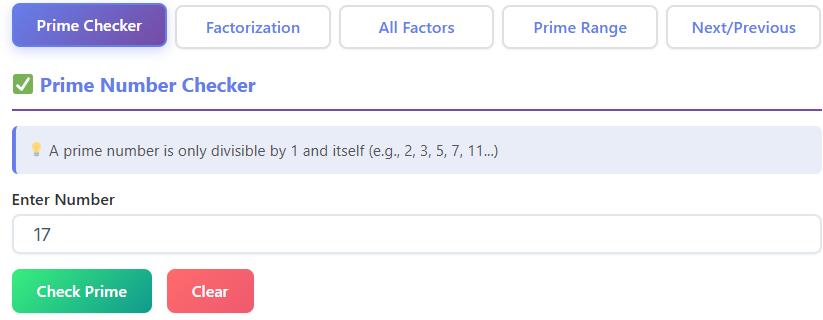
The moment you land on the page, the first thing you notice is its clean, uncluttered design. There are no distracting ads or confusing menus. Front and center is the most important element: the number input field. This is where your entire journey begins. It’s a simple, unassuming box, but it’s the gateway to unlocking all the information about the number you have in mind.
My first test was straightforward. I clicked on the box and typed in a number I was curious about: 137. The interface was immediately responsive. There was no lag, no complicated process. You just type your number. It accepts whole numbers, as you would expect.
I tried entering decimals and negative numbers just to see what would happen, and the tool was smart enough to ignore them, gently guiding me back to the world of positive integers where prime numbers live. This initial interaction set the tone for the rest of my experience: intuitive and user-focused. The design seems to understand that when you’re looking for a prime number calculator, you want answers, not a puzzle.
This input field is the starting point for everyone. For a middle school student, it might be where they type in their homework problem, like checking if 57 is prime. For a cryptography enthusiast, it could be a much larger, more complex number.
I imagined a teacher in a classroom, projecting the screen and using this simple input box to engage students, asking them to shout out numbers to test. The tool’s accessibility makes it perfect for a wide range of users, and it all starts with this single, powerful entry point. The clean design ensures that you’re not overwhelmed, which is a huge plus when dealing with potentially complex mathematical concepts. It’s a great example of a prime number calculator that prioritizes ease of use.
The First Big Reveal: Is It Prime?
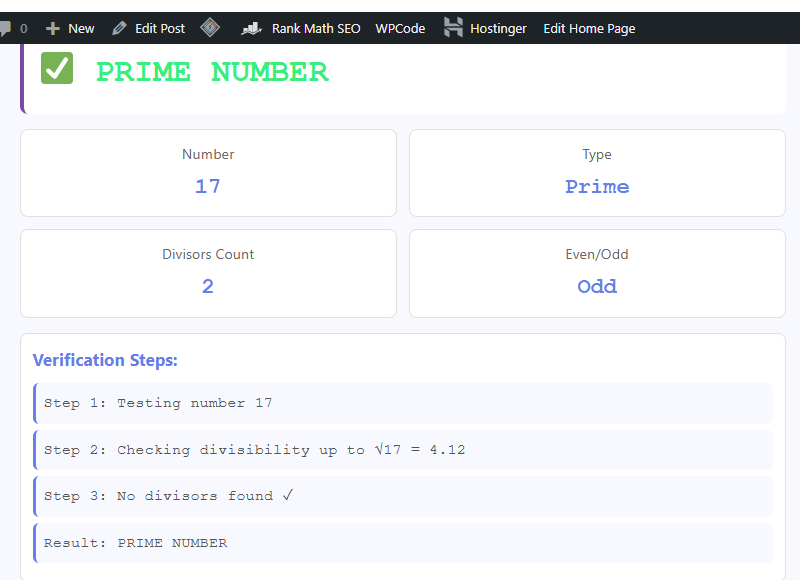
After typing in my number, 137, I hit the “Calculate” button. The result was instantaneous. Right below the input field, a clear, bold message appeared: “137 is a prime number.” The answer was unambiguous. There was no jargon, no complex symbols, just a plain English statement that anyone could understand. This is the core function, the first question everyone wants answered.
To test its limits, I started entering other numbers. I tried 2, the smallest and only even prime. The tool confirmed it. I typed in 99, and it immediately told me “99 is a composite number.” I appreciated this directness. It doesn’t just say “not prime”; it uses the correct mathematical term, “composite,” which is a subtle but valuable learning opportunity. For a student, seeing this reinforces their vocabulary. For a casual user, it might be the first time they learn the proper term for a non-prime number.
This prime-checking feature is the heart of the tool. Think of a student cramming for a math exam. Instead of spending precious minutes trying to divide a number like 283 by every prime up to its square root, they can just type it into this prime number calculator and get an immediate, reliable answer.
This frees up their mental energy to focus on understanding the why behind the result, rather than getting bogged down in the how of the calculation. The confidence of getting a quick, accurate answer is a game-changer for learning and problem-solving. This simple yes-or-no output is arguably the most used feature of any prime number calculator.
Deeper Insights: Uncovering the Prime Factorization
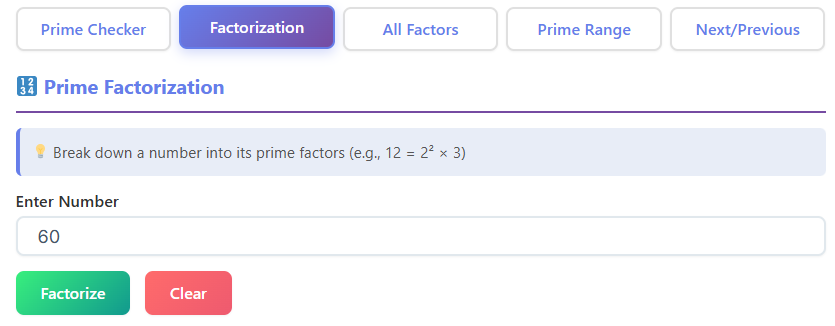
Here’s where the tool started to really shine for me. For any number that isn’t prime, simply knowing it’s composite isn’t enough. You want to know why. What are its building blocks? Below the “composite” declaration, the tool automatically provides the prime factorization.
When I tested the number 100, the tool displayed its prime factorization as 2² × 5². It was beautifully formatted and easy to read. It didn’t just list the factors; it used exponents to show repeated ones, which is the standard mathematical notation. This is incredibly helpful. For a larger number, like 1,200, it broke it down into 2⁴ × 3 × 5². Seeing this, you immediately understand the number’s composition.
I found myself playing with different numbers just to see their factors. For example, a student might be asked in class, “what is the prime factorization of 360?” Manually, this involves a factor tree and can be prone to errors. With this prime number calculator, they can type in 360 and see the result, 2³ × 3² × 5, in seconds. This allows them to check their work or, if they’re stuck, to see the answer and work backward to understand the process.
I even tried a simple one: the prime factorization of 10. The tool correctly showed 2 × 5. This demonstrated that it handles even the most basic cases with the same accuracy. This feature is more than just a convenience; it’s a powerful educational aid. It helps visualize the fundamental theorem of arithmetic—the idea that every integer greater than 1 is either a prime number itself or can be represented as a product of prime numbers.
Using this prime number calculator makes this abstract concept tangible. It’s one thing to hear about it in a lecture; it’s another to see it demonstrated instantly with any number you can imagine.
This feature is also a lifesaver for anyone working in fields that rely on number theory, like computer science. Finding the prime factorization of large numbers is a key step in many algorithms. While you wouldn’t use a web tool for massive-scale cryptographic operations, it’s an incredibly handy utility for testing, learning, and debugging smaller-scale problems. The tool bridges the gap between theoretical knowledge and practical application, a task at which this prime number calculator excels.
Exploring the Neighborhood: The Prime Range Feature
After you’ve analyzed a single number, a natural curiosity often arises: what about the numbers around it? The tool brilliantly anticipates this question with its “prime range” feature. Once you’ve entered a number, it doesn’t just stop there. It also gives you the option to find all the prime numbers within a certain range.
For instance, after I analyzed 137, I wanted to see all the primes between 100 and 150. I entered “100” in the start field and “150” in the end field, clicked a button, and a clean, comma-separated list appeared: 101, 103, 107, 109, 113, 127, 131, 137, 139, 149. This was fantastic. It’s a visual representation of how primes are distributed—or rather, how erratically they appear.
This feature is a dream for teachers. A teacher could ask their class to find all the primes in the first 100 numbers and use this prime number calculator to instantly verify the students’ findings. It’s also great for personal exploration. I found myself wondering about “prime deserts”—long stretches of consecutive composite numbers. I could quickly test ranges to see how far I had to go to find the next prime. For example, there are no primes between 114 and 126. Seeing this list generated by the calculator makes the concept much more concrete than just reading about it.
It also gives a sense of the scale and frequency of prime numbers. You can see how they start to thin out as the numbers get larger. This is a profound concept in number theory, and this tool provides a simple, interactive way to experience it firsthand. It encourages a playful curiosity that is often the spark for deeper learning.
This aspect of the prime number calculator moves it from a simple utility to an exploratory platform. While some calculators focus on single numbers, this one invites you to look at the bigger picture, which I found to be a particularly engaging design choice. While you’re tracking numbers mathematically, it’s also important to track your body’s numbers; tools like a BMR Calculator can help you understand your metabolic rate.
Hopping Along the Number Line: Next and Previous Primes
Another feature that I found incredibly clever and useful is the “Next Prime” and “Previous Prime” functionality. After you analyze a number, say 137, the tool presents you with two simple buttons. Clicking “Next Prime” instantly takes you to the next prime number in the sequence, which is 139. The entire interface updates to show that 139 is prime. From there, you can click it again to find the next one, 149, and so on.
Similarly, the “Previous Prime” button lets you travel backward. From 137, one click took me to 131, then 127, and so on, all the way down to 2. This feature turns the number line into a navigable path, letting you hop from one prime to the next. It’s like stepping stones across a river of composite numbers.
I can see this being incredibly useful in a few scenarios. Imagine a programmer writing code that needs to find a prime number of a certain magnitude. They could use this prime number calculator to quickly find a suitable candidate near their target number. For example, if they need a prime close to 500, they could enter 500, see that it’s composite, and then click “Next Prime” a couple of times to land on 503.
For students, it’s another way to develop an intuition for prime distribution. How far apart are primes? Are they evenly spaced? (Spoiler: they’re not.) Clicking “Next Prime” repeatedly and watching the numbers jump around gives a much better feel for this than a static list. It’s an interactive learning process.
You’re not just being told the information; you’re actively seeking it out, one click at a time. This simple navigation makes the exploration of primes feel dynamic and engaging. This thoughtful feature is another reason why I consider this a top-tier prime number calculator. It’s a small touch, but it adds a significant amount of utility and makes the tool feel more like an interactive guide than a static calculator.
A Helping Hand: The User Guidance Section
No tool is complete without a bit of explanation, and this prime number calculator handles it beautifully. At the bottom of the page, there’s a section with clear, concise guidance on what prime numbers are and how the calculator works. This isn’t a dense, academic treatise; it’s written in simple language that’s accessible to everyone.
It explains that a prime number is a whole number greater than 1 that has no positive divisors other than 1 and itself. It gives examples, like 2, 3, 5, and 7. It also defines a composite number and clarifies that the number 1 is neither prime nor composite. This is a common point of confusion, and the tool addresses it directly. This text acts as a built-in mini-lesson, reinforcing the concepts the calculator demonstrates.
For me, this section completed the experience. It showed that the creators weren’t just building a tool; they were building an educational resource. A student who is completely new to the topic can land on this page, use the prime number calculator, and then read the explanation to connect the practical results with the underlying theory. They might come to the page asking “what is the prime factorization of a number?” and leave not only with the answer but also with a clearer understanding of what that question even means.
This guidance ensures the tool is self-contained. You don’t need to have another tab open with a search engine to understand what you’re looking at. Everything you need is right there. It respects the user’s time and potential lack of prior knowledge.
This commitment to user education is what elevates this from a good prime number calculator to a great one. Much like this tool helps with mental math, keeping your physical health in check is also about understanding numbers, such as using a Water Intake Calculator to ensure proper hydration. The clarity and support provided here are invaluable, especially for those just dipping their toes into the fascinating world of number theory. This guidance transforms the prime number calculator into a complete learning package.
Real-World Applications and Scenarios
Throughout my time using this tool, my mind kept drifting to all the different people who would find it useful. The applications go far beyond the classroom.
For the Student:
A high school student working on a homework assignment is the most obvious user. Let’s say they have a list of 20 numbers to check for primality. Doing this by hand would be incredibly boring and take up most of their study time. Using this prime number calculator, they can get through the list in minutes. This doesn’t mean they’re cheating; it means they’re using their time efficiently. They can then focus on the more challenging problems that require critical thinking, like word problems involving prime factorization. The calculator becomes a tool for verification and exploration, not a crutch.
For the Teacher:
I imagined a math teacher planning a lesson on prime numbers. They could use the prime number calculator to quickly generate examples for their presentation. With the “prime range” feature, they could create worksheets with specific sets of primes. During class, they could project the tool onto a smartboard and have an interactive session where students suggest numbers to test. It turns a dry topic into a hands-on activity. The question “is prime” becomes a call-and-response game between the students and the tool. It’s a dynamic teaching aid that can boost engagement.
For the Programmer and Developer:
Someone working in software development, especially in areas like cryptography, data security, or even game development, often deals with prime numbers. While production code would use optimized libraries, a developer often needs to quickly test or verify something during the development process.
Need a large prime for a hash function? This prime number calculator can help find one. Trying to debug an algorithm that uses prime factorization? You can use the tool to check if your code’s output matches the correct factorization for a test number. It’s a handy utility to have in your digital toolbox for quick sanity checks. Just as a programmer tracks data, an athlete tracks their performance, often using tools like a Heart Rate Calculator to monitor exertion levels.
For the Curious Mind:
Finally, there’s the user who is simply curious. Maybe they read an article about the Riemann hypothesis or saw a video about cicada life cycles being linked to prime numbers. This tool is a playground for them. They can explore the patterns of primes, look for twin primes (pairs of primes that are two apart, like 11 and 13), or just marvel at the massive, indivisible numbers they can find. This tool feeds curiosity, which is the engine of all learning. This is where a good prime number calculator transcends its function and becomes a source of intellectual recreation. The “next prime” feature, in particular, is perfect for this kind of casual exploration.
The versatility of this prime number calculator is one of its greatest strengths. It’s a testament to its thoughtful design that it can serve so many different audiences so effectively. Whether for serious work or casual play, it delivers value.
Final Thoughts on This Exceptional Tool
After spending hours putting this prime number calculator through its paces, I can confidently say it’s an outstanding resource. It succeeds by focusing on the user experience above all else. The interface is clean, the results are instant, and the features are both practical and thoughtfully designed to encourage exploration. It strikes a perfect balance between being a powerful computational tool and an accessible educational guide.
From the simple act of entering a number to the joy of hopping from one prime to the next, every interaction feels intuitive. The tool anticipates the user’s next question, providing the prime factorization for composite numbers and offering ways to explore nearby primes. The inclusion of clear, simple explanations demonstrates a commitment to not just providing answers, but fostering understanding.
It’s rare to find a tool that serves students, teachers, professionals, and the genuinely curious with such equal effectiveness. It demystifies a core concept of mathematics, making it tangible and interactive. Whether you are tackling a homework problem, developing a complex algorithm, or just nurturing a love for numbers, this prime number calculator is an invaluable companion. It’s a prime example of how technology can make learning more engaging, work more efficient, and the world of mathematics more accessible to everyone. For anyone who deals with numbers, I highly recommend making this exceptional prime number calculator a go-to resource in their digital toolkit. It truly is a standout in its field.
FAQs
What is a prime number?
A prime number is a whole number greater than 1 that cannot be formed by multiplying two smaller whole numbers. Its only factors are 1 and itself. For example, 7 is a prime number because it can only be divided by 1 and 7. The number 6, however, is not prime (it’s composite) because it can be divided by 2 and 3.
How does the prime number calculator handle the number 1?
The calculator correctly identifies that 1 is neither a prime nor a composite number. This is a special case in mathematics. By definition, a prime number must be greater than 1, so our tool follows this rule to provide accurate results.
What is prime factorization?
Prime factorization is the process of breaking down a composite (non-prime) number into a unique set of prime numbers that, when multiplied together, equal the original number. For instance, the prime factorization of 12 is 2 x 2 x 3. Our calculator provides this for any composite number you enter, showing you its fundamental building blocks.

