
Your Ultimate Guide to the GCD Calculator
Math can sometimes feel like a puzzle, with numbers and concepts that need to be carefully pieced together. One of these fundamental concepts is the Greatest Common Divisor (GCD), also known as the Greatest Common Factor (GCF). Whether you’re a student trying to simplify fractions, a programmer optimizing an algorithm, or just someone with a curious mind, finding the GCD can be a frequent task. I recently stumbled upon a comprehensive gcd calculator that has completely changed how I approach these problems, and I was so impressed that I had to share my experience with it.
This isn’t just a simple tool that spits out a number. It’s a detailed, multi-faceted platform that peels back the layers of the calculation, showing you the “how” and “why” behind the answer. It’s designed for everyone, from beginners who need a visual guide to experts who want quick, detailed metrics. Let’s walk through this powerful gcd calculator together and explore everything it has to offer.
Getting Started: The GCD Calculator Tab
The moment you land on the page, you’re greeted with the primary function: the GCD Calculator tab. The layout is clean, intuitive, and immediately understandable. It’s clear that the design prioritizes user experience, getting you from question to answer in the shortest time possible, but with the option to dive deeper if you wish.
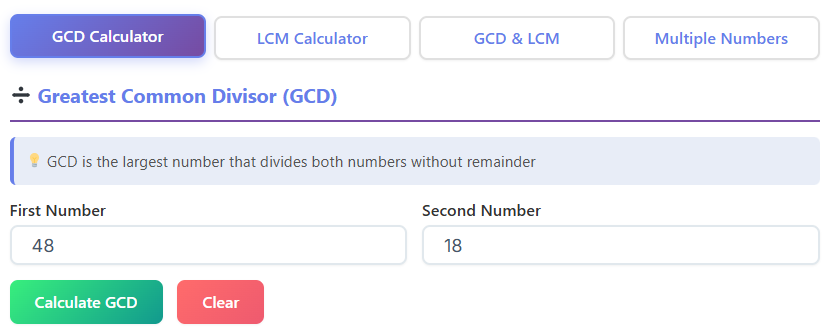
My First Calculation: Inputs and Instant Results
My first test was simple. I wanted to find the greatest common factor of 8 and 12. The interface presented two clearly labeled input boxes, “First Number” and “Second Number.” I typed “8” into the first box and “12” into the second. There’s no confusion, no clutter, just two spots for your numbers.
After entering the values, I clicked the prominent “Calculate GCD” button. The response was instantaneous. A “Result Card” appeared, boldly stating that the GCD of 8 and 12 is 4. It was fast and accurate. For anyone just needing a quick answer, the journey ends here. But for me, this was just the beginning. This initial simplicity is what makes this tool such a great gcf finder for quick checks.
More Than Just a Number: The Metrics Boxes
Below the main result, I noticed a series of smaller “Metrics” boxes. This is where the tool starts to show its true power. For my 8 and 12 example, it provided extra details:
- LCM: It automatically calculated the Least Common Multiple, which was 24.
- Sum: 8 + 12 = 20.
- Difference: 12 – 8 = 4.
- Product: 8 × 12 = 96.
- Quotient: 12 / 8 = 1.5.
This is incredibly useful. Often, when working on math problems, the GCD is just one piece of the puzzle. Having these related calculations done for you saves time and effort. It’s like having a math assistant who anticipates your next steps. This feature alone elevates it beyond a standard gcd calculator.
Unveiling the Method: Euclidean Steps
I’ve always been fascinated by the Euclidean algorithm, the classic method for finding the GCD. To my delight, the gcd calculator includes a section dedicated to showing these steps. It laid out the process clearly:
- Divide 12 by 8, which gives a remainder of 4.
- Now, divide 8 by the previous remainder, 4. The remainder is 0.
- The last non-zero remainder is 4, which is the GCD.
Seeing the steps broken down like this is a fantastic learning aid. For students, it demystifies the algorithm. For teachers, it’s a perfect way to demonstrate the process in class. It transforms the gcd calculator from a “black box” into an interactive teaching tool.
Are They Coprime? A Simple Check
Another small but brilliant feature is the “Coprime?” check. Below the results, a simple message told me, “No, 8 and 12 are not coprime.” This is because მათი GCD is 4, not 1. I tested this by entering 7 and 10. As expected, the tool confirmed their GCD is 1 and the message changed to “Yes, 7 and 10 are coprime.” It’s a quick, clear confirmation that helps solidify the concept of relative primality.
Visualizing the Numbers: The Canvas
This was the part that truly impressed me. The gcd calculator includes a “Visual Representation” canvas. For my 8 and 12 example, it displayed two bars: a blue bar representing 8 and a green bar for 12. Below them, it showed how many times the GCD (4) fits into each number. It displayed two blocks of 4 for the number 8, and three blocks of 4 for the number 12.
This visual aid is a game-changer. It makes an abstract concept tangible. You can literally see why 4 is the greatest common factor. For visual learners, this is an invaluable feature that brings the numbers to life. It’s something I wish I had when I was first learning this concept. It makes you realize that managing your health metrics, like with a Heart Rate Calculator, and understanding mathematical relationships both benefit from clear, visual feedback.
The Relationship Box: A Formulaic Summary
Finally, the GCD tab includes a “Relationship” box. This neat little section displays the fundamental formula connecting GCD and LCM: GCD(a, b) × LCM(a, b) = a × b. For my numbers, it showed GCD(8, 12) × LCM(8, 12) = 4 × 24 = 96. It also showed that 8 × 12 = 96. This provides an immediate verification of the result, reinforcing the mathematical principle at play. It’s a concise summary that ties everything together perfectly.
Exploring the LCM Calculator Tab
Adjacent to the GCD tab is one for the Least Common Multiple (LCM). While my main goal was exploring the gcd calculator, I was curious to see if the LCM side was just as detailed. I wasn’t disappointed. The design philosophy of clarity and depth carries over seamlessly.
Finding the LCM with Ease
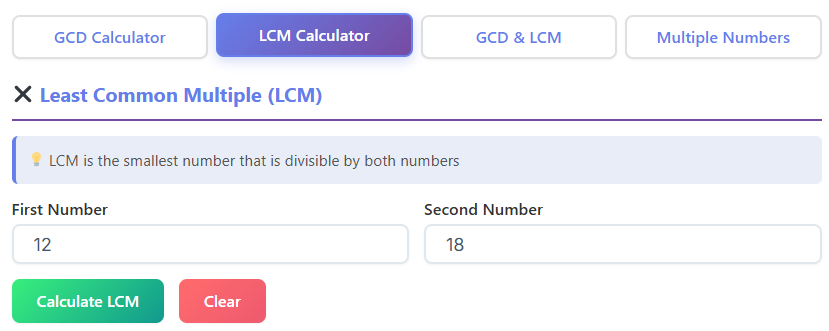
The input process is identical. I entered two new numbers, 15 and 20, into the fields and clicked “Calculate LCM.” The result card popped up, showing the LCM is 60. Again, it was fast and direct. But just like before, the tool invited me to explore further.
Automatic Cross-Calculation
A standout feature here is the automatic GCD calculation. When I calculated the LCM of 15 and 20, the tool also computed their GCD, which is 5, and the product of the numbers (300). This is incredibly efficient. It understands that GCD and LCM are two sides of the same coin and doesn’t make you switch tabs to get the other value. It’s a thoughtful touch that showcases a deep understanding of the user’s needs. This is why it’s more than just a simple gcd calculator; it’s a comprehensive number theory tool.
The Formula in Action
Just like the GCD tab, the LCM section includes a formula box. It displays the same relationship: LCM(a, b) = (a × b) / GCD(a, b). For my example, it showed LCM(15, 20) = (15 × 20) / 5 = 60. Displaying the formula with the actual numbers plugged in is an excellent way to teach the relationship. It’s one thing to memorize a formula; it’s another to see it applied instantly.
Visuals and Steps for LCM
The canvas visualization for LCM is just as insightful. It visually demonstrates the concept by showing multiples of each number until they align. It would show multiples of 15 (15, 30, 45, 60…) and 20 (20, 40, 60…) until they hit the common multiple of 60.
Moreover, a step-by-step list breaks down the calculation. It might list the prime factors of each number (15 = 3 × 5; 20 = 2² × 5) and then explain how to construct the LCM by taking the highest power of each prime factor (2² × 3 × 5 = 60). This methodical breakdown is perfect for anyone who needs to show their work or wants a deeper understanding of the process. This level of detail is what makes this gcd calculator a superior educational resource.
Two-in-One: The GCD & LCM Together Tab
For those times when you need both the GCD and LCM fatores at the same time, the “GCD & LCM Together” tab is the most efficient choice. I decided to test it with a classic pair: 12 and 36. I wanted to see how it would handle a case where one number is a multiple of the other, which often comes up in fraction problems. Finding what is the greatest common factor of 12 and 36 is a common classroom example.
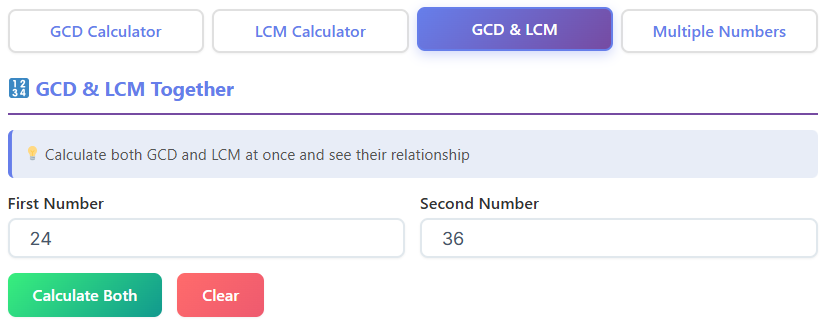
Dual Output for Maximum Efficiency
I entered 12 and 36 and hit calculate. The interface presented two distinct result cards side-by-side: one for the GCD (12) and one for the LCM (36). This dual output is the pinnacle of efficiency. There’s no need to toggle between tabs or perform separate calculations. It’s all there in one go.
This tab is perfect for users who are comparing or working with both values simultaneously. For example, a student simplifying a fraction might need the GCD, while someone adding fractions might need the LCM. This tab serves both needs at once. It’s an exemplary gcd calculator because it thinks ahead for the user.
Verification and Detailed Metrics
The combined tab also features the powerful Product vs GCD × LCM verification. It showed me that GCD(12, 36) × LCM(12, 36) = 12 × 36 = 432. It then showed that the product of the numbers, 12 × 36, is also 432. This immediate check is reassuring and reinforces the core mathematical theorem.
All the detailed metrics from the first tab are present here too, including sum, difference, and quotient. It feels like the most complete view, combining the best of the individual GCD and LCM tabs into one powerhouse screen. This comprehensive approach is useful in many fields, just as a Water Intake Calculator is helpful for both athletes and anyone focused on their daily health.
Steps and Graphs in One Place
To complete the picture, this tab includes both the Euclidean algorithm steps for the GCD and the step-by-step list for the LCM. You also get the visual graph, allowing you to see the relationships on the canvas. Having all this information in a single, scrollable view makes this tab the most thorough option. It’s an exhaustive resource for anyone needing to document, teach, or fully understand the relationship between two numbers. This comprehensive approach is what one should expect from a top-tier gcd calculator.
Beyond Two Numbers: The Multiple Numbers Tab
This is where this gcd calculator truly sets itself apart from the vast majority of other tools online. Most calculators stop at two numbers. But what if you need to find the GCD or LCM of three, four, or even ten numbers? This is a common need in more advanced mathematics, programming, and even in real-world scenarios like logistics or resource allocation.
Adding Numbers with Ease
I decided to try finding the GCD and LCM of 8, 12, and 24. The interface on the “Multiple Numbers” tab is brilliantly designed. Instead of a fixed number of input boxes, there’s a single input field and an “Add Number” button.
I typed “8” and clicked add. A small tag with “8” appeared below. Then I did the same for “12” and “24.” The numbers collected as neat, removable tags. This tag-style display is visually clean and makes it easy to see the set of numbers you’re working with. If I made a mistake, I could just click the “x” on a tag to remove it. It’s a flexible and user-friendly system.
Instant Results for a Set of Numbers
Once I had my three numbers (8, 12, and 24), I clicked the calculate button. The tool instantly returned the GCD (4) and the LCM (24). The process was just as fast and seamless as it was for two numbers. This is incredibly powerful. Imagine a teacher creating a worksheet or a developer needing to find a common denominator for a series of values. This feature is a massive time-saver.
It also correctly calculated the greatest common factor of 12 and 24 as part of its logic, which I already knew was 12, but it handled the third number flawlessly. It’s this ability to go beyond pairs of numbers that makes this tool a professional-grade gcf finder.
Supporting Details for Multiple Numbers
Even with multiple numbers, the tool provides useful metrics. A “Numbers Count” metric showed me that I had entered 3 numbers. This is a small but helpful detail for verification.
The “Coprime?” check is also available here. It correctly informed me that the set {8, 12, 24} is not pairwise coprime. The tool even explained that this is because no pair within the set is coprime (e.g., GCD(8, 12) = 4). This level of detail is fantastic for learning.
To top it off, a “Steps” section is also included. It outlines how the GCD is calculated iteratively. For instance:
- Find GCD(8, 12), which is 4.
- Then, find GCD(4, 24), which is 4.
- Therefore, the GCD of the set is 4.
Seeing this process laid out is crucial for understanding how the GCD of multiple numbers is derived. This makes the gcd calculator an indispensable tool for more complex problems. It’s a reminder that good tools, whether for math or for tracking personal metrics like those from a BMR Calculator, should provide clarity and insight, not just a final number.
This gcd calculator is an excellent resource. It’s the perfect gcf finder for any situation. Whether you’re a student looking for the gcf of 8 12, a teacher demonstrating the greatest common factor of 12 and 24, or a curious individual exploring what is the greatest common factor of 12 and 36, this tool is for you. The ability to calculate with multiple numbers makes this gcd calculator a standout.
Real-World Applications and Final Thoughts
Using this gcd calculator got me thinking about how often this concept appears in daily life.
- For Students and Teachers: This is the most obvious application. Students can use this gcd calculator to check homework, understand the Euclidean algorithm, and visualize fractions. Teachers can use it to create examples and demonstrate concepts in a more engaging way.
- For Programmers and Developers: In computer science, GCD algorithms are used in everything from cryptography to simplifying fractions in software. This gcd calculator is a great way to quickly verify the output of jejich own code or to understand the logic before implementing it.
- For Crafters and Designers: Imagine you’re a quilter with strips of fabric of different lengths, and you want to cut them into the largest possible equal-sized squares with no waste. You’d need to find the GCD of the lengths. This gcd calculator would give you the answer in seconds.
- For Event Planners: If you’re arranging chairs in rows and want to have the same number of chairs in each row for different groups, you’d use the GCD. The multiple numbers tab on this gcd calculator would be perfect for this.
This tool is so much more than a simple calculator. It’s an interactive learning platform, a productivity tool, and a window into the elegance of number theory. The thoughtful design, from the clean input fields to the detailed step-by-step breakdowns and visual canvases, makes it accessible to beginners and powerful enough for experts.
The inclusion of the LCM, the combined view, and the game-changing ability to handle multiple numbers sets it in a class of its own. It anticipates the user’s needs, providing related metrics and clear explanations at every turn. If you ever find yourself needing to find a Greatest Common Divisor, I wholeheartedly recommend this gcd calculator.
It doesn’t just give you the answer; it helps you understand it. It has earned a permanent spot in my browser’s bookmarks, and I am sure it will for you too. Whether you need to find the greatest common factor of 8 and 12 or solve a more complex problem, this is the gcd calculator for the job. This versatile gcd calculator is a must-have.
FAQs
What is the fastest way to find both the GCD and LCM of two numbers?
The most efficient way is to use the “GCD & LCM Together” tab. When you enter your two numbers on this tab, the calculator instantly displays both the Greatest Common Divisor (GCD) and the Least Common Multiple (LCM) in separate result cards. This saves you from having to switch between different tabs or perform two separate calculations.
Can this tool handle more than just two numbers?
Yes, absolutely. You can easily calculate the GCD and LCM for a whole set of numbers by using the “Multiple Numbers” tab. Simply enter each number one at a time and click “Add Number.” The tool will create a list of your numbers and calculate the final GCD and LCM for the entire group, which is perfect for more complex problems.
How does the visual representation help me understand the GCD?
The visual canvas gives you a simple, graphical way to see what the GCD means. It displays your numbers as colored bars and then shows exactly how many times the GCD (represented by smaller blocks) fits perfectly into each of your original numbers. This makes the abstract concept of a “divisor” tangible and easy to grasp, especially for visual learners.

