
Master Any Measurement with the Ultimate Area Converter
Dealing with different units of area can be a major headache. Whether you’re a real estate agent trying to explain a property’s size, a farmer planning crop distribution, or a student working on a project, converting between square meters, acres, hectares, and square feet is a common challenge. Different industries and regions use different standards, making manual calculations slow, tedious, and prone to error. This is where a powerful and intuitive Area Converter becomes an indispensable tool.
An Area Converter simplifies these complex calculations, providing instant and accurate results. It removes the guesswork and the need for complicated formulas, allowing you to focus on the task at hand. From large-scale land development projects to simple home renovations, the ability to quickly translate one unit of area into another is crucial for planning, communication, and decision-making.
This guide will walk you through a feature-rich Area Converter, exploring its design, functionality, and practical applications that make it an essential resource for professionals and individuals alike. We will delve into every aspect of this tool, showing you how it can streamline your workflow and boost your productivity.
A First Look: Header and Visual Design
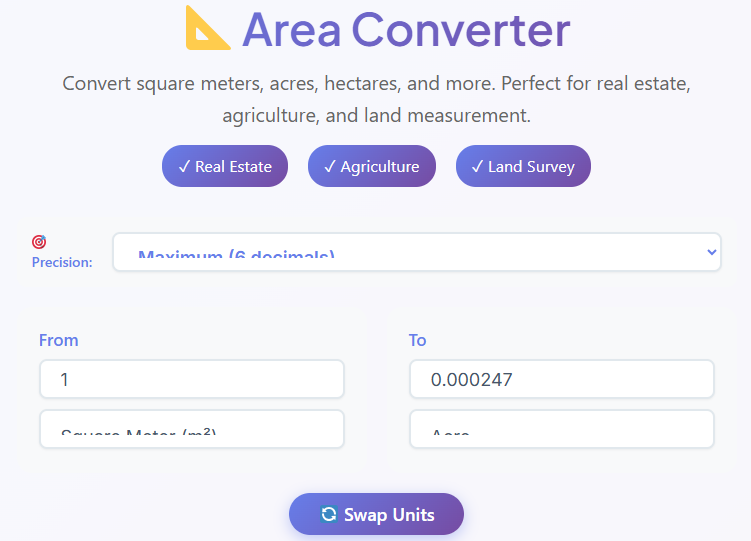
The moment you land on the page, the purpose of the tool is immediately clear. A clean and prominent header proudly displays the title: Area Converter. This straightforward title leaves no room for ambiguity, instantly assuring you that you’ve found the right solution for your measurement needs. Directly beneath the title, a concise description summarizes the tool’s function, letting you know it’s here to help you effortlessly convert between various units of area.
What truly sets this Area Converter apart are the feature badges located prominently in the header. These badges for “Real Estate,” “Agriculture,” and “Land Survey” act as signposts, highlighting the tool’s relevance across key industries.
- Real Estate: This badge signals to agents, buyers, and developers that the tool is perfectly suited for property-related calculations, like converting a plot size from acres to square feet for a listing.
- Agriculture: Farmers and agricultural scientists will recognize that this Area Converter is designed with their needs in mind, simplifying tasks like calculating land area for planting or determining yield per hectare.
- Land Survey: For surveyors and engineers, this badge confirms that the tool provides the precision and reliability required for professional land measurement and mapping.
The overall user interface is a testament to modern, user-centric design. It features a spacious, uncluttered layout with a calming color palette. The design avoids overwhelming you with unnecessary elements, ensuring the focus remains on the core function: converting areas. The fonts are legible, the buttons are clearly defined, and the interactive elements are intuitive. This clean and modern feel makes the Area Converter not just a utility, but a pleasure to use, whether you’re performing a single quick conversion or running multiple calculations for a complex project.
Fine-Tuning Your Results: The Precision Selector

Accuracy is paramount when dealing with measurements, especially in professional contexts. A small rounding error in a land survey or an architectural plan can lead to significant problems down the line. The Area Converter addresses this need for accuracy head-on with its dedicated Precision Selector.
Located conveniently near the input fields, this feature is presented as a dropdown menu. It allows you to choose the number of decimal places you want to see in your converted result. The options typically include:
- 2 Decimal Places: Ideal for general use, like home improvement projects or real estate listings where extreme precision isn’t necessary.
- 4 Decimal Places: A good middle ground, offering a higher degree of accuracy for tasks like landscape design or small-scale farming.
- 6 Decimal Places: This level of precision is often required in engineering and scientific contexts where more detailed calculations are the norm.
- 8 Decimal Places: Reserved for highly technical applications, such as professional land surveying or academic research, where every fraction of a unit matters.
Why would a user need to change this? The required level of precision varies dramatically depending on the application. A real estate agent describing a half-acre lot might be content with two decimal places (e.g., 21,780.00 sq ft). However, an engineer calculating the material needed to pave that same area might require a more precise figure to avoid over-ordering or under-ordering supplies.
By giving you control over the decimal places, this Area Converter empowers you to tailor the output to the specific requirements of your task. It’s a subtle but powerful feature that demonstrates a deep understanding of user needs and elevates the tool from a simple calculator to a professional-grade instrument. This flexibility makes the Area Converter a more versatile and reliable choice for a wide range of users.
The Heart of the Tool: The Input Section
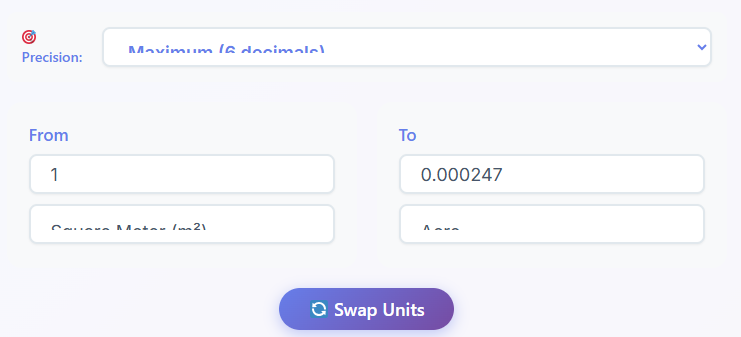
This is where the magic happens. The core functionality of the Area Converter is centered around its simple and intuitive input section. The design is based on a logical “From” and “To” structure that mirrors how we naturally think about conversions. It’s designed for efficiency, allowing you to get the answers you need in just a few clicks.
Let’s break down the step-by-step process:
- The “From” Field: The process begins with the “From” section. Here, you’ll find a prominent input box where you enter the numerical value you wish to convert. For example, if you want to convert 150 acres, you would type “150” into this field.
- The First Unit Dropdown: Next to the input box is the first unit dropdown menu. Clicking this reveals an extensive list of area units from various measurement systems. This list is comprehensive, including common units like:
You simply select the unit of your initial value. Following our example, you would select “Acre” from this list.- Square Meter (m²)
- Square Kilometer (km²)
- Square Centimeter (cm²)
- Square Millimeter (mm²)
- Hectare (ha)
- Acre (ac)
- Square Mile (mi²)
- Square Yard (yd²)
- Square Foot (ft²)
- Square Inch (in²)
- The “To” Field: Directly below or adjacent to the “From” section is the “To” section. This contains the result field, which is read-only. As soon as you enter a value and select your units, the converted result appears here instantly. There’s no need to press a “Calculate” button, making the process incredibly fast.
- The Second Unit Dropdown: Alongside the result field is the second unit dropdown. This menu contains the same comprehensive list of units as the first. Here, you select the target unit you want to convert your value into. For instance, if you wanted to know what 150 acres is in square meters, you would select “Square Meter (m²)” from this dropdown. The Area Converter would immediately display the result.
This streamlined workflow makes performing any land area conversion effortless. The tool does the heavy lifting, allowing you to experiment with different units on the fly. You can quickly see how many hectares are in 150 acres, or how many square feet, just by changing the selection in the second dropdown. This interactive and responsive design is a core strength of this powerful Area Converter.
While converting land measurements is a primary function, many projects involve other types of conversions. For example, a land developer might need to calculate vehicle travel times across a new development. For that, a dedicated tool is essential.
🚗 Speed Converter
Convert km/h, mph, m/s, knots
Open Converter →
This integration provides added value, allowing users to solve related problems without leaving the ecosystem. The thoughtful design of the input section makes this online Area Converter exceptionally user-friendly.
One-Click Reversal: The Swap Units Button
Efficiency is a key theme in the design of this Area Converter, and no feature embodies this more than the “Swap Units” button. This simple but brilliant function is a major time-saver, particularly for users who need to perform reverse conversions or compare units back and forth.
Typically located strategically between the “From” and “To” unit dropdowns, the swap button is often represented by an icon with two arrows pointing in opposite directions. Its function is straightforward: with a single click, it instantly swaps the selected units and their corresponding values.
Let’s revisit our earlier example. Imagine you’ve just used the Area Converter to find out that 150 acres is equal to 607,028.46 square meters. Now, suppose you want to confirm this by converting 607,028.46 square meters back to acres. Instead of manually re-entering the numbers and selecting the units again, you can simply click the swap button.
Instantly, the tool will:
- Move “Square Meter (m²)” to the “From” unit dropdown.
- Move “Acre (ac)” to the “To” unit dropdown.
- Populate the “From” input field with “607,028.46”.
- Display “150” in the “To” result field.
This feature is incredibly useful in many scenarios. A real estate professional might use it to quickly switch between the metric and imperial systems when talking to international clients. A student can use it to double-check their homework by ensuring the reverse conversion is also correct. For anyone comparing different land parcels listed in different units, the swap button streamlines the process, eliminating repetitive data entry and reducing the chance of manual errors. It’s a small detail that has a huge impact on the overall user experience, making this Area Converter feel fast, responsive, and intelligently designed. It reinforces the tool’s status as a top-tier Area Converter by prioritizing user convenience.
At-a-Glance Information: The Quick Reference Section
While the main function of the Area Converter is to perform specific calculations, sometimes you just need a quick, at-a-glance comparison of common units. The Quick Reference section is designed for exactly this purpose. It serves as a handy cheat sheet, providing instant context for the most frequently used area measurements without requiring any input from you.
This section is usually presented as a clean, easy-to-read grid or table. It displays a set of predefined conversions, allowing you to quickly understand the relationship between different units. For example, the grid might show:
- 1 Acre is equal to…
- 43,560 Square Feet
- 0.4047 Hectares
- 4,047 Square Meters
- 1 Hectare is equal to…
- 10,000 Square Meters
- 2.471 Acres
- 1 Square Kilometer is equal to…
- 100 Hectares
- 247.1 Acres
- 0.386 Square Miles
This pre-populated data is incredibly valuable for users who need to quickly contextualize a measurement. A property buyer looking at a 5-hectare plot can glance at the table and immediately understand that it’s roughly 12.35 acres. A student studying geography can use it to quickly memorize key conversion factors.
The Quick Reference section complements the main Area Converter by serving a different but related need. The primary tool is for calculating specific values (e.g., “What is 12.5 acres in square meters?”), while the reference grid is for understanding general equivalencies (e.g., “How big is an acre compared to a hectare?”). By including this section, the tool becomes a more comprehensive resource for anyone working with area measurements. It anticipates user needs and provides answers before the user even has to ask, solidifying its position as a superior Area Converter. This is yet another feature that showcases the tool’s thoughtful design, enhancing its utility and making it an even more effective Area Converter.
Never Lose a Calculation: The Conversion History
When you’re working on a complex project, you often need to perform multiple conversions and refer back to them. You might be comparing several different properties, calculating material needs for various sections of a construction site, or working through a set of problems for an assignment. Manually writing down each result is inefficient and can lead to lost information. The Area Converter solves this problem with its built-in Conversion History feature.
Located discreetly below the main conversion interface, this section automatically keeps a running log of your most recent calculations. Each time you perform a conversion using the Area Converter, the tool saves the entire entry—the “From” value and unit, and the “To” value and unit—as a line item in the history list.
This feature offers several key benefits:
- Easy Recall: You can quickly scan the list to find a previous result without having to perform the calculation again. This is perfect for when you get distracted or need to cross-reference a number you calculated a few minutes ago.
- Comparison: Seeing multiple conversions listed together makes it easy to compare them. A developer can convert the sizes of three different land parcels to hectares and see them all in one place to determine which is the largest.
- Reduced Workload: It eliminates the need for a separate notepad or spreadsheet for simple tasks, keeping your entire workflow contained within the Area Converter tool.
The history typically has a limit, such as storing the last 10 or 20 conversions, to keep the interface clean and manageable. For added convenience, a “Clear History” button is always included. With a single click, you can wipe the entire list and start fresh, ensuring your privacy and removing clutter once you’ve finished your task.
The inclusion of a conversion history transforms the tool from a one-off calculator into a persistent workspace. It understands that a user’s workflow is often not linear and provides the tools to manage that complexity. For projects that involve numbers and data, having a reliable history is crucial. This is true not just for area, but for other digital calculations as well. For example, web developers or IT specialists often need to convert data storage units.
💻 Data Storage Converter
Convert bytes, KB, MB, GB, TB
Open Converter →
Just as a data storage converter helps manage digital information, the history function in the Area Converter helps you manage your measurement data effectively. It’s a practical feature that adds significant value for any serious user.
The Area Converter in Action: Real-Life Examples
Theory and features are one thing, but the true value of a tool is revealed in how it’s used to solve real-world problems. The Area Converter is a versatile instrument used daily by people across numerous professions. Let’s explore a few scenarios.
1. Maria, the Real Estate Agent
Maria is preparing a listing for a large rural property. The official survey documents state the plot is 4.5 hectares. While this is a standard unit in many parts of the world, her primary client base in the United States is more familiar with acres. Furthermore, for marketing materials targeting residential buyers, expressing the size in square feet can make it feel more tangible.
Using the Area Converter, Maria first enters “4.5” and selects “Hectare” in the “From” field. She then selects “Acre” in the “To” field and instantly gets the result: 11.12 acres. She jots this down for her main listing description. Next, she changes the “To” unit to “Square Foot” to find the total area is 484,375.97 square feet. She uses this larger number in her promotional flyers to emphasize the vastness of the property. The swap button also comes in handy when a potential buyer from Canada asks for the size in square meters, allowing her to convert it back from acres or hectares in a second. The Area Converter enables her to communicate effectively with a diverse audience.
2. David, the Farmer
David manages a mid-sized farm and has just acquired a new field that measures 30 acres. He plans to plant corn, and his seed supplier provides application rates in kilograms per hectare. He also needs to calculate his potential fuel usage for plowing the field, and his tractor’s efficiency is measured in gallons per acre, but he buys fuel in liters.
First, David uses the Area Converter to convert his new field’s size. He enters “30” and “Acre,” and selects “Hectare” as the target unit. The tool tells him his field is 12.14 hectares. Now he can accurately calculate the amount of seed he needs to purchase. This simple plot size converter function prevents him from over- or under-buying expensive seed. The Area Converter is a crucial tool for his crop planning.
While planning his fieldwork, he also thinks about fuel. Calculating fuel efficiency across different measurement systems can be complex, so a specialized tool is best.
⛽ Fuel Economy Converter
Convert MPG to L/100km and more
Open Converter →
By using both the Area Converter for his land and a fuel converter for his machinery, David can manage his resources with precision, optimizing his costs and efficiency.
3. Sarah, the Land Surveying Student
Sarah is working on a university assignment that involves analyzing a historical town map. The map uses a mix of old and modern units—some plots are marked in square yards, others in acres, and the total town area is given in square miles. Her task is to standardize all measurements into the metric system (square meters and square kilometers) for a comparative analysis.
The Area Converter becomes her central workspace. She goes through the map plot by plot, entering the values and units as she finds them. She converts square yards to square meters, acres to square meters, and finally, the total square miles to square kilometers. The Conversion History feature is a lifesaver, as it allows her to see all her calculations at once and easily transfer them to her report. The precision selector is also vital, as her professor requires all calculations to be accurate to six decimal places. The Area Converter helps her complete her assignment accurately and efficiently. This reliable Area Converter ensures her results are flawless.
Who Benefits? Broad Use Cases for the Area Converter
The utility of a high-quality Area Converter extends far beyond the examples above. Its applications span dozens of industries and everyday situations, making it a valuable tool for a wide audience. Anyone who needs a plot size converter or a general land area conversion tool will find it useful. Here are some of the key user groups who benefit from this tool.
- Property Buyers and Homeowners: When searching for a new home or land, listings often use different units. An Area Converter allows buyers to easily compare a 0.5-acre suburban lot with a 2,000-square-meter urban plot. Homeowners can use it for renovation or landscaping projects, converting their backyard size into square feet to calculate the amount of turf or patio stones needed.
- Builders and Construction Managers: Precision is non-negotiable in construction. Builders use an Area Converter daily to calculate floor areas, order the correct amount of concrete or flooring, and ensure plans comply with zoning regulations that might be specified in hectares or acres.
- Engineers (Civil, Environmental, and Agricultural): Civil engineers use it for designing infrastructure like roads and dams, converting vast land areas. Environmental engineers use it to measure the size of wetlands or contaminated sites for remediation projects. Agricultural engineers use it to design irrigation systems and optimize farm layouts. For them, an accurate Area Converter is fundamental.
- Students and Educators: From geography and math to agriculture and environmental science, students frequently encounter different units of area. The Area Converter serves as both a practical tool for homework and a learning aid to help them understand the relationships between metric and imperial units.
- Government and Urban Planners: City planners and government agencies deal with land management on a massive scale. They use an Area Converter for zoning, creating parks, planning new residential developments, and analyzing land use data. Standardizing measurements across large regions is essential for effective governance, and this tool simplifies that process.
- Legal Professionals: Lawyers specializing in property law often need to review deeds, surveys, and contracts where land size is a critical detail. An accurate Area Converter helps them verify information and ensure legal documents are precise.
Essentially, anyone who interacts with physical space in a professional or personal capacity can find a use for this tool. The broad applicability of this Area Converter is a testament to its fundamental utility. It is a universal translator for the language of space and size, making it a truly indispensable digital resource. The straightforward nature of this Area Converter makes it accessible to everyone. This is why a reliable Area Converter is so important.
Conclusion
In a world where data comes in many different formats, having the right tools to translate that data is essential for clarity and efficiency. The Area Converter stands out as a perfect example of a tool that does one thing exceptionally well. It takes a common but often frustrating task—converting units of area—and makes it simple, fast, and foolproof. With its clean design, powerful features like the precision selector and swap button, and thoughtful additions like the quick reference grid and conversion history, it caters to a vast spectrum of users, from seasoned professionals to casual homeowners.
Whether you are navigating the complexities of a real estate transaction, planning agricultural operations, or simply satisfying your curiosity about the size of a local park, this Area Converter provides the reliable answers you need. It removes barriers, facilitates better communication, and empowers you to make more informed decisions. It is more than just a calculator; it is a bridge between different systems of measurement, a vital resource for anyone whose work or life touches upon the dimensions of our physical world. The versatility of this Area Converter ensures it will remain a go-to tool for years to come.
FAQs
What is an Area Converter?
An Area Converter is a simple online tool that helps you instantly translate one unit of area measurement into another. For example, you can use it to find out how many square feet are in an acre or how many hectares are in a square mile. It saves you from doing complex manual calculations.
How do I use the Area Converter?
Using the tool is straightforward. First, enter the number you want to convert in the “From” field. Next, select its current unit (like ‘Acres’) from the dropdown menu beside it. Finally, choose the unit you want to convert to (like ‘Square Meters’) in the “To” section, and the correct answer will appear automatically.
Why is the Area Converter useful for real estate?
The Area Converter is essential in real estate because property listings often use different units (acres, square feet, hectares) depending on the region or property type. This tool allows agents, buyers, and sellers to easily compare plot sizes, understand the true dimensions of a property, and communicate measurements clearly to a global audience.

