
Convert Time Units: The Ultimate Guide to Accurate and Instant Time Conversions
Time is a fundamental constant in our lives, governing everything from our daily schedules to complex scientific calculations. We measure it, track it, and often wish we had more of it. But what happens when time is presented in different formats?
A project deadline might be in days, a work log in hours, and a video clip in seconds. To make sense of it all, we need a reliable way to convert time units. This process, while seemingly simple, is critical for accuracy in countless personal and professional scenarios. Being able to effortlessly convert time units ensures that everyone, from project managers to payroll clerks and scientists, is on the same page.
Understanding how to convert time units is more than just a mathematical exercise; it’s a practical skill. It bridges the gap between different systems of measurement we encounter daily. The global standards for time—seconds, minutes, hours, and days—form the foundation of our collective understanding of its passage.
Whether you are planning a trip, logging work hours, or conducting a delicate experiment, the ability to convert time units accurately is indispensable. This guide will explore the importance of this process and introduce a powerful online tool designed to make it seamless, accurate, and incredibly fast. We will delve into how to use a specialized units converter to handle these calculations, making your life easier and your work more efficient.
Tool Header & Visual Overview: First Impressions Matter
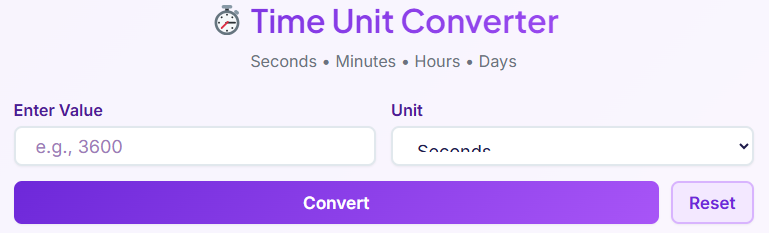
The moment you land on the page, you are greeted by a clean and intuitive interface, headlined by the clear title: ⏱️ Time Unit Converter. Just below it, a concise description—Seconds • Minutes • Hours • Days—tells you exactly what the tool does. There’s no clutter, no confusion, just a straightforward promise of functionality. This initial clarity is crucial for a positive user experience, especially when you need to convert time units quickly. The design immediately instills confidence that you’ve found the right place to get the job done.
The tool’s modern user interface (UI) is designed not just for function but also for visual appeal. It features a sleek layout with subtle gradients that guide your eyes naturally from the input area to the results. This isn’t just about looking good; it’s about creating a user-friendly environment.
The responsive design ensures that the experience is seamless whether you are on a desktop computer, a tablet, or a smartphone. You can convert time units on the go without sacrificing usability. The visual hierarchy is logical, making the tool approachable even for those who are not tech-savvy. Every element is placed with purpose, ensuring that your journey to convert time units is as smooth as possible.
The Input Section: Where Your Conversion Begins

The heart of any interactive tool is its input section, and this time unit converter is no exception. The process starts with a single, clearly labeled field: “Value.” This is where you enter the numerical amount of time you wish to convert. The field includes helpful features like a placeholder that reads “Enter a value,” guiding new users instantly. For example, if you wanted to convert 1.5 hours, you would simply type “1.5” into this box. The design ensures there is no ambiguity about where to begin your task to convert time units.
Adjacent to the value field is the “Unit” selection dropdown menu. This is where you specify the starting unit for your conversion. The menu is populated with the most common units of time: Seconds, Minutes, Hours, and Days. This focused selection prevents overwhelm and keeps the tool centered on its primary purpose.
If you’re starting with 90 minutes and want to see its equivalent in other units, you’d enter “90” and select “Minutes” from this dropdown. This two-step process—entering a value and selecting its unit—is the only setup required. The intuitive design provides real-time guidance, making the process to convert time units straightforward for everyone. This section is the starting point for anyone looking to convert time units with precision.
The Convert Button: Your Gateway to Instant Results

Once you have entered your value and selected its corresponding unit, the next step is a single click. The “Convert” button, prominently displayed and visually highlighted, is the trigger for the entire operation. It’s designed to be unmissable, with a distinct color and clear text that communicates its function perfectly. This button is the command center of the tool. When you press it, you are instructing the system to instantly convert time units based on your input.
Upon clicking “Convert,” the tool immediately processes your request and populates the results section below. The transition is seamless, with no page reloads or jarring delays. The button provides clear visual feedback, momentarily changing state to acknowledge your click before the results appear.
This immediate response is a hallmark of a well-designed user experience. It eliminates guesswork and provides the gratification of an instant outcome. The simplicity of this one-click action is central to the tool’s appeal, making the task to convert time units an efficient and satisfying experience. For anyone who needs to quickly convert time units, this button is the key to getting fast and accurate answers. This simple yet powerful feature is what makes it easy to convert time units.
The Reset Button: A Clean Slate with One Click
Sometimes, you need to start over. You might have made a mistake, or you might have finished one calculation and are ready to begin another. The “Reset” button provides this functionality with elegant simplicity. Located near the “Convert” button, it allows you to clear all fields and results with a single click.
This feature is a small but significant part of the overall user experience, adding a layer of convenience that frequent users will appreciate. Instead of manually deleting your previous entry and clearing your screen, the Reset button does it all for you, readying the tool for your next task to convert time units.
When you press “Reset,” the number you entered in the value field disappears, the input box is cleared, and the entire results section vanishes. The cursor automatically returns its focus to the “Value” input field, so you can immediately begin typing your next number.
This thoughtful detail saves you an extra click and streamlines the workflow, which is particularly useful when you need to convert time units for multiple different values in a row. It’s a feature that demonstrates a deep understanding of user needs, ensuring the tool remains tidy and ready for action. This makes the process to convert time units even more efficient. For those performing many calculations, this is an essential part of the workflow to convert time units.
The Results Section: Clarity and Precision at a Glance
After you click “Convert,” the magic happens in the results section. This area is meticulously organized into a clean grid layout, displaying the converted values for all other time units simultaneously. If you entered a value in hours, you will instantly see its equivalent in seconds, minutes, and days. Each conversion is presented in its own dedicated result card, creating a clear and scannable overview. This design choice prevents a jumble of numbers and ensures you can find the exact information you need without any searching. The goal is to make it easy to convert time units and see all relevant outputs at once.
Each result card contains the calculated value and its corresponding unit. For example, a card might show “86400 Seconds.” But the functionality doesn’t stop there. A “Copy” button is located on each card, allowing you to copy the specific result to your clipboard with a single click. This is incredibly useful for transferring data into spreadsheets, reports, invoices, or any other document.
The tool also emphasizes precision, displaying results up to six decimal places. This level of detail is critical for tasks requiring high accuracy, such as scientific research or financial calculations like billing based on a fraction of an hour (e.g., figuring out what .12 of an hour is in minutes). This precision ensures that when you convert time units, you are getting data you can trust. This entire section is designed to help users who need to convert time units get their results in a usable and accurate format. The ability to convert time units with such precision is a key benefit.
Error Handling: A Smarter, Safer Conversion Experience
A truly great tool anticipates user errors and guides them gracefully toward a solution. This time unit converter includes robust error handling to ensure a smooth and frustration-free experience. What happens if you accidentally enter text instead of a number? Or try to convert a negative value? Instead of crashing or showing a cryptic error message, the tool provides a clear, user-friendly alert. For instance, if you type “abc” into the value field and click convert, a gentle notification will appear, prompting you to enter a valid number.
This intelligent feedback mechanism extends to negative numbers. Since time cannot be negative in this context, the tool will display a warning if you enter a value less than zero. This prevents nonsensical results and guides you to correct your input.
By catching these common mistakes, the error handling system enhances the user experience significantly. It builds trust and makes the tool feel more like a helpful assistant than a rigid program. This proactive approach ensures that your efforts to convert time units are always productive. It’s a small detail that makes a big difference, especially for users who may be less familiar with online calculators. This thoughtful design helps everyone convert time units correctly.
Real-Life Use Cases: Putting Time Conversion into Practice
The need to convert time units appears in many aspects of our daily and professional lives. The true value of a tool is measured by its ability to solve real-world problems. Let’s explore three detailed scenarios where this units converter proves indispensable.
Scenario 1: Tracking Work Hours for Freelancers and Employees
Imagine you’re a freelance consultant who bills clients by the hour. You meticulously track your time for various tasks throughout the day. Your tracking software logs time in minutes. At the end of the week, you have a list of tasks with durations like 45 minutes, 90 minutes, 120 minutes, and 25 minutes. To create an accurate invoice, you need to sum these up and convert hours to decimal format for your billing software.
First, you sum the total minutes: 45 + 90 + 120 + 25 = 280 minutes. Now, you need to convert this to hours. You open the time unit converter, enter “280” into the value field, and select “Minutes” from the dropdown. You click “Convert.” The results section instantly shows you that 280 minutes is equivalent to 4.666667 hours. Using the copy button, you can paste this decimal value directly into your invoice.
This process is far quicker and less error-prone than manual calculation. This is a perfect example of how the tool helps you convert time units for precise financial reporting. Many professionals use a calculator hours tool for this exact purpose, turning minutes into billable hours. This ability to convert time units is crucial for accurate payroll and invoicing.
Scenario 2: Calculating Billable Hours for Payroll
A small business owner is processing payroll. One of their part-time employees submitted a timesheet with entries like “7 hours and 15 minutes” and “6 hours and 45 minutes.” The payroll system requires all time to be entered in decimal hours. The owner needs to accurately convert hours to decimal for both entries. This is a common challenge where a simple min to hr conversion is necessary.
For the first entry, the owner knows they need to convert 15 minutes into a decimal. They use the tool to convert time units, entering “15” and selecting “Minutes.” The result for hours is 0.25. So, the total time is 7.25 hours. For the second entry, they convert 45 minutes, which the tool shows is 0.75 hours, making the total 6.75 hours.
By using the converter, the owner ensures payroll is calculated accurately, avoiding underpayment or overpayment. This simple yet critical task to convert time units maintains fairness and accuracy in business operations. Without a reliable way to convert time units, these calculations would be prone to error. Every time they need to convert time units, they can rely on this tool.
Scenario 3: Precision in Scientific Experiments
A team of biologists is studying the growth rate of a specific bacterium. Their experiment requires them to take measurements at precise intervals over a 72-hour period. The automated microscope captures an image every 90 seconds. To analyze the data and plot it on a graph where the x-axis is in hours, they need to convert time units for each data point.
For each image captured, they have a timestamp in seconds. An image taken at the 5,400-second mark needs to be converted to hours. A researcher enters “5400” into the converter and selects “Seconds.” The tool instantly shows the result: 1.5 hours. They can quickly do this for hundreds of data points, using the copy function to transfer the decimal hour values into their analysis software.
This ability to rapidly and accurately convert time units is crucial for maintaining the integrity of their scientific data. The precision of the tool, down to six decimal places, ensures that their findings are based on exact measurements. In science, the need to convert time units accurately cannot be overstated. This is a field where you must convert time units with complete confidence. The team finds the tool essential to convert time units for their research. It simplifies a tedious but vital part of their work, allowing them to convert time units efficiently.
Expanding Your Conversion Capabilities: Internal Tool Links
Mastering time conversion is just one piece of the puzzle. Many projects, especially in technical and scientific fields, require converting other types of units as well. To help you tackle a wider range of challenges, we offer a suite of powerful and easy-to-use converters.
If you are a programmer or computer science student, you often need to work with different numbering systems. Our 🔢 Number System Converter makes it easy to switch between binary, decimal, hexadecimal, and octal representations.
[Open Converter →]
For engineers, architects, and designers working with geometric data, converting angles is a frequent necessity. The 📊 Angle Converter allows you to seamlessly convert between degrees, radians, and gradians, ensuring your calculations are always accurate.
[Open Converter →]
Mechanics and engineers regularly deal with forces and rotation. Whether you’re tightening a bolt to specification or designing machinery, our 🏗️ Torque Converter is essential for converting between units like Newton-meters (Nm), pound-feet (lb-ft), and kilogram-meters (kg-m).
[Open Converter →]
Each of these tools is built with the same commitment to user-friendliness, accuracy, and speed. They empower you to handle complex conversions with confidence, no matter the domain. The ability to convert time units is just the beginning.
Conclusion: Your Go-To Tool for Time Conversion
In a world driven by data and deadlines, the ability to convert time units accurately and efficiently is not a luxury—it’s a necessity. From managing project timelines and processing payroll to conducting scientific research, the applications are endless. We’ve explored how a well-designed online tool can transform this task from a tedious manual calculation into a quick, seamless, and error-free process. The ease of use of our convert time units tool is one of its greatest strengths.
This convert time units tool stands out for its simplicity, speed, and precision. With its intuitive interface, instant real-time conversions, and thoughtful features like copy-to-clipboard functionality and robust error handling, it is designed to meet the needs of users across all fields. Whether for personal, educational, or professional tasks, this tool provides a reliable solution for anyone who needs to convert time units.
We encourage you to try the tool for yourself. Experience how effortless it can be to convert time units and see how it can streamline your workflow and boost your productivity. Say goodbye to manual calculations and embrace the confidence that comes with having accurate, instant conversions at your fingertips. Make this your go-to solution whenever you need to convert time units. You will find that the need to convert time units comes up more often than you think, and having a reliable tool makes all the difference.
FAQs
Why would I need to convert time units?
Converting time units is a common task in both daily life and professional settings. You might need to convert minutes to hours when filling out a timesheet for work or calculating billing for a project. If you’re planning an event, you might convert days into hours to create a detailed schedule. In cooking, recipes often list preparation times in minutes, which you might convert to hours for longer processes. For scientific or technical work, converting smaller units like seconds into minutes or hours is essential for accurate data analysis and reporting. A time unit converter simplifies these tasks, saving you time and preventing manual calculation errors.
How can I be sure the time conversion is accurate?
A reliable online time unit converter uses standardized, globally accepted values for its calculations (e.g., 60 seconds in a minute, 60 minutes in an hour). To ensure accuracy, these tools perform the math with high precision, often calculating results to several decimal places. This is especially important for financial or scientific applications where even small errors can have a significant impact. For example, when converting minutes to decimal hours for payroll, precision ensures employees are paid correctly for their time. Always use a well-regarded converter that clearly displays its results without rounding them prematurely.
Can I convert fractions of a unit, like 1.5 hours?
Yes, a good time unit converter is designed to handle both whole numbers and decimal values. You can easily input a number like “1.5” and select “Hours” to see its equivalent in minutes (90 minutes) and seconds (5400 seconds). This functionality is useful in many real-world situations, such as calculating the time for a 90-minute movie in hours or converting a task duration of 0.25 hours into minutes (15 minutes) for a project plan. The ability to work with fractions makes the tool flexible for various practical applications, from everyday scheduling to precise professional calculations.

