
Your Ultimate Guide to Using a Speed Converter
Navigating the world often means dealing with different systems of measurement. Whether you’re planning a road trip abroad, analyzing sports performance, or working in a technical field like aviation, understanding speed in various units is essential. This is where a dedicated speed converter becomes an invaluable tool. It bridges the gap between different units, translating kilometers per hour to miles per hour, meters per second to knots, and much more with just a few clicks.
The need for a reliable and intuitive speed converter is widespread, touching many aspects of our personal and professional lives. From a traveler trying to understand local speed limits to a scientist working with complex data, the ability to switch between units seamlessly is crucial. This guide will walk you through a powerful yet simple online speed converter, explaining its features and demonstrating how it can make your life easier.
This article will explore a modern, feature-rich speed converter designed for everyone. We will delve into its user-friendly interface, from the main input fields to advanced features like precision control and conversion history. You will learn how this tool can be applied in real-world scenarios, making it more than just a simple utility; it becomes a problem-solving companion.
We will cover its application in travel, sports, and even specialized fields like marine and aerospace navigation. By the end, you will have a comprehensive understanding of how to leverage this online speed converter for fast, accurate, and effortless calculations, regardless of your specific needs. It’s a tool designed to remove confusion and provide clarity, ensuring you’re always on the same page, no matter the units involved.
Header and Visual Overview of the Tool
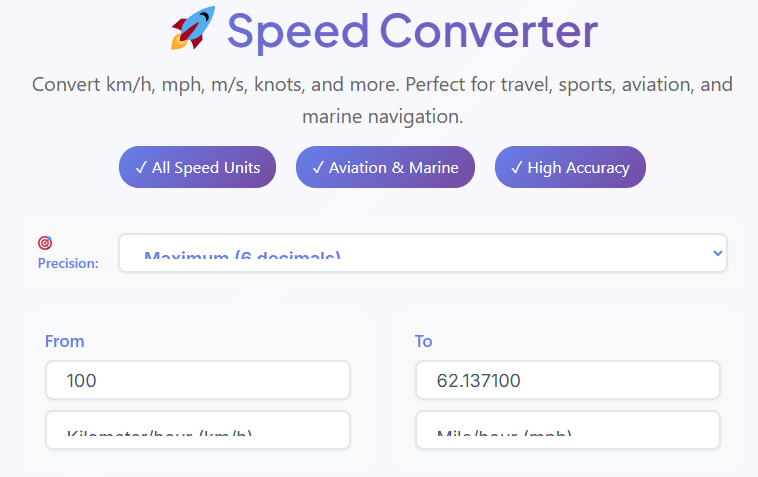
First impressions matter, and the moment you land on the page, the clean and modern design of this speed converter is immediately apparent. At the top, a clear and concise title, “Speed Converter,” leaves no doubt about the tool’s purpose. Directly beneath it, a short description explains its function: to convert between various units of speed effortlessly. This straightforward approach ensures that even first-time users can understand its value proposition instantly.
To the side of the main title, you’ll notice several feature badges that highlight the tool’s capabilities. These are not just decorative elements; they communicate key benefits at a glance. You will see badges like “All Speed Units,” indicating the tool’s comprehensive support for a wide range of measurements. Another badge, “Aviation & Marine,” signals that this speed converter caters to professionals in specialized industries.
A third badge, “High Accuracy,” assures users that the calculations they perform will be precise and reliable. The overall user interface feels intuitive and uncluttered, promoting a sense of efficiency and ease. This thoughtful design philosophy makes the speed converter approachable for casual users while still being powerful enough for technical experts.
The Importance of the Precision Selector

Accuracy is paramount when dealing with measurements, and this is especially true for speed. In scientific research, engineering, and even competitive sports, small fractions can make a significant difference. Recognizing this, the speed converter includes a dedicated “Precision” selector, a feature that gives you complete control over the level of detail in your results. Located prominently within the tool’s interface, this dropdown menu allows you to choose how many decimal places are displayed in the converted value.
You can select from several options, typically ranging from 2, 4, 6, to 8 decimal places. For everyday use, like converting speed limits while driving, two decimal places might be sufficient. However, for a scientific experiment or a complex distance time calculation, you might require a higher degree of precision.
For instance, if you are converting 10 meters per second to mph for a physics problem, using eight decimal places ensures your subsequent calculations are as accurate as possible. This feature empowers you to tailor the output to your specific requirements, making this speed converter a versatile instrument for a wide spectrum of applications. The ability to adjust precision on the fly is a testament to the tool’s thoughtful design, catering to both general and specialized needs.
How to Use the ‘From’ Input Section
The core of any conversion tool is its input section, and this speed converter makes the process incredibly straightforward. This is where you will enter the value you wish to convert. The section is clearly labeled “From” and contains two primary interactive elements: a numeric input field and a unit selection dropdown menu. The process is designed to be as intuitive as possible, guiding you naturally from one step to the next.
Your first action is to click on the numeric input field and type the speed value you want to convert. For example, if you want to convert 100 kilometers per hour, you would simply type “100” into this box. The field is designed to accept numerical inputs, ensuring clean and error-free data entry.
Next, you need to specify the unit of the value you just entered. To do this, you’ll click on the dropdown menu located right beside the input field. This menu presents a comprehensive list of common and specialized speed units. You’ll find standard options like Kilometers per hour (km/h), Miles per hour (mph), and Meters per second (m/s). Additionally, this powerful speed converter includes units for specific domains, such as Knots (for maritime and aviation), Mach (for supersonic speeds), and even the fundamental constant, the Speed of light (c).
You simply scroll through the list and select the unit that corresponds to your initial value. Once you’ve entered the number and selected its unit, you are ready for the conversion.
Understanding the ‘To’ Result Section
Once you have entered your data in the “From” section, the “To” section is where the magic happens. This area of the speed converter is designed for clarity and immediate feedback, displaying the result of your conversion instantly. It mirrors the layout of the input section but serves a different purpose: to present the output. You will see a result field and a target unit selector, both working in tandem to give you the information you need.
The most prominent element is the read-only result field. This box displays the converted speed. What makes this speed converter so efficient is that the result appears automatically and updates in real-time. As soon as you enter a value or change a unit in the “From” section, the converted number instantly populates this field. There is no need to press a “Calculate” or “Enter” button, which streamlines the workflow and saves valuable time.
Adjacent to the result field is another dropdown menu. This one allows you to select the target unit you want to convert to. Just like the input selector, this menu contains a comprehensive list of speed units. You can switch the target unit at any time, and the result will update instantly. For example, you could convert 100 km/h to mph, then, with a single click, see what that value is in m/s or knots. This dynamic functionality makes comparing different units incredibly fast and is a core strength of this particular speed converter.
The ‘Swap Units’ Button: A Time-Saving Feature

Efficiency is a key theme in the design of this speed converter, and nowhere is this more evident than with the “Swap Units” button. Situated conveniently between the “From” and “To” sections, this simple button, often represented by two opposing arrows, provides a powerful shortcut that dramatically speeds up your workflow. Its function is straightforward: it swaps the entire “From” and “To” configurations.
Imagine you just converted 60 miles per hour to kilometers per hour. Now, you want to know what 60 kilometers per hour is in miles per hour. Instead of re-typing the number and manually changing both unit selectors, you can simply click the “Swap Units” button. The tool will instantly move the target unit (km/h) to the input section and the source unit (mph) to the result section, automatically recalculating the value. The number “60” remains, but now it represents km/h, and the result field shows its mph equivalent.
This feature is incredibly useful in real-life scenarios. A pilot might use it to quickly cross-reference airspeeds between knots and mph. A student working on physics homework involving the speed formula distance time might use it to reverse a calculation without starting over. It eliminates redundant steps and makes the process of back-and-forth conversions seamless. This small but mighty button is a prime example of how a well-designed speed converter prioritizes user experience and productivity. It transforms a multi-step process into a single click, saving you time and mental effort.
The Quick Reference Section for Fast Comparisons
While the primary interface of the speed converter is perfect for one-to-one conversions, there are times when you need to see how a single value translates across multiple units simultaneously. The “Quick Reference” section is designed for precisely this purpose. It acts as a dashboard, providing an at-a-glance overview of your input speed converted into several common units at once. This feature is particularly useful for gaining a broader perspective on a measurement without having to manually select each target unit one by one.
Located below the main conversion interface, this section typically displays a series of cards or a table. As soon as you enter a value into the main speed converter, this area automatically populates. For example, if you input 100 km/h, the quick reference cards might instantly show you the equivalent in mph, m/s, knots, and feet per second. This immediate, multi-unit feedback is ideal for comparison. A researcher analyzing data might use this to quickly understand the magnitude of a speed in different standard systems. An engineer might use it to ensure a specification meets various international standards.
This section enhances the utility of the speed converter by providing a richer data context. It moves beyond a simple speed calculator function and becomes an analytical tool. The ability to see multiple conversions at once saves time and helps build a more intuitive understanding of how different speed units relate to one another. For anyone who works with diverse datasets or needs a holistic view of a measurement, this feature is an indispensable part of the tool.
Using the Conversion History for Productivity
For users who perform multiple calculations in a single session, keeping track of previous results can be a challenge. The speed converter solves this problem with an integrated “Conversion History” feature. This function acts like a digital notepad, automatically recording each conversion you make. It enhances productivity by allowing you to review, compare, and reuse past calculations without having to perform them again. The history log is a simple yet powerful addition that transforms the tool from a one-off calculator into a persistent workspace.
The history is usually displayed in a list format, with each entry showing the complete conversion you performed—the original value and unit, and the resulting value and unit. For instance, an entry might read “100 km/h -> 62.14 mph.” This list of recent conversions is saved automatically as you work, creating a running log of your activity. If you need to refer back to a calculation you made a few minutes ago, you can simply glance at the history instead of re-entering the data. This is particularly helpful when working on projects that require multiple, related speed conversions.
To maintain a clean workspace, the speed converter also includes a “Clear History” button. With a single click, you can erase all the saved entries and start fresh. This combination of automatic saving and easy clearing gives you full control over your data. For students, researchers, and professionals who rely on a series of calculations, this feature is a significant productivity booster. It ensures that your work is not lost and can be easily referenced, making the entire process more efficient and organized. This feature elevates the tool beyond a simple speed calculator and makes it a more robust solution for ongoing tasks.
This tool is exceptionally useful on its own, but sometimes speed calculations are part of a larger problem. For instance, a detailed distance time calculation often requires converting units of time as well as speed. For those moments, having related tools handy is a great benefit.
🕐 Time Unit Converter
Convert seconds, minutes, hours, days
Open Converter →
Integrating this functionality helps create a seamless workflow, allowing you to handle all aspects of your calculation in one place. Whether you’re working with the speed formula distance time or another equation, having easy access to a time converter is a major plus. The utility of a good speed converter is often enhanced by its ability to connect with other relevant calculators.
Real-Life Use Cases for the Speed Converter
The true value of any tool is measured by its practical application. This speed converter is not just an abstract utility; it is a problem-solver for a wide range of real-world situations. Its versatility makes it indispensable for travelers, athletes, and technical professionals alike. Let’s explore a few detailed scenarios where this speed converter shines.
1. The International Traveler
Imagine you are a tourist from the United States on a road trip through Europe. You are accustomed to seeing speed limits in miles per hour (mph), but here, all the signs are in kilometers per hour (km/h). This can be confusing and potentially dangerous. Using the online speed converter on your smartphone, you can quickly check the local speed limits.
When you see a sign that says “110 km/h” on the highway, you can enter “110” and select km/h as the unit. The tool will instantly show you that this is approximately 68 mph, giving you immediate context and peace of mind. Later, when a friend from back home asks how fast you were going, you can use the swap feature on the speed converter to easily translate your speed back into km/h to tell your story accurately. This simple use case demonstrates how the speed converter acts as a crucial travel companion, ensuring safety and clarity.
2. The Competitive Athlete and Coach
In the world of sports, performance is measured with precision. A track and field coach is analyzing the performance of their sprinter. The electronic timer clocks the athlete at 10.5 seconds for the 100-meter dash. To better understand this performance and compare it to international benchmarks, the coach needs to convert this into a more common speed unit. They first calculate the speed in meters per second (100 meters / 10.5 seconds ≈ 9.52 m/s). Using the speed converter, the coach enters 9.52 and selects “meters per second.”
They can then instantly see this speed converted to other units. They find out it is approximately 34.27 km/h or 21.29 mph. This allows the coach to compare their athlete’s speed with that of cyclists or even the speed of a car in a school zone. This quick conversion, powered by the speed converter, provides valuable data for training plans and performance analysis. Using a reliable speed and distance time calculator setup is key for athletes.
3. Aviation and Marine Navigation
For professionals in aviation and maritime sectors, speed is almost always measured in knots. A knot is one nautical mile per hour. However, weather reports, especially for wind speed, are often given in other units like mph or km/h. A pilot planning a flight needs to understand the impact of a 30 mph headwind on their aircraft, which measures its own speed in knots. Using this professional-grade speed converter, the pilot can quickly input “30” mph and see that it equates to approximately 26 knots.
This information is critical for calculating fuel consumption, flight time, and ensuring safe navigation. The high-precision capability of this speed converter is essential here, as even small inaccuracies can lead to significant deviations over long distances. In these high-stakes environments, a reliable speed converter is not just a convenience; it’s a critical tool for safety and operational efficiency. The need for a dedicated speed converter in these fields is undeniable.
Similarly, in some engineering contexts, pressure calculations are just as important as speed. For aerodynamic or hydrodynamic analysis, converting between different pressure units is a common task.
💪 Pressure Converter
Convert PSI, bar, Pascal, atm
Open Converter →
Having access to a pressure converter alongside a speed converter can streamline the workflow for engineers and physicists who deal with fluid dynamics. This integrated approach highlights the tool’s utility in technical fields. A good speed converter understands its place in a larger ecosystem of scientific tools.
In other technical domains, like telecommunications or physics, frequency is a key measurement that often needs to be converted alongside other metrics.
📡 Frequency Converter
Convert Hz, kHz, MHz, GHz
Open Converter →
For a scientist studying the Doppler effect, converting the frequency of a wave and the speed of its source are interconnected tasks. The availability of a frequency converter complements the speed converter perfectly in such advanced applications. The best speed converter is one that anticipates the broader needs of its users.
Conclusion: Your Go-To Tool for Speed Calculations
In a world of diverse measurement systems, having a tool that provides instant clarity is essential. This online speed converter stands out not just for its comprehensive list of units, but for its thoughtful design and user-centric features. From the intuitive input fields and real-time results to the high-precision controls and convenient swap button, every element is crafted to make the process of converting speed units as effortless as possible. The inclusion of a quick reference dashboard and a persistent conversion history further elevates its utility, transforming it from a simple calculator into a robust and productive workspace.
Whether you are a traveler navigating foreign roads, a coach analyzing athletic performance, or a pilot making critical calculations, this speed converter offers the accuracy and ease of use you need. It successfully removes the friction and potential for error that comes with manual conversions, allowing you to focus on the task at hand. The practical applications are nearly limitless, underscoring its value as an everyday tool for a global audience. This versatile speed converter is a perfect example of how smart design can simplify complex problems, making it an indispensable resource for anyone who needs to work with speed measurements. For your next calculation, this powerful speed converter is ready to deliver fast and reliable results.
FAQs
How accurate are the conversion results provided by this tool?
Accuracy is a top priority for our Speed Converter. The tool offers a customizable “Precision” selector, allowing you to choose between 2, 4, 6, or 8 decimal places for your results. This feature ensures that whether you need a rough estimate for travel or a highly precise figure for scientific calculations, the output meets your specific requirements. We use standard international conversion factors to guarantee reliability across all unit types.
Can I convert speed units other than km/h and mph?
Yes, absolutely! While kilometers per hour (km/h) and miles per hour (mph) are the most common units, our tool supports a comprehensive range of measurements. You can convert to and from Meters per second (m/s), Knots (for aviation and marine use), Feet per second (ft/s), Mach (speed of sound), and even the Speed of Light. Simply select your desired units from the dropdown menu to see instant results.
Is the Speed Converter free to use on mobile devices?
Yes, the Speed Converter is completely free and fully optimized for mobile devices. The interface is designed to be responsive, meaning it adjusts perfectly to the screen size of your smartphone or tablet. This allows you to perform quick conversions on the go—whether you’re checking speed limits while traveling abroad or calculating athletic performance at the track—without needing to download a separate app.

