
Sleep Calculator
Find optimal bedtime and wake-up times based on natural sleep cycles
Plan Your Sleep
Best Bedtimes for You
To wake up at feeling refreshed, go to sleep at one of these times:
Based on 90-minute sleep cycles and includes ~15 minutes to fall asleep.
Recommended Sleep per Age Group
- Newborn (0-3 mo) 14–17 hours
- Infant (4-12 mo) 12–16 hours
- Toddler (1-2 yrs) 11–14 hours
- Preschool (3-5 yrs) 10–13 hours
- School Age (6-12 yrs) 9–12 hours
- Teen (13-18 yrs) 8–10 hours
- Adult (18+) 7–9 hours
Your Guide to the Sleep Calculator for Optimal Bedtime and Wake Up Time
Have you ever felt the jarring buzz of an alarm clock and thought, “Just five more minutes”? You drag yourself out of bed, shrouded in a mental fog that no amount of coffee seems to penetrate. This feeling, known as sleep inertia, isn’t just about a lack of sleep; it’s often about when you wake up. The secret to feeling refreshed and alert doesn’t just lie in how many hours you sleep, but in honoring your body’s natural rhythms. This is where a sleep calculator for optimal bedtime and wake up time becomes an indispensable tool.
Imagine your sleep isn’t a single, monolithic block of time. Instead, it’s a journey through a series of cycles, each with distinct phases of light and deep sleep. Waking up in the middle of a deep sleep cycle is like being pulled from the depths of the ocean—disorienting and jarring. Waking up at the end of a cycle, however, feels natural and effortless.
This guide will walk you through, step-by-step, how to use our powerful yet simple sleep calculator for optimal bedtime and wake up time to align your rest with your body’s internal clock. We will explore every feature from a user’s perspective, helping you transform your relationship with sleep, one night at a time.
Understanding the Sleep Calculator Interface
When you first land on the page, you’re greeted by a clean, intuitive design. The goal is clarity and ease of use, ensuring that anyone, from a busy parent to a tech-savvy student, can immediately find their perfect sleep schedule. Let’s break down what you see.
The Hero Section: Your Gateway to Better Sleep
At the very top, you’ll notice a gently animated icon of a moon and stars. This small touch is designed to create a sense of calm, setting the stage for a tool that’s all about rest and rejuvenation. Beside it, the heading “Sleep Calculator” clearly states the tool’s purpose.
The short description, “Find optimal bedtime and wake-up times to feel refreshed and energized,” gets straight to the point. It’s not just about calculating time; it’s about improving your quality of life. This simple sentence promises a solution to a universal problem: grogginess.
This section introduces the core concept behind the sleep calculator for optimal bedtime and wake up time: natural sleep cycles. Your body doesn’t just shut down for eight hours. It cycles through different stages of sleep, including light sleep, deep sleep, and REM (Rapid Eye Movement) sleep. Each full cycle prepares your brain and body for the next, playing a vital role in memory consolidation, muscle repair, and emotional regulation.
Waking up at the right point in this cycle is the difference between starting your day with a jolt and waking up with a gentle, natural stir. This is why our sleep calculator for optimal bedtime and wake up time is so transformative. For a college student cramming for an exam, it means waking up sharp and ready to recall information. For a new mother, it helps maximize the precious few hours of rest she gets. For an athlete, it ensures their body gets the deep, restorative sleep needed for peak performance. This tool isn’t just a clock; it’s a wellness partner.
Mode Selector: Planning Your Sleep From Both Ends
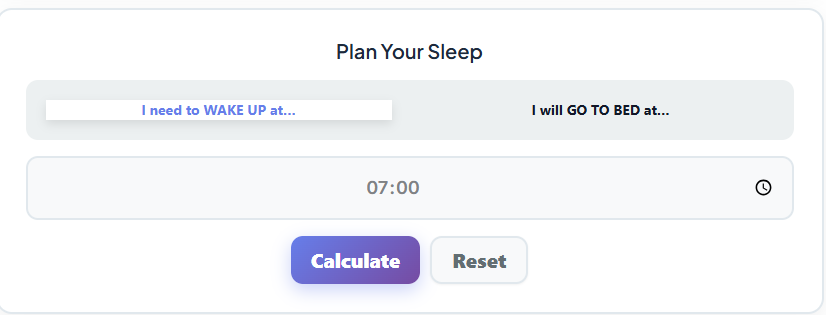
Your sleep schedule isn’t always flexible. Sometimes you have to be up at a specific time, and other times you know when you can finally get to bed. Our sleep calculator for optimal bedtime and wake up time accommodates both scenarios with its dual-mode functionality.
Option 1: “I need to WAKE UP at…”

This is the mode for those with fixed morning schedules. Imagine you’re a programmer, Sarah, who has a non-negotiable 9:00 AM stand-up meeting. She needs to leave her house by 8:15 AM, and her morning routine takes about 45 minutes. That means her absolute latest wake-up time is 7:30 AM.
By selecting this mode, Sarah can input 7:30 AM into the sleep calculator for optimal bedtime and wake up time. The tool then works backward, calculating several ideal bedtimes for her. Instead of just aiming for eight hours of sleep and going to bed at 11:30 PM, she might see suggestions like 10:15 PM or 11:45 PM. These times are synchronized with the end of a sleep cycle, ensuring that when her alarm goes off at 7:30 AM, she’s in a light stage of sleep and can wake up feeling clear-headed and ready for a day of complex problem-solving. This makes it an essential best time to wake up calculator for anyone with a demanding morning schedule.
Option 2: “I will GO TO BED at…”

This mode is a lifesaver for those with less predictable schedules. Consider David, a night-shift nurse. He often gets home exhausted at 8:00 AM and needs to sleep during the day. His bedtime is fixed by his work schedule, but his wake-up time is more flexible.
Using this mode, David can input his 8:30 AM bedtime into the sleep calculator for optimal bedtime and wake up time. The tool will then project a series of optimal wake-up times, each corresponding to the completion of a full sleep cycle. He might see suggestions like 3:00 PM (after 5 cycles) or 4:30 PM (after 6 cycles). This allows him to choose a wake-up time that leaves him feeling rested and alert for his next shift, rather than groggy and disoriented. This function turns the tool into an effective optimal bedtime calculator based on sleep cycles, providing flexibility and control to those who need it most.
The Time Input Box: Simplicity in Selection
The centerpiece of the user interface is the time input box. We designed it to be as frictionless as possible. It’s a clean, centered time picker that allows you to smoothly scroll through hours and minutes. There are no clunky dropdowns or confusing formats. Whether you’re on a desktop or a mobile device, selecting your desired time is intuitive and quick.
A crucial, yet invisible, feature is how the sleep calculator for optimal bedtime and wake up time accounts for the time it takes to fall asleep. Most people don’t fall asleep the moment their head hits the pillow. The tool automatically adds an average of 15 minutes to its calculations to account for this sleep latency period. So, if the calculator suggests a bedtime of 10:15 PM, it’s factoring in that you’ll likely be asleep by 10:30 PM. This small, thoughtful detail makes the results far more accurate and practical for real-world use. It enhances the reliability of this sleep cycle calculator for better rest.
The Buttons: Calculate Your Rest, or Start Anew
Below the time picker, you’ll find two clean and simple buttons: “Calculate” and “Reset.” Their functions are straightforward, designed to give you instant results or a clean slate.
The “Calculate” Button
This is the magic button. Once you’ve selected your mode and input your time, clicking “Calculate” instantly generates your personalized sleep schedule. The results appear immediately below, with no loading screens or delays.
Let’s revisit Sarah, the programmer. She enters 7:30 AM as her wake-up time and hits “Calculate.” Instantly, the sleep calculator for optimal bedtime and wake up time presents her with a list of bedtimes: 10:15 PM, 11:45 PM, and even 1:15 AM for those late nights. She can now plan her evening with precision, knowing exactly when to wind down to ensure a productive morning.
The “Reset” Button
The “Reset” button provides a quick and easy way to start over. Clicking it clears any results and returns the time picker to its default setting. This is useful if you want to compare different scenarios quickly. For example, a parent might use the sleep calculator for optimal bedtime and wake up time to plan for a 6:30 AM wake-up on a school day, then hit “Reset” to plan for a more relaxed 8:00 AM wake-up on the weekend. The process is seamless.
The Results Section: Your Personalized Sleep Blueprint
This is where the sleep calculator for optimal bedtime and wake up time truly shines. The results are presented in a clear, actionable format, tailored to the mode you selected. The dynamic outputs are designed to give you options, because we know that life doesn’t always adhere to a single perfect schedule.
Best Bedtime List (Wake-Up Mode)
When you input your desired wake-up time, the tool displays a list of suggested bedtimes. Each suggestion isn’t arbitrary; it represents the ideal moment to go to bed to wake up after a specific number of complete sleep cycles.
For instance, an athlete, Maria, needs to wake up at 5:00 AM for her morning training. Using the sleep calculator for optimal bedtime and wake up time, she sees bedtime options like 8:45 PM (for 6 cycles) or 10:15 PM (for 5 cycles). Waking at the end of a cycle drastically reduces sleep inertia, that heavy, groggy feeling. For Maria, this means she can jump out of bed feeling physically ready and mentally sharp, maximizing her training effectiveness. This feature is the core of what makes it a premier optimal bedtime calculator based on sleep cycles.
This detailed planning also supports overall health. For those managing their physical wellness, pairing this tool with something like an Ideal Weight Calculator can create a holistic approach to health, linking restorative sleep with fitness goals. A sleep calculator for optimal bedtime and wake up time is a fundamental component of any serious wellness regimen.
Best Wake-Up Time List (Bedtime Mode)
If you’ve told the calculator when you’re going to bed, it will provide you with a list of ideal wake-up windows. This is incredibly empowering for people with flexible schedules or those, like our night-shift nurse David, who need to optimize daytime rest.
Each result is displayed on a neat card, giving you all the information you need at a glance:
- Total Cycles: It tells you if you’ll be completing 4, 5, or 6 sleep cycles.
- Total Hours: It shows the total duration of sleep, helping you see if you’re meeting your personal needs.
- Exact Refreshed Time: This is the precise time your alarm should go off for a smooth wake-up.
This detailed breakdown helps you make an informed choice. You might decide that five cycles (about 7.5 hours) is your sweet spot, or you might opt for six cycles (9 hours) on a day when you need extra recovery. The clarity provided by this sleep calculator for optimal bedtime and wake up time removes the guesswork. You’re no longer just sleeping; you’re sleeping strategically. This turns it into the ultimate best time to wake up calculator.
Next to each suggested wake-up time, you’ll see a small alarm clock icon. This is another feature designed to bridge the gap between planning and action, which we will explore next.
Live Timer & Alarm: Turning Plans into Habits
The sleep calculator for optimal bedtime and wake up time doesn’t just give you data; it helps you act on it. The live timer and alarm feature is a powerful tool for building consistent, healthy sleep habits.
Countdown to Rest
Let’s go back to Sarah, the programmer. She chose the 10:15 PM bedtime. After she gets her results, she can click the alarm icon next to her chosen bedtime. This activates a live countdown timer right on the page. The timer will visually and audibly alert her when it’s time to go to bed.
This feature is rooted in behavioral psychology. A visual countdown creates a sense of gentle urgency and helps you mentally prepare for sleep. Instead of getting lost in another episode of a show or endless scrolling, the timer serves as a friendly nudge, reminding you of your commitment to your well-being. It helps you build a “wind-down” routine, a critical component of good sleep hygiene.
Spoken Alerts and Alarms
The tool also includes a text-to-speech function. When the countdown ends, a clear voice will announce that it’s time to sleep. Similarly, if you’ve set a wake-up time, it can function as your morning alarm. This is more than just a gimmick; it’s about creating a more pleasant transition into and out of sleep.
For parents with a newborn, sleep is fragmented and precious. Using the sleep calculator for optimal bedtime and wake up time, they can calculate a quick nap based on sleep cycles. Setting a timer for a 1.5-hour nap (one cycle) can make a world of difference in their energy levels. The gentle alarm ensures they wake up before the baby does, feeling as restored as possible. Similarly, for expectant mothers tracking their health with tools like a Pregnancy Calculator, ensuring adequate and properly timed rest is crucial. Our sleep calculator for optimal bedtime and wake up time is an excellent companion tool.
This feature solidifies the tool as a comprehensive sleep cycle calculator for better rest, moving beyond simple calculation to active assistance. It empowers you to take control of your sleep schedule in real-time.
Recommended Sleep by Age Group: Context and Guidance
How do you know if you’re getting enough sleep? While personal needs vary, science provides us with general guidelines. At the bottom of the page, our sleep calculator for optimal bedtime and wake up time includes a section on recommended sleep durations for different age groups.
This section provides a quick, scannable list, broken down by age:
- Newborn (0-3 months): 14-17 hours
- Infant (4-11 months): 12-15 hours
- Toddler (1-2 years): 11-14 hours
- Preschool (3-5 years): 10-13 hours
- School Age (6-13 years): 9-11 hours
- Teen (14-17 years): 8-10 hours
- Adult (18-64 years): 7-9 hours
- Older Adult (65+ years): 7-8 hours
This information provides crucial context. After using the sleep calculator for optimal bedtime and wake up time to determine your schedule, you can cross-reference it with these recommendations. For example, a teenager using the tool might realize that their planned 6.5 hours of sleep is well below the recommended amount for their age group, prompting them to adjust their schedule. This transforms the tool into a personalized how much sleep do I need calculator.
It helps you answer not just “When should I sleep?” but also “Am I planning for enough sleep?” This educational component adds a layer of depth, promoting a more holistic understanding of sleep health. For those focused on their overall health metrics, perhaps also using tools to track their Waist to Hip Ratio, understanding sleep duration is another vital piece of the puzzle. Using a sleep calculator for optimal bedtime and wake up time is as important as any other health measurement.
Putting It All Together: Real-Life Scenarios
The true power of this sleep calculator for optimal bedtime and wake up time is revealed when applied to the complexities of daily life.
The College Student: Alex has a final exam at 9:00 AM. He wants to be mentally sharp. He uses the “Wake Up At” mode, setting his alarm for 7:00 AM. The sleep calculator for optimal bedtime and wake up time suggests bedtimes of 9:45 PM, 11:15 PM, or 12:45 AM. Knowing he needs to study, he aims for the 11:15 PM bedtime, ensuring he gets five full sleep cycles. He wakes up feeling refreshed and confident.
The Fitness Athlete: Maria’s coach emphasizes that muscle repair happens during deep sleep. She uses the sleep calculator for optimal bedtime and wake up time religiously. By aligning her wake-up time with the end of a sleep cycle, she minimizes cortisol spikes from a jarring alarm, supports her body’s recovery, and feels energized for her workouts. The sleep calculator for optimal bedtime and wake up time is a cornerstone of her training regimen.
The Parents with a Newborn: Sleep-deprived and exhausted, Mark and Emily use the “Go to Bed At” mode whenever they get a chance to nap. If the baby falls asleep at 1:00 PM, they input that time and see that waking up at 2:30 PM (one cycle) or 4:00 PM (two cycles) would be ideal. This strategic napping, powered by the sleep calculator for optimal bedtime and wake up time, helps them survive the challenging newborn phase.
The Night-Shift Nurse: David’s irregular schedule used to leave him in a state of perpetual jet lag. Now, he uses the sleep calculator for optimal bedtime and wake up time to plan his daytime sleep. By using the optimal bedtime calculator based on sleep cycles, he ensures his rest is high-quality, even if the timing is unconventional. It helps him stay sharp and compassionate during his long, demanding shifts.
The Programmer: Sarah has integrated the sleep calculator for optimal bedtime and wake up time into her daily routine. She knows that a well-rested mind is a productive mind. By using the best time to wake up calculator feature, she avoids the morning brain fog that used to slow down her coding. This simple tool has had a direct, positive impact on her job performance and overall well-being. Using the sleep calculator for optimal bedtime and wake up time has become a non-negotiable part of her day.
Conclusion: Your Journey to Better Sleep Starts Now
Waking up tired doesn’t have to be your reality. By understanding and working with your body’s natural sleep cycles, you can transform your mornings, boost your energy levels, and improve your overall health. Our sleep calculator for optimal bedtime and wake up time is more than just a utility; it is a bridge to a more rested, vibrant you.
It demystifies the science of sleep and puts the power of personalized sleep scheduling directly in your hands. Whether you have a fixed schedule or a completely flexible one, this tool adapts to your life. It functions as a sleep cycle calculator for better rest, a how much sleep do I need calculator, and a practical habit-building assistant all in one.
We’ve walked through every feature, from the simple time picker to the intelligent results and live alarm. You now have the knowledge to use this sleep calculator for optimal bedtime and wake up time to its full potential. Stop fighting your alarm clock and start waking up in sync with your body. Try the sleep calculator for optimal bedtime and wake up time tonight and experience the profound difference that a well-timed wake-up can make. Your journey toward waking up refreshed and revitalized begins with a single calculation. This simple yet powerful sleep calculator for optimal bedtime and wake up time is the first step. Take control of your rest and reclaim your mornings.
FAQs
How does the sleep calculator know the best time for me to wake up?
The calculator works by using the science of sleep cycles. An average sleep cycle lasts about 90 minutes, and we go through several of these each night. Waking up in the middle of a deep sleep cycle is what causes that groggy, tired feeling. Our tool calculates backwards from your desired wake-up time (or forward from your bedtime) to identify the points where you will have completed a full cycle. By aligning your alarm with the end of a cycle, you are more likely to wake up during a lighter stage of sleep, feeling refreshed and alert.
Why does the calculator add 15 minutes to its calculations?
Most people don’t fall asleep the instant their head hits the pillow. We account for this by adding an average of 15 minutes for you to drift off to sleep. For example, if the calculator suggests a bedtime of 10:30 PM, it’s designed so that you are actually asleep by around 10:45 PM. This small adjustment makes the suggested bedtimes and wake-up times much more accurate for real-world use, ensuring the sleep cycle timing aligns with when you are truly resting.
What’s the difference between the “Wake Up At” and “Go To Bed At” modes?
These two modes offer flexibility based on your specific schedule.
“I need to WAKE UP at…” is for when you have a fixed morning obligation, like work, school, or an early flight. You tell the calculator when you need to be awake, and it provides you with a list of optimal bedtimes.
“I will GO TO BED at…” is perfect for when your schedule is more flexible or when you know when you’ll be able to sleep, like a night-shift worker or someone napping during the day. You enter your bedtime, and the tool calculates the best times for you to wake up feeling rested.

