
How to Calculate a Percentage Increase of a Percentage
Introduction
We encounter percentages everywhere. From figuring out the tip at a restaurant to analyzing how much a stock portfolio has grown, understanding these numbers is crucial. Yet, for many of us, the math can get a little fuzzy. You might know your way around basic addition, but when you need to figure out complex shifts in value, things get tricky. That’s why we built our online Percentage Calculator—a tool designed to take the stress out of the numbers game.
If you have ever stared at a spreadsheet wondering how to calculate a percentage increase of a percentage, you are not alone. It is a common stumbling block. This guide is here to walk you through our tool, tab by tab, so you can handle any calculation with confidence. Whether you are budgeting for a renovation or just checking a discount, our tool simplifies the process so you can focus on the results, not the math.
Overview of How to Calculate a Percentage Increase of a Percentage
Before we dive into the specific buttons and tabs of the tool, let's talk about the concept itself. Understanding how to calculate a percentage increase of a percentage is essential because it represents compound growth or cumulative change, which happens constantly in finance and daily life.
Imagine you have a savings account that grew by 10% last year. This year, it grows by another 10%. Did it grow by 20% total? Not quite. The second 10% is calculated on the new, higher amount. This is the essence of compounding. Our tool handles this logic instantly, saving you from the headache of multi-step multiplication. When you understand how to calculate a percentage increase of a percentage, you unlock a deeper understanding of how value accumulates over time.
Many people also get confused when trying to figure out summary statistics alongside these changes. You might wonder how to calculate average growth rates over several years. While our percentage tool focuses on the specific changes, knowing the context of those changes is vital.
The beauty of digital tools is that they remove the barrier to entry. You do not need a degree in statistics to know how to calculate a percentage increase of a percentage. You just need to know which numbers to plug in.
Guide for Section 1: % of Number
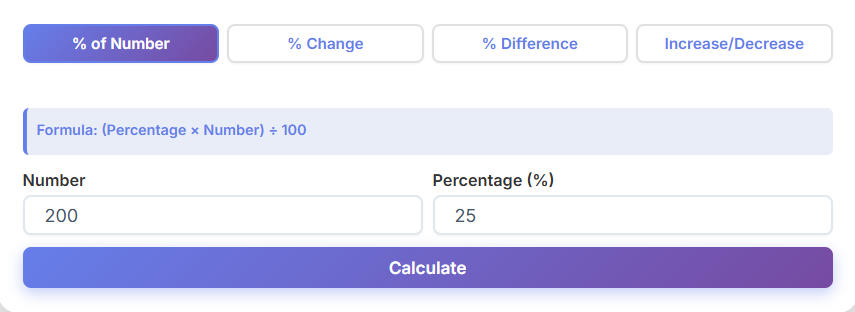
The first tab you will see on our Percentage Calculator is labeled "% of Number." This is the most straightforward function, yet it is the one used most frequently.
The Layout
When you click on this tab, you are greeted with a clean, simple layout. You will see two primary input boxes. One asks for the "Percentage" and the other for the "Number."
Let's say you are shopping and see a jacket for $200 with a sign that says "35% Off." You want to know exactly how much cash that saves you. You would enter "35" in the percentage box and "200" in the number box.
Getting Results
Once you hit the "Calculate" button, the tool works instantly. You don't need to worry about decimal points or moving commas. A clear, colored result card appears below the inputs, showing you the answer immediately.
This section is also a great warm-up for understanding more complex topics, like how to calculate a percentage increase of a percentage. If you can master finding a portion of a whole, you are halfway there.
Sometimes, when dealing with multiple items, you might also need to know how to find the average of numbers involved in your shopping trip to see typical costs. While this tab focuses on one item at a time, the speed allows you to check multiple items in seconds.
The visual metrics grid that appears gives you confidence in the number. It’s large, legible, and color-coded so you know exactly what you are looking at. No tiny text or confusing symbols.
Guide for Section 2: % Change
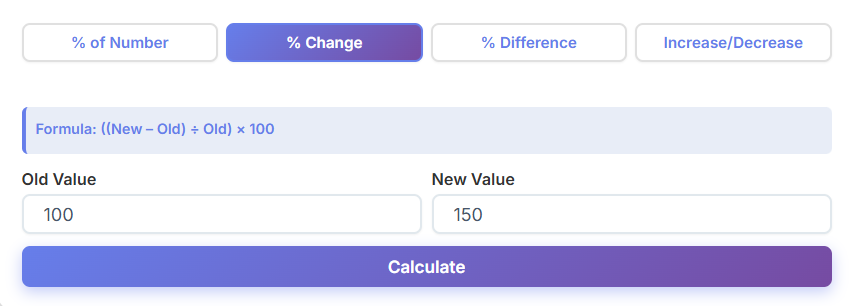
Now, let's move to the second tab: "% Change." This is where things get interesting for anyone tracking progress, whether it's weight loss, savings, or website traffic.
How It Works
In this section, you will see input boxes labeled "Old Value" and "New Value." This is designed to tell you how much something has grown or shrunk relative to where it started.
Imagine you had 500 visitors to your blog last month, and this month you have 750. You enter 500 as the Old Value and 750 as the New Value. The tool instantly calculates a 50% increase.
Why It Matters
This is often the first step in learning how to calculate a percentage increase of a percentage. You need to establish the baseline change before you can look at cumulative effects. If you are tracking this over several months, you might eventually ask how to average percentages to see your monthly performance, but for the immediate change, this tool is unbeatable.
The values update live as you type or upon clicking calculate, ensuring you never have to second-guess if the page refreshed. The simple layout ensures you don't accidentally swap the old and new values, which is a common mistake when doing this manually.
Understanding percentage change is critical for anyone managing a budget. If your rent goes from $1000 to $1050, that is a 5% change. If it goes up again the next year, you are dealing with compound changes, bringing us back to the importance of knowing how to calculate a percentage increase of a percentage.
Guide for Section 3: % Difference
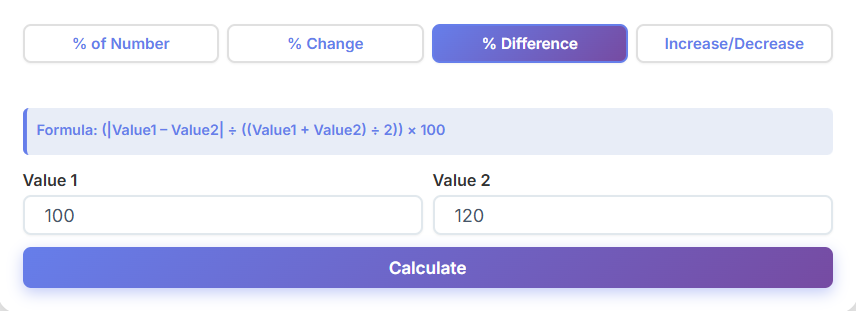
The third tab is "% Difference." This is slightly different from % Change. Change implies time—something was one way, and now it is another. Difference is about comparing two separate things that exist simultaneously.
The User Experience
Here, you will find input boxes for "Value 1" and "Value 2." The order doesn't matter as much here because we are looking at the gap between them relative to their average.
For instance, if you are comparing two salaries for similar jobs—one pays $50,000 and the other pays $55,000—you want to know the percentage difference. You plug the numbers in, and the clear result cards show you the gap.
Visual Metrics
The visual metrics grid here is particularly helpful because it breaks down the absolute difference alongside the percentage. This helps users who might be researching how to calculate a percentage increase of a percentage but realize they actually just need to compare two static numbers.
If you are dealing with a list of different salaries, you might first want to know how to find average salary data before comparing specific offers. This tool helps you nail down the specific comparison between two distinct points.
It works instantly, no login required. You can jump between tabs without losing your data, making it easy to compare a "% Change" scenario with a "% Difference" scenario.
Guide for Section 4: Increase/Decrease Calculator
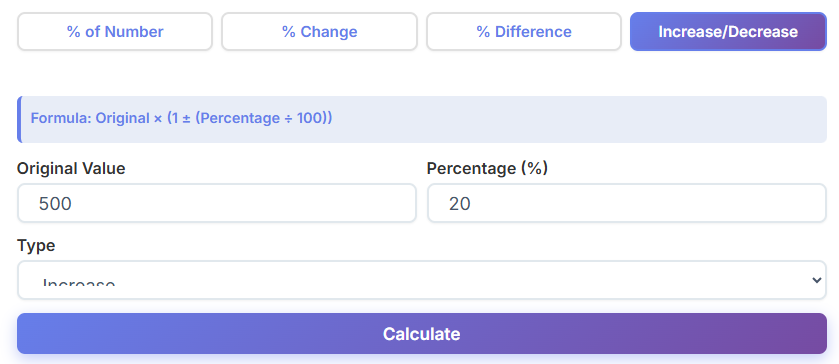
The final tab is the "Increase/Decrease" calculator. This is the power tool for forecasting and adjusting figures.
Forecasting Value
Here you will see inputs for "Original Value" and "Percentage." You can choose whether you want to calculate an increase or a decrease.
Let's say you want to give your employees a 3% raise, and they currently make $45,000. You enter the values, select "Increase," and the tool gives you the new final salary.
Handling Complexity
This section is pivotal when you are trying to understand how to calculate a percentage increase of a percentage. For example, if you increase a number by 10%, and then take that result and increase it by another 10% using this tab again, you will see the compound effect clearly.
This tab is beginner-friendly but powerful. It removes the need for mental gymnastics. You don't need to know how to calculate a percentage increase of a percentage in your head; you just need to run the numbers in sequence here.
Also, if you have a set of raises to give out, you might want to know how to find the average of numbers representing the new salaries. This tool gives you the precise new values so you can easily do that next step.
When to Use Each Type of Percentage Calculation
Choosing the right tab is half the battle.
Use % of Number when you are dealing with parts of a whole, like tax or tips.
Use % Change when tracking progress over time, like investment growth.
Use % Difference when comparing two distinct items, like the price of the same TV at two different stores.
Use Increase/Decrease when you want to project a future value or apply a discount.
Sometimes, you might need to chain these together. If you apply a discount and then a tax, you are essentially looking at how to calculate a percentage increase of a percentage (or decrease). The tool allows you to take the result from one tab and plug it into another easily.
Understanding these distinctions prevents errors. You wouldn't use % Difference to track your weight loss; you’d use % Change. And if you are trying to see the total effect of back-to-back price hikes, you are dealing with how to calculate a percentage increase of a percentage.
Real-Life Use Cases
Let’s look at how this applies to the real world.
The Savvy Shopper
Sarah is shopping for furniture. She sees a couch for $800. It is on sale for 20% off. She uses the "Increase/Decrease" tab to find the new price. Then, she remembers she has a coupon for an extra 10% off the sale price. She uses the tool again on the new number. She just figured out how to calculate a percentage increase of a percentage (technically a decrease here) without needing a pen and paper.
The Small Business Owner
Mike runs a coffee shop. He wants to raise prices by 5% due to inflation. He uses the tool to adjust his menu prices. Later, he wants to analyze his weekly sales. He might look at how to calculate average weekly revenue, but he uses our tool to see the specific % Change from week to week.
The Fitness Enthusiast
Jenny is tracking her running times. She improved her 5k time by 2% this month. She wants to improve by another 2% next month. She uses the tool to set her target time. She is effectively applying the concept of how to calculate a percentage increase of a percentage to her athletic performance.
Comparison with Manual Calculations
We have all been there—scribbling numbers on the back of a napkin, crossing them out, and getting frustrated.
Manual calculations are prone to error. Did you move the decimal two places or one? Did you divide by the old value or the new one? When you try to figure out how to calculate a percentage increase of a percentage manually, the order of operations can get messy. You have to calculate the first increase, add it to the original, and then calculate the second increase on the new total.
Our tool eliminates that friction. It is cleaner, faster, and error-free. You don't need to worry about the underlying math rules. You also don't need to worry about how to average percentages manually, which is a common statistical trap (you can't just add them and divide!).
If you are a student or a professional, saving time is key. Why spend ten minutes doing what our tool does in ten milliseconds? The clear, colored result cards ensure you don't misread your own handwriting.
Basic Calculator – Open Calculator →
Practical Tips for Beginners
If you are new to using online calculators, here are some tips to get the best results.
1. Double Check Your Inputs
Garbage in, garbage out. Ensure you have entered the correct numbers in the correct boxes. The "Old Value" vs "New Value" distinction in the % Change tab is crucial.
2. Understand the Context
The tool gives you the number, but you provide the meaning. A 50% increase in rent is bad; a 50% increase in salary is good.
3. Use It for Compound Learning
Try running a number through the "Increase" tab, then take that result and run it through again. This is the best way to visualize how to calculate a percentage increase of a percentage. It makes the abstract concept of compounding very concrete.
4. Don't Mix Units
If you are comparing money, keep it all in dollars. If you are comparing distance, keep it all in miles.
5. Explore Related Tools
Once you master percentages, you might find you need other math helpers. For instance, if you are dealing with geometric shapes or areas, you might need a Square Root Calculator – Open Calculator →.
About the Tool
We designed this tool with one goal: simplicity.
The Visual Experience
When you land on the page, you see four distinct tabs at the top: % of Number, % Change, % Difference, and Increase/Decrease. This navigation is intuitive. You are never more than one click away from the function you need.
Beginner Friendly Design
The input boxes are large and clearly labeled. We use terms like "Old Value," "New Value," and "Original Value" to avoid jargon. You won't see complex mathematical notation.
Instant Gratification
The Calculate buttons are prominent. As soon as you click, the values update live. The clear, colored result cards pop up instantly. If the result is a positive change, it might be green; if negative, red. This visual cue helps you process the data faster.
No Barriers
This tool works instantly, no login required. We don't ask for your email. We don't make you sign up. You just come, calculate, and go. It’s a pure utility designed for the user.
Visual Metrics Grid
Below the main result, you will often see a visual metrics grid. This breaks down the answer into helpful context. If you are looking at how to calculate a percentage increase of a percentage, seeing the intermediate steps or the total cumulative change in a grid format can be incredibly clarifying.
Deep Dive: The Nuance of Compound Percentages
Let's spend a moment really focusing on how to calculate a percentage increase of a percentage, as this is the primary pain point for many users.
When we talk about how to calculate a percentage increase of a percentage, we are usually talking about sequential changes. If a price goes up 10%, and then that new price goes up another 10%, the total increase is 21%, not 20%.
Why? Because the second 10% is acting on a larger base number.
Our tool helps you see this reality. By using the Increase/Decrease tab sequentially, you can prove this to yourself.
- Enter 100 as the Original Value.
- Enter 10 as the Percentage Increase.
- Result is 110.
- Now, enter 110 as the Original Value.
- Enter 10 as the Percentage Increase.
- Result is 121.
This is the definitive way to understand how to calculate a percentage increase of a percentage. It turns a confusing math problem into a simple, step-by-step process.
This concept is vital for investors. If you want to know how to find average returns over time, you have to respect the compounding nature of the market. You cannot simply average the annual percentage returns to get the true picture of your wealth growth.
More Scenarios: Why "Percentage of a Percentage" Matters
You might think you rarely need to know how to calculate a percentage increase of a percentage, but it hides in plain sight.
Taxes: In some regions, you pay a sales tax, and then perhaps a surcharge is calculated on top of the taxed amount. That is a percentage increase of a percentage.
Fees: Service fees are often applied to a subtotal that already includes a service charge.
Discounts: "Take an extra 20% off the sale price" is the classic example of how to calculate a percentage increase of a percentage (in reverse, as a decrease).
By using our tool, you ensure you aren't overpaying or underestimating costs.
Sometimes, you have a dataset with many of these compound values, and you need to summarize them. You might search for how to calculate average growth, but be careful. Averaging percentages that act on different base values can be misleading. Our tool focuses on the precise calculation of each step, ensuring accuracy before you attempt any summary statistics.
If you are dealing with large datasets, you might eventually need more advanced analysis. For that, you might want to check out a Statistics Calculator – Open Calculator →.
Conclusion
Percentages are the language of change. They tell us how much our money has grown, how much weight we have lost, and how much we are saving on a deal. But the math can be a barrier.
Our online Percentage Calculator removes that barrier. It answers the question of how to calculate a percentage increase of a percentage with a few clicks. It solves the issue of how to average percentages by giving you the clear, absolute numbers you need to find a true mean.
From the clean tabs at the top to the clear, colored result cards at the bottom, every inch of this tool is designed for you. It is beginner-friendly, works instantly, and requires no login.
Next time you are stuck wondering how to calculate a percentage increase of a percentage, don't reach for a textbook. Open our tool, punch in the numbers, and get on with your day. Whether you are a student, a business owner, or just a smart shopper, this guide and our tool are here to help you master the numbers that shape your life.
Remember, understanding how to calculate a percentage increase of a percentage is a superpower in a world driven by compound interest and cumulative data. Use it wisely!
Final Thoughts on Precision
We hope this guide has demystified the process. We know that searching for how to calculate a percentage increase of a percentage can lead to confusing academic articles. Our goal was to provide a practical, user-friendly alternative.
Don't forget the secondary utilities. Knowing how to find the average of numbers derived from these percentage calculations is a great next step for data literacy. And if you ever get stuck on how to find average values in a complex list, remember that getting the individual percentage changes right is the foundation.
Bookmark this page. The next time you need to know how to calculate a percentage increase of a percentage, you will know exactly where to go.
Summary of Key Features
- % of Number: For finding parts of a whole.
- % Change: For tracking growth or loss.
- % Difference: For comparing two items.
- Increase/Decrease: For forecasting and compounding—the key to mastering how to calculate a percentage increase of a percentage.
Thank you for choosing our tool. We made it simple so you can be smart. Now go calculate with confidence!
Whether you are solving how to calculate a percentage increase of a percentage for a school project or a board meeting, accuracy is just a click away. And remember, when you need to know how to calculate a percentage increase of a percentage quickly, there is no faster way than our "Increase/Decrease" tab used in sequence.
Using the tool is intuitive. You simply look at the visual metrics grid, check the values updating live, and trust the result. No backend logic to worry about, just pure, informational answers.
So, the next time someone asks you how to calculate a percentage increase of a percentage, you can show them this tool and look like the expert.
One final reminder: if you are analyzing a group of percentage changes, and you wonder how to average percentages, proceed with caution and use our tool to verify the absolute values first.
This concludes our guide on how to calculate a percentage increase of a percentage. Happy calculating!
Meta Title: How to Calculate a Percentage Increase of a Percentage: A Complete Guide Meta Description: Learn how to calculate a percentage increase of a percentage using our free online tool. Simple steps, real examples, and instant results.
FAQs
What is a percentage increase of a percentage?
A percentage increase of a percentage refers to calculating the growth or change when one percentage is applied to another. For example, if a value increases by 10% and then by another 10%, the second increase is calculated on the new total, not the original value. This concept is essential in understanding compounding growth in areas like finance, discounts, and investments.
Why is it important to calculate a percentage increase of a percentage?
Understanding how to calculate a percentage increase of a percentage is crucial for accurate financial planning, budgeting, and data analysis. It helps in scenarios like tracking compound interest, applying sequential discounts, or analyzing cumulative growth over time. Without this knowledge, you might underestimate or overestimate changes, leading to errors in decision-making.
How does the online Percentage Calculator simplify this process?
The online Percentage Calculator eliminates the complexity of manual calculations. With its intuitive tabs like "% of Number," "% Change," "% Difference," and "Increase/Decrease," users can quickly and accurately calculate percentage increases, decreases, and differences. The tool provides instant results with a user-friendly interface, making it accessible for beginners and experts alike.

