
Your Go-To Logarithmic Differentiation Calculator
Logarithms can feel like a complex puzzle, especially when they pop up in calculus. Expressions with variables in the exponent, or functions that are products and quotients of other functions, often require a special technique to solve. This is where logarithmic differentiation comes in, a powerful method for simplifying tricky derivatives. But manually working through these steps can be tedious and prone to error. That’s why having a reliable logarithmic differentiation calculator is a game-changer for students, educators, and professionals alike.
This tool isn’t just about finding an answer; it’s about understanding the process. It’s designed to handle a wide range of logarithmic calculations, from basic logs to more complex differentiations, making it an indispensable resource. Whether you’re grappling with the derivative of 1/x or need a quick log solver for an engineering problem, this calculator streamlines the entire workflow. It simplifies complex problems, provides clear, step-by-step solutions, and helps you visualize the results, turning confusion into clarity. Let’s dive in and explore how this versatile logarithmic differentiation calculator works.
Exploring the Input Interface
The first thing you’ll notice is the clean, modern design. The entire tool is housed within a sleek, card-style user interface, making navigation intuitive and easy on the eyes. At the top of this card, a series of five tabs allows you to switch between different calculation modes. These tabs look like stylish gradient buttons. When you select a tab, it becomes highlighted with a distinct color, and the content below transitions smoothly to reveal the relevant input fields and options for that specific function. This thoughtful design ensures you can find what you need without any clutter or confusion.
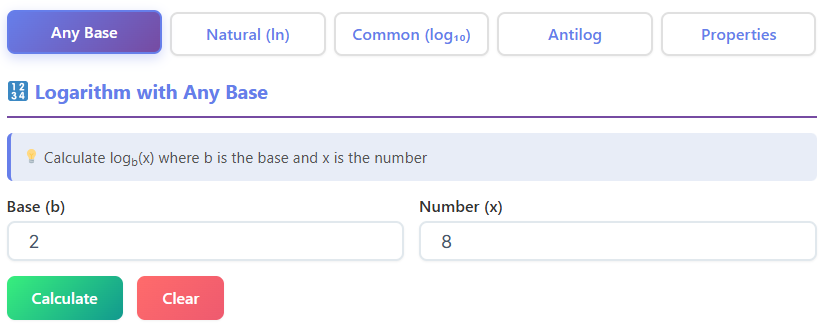
The five tabs you’ll see are:
- Any Base
- Natural Logarithm (ln)
- Common Logarithm (log₁₀)
- Antilog
- Properties
Let’s walk through what each of these tabs offers.
Tab 1: Any Base Logarithm
When you first land on the page, the “Any Base” tab is active by default. This section is dedicated to solving logarithms with any base you choose. The title at the top clearly reads, “Logarithm with Any Base,” so you know you’re in the right place. Just below the title, a small help box provides a quick reminder of the mathematical notation: log₍b₎(x). This is a helpful touch for anyone who needs a quick refresher.
The core of this section consists of two clean input fields neatly labeled “Base (b)” and “Number (x).” Here, you can enter the values for your specific logarithm problem. Once your numbers are in, two prominent buttons are waiting for you below. The “Calculate” button features an eye-catching green gradient, inviting you to click it to get your result. Next to it is a “Clear” button with a red gradient, which lets you easily reset the fields and start a new calculation. Using this feature of the logarithmic differentiation calculator feels straightforward and efficient.
After you click “Calculate,” the result section appears seamlessly below. It’s packed with information, starting with a main result card that displays the answer in a large, easy-to-read font. Below that, four metric boxes provide a complete breakdown: Base, Number, Result, and Verification. This ensures you can double-check the inputs and outputs at a glance. To the right, a canvas visualization box appears, offering a graphical representation of the function.
Finally, a dedicated formula box shows the underlying formula used for the calculation: log₍b₎(x) = ln(x) / ln(b). The tool even shows the formula with your numbers plugged in, followed by a detailed, step-by-step calculation section that breaks down how it arrived at the solution. This makes the tool more than just a simple answer-finder; it’s a powerful learning aid.
Tab 2: Natural Logarithm (ln)
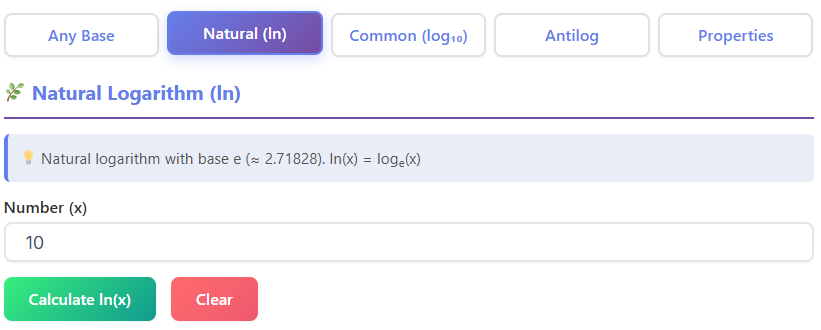
Clicking on the “Natural Logarithm (ln)” tab transitions you to a section specifically for calculating natural logs (logarithms with base e). The interface here is even more streamlined. You’ll find a single input field labeled “Number (x),” where you can enter the value you want to find the natural log of.
Similar to the first tab, you have a green “Calculate ln(x)” button and a red “Clear” button. Upon calculation, the result section displays a wealth of information in neatly organized cards. You’ll see the primary result for ln(x), along with cards confirming the Base (e), the ln(x) value, and the verification check e^(ln(x)).
What makes this tab particularly useful for students is the “Properties” section displayed directly in the UI. It visually lists key properties of natural logarithms, such as:
- ln(e) = 1
- ln(1) = 0
- e^(ln(x)) = x
- ln(xy) = ln(x)+ln(y)
This constant reinforcement helps solidify your understanding of how natural logs work. Of course, this tab also includes the canvas graph for visualization and a detailed steps box, making this section a comprehensive tool for anyone working with the natural log. This function is essential for a high-quality logarithmic differentiation calculator.
Tab 3: Common Logarithm (log₁₀)
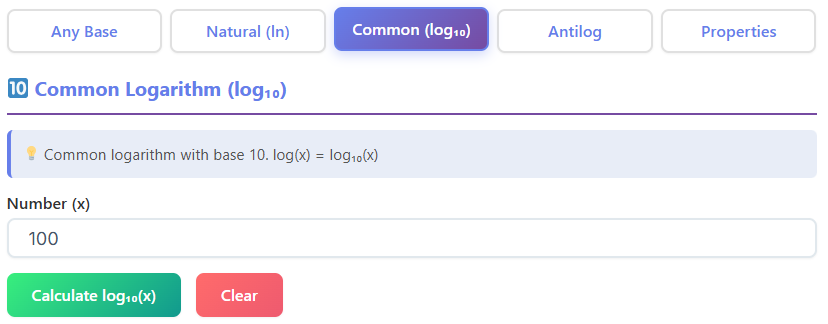
The next tab over is “Common Logarithm (log₁₀),” designed for logarithms with a base of 10. The layout mirrors the natural log tab in its simplicity. You get one input field for the “Number (x)” and the familiar calculate and clear buttons. This consistency in design makes the entire logarithmic differentiation calculator feel cohesive and easy to master.
When you calculate a common log, the result box provides the value for log₁₀(x), confirms the base is 10, and shows the verification step 10^(log x). Just like the natural log tab, this section also displays relevant properties visually to aid in learning and recall. A canvas visualization and a step-by-step breakdown of the calculation are also present, ensuring you have all the information you need. This feature set makes the tool a very effective calculator log for common base-10 problems.
Tab 4: Antilogarithm
The “Antilog” tab helps you find the inverse of a logarithm. When you switch to this tab, the interface presents two input fields: “Base (b)” and “Log value (y).” This is where you enter the base of the logarithm and the logarithm value itself to find the original number.
The calculate and clear buttons are present here as well, maintaining the consistent user experience. Once you perform a calculation, the results are displayed in a similar format to the “Any Base” tab. You get a main result card and four metric boxes detailing the inputs and outputs. A canvas graph provides a visual of the antilog function.
A key feature of this tab is the formula box, which clearly shows the formula for antilogarithms: antilog₍b₎(y) = bʸ. This simple but crucial piece of information helps demystify the concept of antilogs, showing that it’s just another way of expressing an exponential function. This component is a great addition to the overall logarithmic differentiation calculator.
Tab 5: Logarithm Properties
The final tab, “Logarithm Properties,” is a purely educational section that acts as an interactive reference guide. Instead of performing a single calculation, this tab is designed to demonstrate the fundamental rules of logarithms. It features input fields for “Value a,” “Value b,” and “Power n.”
As you enter numbers into these fields, the results header updates live, and a series of property cards below instantly show how the rules apply to your specific numbers. The properties covered include:
- Product Rule: Shows how log(a * b) equals log(a) + log(b).
- Quotient Rule: Illustrates how log(a / b) equals log(a) – log(b).
- Power Rule: Demonstrates how log(aⁿ) equals n * log(a).
- Change of Base Rule: Explains how to convert a log from one base to another.
Additionally, this tab lists special cases, like log(1)=0 and log(10)=1, providing a complete overview. This interactive approach makes learning logarithm properties more engaging than just reading them from a textbook. It’s an excellent companion for the main logarithmic differentiation calculator functions.
Buttons and User Interaction
The user experience of this logarithmic differentiation calculator is defined by its smooth and responsive interactions. The buttons are more than just functional; they are designed to be visually appealing and intuitive. The primary action button, “Calculate,” draws your attention with its vibrant green gradient, clearly signaling the next step. In contrast, the “Clear” button uses a red gradient, a universal cue for resetting or stopping, allowing you to quickly start over without a second thought.
Interaction goes beyond just clicks. When you select one of the five main tabs—Any Base, Natural Logarithm, Common Logarithm, Antilog, or Properties—the active tab is highlighted, and the content area below transitions with a subtle, smooth animation. There are no jarring screen reloads or delays. This seamless flow makes navigating between different types of logarithmic calculations feel effortless and modern.
One of the standout features is how the results appear. The moment you press the “Calculate” button, the output section materializes smoothly on the screen. It doesn’t just pop into existence; it fades and scales into view, guiding your eyes naturally to the solution. Furthermore, the numbers within the result boxes aren’t static. In the “Logarithm Properties” tab, for instance, as you type different values for ‘a’, ‘b’, or ‘n’, the formulas in the result cards update live. This dynamic feedback transforms a static tool into an interactive learning environment, helping you build an intuitive understanding of how logarithmic properties work in real time.
Understanding the Output Section
Once a calculation is performed, the output section presents the information in a remarkably clear and organized manner. The design prioritizes readability, ensuring you can find and interpret the results without any strain. The information is presented in a series of result cards arranged in a clean grid layout. This modular design helps separate different pieces of information—like the main answer, the base, and verification—into digestible chunks.
Inside each card, the most important values are made bold, drawing your immediate attention to the final answer. The numbers themselves are rendered in a courier-style monospace font. This is a subtle but significant design choice. Monospace fonts give every character the same width, which makes long strings of numbers, especially those with many decimal places, appear neat and perfectly aligned. It’s a small detail that greatly enhances the professional feel of the tool and makes it easier to read complex results. For anyone needing a powerful log solver, this clarity is essential.
The output isn’t limited to just numbers. A visual graph preview is included for most calculations. This appears as a simple yet effective visualization inside a rectangular box, helping you understand the behavior of the logarithmic function you just calculated. Additionally, for more complex problems, a shaded formula box displays the exact mathematical formula used to derive the answer. This is followed by detailed step-by-step boxes that break down the entire calculation process, making this tool an excellent derivative calculator with steps. It’s this combination of numerical results, visual aids, and detailed explanations that makes this logarithmic differentiation calculator so effective.
Formulas and Explanations On-Screen
A major strength of this logarithmic differentiation calculator is its transparency. It doesn’t just give you an answer; it shows you exactly how it got there by displaying the relevant formulas directly within the user interface. This feature is seamlessly integrated into each tab, providing context right where you need it. You don’t have to hunt for a separate help section or wonder about the underlying math.
For example, when using the “Any Base” logarithm tab, a dedicated formula box appears in the output section. It clearly states the change of base formula that the calculator uses: log₍b₎(x) = ln(x) / ln(b). The tool then shows this formula again with your specific input numbers substituted, followed by the final computed result. This immediate application of the formula reinforces your learning and confirms that the calculation is being performed correctly.
Similarly, in the “Antilogarithm” tab, the interface displays the formula for finding an antilog: antilog₍b₎(y) = bʸ. Seeing this simple exponential relationship helps clarify what an antilog is and how it relates to logarithms. Even in the “Natural Logarithm (ln)” and “Common Logarithm (log₁₀)” tabs, while the core formula is more implicit, the tool provides a list of key properties and identities on the screen. Things like ln(e) = 1 or e^(ln(x)) = x are displayed prominently, serving as constant reminders of the rules governing these functions. This on-screen guidance is invaluable for students and anyone looking to solidify their understanding of logarithmic principles.
Graph and Visualization
Visual learning is a powerful tool, and this logarithmic differentiation calculator leverages it effectively. For each calculation you perform in the first four tabs—Any Base, Natural Logarithm, Common Logarithm, and Antilog—a dedicated graph visualization appears in the output section. This isn’t an overly complex or interactive chart, but rather a clean, static image that provides a snapshot of the function you’re working with.
The visualization is presented within a simple rectangular white box that has a crisp purple border. This clean design helps it stand out from the numerical data without being distracting. Inside the box, you’ll see a basic 2D plot of the corresponding logarithmic or antilogarithmic curve. The graph provides a quick visual reference for the function’s behavior—for example, showing the characteristic steep rise and slow leveling-off of a log curve.
The purpose of this visualization isn’t for deep data analysis but to offer an immediate graphical context for the numbers. By seeing the curve, you can instantly get a feel for whether the log value should be positive or negative, large or small, which complements the precise numerical answer provided by the log solver. This feature is particularly helpful for students who are just starting to build an intuition for how these mathematical functions look and behave. It connects the abstract numbers to a tangible shape, making the concepts easier to grasp and remember.
Real-Life Examples in Action
While the math behind logarithms is fascinating, its true power is revealed in its real-world applications. A logarithmic differentiation calculator isn’t just for abstract homework problems; it’s a practical tool for solving tangible challenges across various fields.
Consider an engineering student working on a signal processing project. They might be analyzing a signal whose intensity decays over time, a process often modeled by a function involving exponents and products, like f(t) = (t^2 + 1) * e^(-0.5t). Finding the rate of decay (the derivative) of this function manually would be cumbersome. Using a logarithmic differentiation calculator, the student can apply the principles of logarithmic differentiation to simplify the problem into manageable parts, finding the derivative quickly and accurately. This allows them to focus on the engineering implications rather than getting bogged down in complex calculus.
Another practical scenario involves a chemistry teacher explaining the concept of pH to their class. The pH scale is logarithmic, defined as pH = -log₁₀[H+], where [H+] is the concentration of hydrogen ions. To create engaging examples and quiz questions, the teacher can use a calculator log tool to instantly find the pH for various concentrations or work backward to find the concentration from a given pH. With a tool that shows steps, the teacher can then project the breakdown to the class, illustrating how the formula works and reinforcing the lesson. It’s an excellent way to connect mathematical concepts to scientific principles. This is just one example of how a good logarithmic differentiation calculator can be a valuable teaching aid.
Who Benefits from This Calculator?
The versatility of this logarithmic differentiation calculator makes it an invaluable asset for a wide range of users, each benefiting in their own unique way.
Students: For high school and college students tackling calculus, this tool is a lifesaver. It serves as an interactive learning aid, helping them verify their homework, understand the steps involved in solving complex derivatives, and study for exams. Instead of just getting an answer, they get a full breakdown, which is crucial for learning concepts like the derivative of 1/x.
Mathematicians: Researchers and mathematicians often work with highly complex functions. This tool can serve as a quick and reliable way to compute or verify intermediate calculations, freeing up mental bandwidth to focus on more abstract theoretical aspects of their work.
Engineers: From electrical engineers analyzing circuit responses to mechanical engineers studying heat transfer, logarithmic and exponential functions are everywhere. An accurate logarithmic differentiation calculator allows them to model and analyze systems efficiently, ensuring their calculations for rates of change are precise.
Programmers: Software developers, especially those working in scientific computing, data science, or game development, often need to implement mathematical algorithms. This tool can help them prototype and test logarithmic calculations before writing code, ensuring their implementation is correct. The clear layout of the log solver is particularly helpful.
Finance Professionals: Financial analysts use logarithmic returns to model asset price changes over time. A tool that can handle log calculations accurately is essential for tasks like risk assessment, portfolio management, and derivatives pricing.
Researchers: In fields like biology, physics, and environmental science, researchers use logarithmic scales to measure and model natural phenomena, from earthquake magnitudes (Richter scale) to population growth. This logarithmic differentiation calculator provides a quick way to process data and test hypotheses involving these models.
Conclusion
Navigating the world of logarithms and calculus can be challenging, but having the right tools makes all the difference. This logarithmic differentiation calculator stands out as a comprehensive, user-friendly solution for anyone working with these concepts. Its intuitive design, featuring clean tabs and interactive elements, makes complex calculations feel simple and straightforward. From finding a basic logarithm with any base to breaking down the steps of a tricky derivative, the tool provides clear, accurate, and insightful results.
The thoughtful inclusion of on-screen formulas, visual graphs, and detailed step-by-step breakdowns transforms it from a mere answer-finder into a powerful learning and verification resource. Whether you are a student striving to master calculus, an engineer solving a complex problem, or a teacher looking for an effective way to explain mathematical principles, this tool is designed to support you. You can find this and other helpful tools at https://swiftcalcu.com/. By simplifying the process and revealing the logic behind the answers, this logarithmic differentiation calculator empowers you to work with confidence and clarity.
FAQs
What is the difference between the “Any Base” tab and the “Natural Logarithm” tab?
The “Any Base” tab is designed for flexibility, allowing you to calculate logarithms with any base number you choose (like base 2 or base 5). You simply enter your specific base and the number you are solving for. The “Natural Logarithm” tab is streamlined specifically for calculations using base e (approximately 2.718), which is common in calculus and scientific growth models. It automatically sets the base for you, making the process faster for ln calculations.
Can I use this calculator to check my calculus homework steps?
Yes! The logarithmic differentiation calculator is an excellent tool for verifying your work. After you input your numbers and hit “Calculate,” the tool provides a “Step-by-step calculation” section. This breakdown shows you exactly how the final answer was derived, including the formulas used, which can help you understand where you might have made a mistake in your manual calculations.
Why does the calculator show a graph with my result?
The graph provides a visual representation of the function you are calculating. While the numbers give you the precise answer, the graph helps you understand the behavior of the logarithm—such as how quickly the curve rises or levels off. This visualization is particularly helpful for students who are learning to connect the abstract numerical answer with the actual shape and trend of logarithmic functions.

