
Ideal Weight Calculator
Find your ideal body weight range based on various scientific formulas
Enter Your Details
Healthy BMI Weight Range
Ideal Weight by Formula
| Formula | Ideal Weight |
|---|---|
| — | |
The Ultimate Guide to Using the Adjusted Ideal Body Weight Calculator for Your Health Goals
When it comes to understanding your body and setting realistic health goals, knowing your ideal weight is a crucial first step. But with so many factors influencing what’s considered “ideal,” it can be overwhelming to figure out where to start. That’s where the adjusted ideal body weight calculator comes in—a user-friendly tool designed to help you determine your ideal weight using scientifically validated methods. Whether you’re embarking on a fitness journey, managing your health, or simply curious about your body’s metrics, this calculator is your go-to resource.
In this guide, we’ll walk you through how to use the tool, explain its features, and provide practical insights into what the results mean for you. By the end, you’ll not only know how to use the calculator but also understand the science behind ideal body weight and how it applies to your unique body.
Hero Section: Setting the Stage for Your Ideal Weight Journey
The first thing you’ll notice when you open the adjusted ideal body weight calculator is its clean and inviting design. The hero section greets you with a simple yet impactful layout, featuring a ⚖️ icon that immediately sets the tone. Below it, the heading “Ideal Weight Calculator” grabs your attention, followed by a short explanation about the tool’s purpose: helping you find your ideal body weight using scientific formulas.
This section is like the welcome mat to your health journey. It’s designed to make you feel confident and informed right from the start. The straightforward introduction ensures you know exactly what the tool is for and how it can help you. Whether you’re a fitness enthusiast or someone just starting to explore their health metrics, this hero section sets the stage perfectly.
Input Section: Entering Your Details for Accurate Results
Once you’re ready to dive in, the input section is where the magic begins. This is where you’ll provide the details the calculator needs to estimate your ideal weight accurately. Let’s break it down step by step:
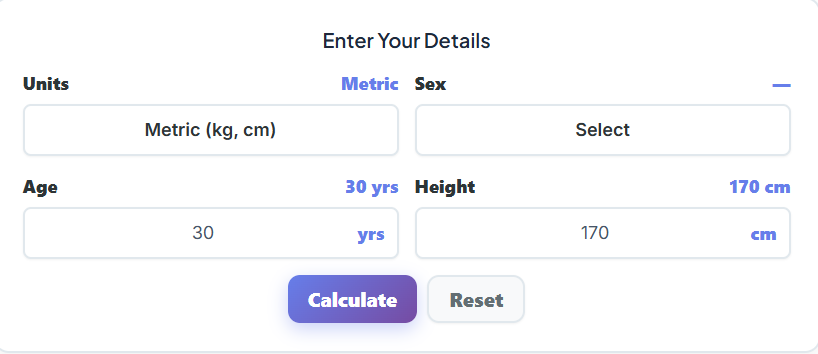
Units Selector (Metric/Imperial)
The first thing you’ll do is choose your preferred measurement system. Are you more comfortable with kilograms and centimeters, or do you prefer pounds and feet/inches? The calculator offers a simple toggle between Metric and Imperial units, making it accessible no matter where you’re from or how you measure your body metrics.
Sex
Next, you’ll select your sex—Male or Female. This is a critical input because the formulas used to calculate ideal body weight differ based on biological differences. For example, men typically have more muscle mass, while women naturally carry more body fat. By selecting your sex, the calculator ensures the results are tailored to your physiology.
Age Field
Age is another important factor in determining your ideal weight. As you enter your age, you’ll notice a live preview displaying the number you’ve input. This feature ensures accuracy and allows you to double-check your details before proceeding.
Height Field
Height is a key variable in calculating ideal body weight, and the tool makes it easy to input your measurements. Depending on the unit system you’ve selected, you’ll either enter your height in centimeters or use a dual-box input for feet and inches. This dual-box design is especially user-friendly, allowing you to input your height in a way that feels natural to you.
This input section is designed to be intuitive and straightforward, ensuring that even first-time users can navigate it with ease. By providing these details, you’re giving the calculator the information it needs to deliver precise and personalized results.
Buttons Section: Simple Controls for Effortless Use
Once you’ve entered your details, it’s time to interact with the buttons section. This part of the tool is all about functionality and ease of use.

Calculate Button
The Calculate button is your gateway to results. With a single click, the calculator processes your inputs and generates your ideal weight metrics. It’s fast, efficient, and designed to give you instant feedback.
Reset Button
Made a mistake or want to start over? The Reset button clears all your inputs and restores the default values. This feature is especially helpful if you’re experimenting with different scenarios, such as comparing your ideal weight at different heights or ages.
These buttons make the tool incredibly user-friendly, ensuring that anyone can use it without feeling overwhelmed. Whether you’re tech-savvy or not, the simplicity of these controls makes the calculator accessible to all.
Healthy BMI Weight Range Section: Understanding Your Results
After hitting the Calculate button, one of the first things you’ll see is your Healthy BMI Weight Range. This section provides a comprehensive overview of where your weight falls in relation to the Body Mass Index (BMI) scale. Here’s what it includes:
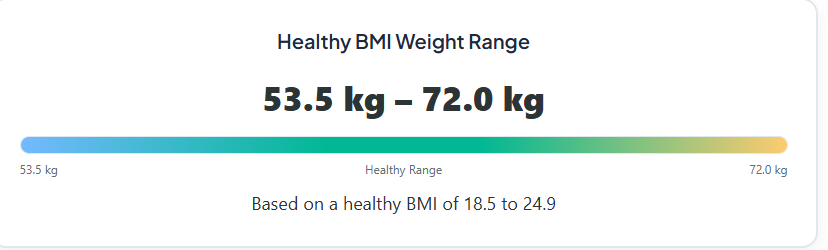
- Overall Healthy BMI Weight Range: This shows the minimum and maximum weight considered healthy for your height.
- Minimum Healthy Weight: The lowest weight within the healthy BMI range.
- Maximum Healthy Weight: The highest weight within the healthy BMI range.
- Colored Scale Bar: A visual representation of the BMI range, with a pointer marker indicating where your current weight falls.
This section is incredibly insightful because it gives you a clear picture of your weight relative to established health standards. For example, if your weight is near the lower end of the range, you might focus on building muscle mass. If it’s near the higher end, you might consider strategies for weight management. The colored scale bar and pointer marker make it easy to interpret the data at a glance, ensuring you understand your results without needing a medical degree.
Ideal Weight by Multiple Scientific Formulas: A Comprehensive Comparison
One of the standout features of the adjusted ideal body weight calculator is its ability to calculate your ideal weight using multiple scientific formulas. This section presents a table with results from the following methods:
- Robinson Formula
- Miller Formula
- Devine Formula
- Hamwi Formula
- Healthy BMI Average Weight
Each formula offers a slightly different perspective on what your ideal weight should be, based on various scientific principles. For instance, the Robinson Formula might suggest a slightly lower weight compared to the Hamwi Formula, which tends to favor a higher range. By presenting all these results side by side, the calculator allows you to compare and choose the method that resonates most with your goals.
This feature is particularly useful for those who want a deeper understanding of their body metrics. For example, if you’re working with a fitness coach or healthcare provider, you can discuss which formula aligns best with your health objectives. It’s like having a panel of experts weigh in on your ideal weight, all in one place.
Automatic Unit Conversion + Live Updates: Seamless and Accurate
One of the most impressive aspects of this calculator is its ability to handle automatic unit conversion and live updates. Here’s how it works:
- When you switch between Metric and Imperial units, the calculator automatically adjusts all inputs and results. For example, if you enter your height in centimeters and then switch to Imperial, it will instantly convert your height to feet and inches.
- As you input your details, the text values update in real time. This ensures that you can see the impact of each change immediately, making the experience both interactive and accurate.
This feature is a game-changer for users who might not be familiar with unit conversions. It eliminates the need for manual calculations, allowing you to focus on what really matters: understanding your ideal weight.
Practical Insights: What Your Results Mean for You
Now that you know how to use the adjusted ideal body weight calculator, let’s talk about what the results mean for your health and fitness journey.
Understanding Ideal Body Weight
Your ideal body weight is more than just a number—it’s a reflection of your overall health. By comparing your weight to scientifically validated formulas, you can set realistic goals that align with your body’s unique needs. For example, if your current weight is above the ideal range, you might focus on strategies like calorie control and increased physical activity. If it’s below the range, you might prioritize nutrient-dense foods and strength training.
The Role of BMI
While BMI is a useful tool, it’s important to remember that it’s not the be-all and end-all of health metrics. Factors like muscle mass, bone density, and body composition can all influence your BMI. That’s why the calculator provides a range of results, allowing you to see the bigger picture.
Why Adjusted Body Weight Matters
For individuals with a higher body fat percentage, the adjusted body weight formula offers a more accurate representation of their ideal weight. This is particularly useful for those managing conditions like obesity or undergoing medical treatments that require precise weight measurements.
Take Your Health Journey Further
The adjusted ideal body weight calculator is just one tool in your health and fitness arsenal. To get a more comprehensive understanding of your body, consider exploring these additional resources:
- BMR Calculator: Find out how many calories your body burns at rest and use this information to tailor your diet and exercise plan.
- Water Intake Calculator: Stay hydrated by calculating your daily water needs based on your weight and activity level.
- Heart Rate Calculator: Determine your target heart rate zones for optimal cardiovascular training.
By combining these tools, you can create a well-rounded approach to health and fitness that’s tailored to your unique needs.
Final Thoughts
The adjusted ideal body weight calculator is more than just a tool—it’s a gateway to understanding your body and taking control of your health. With its user-friendly design, scientifically validated formulas, and practical insights, it’s the perfect companion for anyone looking to achieve their ideal weight. So why wait? Start using the calculator today and take the first step toward a healthier, happier you.
FAQs
What is the adjusted ideal body weight calculator, and how is it different from a regular ideal weight calculator?
The adjusted ideal body weight calculator is a tool designed to provide a more accurate estimate of your ideal weight by factoring in variables like sex, age, and height. Unlike a regular ideal weight calculator, this tool also considers adjusted body weight, which is particularly useful for individuals with higher body fat percentages. It uses multiple scientific formulas to give you a comprehensive view of your ideal weight, making it more precise and personalized.
Why does the calculator use multiple formulas to determine ideal weight?
The calculator includes results from several scientific formulas—like Robinson, Miller, Devine, and Hamwi—because each method has its own approach to calculating ideal weight. For example, some formulas are better suited for specific body types or medical contexts. By comparing these results, you can get a broader understanding of what your ideal weight might be and choose the formula that aligns best with your health goals.
Can I use this calculator to track my weight loss or fitness progress?
Absolutely! The adjusted ideal body weight calculator is a great tool for setting realistic weight goals and tracking your progress over time. By entering your updated weight and measurements regularly, you can see how close you are to your ideal weight and adjust your fitness or nutrition plan accordingly. Pairing this tool with others, like a BMR calculator or water intake calculator, can help you create a well-rounded health strategy.

