
Enter Your Details
Your Heart Rate Metrics
Max HR
0 bpm
Resting HR
0 bpm
HR Reserve
0 bpm
Target Heart Rate Zones
Heart Rate Calculator Online: Your Ultimate Guide to Fitness and Cardio Training
Your heart is the engine of your body. It beats tirelessly, pumping life-giving blood to every cell, muscle, and organ. When it comes to fitness, understanding this engine isn’t just for elite athletes—it’s for everyone. Whether you’re taking your first steps into jogging or you’re a seasoned marathoner, your heart rate is the most powerful piece of data you have. It tells you how hard you’re working, if you’re burning fat or building endurance, and when it’s time to push harder or pull back.
But how do you translate beats per minute into actionable fitness wisdom? The answer lies in using a heart rate calculator online. This powerful tool demystifies the numbers, transforming complex physiological data into a simple, personalized roadmap for your health and performance. It helps you find your unique training zones, ensuring every minute of your workout is effective, safe, and perfectly aligned with your goals.
In this ultimate guide, we will explore everything you need to know about monitoring your heart rate. We’ll break down how to use a heart rate calculator online to unlock your body’s full potential. You’ll learn about maximum heart rate, resting heart rate, and the crucial concept of heart rate reserve. We will dive deep into the five training zones and show you how to use them to achieve specific outcomes, from gentle recovery to peak performance. This isn’t just about numbers; it’s about making your fitness journey smarter, not just harder.
Your Personal Command Center: Introducing the Heart Rate Calculator
Before we dive into the science, let’s get you acquainted with the tool that makes it all possible. A great heart rate calculator online should be intuitive, comprehensive, and easy to use. The first thing you’ll notice is its clean and modern design, created to give you a seamless experience from start to finish.
The Hero Section: Your Starting Point

As soon as the page loads, you are greeted by the hero card. This isn’t just a decorative element; it’s the welcoming handshake of the tool. You’ll see a captivating heart icon, gently animating to symbolize the living, beating pulse you’re about to measure.
Right below it, the heading “Heart Rate Calculator” clearly states the tool’s purpose. Accompanying it is a short, helpful description that explains what the calculator does: it helps you determine your optimal training zones based on your personal metrics. This section is designed to be your clear and simple starting point, assuring you that you’re in the right place to get the personalized data you need.
The Input Section: Tailoring the Results to You
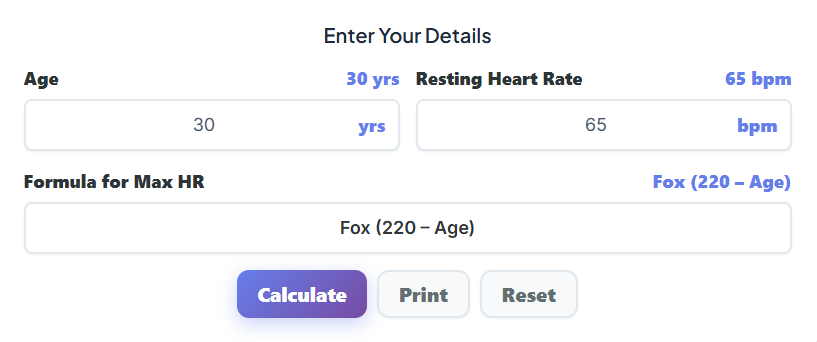
The accuracy of any fitness tool depends on the quality of the information you provide. This is where our heart rate calculator online truly shines. It asks for a few key details to create a profile that is uniquely yours. Let’s walk through the user details form.
- Age Input: This is the first and one of the most critical fields. As you enter your age, you’ll notice something special—the numbers in the output sections begin to change instantly. Age is a primary factor in estimating your maximum heart rate (Max HR), so this input lays the foundation for all subsequent calculations.
- Resting Heart Rate (RHR) Input: Your RHR is your heart rate when you are completely at rest. It’s a powerful indicator of your cardiovascular fitness. A lower RHR generally signifies a more efficient heart. By entering this value, you allow the calculator to use the Karvonen formula, which incorporates your Heart Rate Reserve (HRR) for a more personalized and accurate set of training zones. We’ll discuss how to measure this accurately later on.
- Formula Selector: Not all heart rate formulas are created equal. This heart rate calculator online gives you the power of choice. You can select from:
- Fox Formula (220 – Age): The most well-known and widely used formula. It’s a great starting point for most people.
- Tanaka Formula (208 – 0.7 x Age): A more modern formula that many experts believe is more accurate, especially for older adults.
- Custom Max HR: If you know your true maximum heart rate from a clinical test or a field test performed under professional guidance, you can select this option. A new field will appear, allowing you to enter your precise Max HR. This is the gold standard for accuracy.
These inputs are designed to be user-friendly, but their combined power is immense. They transform a generic tool into a highly personalized accurate heart rate calculator online for exercise.
The Buttons Section: Your Control Panel
Once you’ve entered your details, three simple buttons give you full control over the calculator’s functions. This is user guidance at its best—clear, simple, and effective.

- Calculate: While the calculator provides a live preview, hitting “Calculate” formally processes your information and locks in the results on the screen. It confirms that the displayed data is based on your final inputs.
- Print: Fitness is a journey, and keeping records is part of it. The “Print” button allows you to create a physical copy of your results. You can pin it to your fridge, tuck it into your gym bag, or add it to your training journal. This feature is perfect for tracking your progress over time or sharing your zones with a personal trainer.
- Reset: Made a mistake or want to start fresh? The “Reset” button instantly clears all fields and returns the calculator to its default state. It’s a simple one-click way to begin again.
Understanding Your Results: From Data to Action
After you input your details, the heart rate calculator online instantly generates a wealth of information. This data appears in several clear, easy-to-understand sections. Let’s break down what these numbers mean and how you can use them to revolutionize your workouts.
The Output Section: Your Core Fitness Metrics
This card displays three fundamental metrics that form the cornerstone of heart rate training.
- Max HR (Maximum Heart Rate): This is the highest number of times your heart can safely beat in one minute during maximal exertion. The calculator estimates this value based on your age and the formula you selected. Knowing your Max HR is critical because it acts as the ceiling for all your training zones. For example, a 30-year-old using the Fox formula would have an estimated Max HR of 190 bpm (220 – 30). This number isn’t a target to hit regularly, but a benchmark used to calculate your intensity levels. A reliable max heart rate calculator online free like this one is the first step to structured training.
- Resting HR (Resting Heart Rate): This is the number you entered—your heart rate at complete rest. As your cardiovascular fitness improves, your heart muscle becomes stronger and more efficient. It can pump more blood with each beat, meaning it doesn’t have to beat as often to meet your body’s needs at rest. Tracking your RHR over time is a fantastic way to measure your fitness progress. A downward trend is a clear sign you’re getting healthier.
- HR Reserve (HRR – Heart Rate Reserve): This is perhaps the most important metric for personalized training. HRR is the difference between your Maximum Heart Rate and your Resting Heart Rate (Max HR – Resting HR). It represents the “working range” of your heart rate. Why is it so crucial? Because it accounts for your individual fitness level (as indicated by your RHR). Two people of the same age might have the same Max HR, but the fitter person with a lower RHR will have a larger HRR, leading to different, more accurate training zones. Using a heart rate calculator online that calculates HRR is key for advanced training.
The Target Heart Rate Zones Section: Your Workout Blueprint
This is where the magic happens. Using your core metrics, the tool automatically generates five distinct heart rate zones. This section acts as a target heart rate zones calculator online, giving you the precise BPM ranges you need to target for specific fitness goals. Each zone is a percentage of your Heart Rate Reserve (or Max HR, depending on the method).
Let’s explore each zone and what it means for your cardio training.
- Zone 1: Very Light (50-60% of HRR):
- BPM Range: The calculator will show you the exact BPM range for this zone.
- Purpose: This zone feels very relaxed, like a leisurely walk. It’s primarily used for active recovery, warm-ups, and cool-downs. Training here helps improve blood flow and aids muscle repair after a tough workout. It’s not strenuous enough to provide major cardiovascular benefits, but it’s essential for overall training balance.
- Real-Life Scenario: Imagine you just finished a hard 5k run. A 10-minute walk in Zone 1 the next day will help reduce muscle soreness and get you ready for your next session.
- Zone 2: Light (60-70% of HRR):
- BPM Range: Check your personalized range on the calculator.
- Purpose: This is your primary fat-burning zone. At this intensity, your body preferentially uses fat stores as its main fuel source. It’s also the zone where you build your aerobic base and improve muscular endurance. You should be able to hold a full conversation comfortably while training in Zone 2.
- Real-Life Scenario: A long, slow jog or a brisk walk where you can still chat with a friend is a perfect Zone 2 workout. It’s the foundation of endurance training for marathon runners and a key tool for anyone focused on weight management.
- Zone 3: Moderate (70-80% of HRR):
- BPM Range: Find your target BPM on the results panel.
- Purpose: Welcome to the heart of cardiovascular improvement. Training in Zone 3 improves your body’s efficiency at circulating blood and oxygen. It’s the “feel good” pace where you’re working but not straining. You can still speak, but only in shorter sentences. This zone is ideal for improving your general fitness and building a stronger heart.
- Real-Life Scenario: A steady-paced run, a spin class, or a session on the elliptical where you’re breathing noticeably but not gasping for air. This is the sweet spot for many weekly workouts.
- Zone 4: Hard (80-90% of HRR):
- BPM Range: The calculator will define this intense range for you.
- Purpose: Now we’re getting serious. Training in this zone pushes your anaerobic threshold. Your body can no longer clear lactic acid as fast as it’s produced, leading to that familiar muscle burn. Workouts here are tough and can’t be sustained for long periods. The benefit? You significantly improve your speed, power, and high-end performance. Conversation is limited to a few words at a time.
- Real-Life Scenario: High-Intensity Interval Training (HIIT) is the classic example. Think 1-minute sprints on a bike or treadmill, followed by a recovery period. This is where you push your limits.
- Zone 5: Maximum (90-100% of HRR):
- BPM Range: Your peak effort zone, as defined by the heart rate calculator online.
- Purpose: This is your all-out effort. It can only be sustained for very short bursts, often just 30-60 seconds. Training in Zone 5 develops your fast-twitch muscle fibers and helps you push past performance plateaus. It’s reserved for the fittest individuals and should be approached with caution.
- Real-Life Scenario: The final sprint to the finish line in a race or the last explosive interval in a HIIT session. It’s a maximal effort that leaves you breathless.
Using this heart rate zone calculator for cardio training allows you to structure your workouts with purpose. Instead of just going for a run, you can go for a “Zone 2 base-building run” or a “Zone 4 threshold-pushing session.”
The Chart Section: Visualizing Your Effort
For many of us, visual aids make complex information much easier to digest. The heart rate calculator online includes a beautifully designed, color-coded bar graph that brings your training zones to life.
This chart visually represents each of the five heart rate zones, from the cool blue of Zone 1 to the fiery red of Zone 5. Each bar clearly shows the minimum and maximum BPM for that zone. This visual breakdown helps you instantly understand the relationship between the zones and the progression of intensity. You can see at a glance how narrow the “Maximum” zone is compared to the broader “Light” and “Moderate” zones, helping you better plan the duration of your efforts.
The Auto-Update Feature: Instantaneous Accuracy
One of the most powerful features of this heart rate calculator online is its live preview capability. As you adjust the numbers in the “Age” or “Resting Heart Rate” input fields, you’ll see the Max HR, HR Reserve, and all five training zones update in real-time.
What’s the benefit? It allows for effortless experimentation and instant accuracy. You can see immediately how a lower resting heart rate (a sign of improved fitness) widens your training zones. You can also quickly check the zones for a friend or family member by simply changing the age. This dynamic feedback loop makes the tool incredibly engaging and educational, helping you develop a deeper intuition for how these metrics are interconnected.
Putting It All Together: A Practical Guide to Heart Rate Training
Now that you understand how to use the heart rate calculator online, let’s talk about applying this knowledge to your fitness routine.
How to Find Your Resting Heart Rate (RHR)
To get the most out of a resting heart rate calculator online, you need an accurate RHR measurement. The best time to measure it is in the morning, right after you wake up, before you get out of bed, and before you’ve had any caffeine.
- Lie down comfortably and breathe normally for a minute or two.
- Place your index and middle fingers on your wrist (on the thumb side) or on your neck to the side of your windpipe.
- Count the number of beats you feel in 30 seconds.
- Multiply that number by 2 to get your beats per minute.
- For the best accuracy, do this for three consecutive mornings and take the average.
Structuring Your Workout Week with a Plan
A common mistake is to train too hard, too often. A balanced weekly plan should incorporate workouts across different heart rate zones. The 80/20 rule is a popular principle used by endurance athletes: spend 80% of your training time in lower-intensity zones (Zones 1 and 2) and 20% in higher-intensity zones (Zones 3, 4, and 5).
Here is a sample week for an intermediate runner:
- Monday: Zone 4 Intervals (20%): 10-minute warm-up (Zone 1/2), 6 x 3-minute intervals in Zone 4 with 2-minute recovery jogs (Zone 1), 10-minute cool-down (Zone 1).
- Tuesday: Active Recovery (80%): 30-minute easy walk or cross-training in Zone 1.
- Wednesday: Zone 3 Tempo Run (20%): 10-minute warm-up, 20 minutes steady running in the upper end of Zone 3, 10-minute cool-down.
- Thursday: Rest or very light activity.
- Friday: Rest or Active Recovery (80%): 20-minute gentle stretch and walk in Zone 1.
- Saturday: Long, Slow Run (80%): 60-90 minutes of running firmly in Zone 2. The goal is endurance, not speed.
- Sunday: Rest.
This balanced approach builds a strong aerobic base, improves speed and efficiency, and crucially, prevents burnout and injury. Use your personalized results from the heart rate calculator online to set the exact BPM targets for each of these sessions.
Beyond Heart Rate: A Holistic Approach to Fitness
Your heart rate is a vital piece of the puzzle, but it’s not the only one. For a truly comprehensive view of your health and fitness, it’s beneficial to use a suite of tools that work together.
- Know Your Caloric Needs: Your performance is fueled by what you eat. Use a Calorie Calculator to understand how many calories you need to support your training and achieve your weight goals.
- Understand Your Metabolism: Your Basal Metabolic Rate (BMR) is the number of calories your body burns at rest. A BMR Calculator can help you fine-tune your nutrition plan with even greater precision.
- Stay Hydrated: Dehydration can significantly elevate your heart rate and harm your performance. Use a Water Intake Calculator to determine your daily hydration needs, which increase with exercise.
- Track Your Body Composition: While your weight is one metric, your Body Mass Index (BMI) provides context based on your height. A BMI Calculator can be a useful tool for tracking your overall health status alongside your cardiovascular fitness.
By combining insights from a heart rate calculator online with these other tools, you create a powerful, data-driven approach to your well-being.
Final Thoughts: Train Smarter, Not Harder
The journey to fitness is a marathon, not a sprint. For too long, many of us have relied on guesswork, pushing ourselves based on how we feel—a method that can easily lead to undertraining, overtraining, and frustration.
The era of blind training is over. A powerful, intuitive, and accurate heart rate calculator online for exercise gives you the keys to your own physiology. It empowers you to step away from the “no pain, no gain” mindset and embrace a smarter, more sustainable approach.
By understanding your Max HR, leveraging your Heart Rate Reserve, and training with purpose in your five personalized zones, you transform every workout into a precise step toward your goal. You’ll build a stronger aerobic base, burn fat more efficiently, increase your speed and power, and recover more effectively.
Take a moment to use the heart rate calculator online. Find your resting heart rate, input your age, and generate your personal training blueprint. Print it out. Study it. Most importantly, use it. Let it guide your next run, your next bike ride, your next gym session. Listen to your body, but verify with the data. Your heart has been talking to you all along; now, you finally have the tools to understand what it’s saying.
FAQs
Why is my “Maximum Heart Rate” different on this calculator compared to my fitness watch?
This is a very common question! Most fitness watches use a standard formula (often the Fox formula: 220 minus age) as a default setting to estimate your maximum heart rate (Max HR). However, our heart rate calculator online offers you more flexibility.
We allow you to choose between different formulas—like the Tanaka formula, which is often considered more accurate for adults over 40—or to input a custom Max HR if you have had professional testing done.
Action Step: If your watch data feels “off” during workouts (e.g., it says you are in a “maximum” zone but you can still talk easily), try using the Tanaka formula on our calculator to see if the adjusted zones align better with how you actually feel.
How often should I re-check my heart rate zones?
Your heart rate zones aren’t set in stone; they change as your fitness improves! As you get fitter, your Resting Heart Rate (RHR) will typically drop because your heart becomes more efficient at pumping blood.
We recommend checking your numbers using the calculator every 4 to 6 weeks.
Why it matters: If your RHR drops from 70 bpm to 60 bpm, your “Heart Rate Reserve” increases. This means your training zones will shift, and you might need to push slightly harder to get the same workout benefits.
Tip: Measure your resting heart rate first thing in the morning for three days in a row and use the average for the most accurate result.
Which heart rate zone is best for burning fat?
While high-intensity workouts get a lot of attention, the most efficient zone for utilizing fat as fuel is actually Zone 2 (Light).
The Science: In this zone (usually 60-70% of your Heart Rate Reserve), your body has enough oxygen to metabolize fat efficiently for energy.
The Feeling: It should feel like a pace you could maintain for hours—you should be able to hold a full conversation without gasping for air.
Recommendation: If your goal is weight management, try to spend a significant portion of your weekly cardio time (like long walks or slow jogs) in this zone. It builds a massive aerobic base without burning you out

