
Frequency Converter: The Ultimate Tool for Accurate Frequency Conversions
Introduction
In our modern, interconnected world, the invisible forces that power our daily lives are often taken for granted. Among these fundamental forces is electricity, and more specifically, the oscillating rhythm at which it flows. This rhythm is known as frequency. Whether you are an audio engineer fine-tuning a sound system, a traveler trying to use a hair dryer in a foreign country, or an industrial technician monitoring massive turbines, understanding and manipulating frequency values is essential. This is where the need for a reliable frequency converter becomes paramount.
Frequency measures the rate of a recurring event, such as a wave cycle. In the context of alternating current (AC) electricity, sound waves, and radio transmissions, this measurement defines how systems operate and interact. The standard unit of frequency is the Hertz (Hz), named after the German physicist Heinrich Hertz. While a single Hertz represents one cycle per second, the spectrum of frequency extends far beyond simple integers.
We deal with Kilohertz (kHz) in audio processing, Megahertz (MHz) in radio broadcasting and early computing, and Gigahertz (GHz) in modern processors and wireless communication. Navigating between these vast scales requires precision. A miscalculation in a lab setting or a misunderstanding of a power supply’s requirements can lead to failed experiments or damaged equipment.
The global landscape of electronics is not uniform. One of the most common challenges arises from the disparity in power grid standards. Approximately 20% of the world, including North America, operates on a 60Hz standard. The rest of the world generally utilizes 50Hz.
This creates a friction point for imported electronics and travelers. A device built for one standard may run too hot, too slow, or not at all on another. While a digital tool cannot physically alter the electrical current flowing from your wall, a digital frequency converter is the first step in diagnosing compatibility issues and calculating the necessary adjustments for variable frequency drives (VFDs) or signal generators.
Furthermore, the scientific and educational communities rely heavily on accurate data conversion. Students learning about wave properties or researchers analyzing signal data need a quick, error-free method to translate values. Manual calculation, while possible, introduces the risk of human error. Moving a decimal point in the wrong direction when converting GHz to Hz results in a value that is off by a factor of a billion. In high-stakes environments, such errors are unacceptable.
This article introduces a sophisticated online tool designed to bridge these gaps. It serves as a universal translator for frequency units, offering a seamless interface for converting between Hz, kHz, MHz, and GHz. By eliminating the complexity of manual math, this frequency converter empowers users to focus on their work, whether that involves calibrating sensitive machinery or simply ensuring an imported appliance can operate safely. We will explore the nuances of this tool, its design philosophy, and practical applications in the real world.
Tool Header & Visual Overview
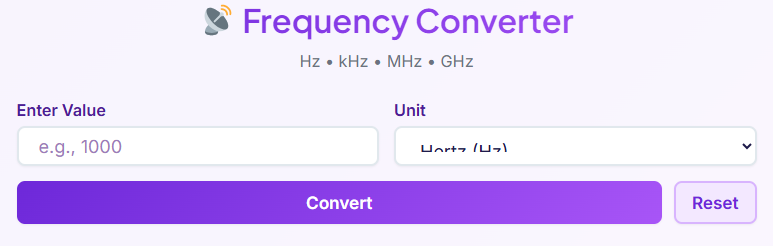
When you first access the page, you are greeted by the tool header: 📡 Frequency Converter. This title is not just a label; it sets the stage for a professional user experience. The inclusion of the satellite antenna icon symbolizes communication and signal transmission, core areas where frequency management is critical. Immediately below the main title, you will find a concise descriptor: Hz • kHz • MHz • GHz. This short description effectively communicates the tool’s scope, letting the user know instantly that this solution handles the full spectrum of standard frequency units, from the audible to the microwave range.
The visual design of the frequency converter prioritizes clarity and modern aesthetics. The interface utilizes a clean, card-based layout that sits comfortably against a subtle background. We have employed a soft gradient design that guides the eye naturally from the input section to the results.
This is not merely for decoration; in user experience (UX) design, visual flow is crucial for reducing cognitive load. When a user is in a hurry to perform a calculation, a cluttered or stark interface can be distracting. Here, the use of gradients and ample whitespace creates a sense of calm and precision, mimicking the clean environment of a high-tech laboratory.
Responsive layout is another cornerstone of this tool’s architecture. Whether you are accessing the converter from a desktop monitor in an engineering firm, a tablet in a university lecture hall, or a smartphone at a remote industrial site, the interface adapts perfectly. The input fields and result cards stack or expand based on the screen width, ensuring that the buttons are always touch-friendly and the text remains legible without zooming.
This responsiveness ensures that the utility of the frequency converter is never compromised by the device you happen to have on hand. The overall visual appeal serves to reinforce trust; a well-designed tool implies a well-engineered backend, giving users confidence in the accuracy of their conversions.
Input Section

The heart of any interactive utility lies in its input mechanism. For this frequency converter, the input section has been crafted to be as intuitive as possible, minimizing the steps required to get an answer. The primary element is the Value Input Field. This is a dedicated text box designed to accept numerical values. To assist users, the field includes a placeholder text that disappears once typing begins, as well as a subtle example value to indicate the expected format. The field is engineered to accept standard numerical inputs, including decimals, allowing for high-precision entries like “60.5” or “0.004”.
Adjacent to the value field is the Unit Selection Dropdown. This component is critical for defining the context of your input. By default, the tool might select Hertz (Hz), but with a simple click or tap, a menu reveals the other available units: Kilohertz (kHz), Megahertz (MHz), and Gigahertz (GHz). This selection process is vital. Entering “50” means something vastly different if the unit is set to GHz versus Hz. The dropdown is styled for high visibility, ensuring the user is always aware of the active unit setting before they proceed.
Real-time guidance is subtly integrated into this section. As the user interacts with the input field, the focus state changes—perhaps a border highlight or a slight shadow shift—indicating that the tool is ready to receive data. This feedback loop is essential for accessibility and usability.
It confirms to the user that the system is active and responsive. The layout groups the value input and the unit selection closely together, reinforcing the connection between the number and its measurement. This proximity reduces the likelihood of “unit errors,” a common mistake where a user enters a value intending one unit but inadvertently leaves the tool set to another. Every pixel of the input section in this frequency converter is optimized to ensure the data entering the system is exactly what the user intends.
Convert Button

Once the data is entered, the Convert Button serves as the catalyst for the transformation. Prominently displayed and styled to stand out from the background, this button is the primary call to action (CTA). When clicked, it triggers the engine of the frequency converter, instantly processing the input value and the selected unit.
The action is immediate. There are no page reloads or long waiting times. In the world of digital tools, speed is a feature. A user checking a specification sheet or configuring a piece of hardware needs answers now, not in five seconds. The button is designed with an active state, providing visual feedback (such as a “press” animation) to confirm the click was registered. This tactile-like response bridges the gap between digital interface and physical interaction.
Upon activation, the button not only processes the math but also triggers the visibility of the results section. If the results were previously hidden or stale, pressing Convert refreshes the entire display with the new data. This ensures that the user is never looking at “old” data from a previous calculation. The distinct coloration of the Convert button guides the user’s journey: Input -> Select Unit -> Convert.
It creates a linear, logical path through the tool. This simplicity is deceptive; behind this single click, the frequency converter performs multiple cross-calculations simultaneously, resolving the input against every possible output unit to prepare the comprehensive grid of results.
Reset Button
In scenarios where multiple calculations are required in quick succession, the Reset Button becomes an invaluable feature. Located strategically near the Convert button, the Reset function provides a “clean slate” mechanism. One click instantly clears the value input field, resets the unit selection to its default state, and wipes the results area.
This feature is about more than just deleting text; it is about resetting the user’s mental focus. If a user has just finished calculating radio frequencies in the MHz range and needs to switch tasks to analyze AC power in the Hz range, manually backspacing the numbers and re-selecting units can be tedious and prone to error. The Reset button eliminates this friction. It returns the frequency converter to its initial, pristine state, ready for a completely new query.
From a usability standpoint, the Reset button also manages the “focus” of the page. After clearing the data, smart tool design often places the cursor back into the input field, anticipating that the user wants to type a new number immediately. This small detail saves a click and streamlines the workflow for professionals who might be batch-processing a list of values from a clipboard or a datasheet. It underscores the tool’s commitment to efficiency and user convenience.
Results Section
The output of the frequency converter is presented in a sophisticated Results Section. Unlike simple tools that might give you just one answer, this utility generates a comprehensive grid layout displaying the converted value across all supported units simultaneously. If you input “60 Hz”, the results section will show you the equivalent value in kHz, MHz, and GHz all at once. This panoramic view of the data is incredibly useful for comparative analysis and helps users understand the magnitude of the frequency they are working with.
Each unit is displayed in its own Result Card. These cards are distinct visual containers that separate the data, preventing the numbers from running together. Within each card, the unit label (e.g., “Kilohertz”) is clearly formatted, followed by the precise numerical value. The typography is chosen for maximum readability, with larger font sizes for the numbers to ensure they can be read at a glance.
A standout feature of the results section is the Copy Button integrated into each card. In digital workflows, manual transcription of long numbers is a primary source of error. Copying a value like “0.00006” by hand is risky; it is easy to miss a zero. The copy button allows the user to grab the exact value directly to their clipboard with a single click. This is perfect for pasting into reports, spreadsheets, or other simulation software. The frequency converter thus acts not just as a viewer, but as a bridge between data sources and destinations.
Precision is handled with care. The tool creates results that respect significant figures where appropriate, avoiding scientific notation unless necessary, or presenting it clearly when the scale difference is massive (like converting Hz to GHz). This attention to readability ensures that the frequency converter remains useful for both high-level estimates and precise engineering tasks.
Error Handling
A robust tool must account for human unpredictability. The Error Handling mechanisms within this frequency converter are designed to guide users back to the right path without frustration. The most basic form of error handling addresses invalid inputs. If a user attempts to type letters or special characters into the numeric input field, the system alerts the user or prevents the entry entirely. This proactive validation saves time by catching mistakes before the convert button is even pressed.
Another critical aspect is the handling of negative numbers. In the context of standard frequency physics, a negative frequency is generally a theoretical concept used in complex signal processing math, but for standard physical conversion (like sound waves or electrical cycles), frequency is a positive scalar quantity. If a user inputs a negative number, the tool issues a Negative Numbers Warning. This alert serves an educational purpose, reminding the user that for practical applications like configuring a 50 60 hz converter setup, positive values are required.
These alerts are designed to be informative rather than punitive. Instead of a vague “Error” message, the tool explains what went wrong (e.g., “Please enter a valid positive number”). This enhances the user experience by turning a potential roadmap block into a gentle nudge in the right direction. Good error handling builds trust; it shows that the frequency converter is “smart” enough to understand the rules of the data it processes and looks out for the user’s best interests.
Real-Life Use Cases
To truly appreciate the utility of this tool, we must look at how it applies to real-world scenarios. Here are three detailed examples of how a frequency converter simplifies complex tasks.
Scenario 1: International Travel and Appliance Safety
Imagine a family relocating from the United States to the United Kingdom. They bring with them a high-end blender and some specialized grooming electronics. The US grid operates at 60Hz, while the UK operates at 50Hz. The family needs to understand the implications of plugging their devices in.
They might search for a 60 to 50hz converter solution physically, but first, they use our online tool to understand the relationship between the frequencies. By inputting “60 Hz”, they can visualize the unit difference. While the tool doesn’t change the electricity, it acts as the first step in their research for a physical hz changer or transformer. They realize that a motor designed for 60Hz might run 17% slower on 50Hz, potentially leading to overheating. The frequency converter helps them quantify the data on their device labels, ensuring they buy the correct physical step-down or frequency-altering hardware to protect their appliances.
Scenario 2: Vintage Electronics and Audio Restoration
An audiophile imports a rare vintage turntable from Japan. Japan is unique in that it has both 50Hz (East) and 60Hz (West) regions. The turntable was designed for the 50Hz region, but the user lives in a 60Hz zone. The user needs to understand the speed discrepancy. They might look for a 50hz to 60hz converter calculation to see how the pitch of the audio will be affected.
By using the frequency converter, they can calculate the ratio of difference. If they are trying to calibrate a digital speed controller (stroboscope), they might need to convert the target frequency into kHz for the controller’s input settings. The tool allows them to quickly switch between Hz and kHz, ensuring that their expensive vintage gear spins at the exact revolutions per minute required for high-fidelity sound.
Scenario 3: Industrial Equipment Setup
A factory manager is installing a new conveyor belt system powered by a Variable Frequency Drive (VFD). The motor nameplate provides specifications in terms of voltage and base frequency, but the control system interface requests input in different units for high-speed operation.
The technician is dealing with voltage to hz ratios—a concept known as V/f control—where maintaining the correct ratio is essential for constant torque. While the technician calculates the ratio manually, they use the frequency converter to verify the frequency targets.
If the VFD needs to run the motor at nearly double speed, the technician converts the base 60Hz to verify the high-speed target in the control software, which might display in kHz. Additionally, for specialized imported machinery requiring a specific 50 60 hz converter setting, the tool ensures that the input values programmed into the VFD match the motor’s safe operating limits exactly.
Internal Tool Links
While the frequency converter is powerful, it is often used as part of a larger suite of calculations. For comprehensive engineering and conversion tasks, we recommend exploring our other specialized tools.
If you are working with digital signals or computing frequencies where binary data is involved, our 🔢 Number System Converter – Binary, decimal, hexadecimal, octal (Open Converter →) is an essential companion.
For those dealing with phase shifts in AC circuits or rotational frequency, understanding the angular component is key. You can easily switch to our 📊 Angle Converter – Convert degrees, radians, gradians (Open Converter →) for precise angular adjustments.
Finally, in industrial settings where frequency directly impacts motor output, the relationship between speed and force is critical. Use the 🏗️ Torque Converter – Convert Nm, lb-ft, kg-m (Open Converter →) to calculate the mechanical output of your machinery.
Integrating these tools into your workflow ensures that every variable, from frequency to torque, is calculated with the same high level of accuracy.
Conclusion frequency converter
The frequency converter is more than just a simple calculator; it is an essential utility for anyone navigating the complex world of waves, signals, and electrical standards. From the student in a physics lab converting gigahertz for a homework assignment to the engineer commissioning a new power plant, the need for accurate, fast, and reliable conversion is universal.
We have designed this tool to prioritize ease of use without sacrificing precision. The modern interface, instant response time, and comprehensive result display ensure that you get the data you need without unnecessary friction. Whether you are troubleshooting an imported appliance, calibrating audio equipment, or setting up industrial drives, the frequency converter provides the clarity required to proceed with confidence.
Global usability is at the core of our design. By bridging the gap between different metric prefixes and understanding the nuances of standard operating frequencies, this tool serves personal, educational, and professional needs alike. We encourage you to try the tool today. Bookmark it for your next project, use it to double-check your manual calculations, or simply explore the relationships between different units of frequency. In a world dependent on precision, let this frequency converter be your trusted standard for accuracy.
FAQs
What is the difference between a frequency converter and a voltage converter?
A frequency converter changes the rate of the electrical current, measured in Hertz (Hz), such as from 60Hz to 50Hz. This is crucial because motors and some electronics are designed to run at a specific speed determined by the frequency. A voltage converter, on the other hand, changes the electrical pressure, measured in volts (V), like stepping down 220V to 110V. While some devices can handle both frequencies, many require the correct frequency to operate safely and efficiently. It’s important to check your device’s label to see if you need to convert frequency, voltage, or both when traveling or using imported electronics.
Can I use an appliance from a 60Hz country in a 50Hz country?
It depends on the appliance. Simple heating devices like toasters or electric kettles are often unaffected by frequency changes. However, devices with motors, such as blenders, fans, and clocks, will be affected. A motor designed for 60Hz will run about 17% slower on a 50Hz supply, which can cause it to overheat and potentially shorten its lifespan. Always check the device’s specifications. If it’s not rated for both 50Hz and 60Hz, you will need a physical frequency converter to ensure it works correctly and safely.
Does using a digital frequency converter tool change my electricity?
No, an online or digital frequency converter tool is a calculator, not a physical device. It helps you understand and calculate the mathematical difference between various frequency units (like Hz, kHz, MHz, GHz) or see the conversion between standards like 50Hz and 60Hz. It is used for planning, research, and technical calculations. To actually change the frequency of your power supply for an appliance, you would need to purchase a separate piece of hardware, which is also called a frequency converter or a variable frequency drive (VFD).

