
The Ultimate Guide to Using a Freelance Hourly Rate Calculator
Pricing your services is arguably the most daunting hurdle in the freelance journey. If you ask too little, you risk burnout and financial instability. If you ask too much without justification, you might alienate prospective clients. Striking that perfect balance requires more than intuition; it requires hard data. This is where a robust freelance hourly rate calculator becomes your most valuable asset.
Instead of guessing what your time is worth, a freelance hourly rate calculator allows you to reverse-engineer your pricing based on your real-world financial needs. By inputting your desired income, business expenses, and billable hours, you transform abstract financial goals into a concrete, actionable hourly figure. This guide will walk you through exactly how to use our tool to establish a rate that ensures your business thrives.
Why Freelancers Struggle with Pricing
Before we explore the mechanics of the tool, it is crucial to understand why manual calculations often fail. Many freelancers simply look at what their peers charge and adopt a similar figure. This “market rate” approach is dangerous because it ignores your unique financial ecosystem. Your peer might have lower rent, fewer dependents, or different business overheads.
Another common mistake is treating a freelance hourly rate like a salary. If you earned $40 an hour at your last corporate job, charging $40 an hour as a freelancer will leave you broke. As an independent business owner, you are responsible for taxes, insurance, software costs, and unbillable administrative time. A comprehensive freelance hourly rate calculator accounts for these invisible costs, ensuring that every billable hour supports your entire business structure.
Overview of the Freelance Hourly Rate Calculator
Our tool is designed with a clean, user-friendly interface that prioritizes clarity over complexity. It offers three distinct modes of operation, catering to freelancers at different stages of their pricing journey. Whether you need a quick estimate or a deep financial audit, the freelance hourly rate calculator adapts to your needs.
Tab 1: Simple Calculation – Speed and Clarity
The “Simple Calculation” tab is designed for users who need a fast benchmark. It strips away the complex variables to give you a ballpark figure in seconds. This is an excellent starting point for new freelancers or those using a freelance fee calculator for the first time.
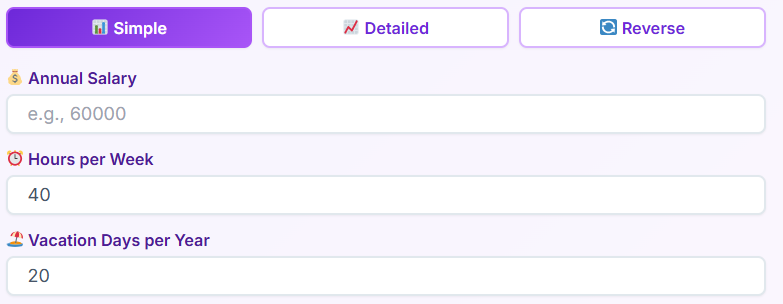
How to Use the Simple Tab:
- Desired Annual Income: Enter the total amount you want to take home before taxes. Be realistic but ambitious. This figure should cover your personal lifestyle and savings goals.
- Annual Business Expenses: Input a rough estimate of your yearly business costs. Think about your laptop, internet, software subscriptions, and marketing.
- Billable Hours: This is critical. You cannot bill for 40 hours a week, 52 weeks a year. You must account for vacation, sick days, and administrative tasks like emailing and invoicing. Enter the number of hours you truly expect to bill clients each week, and the weeks you plan to work.
Once these three fields are populated, the freelance hourly rate calculator instantly displays your required hourly rate. It also breaks this down into daily, weekly, and monthly targets, giving you a clear roadmap for your income.
Tab 2: Detailed Calculation – Precision and Profit
For those who treat their freelancing as a serious business entity, the “Detailed Calculation” tab offers granular control. This mode ensures that nothing slips through the cracks. It transforms the tool from a simple estimator into a comprehensive freelance pay calculator.
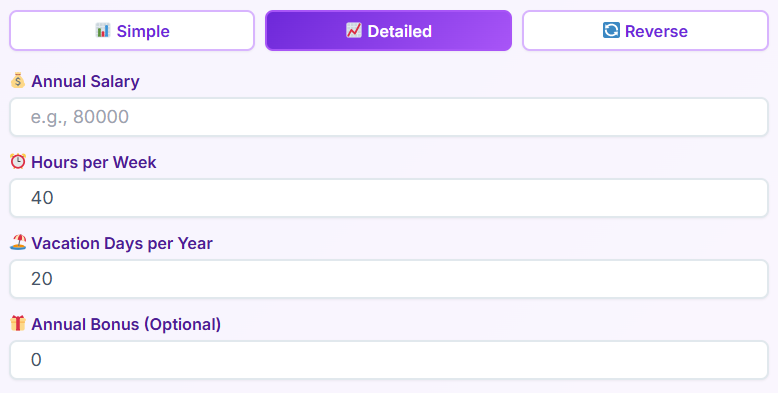
Step-by-Step Walkthrough:
- Personal Expenses Breakdown: Instead of a lump sum, you can input specific monthly costs for rent/mortgage, utilities, food, entertainment, and insurance. This forces you to confront your actual cost of living.
- Business Overhead Itemization: Here, you detail specific business costs. Does your work require expensive Adobe subscriptions? Do you pay for co-working space? The freelance hourly rate calculator aggregates these to ensure your clients—not your personal savings—are covering your business costs.
- Tax Buffer: One of the biggest pitfalls for freelancers is the tax bill. This section allows you to set a percentage of income aside for taxes. The calculator inflates your hourly rate to ensure that when tax season arrives, the money is already there.
- Profit Margin: A business that breaks even is a hobby. To grow, you need profit. The tool allows you to add a profit margin (e.g., 20%) on top of your costs. This profit can be reinvested into the business or used as a safety net.
- Non-Billable Time: This advanced feature asks you to estimate hours spent on marketing, admin, and professional development. The freelance hourly rate calculator then adjusts your rate higher to compensate for these unpaid working hours.
The result is a highly sophisticated rate that guarantees profitability. When you calculate a freelance rate using this method, you can defend your pricing with confidence because you know exactly where every dollar goes.
Tab 3: Reverse Calculation – Lifestyle Planning
Sometimes, you already have a rate in mind, or perhaps a client has offered a specific fee. The “Reverse Calculation” tab allows you to work backward to see if that rate supports your lifestyle. This makes the tool a versatile calculator freelance professionals can use for scenario planning.
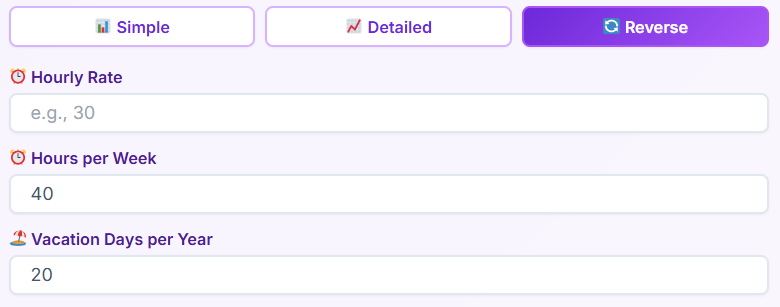
Using the Reverse Function:
- Input Proposed Rate: Enter the hourly rate you are considering (e.g., $75/hour).
- Set Work Parameters: Define how much you want to work. Maybe you only want to work 20 hours a week or take two months off per year.
- Add Expenses: Input your total financial obligations.
The freelance hourly rate calculator will then generate your resulting annual income. This is incredibly powerful for answering “What if?” questions. What if I raise my rates by $10? What if I take Fridays off? The tool immediately shows the financial impact of these lifestyle decisions.
The Strategic Benefits of Using This Tool
Integrating a freelance hourly rate calculator into your business workflow offers benefits that extend far beyond simple math.
1. Psychological Confidence
Imposter syndrome is real. When you pull a number out of thin air, you are more likely to cave during negotiations. However, when you use a freelance hourly rate calculator, your rate becomes a mathematical fact, not a request. You know that charging less means literally paying to work. This knowledge empowers you to stand firm.
2. Financial Sustainability
Many freelancers burn out because they don’t account for non-billable time. They work 60 hours a week but only bill for 30, effectively halving their hourly income. By accounting for unbillable hours, the freelance hourly rate calculator ensures you are paid for your administrative time, even though it’s not itemized on the client’s invoice.
3. Goal Setting
The tool acts as a reality check. If the freelance hourly rate calculator says you need to charge $150/hour to meet your goals, but the market average is $50, you know you have a gap to bridge. You either need to lower your expenses, increase your billable hours, or upskill to justify the higher rate.
Real-World Use Cases
Let’s look at how different professionals might utilize the freelance hourly rate calculator to improve their businesses.
Case Study A: The Web Developer
Sarah is a developer transitioning from a salary of $80k. She assumes she needs to earn $80k as a freelancer. She uses the Simple tab on the freelance hourly rate calculator. She quickly realizes that to match her $80k salary—once she accounts for self-employment tax, health insurance, and buying her own equipment—she actually needs to bill $115k annually. The tool saves her from a year of under-earning.
Case Study B: The Copywriter
Mark feels he is working too much for too little. He uses the Detailed tab of the freelance hourly rate calculator. He inputs his specific expenses and realizes his “cheap” subscriptions are adding up to $400 a month. He also adds a 15% profit margin for the first time. The calculator shows his current rate of $50/hour is barely covering costs. He raises his rate to $85/hour, backed by the data.
Case Study C: The Consultant
Elena wants to work less. She uses the Reverse tab on the freelance hourly rate calculator. She inputs a high rate of $200/hour and adjusts the “weeks worked” to 40 (taking 12 weeks off). The tool confirms she can still hit her income goals. She uses this data to confidently restructure her year around quarterly sabbaticals.
Connecting Your Rate to Other Financial Metrics
Once you have established your baseline using the freelance hourly rate calculator, you can integrate this data with other financial tools for a complete business ecosystem.
Structuring Project Prices
While hourly billing is common, many clients prefer fixed project fees. You can use your calculated hourly rate as the foundation for these fixed fees. For help with this conversion, check out our Pricing Calculator, which helps you determine optimal product and service pricing strategies based on your base costs.
Managing Cash Flow
Knowing your hourly rate is one thing; managing the timing of that income is another. Freelance income is often irregular. After determining your potential annual income with the freelance hourly rate calculator, use our Cash Flow Calculator to track and forecast your business liquidity, ensuring you can cover expenses during lean months.
Long-Term Client Value
Not all clients are created equal. A client who pays a lower hourly rate but provides consistent work for years might be more valuable than a high-paying one-off project. Use the insights from your rate calculation in conjunction with our Customer Lifetime Value Calculator to identify which client relationships are truly driving your business growth.
Best Practices for Freelance Pricing
While the freelance hourly rate calculator provides the numbers, how you implement them matters.
Review Regularly: Your expenses and goals change. Rent goes up, software prices increase, and your experience level grows. You should revisit the freelance hourly rate calculator at least once every six months to ensure your pricing remains accurate.
Don’t Forget Taxes: The most common shock for new freelancers is the tax bill. Always use the tax features in the detailed section of the freelance hourly rate calculator. A general rule of thumb is to set aside 25-30% of every payment.
Factor in Experience: The calculator tells you what you need to charge to survive. It does not dictate the ceiling. If you are an expert in your field, you should add a premium on top of the rate generated by the freelance hourly rate calculator. This is where the “Profit Margin” field becomes essential.
Common Questions About Rate Calculations
Is my calculated rate too high?
If the freelance hourly rate calculator gives you a number that seems high, do not panic. This is often the “sticker shock” of realizing the true cost of doing business. Instead of arbitrarily lowering the rate, look at your inputs. Can you reduce business expenses? Can you increase billable hours? If not, the rate is accurate, and you need to target clients who can afford it.
Should I show clients my calculation?
Generally, no. The freelance hourly rate calculator is an internal tool for your business intelligence. Clients pay for value, not for your rent. However, knowing the number gives you the confidence to say, “My rate is $100/hour,” without wavering.
How do I handle different services?
You might offer different services with different values (e.g., consulting vs. administrative work). You can use the freelance hourly rate calculator to determine your “floor” or minimum acceptable rate. From there, you can scale up for high-value services like strategy or consulting.
Why “Billable Hours” is the Key Variable
The most critical input in any freelance hourly rate calculator is the number of billable hours. New freelancers often overestimate this. They assume that if they work 8 hours a day, they bill 8 hours a day.
In reality, you spend time finding clients, writing proposals, invoicing, updating your website, and learning new skills. None of this is billable. A realistic utilization rate for a freelancer is often between 50% and 60%. If you input 40 billable hours a week into the freelance hourly rate calculator, your resulting rate will be artificially low, and you will struggle to meet your income goals. Be conservative with this number to ensure your rate is robust enough to cover your non-billable time.
Conclusion
Your journey to financial freedom begins with accurate data. Stop guessing, stop copying your peers, and stop undervaluing your time. The freelance hourly rate calculator is more than just a simple utility; it is a fundamental pillar of your business strategy. It bridges the gap between your financial needs and your client invoices.
By using the Simple, Detailed, and Reverse modes, you can gain a 360-degree view of your financial health. Whether you are using it as a freelance fee calculator for a quick project quote or a comprehensive planning tool, the insights you gain will be transformative.
Take control of your pricing today. Input your data, adjust your variables, and let the freelance hourly rate calculator show you exactly what your expertise is worth. When you price with confidence, you work with purpose, and that is the key to a long, prosperous freelance career.
Next Steps for Your Business
Now that you have your ideal rate, it is time to put it into action. Update your contracts, refresh your proposals, and start the conversation with your clients. Remember to save your calculations or take a screenshot of your results from the freelance hourly rate calculator for future reference.
Don’t forget to explore our other tools to fully round out your financial strategy. Once your rate is set, look at the Pricing Calculator for product strategy, the Cash Flow Calculator for monthly stability, and the Customer Lifetime Value Calculator for long-term growth. Your business is a system, and your hourly rate is the engine that drives it. Keep that engine tuned with the best freelance hourly rate calculator available.
FAQs
Why does the calculator ask for my billable hours separately from my total working hours?
This distinction is crucial for accuracy. As a freelancer, you perform many tasks that you cannot directly charge clients for, such as marketing, invoicing, and professional development. If you calculated your rate based on a standard 40-hour work week, you would inadvertently undercharge because you aren’t actually billing clients for all 40 hours. By focusing on “billable hours”—the time actually spent on client projects—the calculator ensures your rate is high enough to cover your administrative time and business overhead.
Can I use this calculator if I charge per project instead of per hour?
Absolutely. Even if you quote fixed project fees, knowing your baseline hourly rate is essential for profitability. You can use the calculator to determine the minimum hourly rate you need to earn to meet your financial goals. Then, when estimating a fixed-price project, simply estimate how many hours the project will take and multiply that by your calculated hourly rate. This ensures your fixed price covers your costs and desired profit margin, preventing you from underquoting on large deliverables.
How often should I recalculate my freelance rate?
It is best practice to revisit your rate calculation at least once every six months or whenever your circumstances change significantly. Factors like increased living expenses (rent, utilities), new business subscriptions, or a change in your tax situation can all impact your bottom line. additionally, as you gain more experience and expertise in your field, you should adjust your “profit margin” or desired income upwards to reflect the increased value you provide to your clients.

