
Your Ultimate Guide to Calculate Duration Time
Understanding and managing time is a fundamental part of our daily lives. From scheduling meetings to planning projects, we constantly need to measure and convert units of time. The need to calculate duration time is a universal one, whether you're a student tracking study sessions, a professional managing work hours, or simply trying to figure out how long a task will take. This process involves converting one unit of time, like minutes, into others, such as hours or days, to gain a clearer perspective on a given period.
This guide will walk you through how a simple yet powerful duration calculator works, helping you master your schedule and make sense of time in any context. We'll explore why this skill is so essential and provide step-by-step instructions and real-world examples to make you a pro at time management.
Why People Need to Calculate Duration Time
The need to calculate duration time stems from a wide variety of daily activities and professional responsibilities. At its core, it's about bringing clarity to our schedules and understanding the resources we allocate to different tasks. Without a firm grasp on duration, planning becomes guesswork, and productivity can suffer.
In the workplace, calculating time is crucial for payroll, project management, and resource allocation. Employees often need to track their hours to ensure accurate compensation, while managers must estimate the time required for projects to set realistic deadlines and budgets.
For example, knowing that a task takes 150 minutes is useful, but converting that to 2.5 hours provides a much clearer picture for scheduling. This simple conversion helps in breaking down large projects into manageable chunks and ensures that team members are not overloaded.
Students are another group that heavily relies on calculating duration. Effective study habits often involve time-blocking, where specific periods are allocated to different subjects. A student might plan to study for 180 minutes, but understanding this as 3 hours helps them fit it into their daily schedule alongside classes and other commitments. It’s also vital for exam preparation, where every minute counts. Calculating the remaining time until an exam or a project deadline helps prioritize what needs to be done.
Even in our personal lives, the need to calculate duration time is ever-present. Planning a road trip, cooking a complex meal, or even just managing a fitness routine involves understanding time. How long will it take to drive 300 miles? How many hours are left until your flight? These are common questions that require quick and accurate time calculations. By converting minutes to hours or hours to days, we can better organize our activities and make the most of our free time. It empowers us to answer practical questions, from scheduling appointments to coordinating events with friends and family. Ultimately, it’s about efficiency and control over one of our most valuable resources: time.
Understanding the Duration Value Input

The first step in using a duration calculator is entering a numerical value. This is the core piece of information the tool will work with. On the screen, you'll see a simple input field, typically labeled "Enter Duration Value" or something similar. This is where you type the number you want to convert. It's designed to be straightforward, accepting whole numbers and decimals.
Entering a whole number like 120 is simple. This could represent 120 seconds, 120 minutes, or 120 hours, depending on the unit you select next. The tool is built to handle these direct inputs without any confusion. However, the real flexibility comes from its ability to understand decimals. This is particularly important for achieving precision in your calculations.
For instance, you might need to calculate the duration for a task that took two and a half hours. Instead of trying to convert this to minutes in your head first, you can simply enter 2.5 into the value field and select "Hours" as your unit. The calculator will handle the rest.
This is incredibly useful for logging work hours, where partial hours are common. An employee who worked 7 hours and 45 minutes could enter 7.75 hours for a more accurate payroll calculation. The decimal represents a fraction of a whole unit, and the tool correctly interprets this. 0.5 hours is understood as half an hour (30 minutes), and 0.25 days is understood as a quarter of a day (6 hours). This functionality removes the mental gymnastics of converting fractions of time before you even begin, streamlining the entire process to calculate duration time.
Selecting the Correct Time Unit

After entering your numerical value, the next crucial step is to define what that number represents. This is done by selecting a time unit from a dropdown menu or a set of buttons. This selection gives context to your number, telling the calculator whether you entered seconds, minutes, hours, days, weeks, months, or years. Choosing the correct unit is essential for getting an accurate and meaningful result.
Let’s break down what each unit means in simple, human terms:
- Seconds: This is the smallest standard unit of time. It's perfect for measuring very short events, like the length of a short video clip, a sprinter's race time, or a system's response time.
- Minutes: A minute is composed of 60 seconds. This is one of the most common units in daily life. We use it to measure meeting lengths, commute times, or how long it takes to cook a meal.
- Hours: An hour consists of 60 minutes. This unit is the standard for measuring a workday, a flight's duration, or how much sleep you get.
- Days: A day is 24 hours long. We use this to plan vacations, track project timelines, or mark significant events.
- Weeks: A week is a period of 7 days. It's a useful unit for short-term planning, such as scheduling a project sprint or organizing a weekly work plan.
- Months: Months are a bit trickier, as their length varies (from 28 to 31 days). For calculation purposes, a month is often averaged to about 30.44 days. This unit is used for long-term planning, like rental agreements or subscription services.
- Years: A year is made up of 12 months or approximately 365.25 days (accounting for leap years). This is the largest unit available and is used for measuring ages, long-term financial plans, or historical periods.
When you select a unit, you are anchoring your calculation. If you enter the number 3 and select "Days," the tool knows you mean a total of 72 hours. If you enter 3 and select "Hours," it understands you mean 180 minutes. This simple selection is what makes the tool so versatile, allowing you to calculate duration time from any starting point and see how it translates across the entire spectrum of time measurement.
How “Calculate Now” Works (From a User's View)
Once you've entered your duration value and selected the corresponding time unit, the final action is to click the "Calculate Now" button. This is the trigger that tells the tool to perform the conversions. From your perspective as a user, the process is instantaneous and seamless. You don't see complex formulas or lines of code running in the background; you just see an immediate result.
Upon clicking "Calculate Now," the interface updates instantly. The results of the conversion appear on the screen, typically organized in a clear, easy-to-read format. You might see a series of cards or a table, with each entry displaying the equivalent duration in a different time unit. For example, if you entered 90 and selected "Minutes," the results area will populate with the corresponding values in seconds, hours, days, and so on.
The interface is designed for clarity. There’s no loading screen or delay. The numbers you entered remain visible, so you can reference your original input, and the newly generated conversions are presented below. This immediate feedback loop is what makes the tool so efficient. You can experiment with different numbers and units, and with each click of "Calculate Now," you get a fresh set of results.
There is also usually a "Reset" button nearby. If you want to start a new calculation, clicking "Reset" will clear the input field and the results area, returning the tool to its original state. This allows you to perform multiple, unrelated calculations one after another without any hassle. The entire user experience is built around simplicity and speed, ensuring that anyone can calculate duration time without a learning curve. The magic happens behind the scenes, but all you experience is a powerful, responsive tool that delivers exactly what you need with a single click.
Reading the Conversion Results
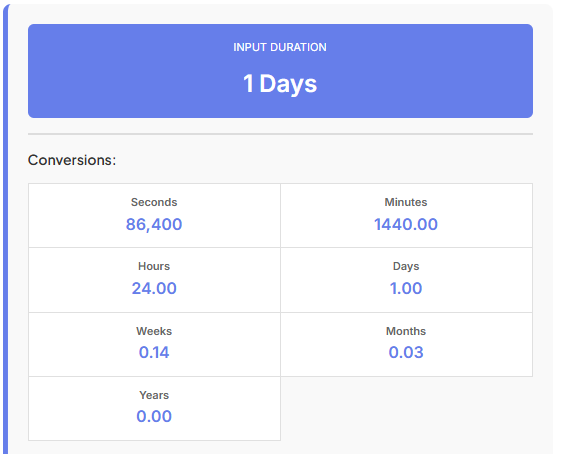
After you click "Calculate Now," the most important part of the tool is revealed: the results. The output is designed to be as clear and intuitive as possible, giving you a complete overview of your entered duration across all standard time units. The results are typically displayed in separate, labeled sections, making it easy to find the exact information you need.
Let's walk through what you'll see. If you entered 1.5 and selected "Hours," the tool would convert this into every other unit. Here’s how the results would be broken down:
- Seconds: This result shows the total number of seconds in your duration. For 1.5 hours, this would be
5400. This is useful for technical applications or scientific measurements where precision down to the second is required. - Minutes: Here, you'll see the total number of minutes. In our example, 1.5 hours is equal to
90minutes. This is one of the most commonly sought-after conversions, as many people think in terms of both minutes and hours. - Hours: This section confirms your original input if you started with hours, or shows the conversion into hours if you started with another unit. For our example, it would simply display
1.5hours. It serves as a good reference point. - Days: This shows your duration as a fraction or decimal of a day. 1.5 hours would be displayed as
0.0625days. This conversion is particularly helpful for project planning, where tasks are often measured in person-days. - Weeks: The duration is converted into its equivalent in weeks. 1.5 hours is a very small fraction of a week, so you’d see a number like
0.0089. This is useful for contextualizing shorter tasks within a weekly schedule. - Months: This shows the duration as a fraction of an average month. For 1.5 hours, the value would be very small, around
0.002. This helps in long-term planning where you need to see how small, repeated tasks add up over a month. - Years: Finally, the duration is shown as a fraction of a year. 1.5 hours is a minuscule portion of a year, appearing as a tiny decimal. This is less common for short durations but becomes relevant when you calculate duration time for much longer periods, like a project spanning several months.
Each result is clearly labeled, so you can quickly scan and pick out the number you need. This comprehensive breakdown removes any ambiguity and saves you from performing manual conversions, ensuring accuracy every time.
Real-Life Time Examples
To truly understand the power of a duration calculator, let's apply it to common questions and scenarios people face every day. These real-life examples show how the tool can provide instant, practical answers.
9 to 4 how many hours?
This is a classic question for anyone working a standard office job. You want to know the total duration of your workday, excluding any unpaid breaks. To solve this with the calculator, you first need to determine the total time span. From 9 AM to 4 PM is a 7-hour period. You can enter the number 7 into the duration field and select "Hours" as the unit. After clicking "Calculate Now," the tool will instantly show you that this is equal to 420 minutes or 25,200 seconds. This is especially useful if you need to log your time in minutes for a timesheet.
45+45+45 minutes
Imagine you're a student with three study sessions planned, each lasting 45 minutes. You want to know the total study time in hours. First, you'd do the simple addition: 45 + 45 + 45 = 135 minutes. Now, you can use the calculator. Enter 135 into the value field and select "Minutes" as the unit. The results will immediately show you that your total study time is 2.25 hours. This is much more intuitive for scheduling than "135 minutes." Seeing it as 2.25 hours helps you visualize the block of time you need to set aside in your day. This ability to easily calculate duration time from summed minutes is a huge help for time management.
Calculator Hours
The term "calculator hours" often refers to using a tool to figure out total work hours, especially when dealing with partial hours or varied start and end times. For instance, a freelancer might work from 10:00 AM to 1:15 PM and then again from 3:00 PM to 5:45 PM. The first session is 3 hours and 15 minutes (3.25 hours). The second is 2 hours and 45 minutes (2.75 hours). You can add these together: 3.25 + 2.75 = 6 hours. You can enter 6 and select "Hours." Or, you could sum the minutes: (3 * 60 + 15) + (2 * 60 + 45) = 195 + 165 = 360 minutes. Enter 360 and "Minutes," and the result will confirm it's 6 hours.
How many hours ago was 10 am Wednesday?
This type of question requires you to work backward from the current time. Let's say it's currently 2 PM on Thursday. First, you need to count the hours. From 10 AM Wednesday to 10 AM Thursday is exactly 24 hours. Then, from 10 AM Thursday to 2 PM Thursday is another 4 hours. So, the total duration is 24 + 4 = 28 hours. You can enter 28 into the calculator and select "Hours." The tool will then convert this for you, showing it's 1.1667 days or 1680 minutes. This is useful for tracking events, figuring out when something happened, or checking timelines.
Counting Time Across Days
While calculating durations within a single 24-hour period is common, many situations require us to count date and time spans that stretch across multiple days, weeks, or even months. This is where a duration calculator becomes even more valuable, as it simplifies what could otherwise be a complicated manual calculation. It helps us bridge the gap between different days and understand the total elapsed time without getting lost in calendar details.
Imagine you are a project manager, and a critical task started at 11 AM on a Monday and was completed at 3 PM on the following Thursday. Manually calculating the total business hours can be tedious. However, with a duration-focused mindset, you can break it down. You can calculate the time for each day and sum it up, or you can calculate the total time span. From Monday 11 AM to Thursday 11 AM is exactly 3 days, which is 72 hours. Then, from Thursday 11 AM to Thursday 3 PM is an additional 4 hours. The total duration is 72 + 4 = 76 hours.
By entering 76 and selecting "Hours" in the duration calculator, you can instantly see this period converted into other units. The tool will show you that 76 hours is equivalent to 3.167 days or 4560 minutes. This information is crucial for project reports, client billing, and future planning. It removes the guesswork associated with "a few days" and replaces it with a precise, quantifiable duration.
This ability to count date spans is also useful in personal life. For example, you might be planning a long road trip. You estimate driving about 8 hours per day for 4 days. Instead of keeping that as separate chunks, you can calculate the total duration: 8 hours/day * 4 days = 32 hours. Entering 32 and "Hours" into the calculator helps you see the bigger picture. You can see it's 1.33 days of total driving time, which can help in planning rest stops and overnight stays more effectively. It transforms abstract plans into concrete numbers.
Practical Use Cases
The ability to easily calculate duration time has a wide range of practical applications across various fields and everyday scenarios. It’s a tool that provides value to almost anyone who needs to manage, track, or understand time.
Office Work and Freelancing:
For professionals, time is money. Employees use duration calculators to fill out timesheets, especially when hours are logged in decimals or minutes. Managers use them to estimate project timelines, allocate resources, and ensure deadlines are met. Freelancers, who often bill by the hour, rely on precise time tracking to create accurate invoices. If a freelancer works for 25 hours on a project, they can use the calculator to convert this to 1500 minutes or 3.125 standard 8-hour workdays, helping them justify their billing and manage their workload.
Education:
Students are constantly juggling deadlines, study sessions, and classes. A duration calculator is an invaluable tool for academic planning. A student can calculate the total time needed for a research paper by breaking it down into smaller tasks—research (e.g., 300 minutes), writing (e.g., 480 minutes), and editing (e.g., 90 minutes). By summing these up (870 minutes) and converting them, they see it equates to 14.5 hours. This clarity helps them allocate sufficient time in their schedule and avoid last-minute cramming.
Travel and Logistics:
Planning travel involves many time-based calculations. How long is a layover? What is the total flight time? If a flight departs at 8 PM and arrives at 5 AM the next day in a different time zone, calculating the actual travel duration can be confusing. By figuring out the total hours—say, 9 hours—and inputting it into the calculator, a traveler can better plan their sleep schedule and connecting activities. This is also useful for road trips, train journeys, and shipping logistics, where estimating arrival times is critical.
Daily Life:
Even in day-to-day activities, a duration calculator comes in handy. It can be used for fitness goals (e.g., converting a 75-minute workout to 1.25 hours), cooking (e.g., adding up prep and cook times for a meal), or personal hobbies. For anyone trying to build a new habit, tracking the time spent on it can be motivating. Seeing that 15 minutes a day adds up to 1.75 hours a week or 7.5 hours a month can provide a powerful sense of accomplishment.
Connecting Duration with Other Time Tools
Understanding duration is just one piece of the time management puzzle. The ability to calculate duration time becomes even more powerful when combined with other specialized time-based tools. By linking these concepts, you can create a comprehensive system for planning and executing your tasks.
For example, knowing how long a task will take is the first step; knowing when it needs to be completed is the next. This is where a Deadline Calculator comes into play. If you've calculated that a report will take you 12 hours to write, you can use a Deadline Calculator to determine your exact due date and time. By inputting your start time and the 12-hour duration, you can see precisely when you need to finish, helping you manage expectations and deliver on time. This synergy between calculating duration and setting deadlines is the cornerstone of effective project management.
Time-based planning isn't limited to work or projects; it extends to hobbies and natural events. For photographers, astronomers, or even gardeners, timing is everything. A Moon Phase Calculator helps you identify the dates and times of specific lunar phases, like the full moon or new moon. If you want to plan a nighttime photography session, you first use the Moon Phase Calculator to find the optimal night. Then, you might use a duration calculator to plan your session—for instance, blocking out a 3-hour (180-minute) window to capture the perfect shot. This combination allows for precise planning around natural celestial cycles.
Similarly, many outdoor activities are dependent on daylight. Whether you're a hiker, a runner, or planning a family barbecue, you need to know how much sunlight you have. A Sunrise Sunset Calculator gives you the exact times for sunrise and sunset in your location. Once you know you have, for example, 8 hours of daylight between sunrise and your planned end time, you can use a duration calculator to break down your activities. You could plan a 4.5-hour hike, a 1-hour lunch, and still have plenty of time left before dusk. This integration of tools ensures you can plan your day safely and efficiently, making the most of the natural light available.
Who Should Use This Duration Calculator
This duration calculator is a versatile tool designed for a broad audience. Its simplicity and utility make it valuable for anyone who deals with time, which is practically everyone. However, some groups will find it particularly indispensable for their daily routines and professional responsibilities.
Students: From high school to university, students are in a constant battle against the clock. They can use this tool to plan study sessions, track time spent on assignments, and manage long-term project deadlines. Breaking down a 10-page paper into manageable time blocks (e.g., 90 minutes per section) becomes much easier with a reliable calculator.
Employees and Office Workers: Anyone who works in a corporate environment can benefit. It's perfect for filling out timesheets, calculating the length of meetings, or estimating the time needed to complete a task. It ensures accuracy in reporting hours and helps with personal time management at work.
Managers and Project Leaders: For those in charge of teams and projects, the ability to calculate duration time is critical. Managers can use it to create realistic project timelines, allocate resources effectively, and set achievable goals for their team members. It aids in converting man-hours into days or weeks for better long-term planning.
Freelancers and Gig Workers: The flexible nature of freelance work means that precise time tracking is essential for billing. Whether charging by the minute or the hour, this tool allows freelancers to accurately calculate their work duration and create transparent, professional invoices for their clients.
Travelers: Planning a trip involves juggling flight times, layovers, and travel durations. A duration calculator can help travelers understand the total time commitment of a journey, plan connections, and adjust to different time zones more effectively.
Personal Users: Anyone looking to improve their personal productivity can use this tool. It's great for timing workouts, managing cooking times, or tracking time spent on hobbies. It provides the data needed to build better habits and make the most of one's free time.
Final Conclusion
In a world where time is one of our most precious assets, the ability to measure, convert, and manage it effectively is more than just a convenience—it's a necessity. The simple act to calculate duration time is a fundamental skill that empowers us to bring order to our schedules, enhance our productivity, and achieve our goals. From students planning their studies to professionals managing complex projects, this tool serves as a reliable partner in navigating the constant flow of time.
We've explored how a duration calculator works from a user's perspective, demystifying the process of converting seconds into minutes, hours into days, and beyond. By walking through practical examples—like figuring out work hours from 9 to 4 or totaling multiple study sessions—we've seen how this tool provides instant clarity to everyday questions. Its real power lies in its simplicity and versatility, offering precise answers without the need for complex mental math or manual calculations.
Whether you are coordinating a project, planning a trip, or simply trying to make the most of your day, understanding duration is key. This guide has shown that with the right tool, anyone can master the art of time conversion and apply it to a multitude of real-life scenarios. It is an essential resource for anyone looking to gain better control over their schedule and, ultimately, their life.
FAQs
How do I calculate duration time for work hours involving a lunch break?
To accurately calculate duration time for your workday, it helps to break it down into two parts: before lunch and after lunch. First, enter the duration of your morning shift (e.g., 9:00 AM to 1:00 PM = 4 hours) and note the result. Then, do the same for your afternoon shift (e.g., 2:00 PM to 5:00 PM = 3 hours). Finally, simply add those two durations together (4 hours + 3 hours = 7 hours) to get your total active work time. This method ensures you aren't accidentally counting your unpaid break as work time.
Can I use this tool to calculate duration time across different dates?
Yes, you can easily use this tool to handle multi-day spans. If you need to calculate duration time for a project that started on Monday and ended on Wednesday, you first determine the total hours between your start and end times. For example, if a task takes 48 hours, simply enter "48" and select "Hours" as your unit. The calculator will instantly convert that into days (2 days), minutes, or seconds, helping you visualize exactly how much time has passed between those two dates.
Why does the decimal result look different from minutes when I calculate duration time?
This is a common point of confusion! When you calculate duration time, decimals represent a fraction of 100, while minutes are a fraction of 60. For example, if you see a result of "1.5 hours," the ".5" represents 50% of an hour, which is 30 minutes.

