
Working Days Calculator
Calculate business days between two dates, excluding weekends and holidays
Select Your Date Range
How to Calculate Working Days Between Two Dates Efficiently
Why Accurate Date Calculation Matters
When you need to calculate working days between two dates, you are doing more than just counting numbers on a calendar. You are managing expectations, setting financial boundaries, and ensuring project success. In the professional world, time is not measured in continuous flow but in billable units. A standard week has seven days, but a business week usually has five. This discrepancy causes major issues for project managers, HR professionals, and logistics coordinators who fail to accurately calculate working days between two dates.
Imagine planning a project launch. You set a deadline for 30 days from now. However, if you forget to calculate working days between two dates rather than calendar days, you might actually only have 20 days of production time. That is a massive difference that can lead to missed milestones and stressed teams. Whether you are handling payroll for a new employee or waiting for an international shipment, the ability to precisely calculate working days between two dates is a critical skill.
This guide explores our specialized tool designed to help you calculate working days between two dates. We will look at how it handles weekends, holidays, and specific business scenarios. By the end, you will understand exactly how to use this calculator to streamline your workflow and why manual counting is a thing of the past.
What This Calculator Does
Our tool is a specialized engine designed to help users calculate working days between two dates with speed and precision. Unlike a standard calendar that shows you every single day of the month, this calculator acts as a filter. It takes a start point and an end point—using a simple “from date to” logic—and strips away the non-working time.
The primary function is to distinguish between “calendar days” and “business days.” Calendar days include everything: Mondays, Sundays, national holidays, and leap days. Business days are strictly the days available for work. When you calculate working days between two dates using this tool, the system automatically identifies Saturdays and Sundays and removes them from the total count.
Furthermore, the tool allows for custom exclusions. A machine cannot guess your local holidays or specific company off-days. Therefore, to correctly calculate working days between two dates, our tool lets you manually input specific dates to skip. This feature is essential for international teams working across different holiday schedules. The calculator then processes the “time in between dates” to give you a net total of actionable days. This ensures that when you set out to calculate working days between two dates, the number you receive is the actual number of days you have to get the job done.
Step-by-Step: How to Use the Tool
Using this tool to calculate working days between two dates is straightforward. We designed the interface to be intuitive, requiring no technical knowledge. Follow these steps to get your accurate count.
Step 1: Select Your Start Date

The first step to calculate working days between two dates is defining your starting point. You will see a calendar picker labeled “Start Date.” Click on this field to open the calendar view. Navigate to the correct month and year, then select the specific day your period begins. Accuracy here is vital. If you are tracking a project that starts on a Monday, ensure you don’t accidentally click Sunday, as this will affect how the system tracks the “from date to” duration.
Step 2: Select Your End Date

Next, you need to define the finish line. Move to the “End Date” field. Just like the first step, use the calendar picker to choose the date your project or period ends. It is important to note that when you calculate working days between two dates, the inclusion of the end date depends on standard business practices, which this tool handles seamlessly. Ensure your “from date to” range covers the entire period you want to analyze.
Step 3: Add Holidays (Optional)
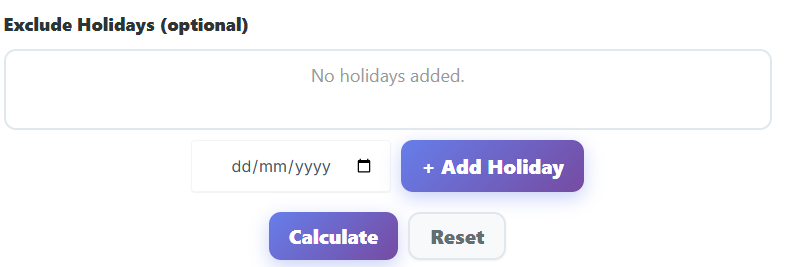
This is the step that makes the tool truly powerful. To accurately calculate working days between two dates, you must account for public holidays. If your project spans December, you likely have Christmas or Hanukkah off. If it is July in the United States, you have Independence Day.
The tool provides a section to add these exceptions. Click to add a holiday and select the date from the calendar. You can add multiple holidays if the timeframe is long. If you skip this step, the system will only remove weekends when it attempts to calculate working days between two dates. By adding holidays, you ensure the “business day calendar calculator” logic is applied perfectly to your specific region.
Step 4: Click Calculate
Once your parameters are set, look for the calculation button. One click triggers the engine to calculate working days between two dates based on your inputs. It processes the start date, the end date, removes the weekends, and subtracts the specific holidays you entered.
Step 5: Understand the Results
The tool will instantly display the results. You will see a breakdown that helps you verify the data. It is not enough to just calculate working days between two dates; you need to know what was excluded to trust the number. We will detail how to read these outputs in the next section.
Understanding the Results
After you calculate working days between two dates, the tool presents several data points. Understanding these helps you plan better.
Business Days Output
This is the primary number you were looking for. It represents the total count of days available for work. For example, if you calculate working days between two dates spanning a standard month, this number might be around 20 or 21, even though the month has 30 or 31 days. This figure is your “budget” of time. If you are a project manager, this is the number of days you have to assign tasks.
Total Calendar Days
This figure shows the raw “time in between dates” without any exclusions. It includes weekends and holidays. Seeing this number side-by-side with your business days helps visualize how much time is lost to non-working days. It highlights why it is dangerous to plan based on calendar days alone and why you must calculate working days between two dates for accuracy.
Weekends Excluded
The tool clearly indicates how many Saturdays and Sundays were removed from the count. This confirms that the automatic weekend exclusion worked correctly. If you need to know the specific day of the week for a deadline to ensure it doesn’t fall on a Saturday, you might also find our Day of Week Calculator useful for verifying specific dates before you start your count.
Holidays Excluded
If you entered holidays, this count shows how many were subtracted. If this number is zero but you know there was a holiday, you might have forgotten to input it in Step 3. Always double-check this section to ensure you calculate working days between two dates with all factors considered.
Common Use Cases
Why do people need to calculate working days between two dates? The applications are vast and affect almost every industry. Here is how different professionals utilize this tool.
Project Deadlines and Planning
Project managers live and die by the schedule. If a client demands a project be delivered in “45 days,” the manager must immediately clarify: calendar days or business days? A 45-day duration in calendar days is very different from 45 business days.
By using this tool to calculate working days between two dates, a manager can see that 45 business days actually pushes the deadline more than two months into the future due to weekends. This prevents overpromising. When mapping out these long timelines, using a Due Date Calculator alongside this tool can help you pinpoint the exact finish line after you calculate working days between two dates.
HR and Payroll Cycles
Human Resources professionals frequently need to calculate working days between two dates for payroll and leave management. If an employee resigns and gives notice, HR must determine exactly how many days they will physically work before leaving. This affects their final paycheck.
Similarly, when onboarding new staff, HR often needs to prorate the first month’s salary. They must calculate working days between two dates—from the start date to the end of the pay period—to determine the exact percentage of the salary the employee has earned. Using a standard calendar count would result in overpayment or underpayment.
Shipping and Delivery Estimates
Logistics companies often quote delivery times like “8-12 business days.” For a customer, this can be confusing. Does that mean two weeks? Three weeks? Customers often use our tool to calculate working days between two dates to figure out when their package will actually arrive.
If a package is shipped on a Friday with a delivery window of “8-12 business days in days,” the counter doesn’t really start moving until Monday. If there is a holiday in between, it delays it further. By being able to calculate working days between two dates, both shippers and receivers can align their expectations on the “days till calculator” results.
Legal and Compliance Documents
Legal contracts often specify response times in business days. For instance, a landlord might have “5 business days” to return a deposit, or a company might have “30 working days” to respond to a query. Lawyers and assistants use this tool to calculate working days between two dates to ensure they do not breach contract terms. Missing a deadline because you counted a Saturday as a working day can lead to legal penalties.
Productivity and Sprint Planning
Agile teams work in sprints, typically two weeks long. However, a two-week sprint does not always equal 10 working days. National holidays or team off-sites can reduce capacity. Scrum masters use the tool to calculate working days between two dates for the upcoming sprint. If they see only 8 working days are available, they adjust the points capacity accordingly. For tracking the actual execution of tasks within these days, a Stopwatch Timer is often the next tool in the workflow.
Why This Tool Is Better
There are many ways to count days, including manual counting on a wall calendar. So why should you use our digital solution to calculate working days between two dates?
Accuracy Over Assumptions
Human error is the biggest risk in manual counting. It is easy to skip a week or forget that a month ends on the 30th, not the 31st. When you try to calculate working days between two dates in your head, you might miss a leap year adjustment or forget a bank holiday. Our tool eliminates this risk. The algorithm is precise. It knows exactly how many days are in every month and never loses count.
Speed and Efficiency
Manually counting a duration of three or four months takes time. You have to flip calendar pages and tally numbers. This tool lets you calculate working days between two dates in seconds. You select the start, select the end, and the answer is there. This speed is invaluable for professionals who have to run these checks multiple times a day.
No Signup or Installation
Many software solutions require you to create an account or download heavy applications just to perform simple tasks. Our tool is web-based and instant. You can calculate working days between two dates immediately without handing over your email address or waiting for an installation wizard. It is designed for immediate utility.
The “Business Day Calendar Calculator” Advantage
Standard calculators only do math. They don’t understand time. This tool is specifically a “business day calendar calculator.” It understands the concept of the work week. This context awareness makes it superior for professional use. When you calculate working days between two dates with a tool that understands the context of a weekend, you get data that is actually usable for business logic, not just raw arithmetic.
Global Usability
Because the tool allows you to manually input holidays, it works for everyone, everywhere. It doesn’t force a US-centric holiday schedule on a user in the UK or Japan. You define the breaks, and the tool adapts. This flexibility allows anyone around the globe to calculate working days between two dates according to their local laws and customs.
Handling Complex Date Scenarios
Sometimes, the need to calculate working days between two dates involves complex scenarios that go beyond simple Monday-to-Friday logic. While the standard tool defaults to excluding weekends, understanding how to manipulate your “from date to” inputs can help in unique situations.
Partial Weeks and Mid-Week Starts
Projects rarely start conveniently on a Monday morning. Often, you receive approval on a Wednesday or Thursday. When you calculate working days between two dates starting mid-week, the immediate weekend acts as a speed bump.
For example, starting on a Friday means you have one working day, then a two-day gap. This disrupts momentum. By using the tool to calculate working days between two dates, you can visualize these gaps. If you see that a start date leaves you with only one day before a break, you might choose to shift the official start date to the following Monday for better team cohesion.
Long-Term Forecasting
When planning annual budgets or year-long roadmaps, you must calculate working days between two dates over a 12-month period. The difference between calendar years and business years is massive. A year has 365 days, but typically only about 250 to 260 working days. That is over 100 days of non-production time.
Executives who fail to calculate working days between two dates for the whole year often set revenue targets that are impossible to meet because they overestimated production capacity. Using the tool allows for realistic, data-backed forecasting.
Bridging Holidays
A common phenomenon is “bridging,” where employees take a leave day on a Friday if Thursday is a holiday, creating a four-day weekend. While the tool lets you calculate working days between two dates based on official holidays, you should also be aware of these cultural habits.
If you are planning a launch around a major holiday, use the tool to calculate working days between two dates and then manually subtract a few more days as “risk buffer” in your own planning notes. This ensures that even if half the team takes a bridge day, your deadline remains safe.
The “Time in Between Dates” Factor
The concept of “time in between dates” is crucial for contract law and service level agreements (SLAs). When you calculate working days between two dates, you are defining the window of liability.
For instance, an insurance claim might need to be processed within “10 days.” If the policy doesn’t specify business days, the clock is ticking through the weekend. However, most corporate policies rely on business days. Being able to clearly calculate working days between two dates provides the evidence needed to prove compliance. If a dispute arises regarding a late payment or a missed deadline, a screenshot of the calculation showing the exact business day count can be powerful evidence.
Understanding “8-12 Business Days in Days”
We mentioned shipping earlier, but let’s break down the math of “8-12 business days in days” to see why you need a calculator.
If you buy a product on December 20th and shipping is “8-12 business days,” when do you get it?
- December 25th is a holiday.
- January 1st is a holiday.
- Weekends happen in between.
If you try to guess, you will likely be wrong. You must calculate working days between two dates by adding the holidays. The “12 business days” might actually translate to 20+ calendar days during the holiday season. The tool helps manage this frustration. By inputting the start date and manually adding the holidays, you can find the date that corresponds to the 12th business day. This converts the abstract “8-12 business days in days” concept into a concrete calendar date you can mark on your wall.
Conclusion
Time management is the backbone of efficiency. Whether you are running a multinational corporation, managing a small team, or just trying to figure out when your online order will arrive, the ability to calculate working days between two dates is essential.
Our tool removes the guesswork. It handles the math, the weekends, and the holidays so you don’t have to. It transforms a complex mental calculation into a simple click. By understanding the difference between calendar days and business days, and utilizing this tool to calculate working days between two dates, you gain control over your schedule.
Don’t let weekends and holidays throw off your plans. Use the calculator today to plan accurately, work efficiently, and meet every deadline with confidence. Remember, in business, accuracy is everything, and the best way to ensure accuracy is to correctly calculate working days between two dates every single time.
FAQs
Does the calculator automatically exclude weekends from the result?
Yes. By default, the tool identifies “business days” as Monday through Friday. When you select your start and end dates, the calculator automatically removes all Saturdays and Sundays from the final count. This ensures you get an accurate representation of the standard working week without needing to manually count or subtract weekends yourself.
Can I add specific public holidays to my calculation?
Absolutely. Since public holidays vary by country and region, the calculator includes an optional “Add Holidays” feature. You can manually select specific dates on the calendar—such as national holidays, bank holidays, or company-specific off days—to exclude them from the total business day count. This allows for precise calculations regardless of where you are located.
What is the difference between “Business Days” and “Total Calendar Days”?
The tool provides two different results to help you plan effectively:
Business Days: This is the count of actionable working days (Monday–Friday), excluding weekends and any holidays you manually added. This is the number you should use for project deadlines, shipping estimates, and payroll.
Total Calendar Days: This is the total duration of time between your start and end dates, including weekends and holidays. This number helps you understand the actual chronological time that will pass, which is useful for long-term scheduling.

