
Add or Subtract Time
Duration Between Dates
Business Days Calculator
Master Your Schedule with the Ultimate Date Calculator Tool Free
Introduction: Why Time Calculation Matters
We all live by the calendar. Whether you are a project manager mapping out a critical product launch, a bride-to-be counting down the days to the wedding, or a student trying to figure out exactly when that term paper is due, dates govern our lives. But let’s be honest—calculating dates manually is a headache. Trying to figure out what day of the week a specific date falls on three months from now, or excluding weekends from a project timeline, is prone to human error.
That is why you need a reliable date calculator tool free of charge and easy to use.
Imagine you need to know the exact date for a 90-day warranty expiration. Or perhaps you are curious about a historical event and want to know exactly how long ago it happened. Doing the mental math is risky. You might forget that some months have 30 days while others have 31, or completely overlook a leap year.
This guide explores a powerful, user-friendly online solution designed to handle all your date-related math. We will walk you through exactly how this tool works, what you will see on your screen, and how it can simplify your daily planning. From answering questions like "what is 6 months from today" to acting as a robust business day calendar calculator, this tool covers it all without requiring you to download any software or sign up for an account.
Let’s dive into the interface and see how this date calculator tool free can transform the way you manage time.
2. First Impressions: The Header and Hero Section
When you first land on the page, clarity is king. The design philosophy here is obviously "less is more." You aren’t bombarded with ads or confusing pop-ups. Instead, you are greeted by a clean, professional layout that screams utility.
At the very top, you will see a distinct Calendar icon 📅. This isn’t just decoration; it immediately signals that you are in the right place for time management. Next to it, the main title reads "Date Calculator". It’s bold, legible, and straight to the point.
Underneath the main title sits a helpful subtitle. It briefly explains the core capabilities of the tool: adding or subtracting dates, calculating time spans, and determining business days. This text is crucial because it confirms that whether you want to count date differences or project a future deadline, this single interface handles it all.
The visual hierarchy is designed for speed. The colors are likely soft and neutral—easy on the eyes for office workers using the tool under fluorescent lights or students working late at night. There is a sense of calm efficiency here. You don’t need to search for instructions because the layout guides your eye naturally from the title down to the active tools.
This hero section sets the stage. It promises a frustration-free experience, and as you scroll down to the actual calculator modules, you will see that the tool keeps that promise.
3. The "Add or Subtract Time" Section
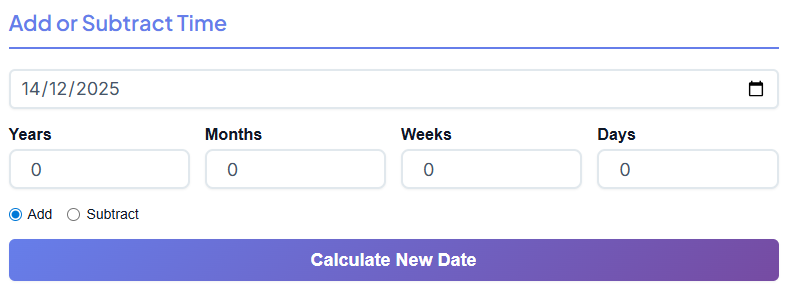
The first major module you will encounter is the "Add or Subtract Time" section. This is the bread and butter of the date calculator tool free. It is designed for those moments when you have a starting point and a duration, but you lack the final date.
The Inputs: Precision at Your Fingertips
The first thing you interact with is the Start Date picker. It usually defaults to today’s date, which is a thoughtful touch for quick calculations. If you click it, a calendar dropdown appears, allowing you to select any date in the past or future.
Below the start date, you see a row of clearly labeled input boxes:
- Years
- Months
- Weeks
- Days
This granular control is fantastic. You aren't forced to convert everything into days manually. If your warranty is "2 years and 3 months," you just type "2" in the Years box and "3" in the Months box.
The Logic Toggles
Next, you will see two radio buttons: Add and Subtract.
- Add: Select this if you want to move forward in time. This is perfect for answering questions like what is 6 months from today?
- Subtract: Select this to look backward. This is how you solve queries like "what date was it 45 days ago?"
The Magic Button and Result
Once your numbers are in, you click the “Calculate New Date” button. We will talk more about the button design later, but functionally, it triggers an instant update.
The New Date result box appears immediately. It doesn’t just give you a raw date like "12/12/2025." It typically provides the full context, including the day of the week (e.g., "Friday, December 12, 2025").
Solving Common Mysteries
This section is where you solve those nagging questions that pop up in daily life.
Scenario A: The Warranty Check
You bought a laptop today, and you have a 30-day return window. You simply enter "30" in the Days box and ensure "Add" is selected. In a split second, you know exactly when your window closes. You are essentially answering the query: 30 days from today’s date.
Scenario B: Historical Curiosity
Maybe you are looking at an old photo and wondering about the timeline. You can enter a past date and subtract years. While people often ask what year was it 18 years ago for legal or historical reasons, you can use this tool to pinpoint the exact day of the week that date fell on, adding a layer of depth to your research.
This section is intuitive. You input what you know, and the tool fills in the blank.
4. Duration Between Dates Section
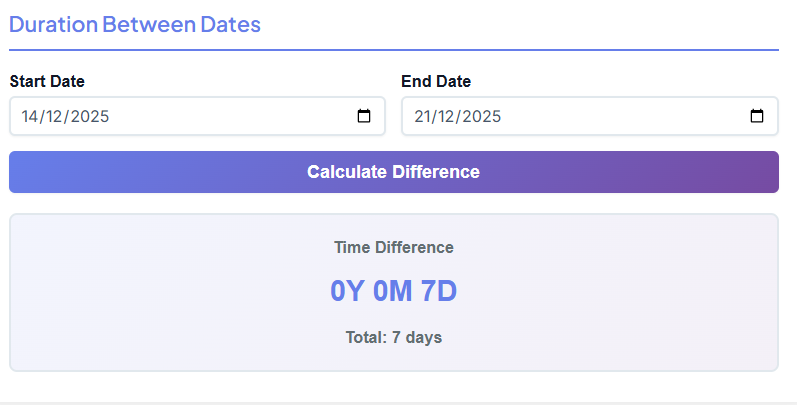
Scroll down a little further, and you find the "Duration Between Dates" section. While the previous section projected a date forward or backward, this section measures the gap between two fixed points in time.
The Layout
You are presented with two primary inputs:
- Start Date
- End Date
Again, the date pickers here are smooth and responsive. You can click to open the calendar view or type the dates manually if you prefer speed.
The Calculation
Between these inputs sits the “Calculate Difference” button. When you click this, the tool performs the math to count date intervals accurately.
The Result Display
The output here is often two-fold, which is a massive help for clarity:
- Breakdown Format: The tool will tell you the duration in natural language, such as "2 Years, 4 Months, 15 Days."
- Total Days: Below that, it usually displays the total count, like "867 Days."
Why This Matters
This dual display is critical. Sometimes you need the "Total Days" for a per-diem calculation (like billing a client daily rates). Other times, you need the "Years/Months/Days" format to explain a timeline to a human being.
For example, if you want to know what year was it 18 years ago exactly from a specific birthday, you can plug in the birth date and today’s date to see the precise age breakdown. Or, if you are planning a project and need to know the total scope, this tool helps you count date spans without worrying about leap years or varying month lengths.
📅 Days Between Dates
Calculate exact days between two dates
Open Calculator →
This feature is incredibly popular for planning vacations. If you know you leave on the 1st and return on the 15th, popping those dates in confirms exactly how long your trip is, ensuring you book the right amount of accommodation.
5. Business Days Calculator Section
Now we get to the powerhouse feature for professionals: the Business Days Calculator.
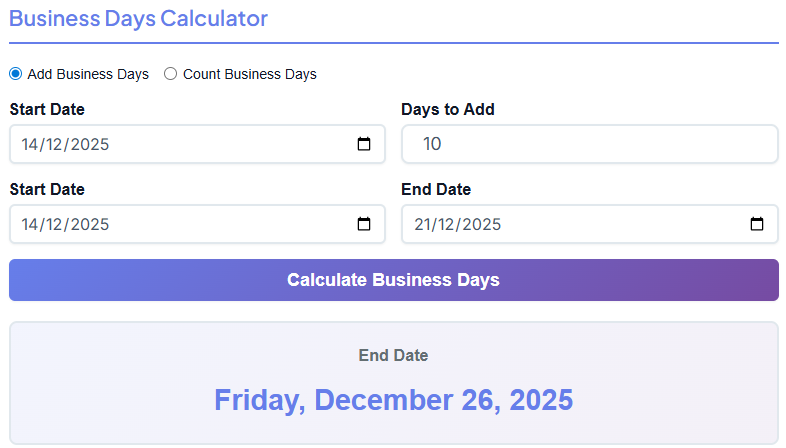
Standard calendars are great, but the working world doesn't run on weekends. If you have a project due in "10 days," that usually means 10 working days, which is actually two weeks of real time. Using a standard calculator would make you miss your deadline.
This section effectively functions as a specialized business day calendar calculator.
The Modes
You typically see two tabs or modes here:
- Add Business Days: You pick a start date and add a number of working days to find a due date.
- Count Business Days: You pick a start and end date, and the tool tells you how many working days fall between them.
Input Fields
- Start Date: The day the project begins.
- Days to Add (or End Date): Depending on the mode.
- Weekend Logic: The tool automatically assumes Saturday and Sunday are non-working days.
The Output
When you hit calculate, the tool skips the weekends for you.
If you ask what is 6 months from today in a standard sense, you get one date. But if you ask "what is 120 business days from today," you get a completely different date that accounts for all those Saturdays and Sundays.
This is invaluable for:
- Shipping Estimates: "Delivery in 5-7 business days."
- Legal Notices: "You have 10 business days to respond."
- Sprint Planning: Agile teams work in 2-week sprints, but that really means 10 days of capacity.
By using this business day calendar calculator section, you avoid the embarrassment of setting a deadline on a Sunday or underestimating how long a task will take.
⏰ Working Days Calculator
Calculate business days excluding weekends
Open Calculator →
It simplifies the complex logic of the work week into a single click.
6. Buttons & User Interaction
We must talk about the user experience (UX), specifically the buttons and interaction design. A tool can have great logic, but if it feels clunky, nobody will use it. This date calculator tool free excels in "feel."
Large Gradient Buttons
The Call-to-Action (CTA) buttons—labeled "Calculate"—are impossible to miss. They often feature a subtle gradient, perhaps shifting from a deep blue to a lighter cyan, or a professional green. This invites the click. They are large enough to be easily tapped on a smartphone screen, which is crucial for users on the go.
Instant Result Updates
The speed is noticeable. There is no page reload. You don't hit "Calculate" and wait for a spinning wheel. The moment you click, the result appears. This instant feedback loop makes the tool feel snappy and modern.
Clear Result Boxes
The results aren't hidden in small text. They appear in dedicated, often shaded or bordered boxes that stand out from the input fields. This high contrast ensures that your eyes go straight to the answer.
Smooth Experience for Beginners
You don't need a tutorial to use this. The flow is top-to-bottom, left-to-right. The labels are in plain English. The distinction between "Add" and "Subtract" is visual and clear. It is a smooth experience designed for someone who might be stressed about a deadline and needs a quick, accurate answer without friction.
7. Real-Life Examples
To truly understand the value of this date calculator tool free, let’s look at how different people use it in the real world.
The Legal Secretary
Sarah works at a law firm. She receives a court order dated today, stating a response is due in "30 days." In the legal world, missing a deadline is a disaster.
Sarah opens the tool. She goes to the "Add or Subtract Time" section. She enters 30 days from today’s date into the calculator. The tool instantly gives her the exact submission date. She then double-checks using the business day calendar calculator section if the judge specified "business days." The tool saves her from manually counting squares on a wall calendar and risking a mistake.
The Nostalgic Student
Mark is writing a history paper about his own generation. He wants to contextualize the year 2006. He types in the current date and subtracts 18 years. He asks the tool what year was it 18 years ago effectively, but also checks specific dates to see what day of the week major events occurred. This helps him write a more engaging narrative. He also uses the tool to count date intervals between historical treaties to emphasize how short peace treaties lasted.
The Event Planner
Jessica is planning a wedding. The venue is booked for a specific Saturday six months out. She needs to send "Save the Dates" exactly six months prior. She uses the tool to answer what is 6 months from today (assuming today is her planning start date) to schedule her mail-out. She also uses the duration calculator to see exactly how many days are left until the big day so she can update the couple’s wedding website countdown.
These examples show that the date calculator tool free isn't just for math geeks—it's for anyone who wants to be organized and accurate.
8. Use Cases and Benefits
Who benefits most from keeping this tool bookmarked? Almost everyone, but here are specific groups who find it indispensable.
Office Professionals & HR Teams
Human Resources departments live by dates. Probation periods (usually 90 days), maternity leave calculations, and retirement countdowns all require precision. Using the business day calendar calculator ensures that an employee's leave is tracked accurately, excluding weekends, so paychecks are correct.
Project Managers
For PMs, the schedule is the bible. If a project is delayed by 15 days, they need to know the new launch date immediately. They can use the tool to project new timelines instantly during a meeting, rather than saying "I'll get back to you."
Freelancers
Freelancers often have "Net 30" or "Net 60" payment terms. When they send an invoice, they need to put a specific due date on it. By quickly calculating 30 days from today’s date (the invoice date), they can write "Due: October 15th" instead of a vague "Due in 30 days," which helps them get paid faster.
📊 Week Number Calculator
Find week number for any date
Open Calculator →
Students and Academics
Planning a study schedule requires knowing exactly how much time you have before finals. Students can calculate the days between now and their first exam to create a realistic revision timetable.
9. Conclusion
Time is our most valuable resource, and managing it shouldn't be a struggle. The date calculator tool free offers a simple, elegant solution to the complex problem of calendar math. By stripping away the need for manual counting and mental gymnastics, it provides accuracy and peace of mind.
Whether you are trying to figure out what is 6 months from today for a vacation booking, using the business day calendar calculator to hit a work deadline, or just curious about what year was it 18 years ago, this tool delivers instant answers.
The interface is clean, the buttons are responsive, and the results are precise. You don't need to worry about leap years, varying month lengths, or accidentally counting a Sunday as a workday. The tool handles the logic; you just handle the inputs.
Next time you find yourself staring at a wall calendar, trying to finger-count weeks or days, remember there is a better way. Rely on this date calculator tool free for your daily planning, and take the guesswork out of your schedule. Accurate planning is just a click away.
FAQs
Can this tool calculate deadlines excluding weekends and holidays?
Yes, absolutely. The tool includes a "Business Days Calculator" feature designed specifically for this purpose. You can use it in two ways: either add a specific number of business days to a start date to find your deadline, or count the total number of working days between two dates. It automatically skips Saturdays and Sundays, making it perfect for professional timelines, project planning, and legal deadlines.
How do I calculate a date far in the past or future?
It's simple. Use the "Add or Subtract Time" section of the tool. First, select your starting date using the calendar picker. Then, type the number of years, months, weeks, or days you want to go forward or backward in time into the corresponding boxes. Select either the "Add" or "Subtract" option and click calculate. The tool will instantly show you the exact date, including the day of the week.
Is there a way to find out the total number of days between two specific dates?
Yes, the "Duration Between Dates" section is built for exactly this. Just input your "Start Date" and "End Date" into the provided fields. When you click the "Calculate Difference" button, the tool will show you the total duration broken down into years, months, and days, as well as the total number of days between them. This is great for tracking project lengths, event countdowns, or personal milestones.

