
12-Hour Format
24-Hour Format
Your Ultimate Guide to Using a Military Time Converter
Time is a universal constant, but how we express it varies significantly around the globe. While many are accustomed to the familiar 12-hour clock with its AM and PM designations, another system operates with streamlined precision: the 24-hour clock, commonly known as military time. Every day, countless people in various professions and situations need to navigate between these two formats. The need to accurately convert military time is more common than you might think, whether it's for coordinating international travel, managing a project deadline, or simply understanding a schedule set in a different format. This guide will explore military time in depth and show you how to use a simple yet powerful tool to make these conversions effortless.
Understanding how to translate between standard and military time is a skill that eliminates confusion and prevents costly errors. It ensures that a meeting scheduled for "18:00" isn't mistaken for 6:00 AM, or that a flight departing at "00:30" is correctly understood as taking place just after midnight. Our goal is to demystify this process completely. We will walk through what military time is, how it differs from the 12-hour system, and provide a clear, step-by-step tutorial on using a converter tool to handle any time format with confidence.
What Is Military Time?
At its core, military time is a method of keeping time where the day runs from midnight to midnight and is divided into 24 hours. It’s numbered from 0 to 23, making it a "24-hour clock." Unlike the standard 12-hour system that splits the day into two cycles (AM and PM), military time uses a single, continuous sequence of numbers. This removes any ambiguity. For example, in the 12-hour system, "8 o'clock" could mean 8 in the morning or 8 in the evening. In military time, 08:00 is always in the morning, and 20:00 is always in the evening. There is no room for interpretation.
The name "military time" comes from its widespread use in armed forces across the world, where precision and clarity are critical for coordinating operations. However, its application extends far beyond the military. You will find it used in aviation, medicine, emergency services, meteorology, and many international contexts. The format is typically written as four digits without a colon, such as "1600" for 4:00 PM. In digital clocks and many civilian applications, a colon is often used, like "16:00." This system's primary advantage is its straightforward nature; each minute of the day has a unique designation, from 00:00 (midnight) to 23:59 (one minute before the next midnight).
The Difference Between 12-Hour and 24-Hour Time
The fundamental difference between the 12-hour and 24-hour time systems lies in how they handle the second half of the day. Both systems are identical from the start of the day until noon.
- 12-Hour System (Standard Time): This system divides the 24-hour day into two 12-hour periods. The first period, "ante meridiem" (AM), runs from midnight (12:00 AM) to noon (11:59 AM). The second period, "post meridiem" (PM), runs from noon (12:00 PM) to just before midnight (11:59 PM). The main point of confusion often arises around midnight and noon, which are both represented as "12."
- 24-Hour System (Military Time): This system uses a single 24-hour cycle. The day begins at 00:00 (midnight) and progresses sequentially until 23:59. After 12:59 PM (or 12:59 in military time), the next hour is simply 13:00, followed by 14:00, and so on, until 23:00 (11:00 PM). This logical progression eliminates the need for AM and PM markers.
For example, 1:00 AM is 01:00 in military time, and the hours continue to match up until noon. After noon, the change becomes apparent. While standard time resets to 1:00 PM, military time continues counting up: 1:00 PM becomes 13:00, 2:00 PM becomes 14:00, and this pattern continues. This makes the 24-hour system inherently clearer for scheduling and logging events.
How to Convert 12-Hour Time to Military Time with Our Tool
Using a dedicated tool is the fastest and most reliable way to convert military time without doing mental math. Our Military Time Converter is designed for simplicity, allowing you to get an accurate conversion in seconds. Let's walk through converting a standard 12-hour time into its 24-hour equivalent. Imagine you need to find out 4 pm military time.
Step 1: Enter the Hour
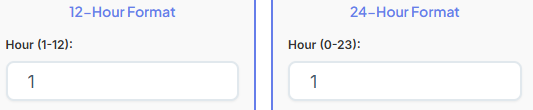
First, locate the input field labeled "Hour." Since you are converting 4 PM, you will enter the number "4" into this box. The tool accepts numbers from 1 to 12 for the hour input in the 12-hour format.
Step 2: Enter the Minutes

Next, move to the "Minute" input field. If the time is exactly 4:00 PM, you can enter "0" or "00." If the time was, for instance, 4:25 PM, you would enter "25." The minute field accepts values from 0 to 59.
Step 3: Select AM or PM
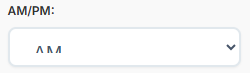
This is a crucial step. To the right of the time inputs, you will see options for "AM" and "PM." Since you are converting 4 PM, you must select the "PM" option. Clicking it will highlight your selection, telling the tool that the time you entered is in the afternoon. If you were converting a morning time, you would select "AM."
Step 4: View the Instant Result
As soon as you enter the values and select PM, the tool automatically processes the information. You don't even need to click a "convert" button. The result is displayed instantly and clearly. For your input of 4:00 PM, the result will show "16:00." The tool does the work for you, adding 12 hours to the PM hour to give you the correct 24-hour format.
This entire process is seamless. The tool's interface is intuitive, guiding you through the necessary inputs without any confusing steps. The instant display of the converted time provides immediate feedback, making it an incredibly efficient way to handle time conversions.
How to Convert Military Time to Standard Time
The converter works both ways, making it just as easy to translate a 24-hour time back into the familiar 12-hour AM/PM format. Let's say you have received an event invitation for 17:00 military time and you want to know what that means in standard time. People often search for "what is 17:00 in time" for this exact reason.
Step 1: Enter the Military Time Hour
In the section of the tool designed for this conversion, you'll find an input field for the 24-hour time. Here, you would enter "17" for the hour part of "17:00." The tool is smart enough to know this is a 24-hour input because of the section you're using.
Step 2: Enter the Military Time Minutes
Next, you will enter the minutes. For "17:00," the minute value is "00." You would enter "0" or "00" into the corresponding minute field. If the time were 17:45, you would enter "45."
Step 3: See the Conversion Unfold
Just like before, the tool provides an instant conversion. Upon entering "17" and "00," the result area will immediately display the standard time equivalent: "5:00 PM." The tool automatically subtracts 12 from the hour (since it's greater than 12) and appends the "PM" designator. If you had entered a time like "09:00," it would correctly convert it to "9:00 AM."
This reverse conversion is essential for anyone who interacts with schedules or communications that use the 24-hour format. It removes the guesswork and ensures you never misinterpret a time again. The tool acts as your personal translator for the language of time.
Understanding the Hour and Minute Inputs
The accuracy of any conversion depends on providing the correct inputs. Our Military Time Converter is designed with user-friendliness in mind, but it's helpful to understand the logic behind the input fields.
When converting from 12-hour time, the "Hour" input expects a number between 1 and 12. The "Minute" input expects a number between 0 and 59. The most important part of this conversion is correctly selecting either "AM" or "PM." Forgetting to switch from the default AM to PM is a common user error, which is why the tool makes these buttons clear and easy to click. Selecting PM tells the converter to add 12 to the hour (for hours 1 through 11) to calculate the 24-hour format.
When converting from 24-hour time, the "Hour" input expects a number between 0 and 23. The "Minute" input still expects a number between 0 and 59. Here, there are no AM/PM selectors because they are not needed. The hour itself contains that information. If you enter an hour from 0 to 11, the tool knows it's an AM time. If you enter an hour from 12 to 23, it knows it's a PM time and will perform the necessary subtraction to display it in the 12-hour format. The tool's clear separation of these two conversion flows prevents you from entering an invalid time, such as "14 PM," ensuring a smooth and error-free experience.
Reading the Conversion Result
Once you have entered your time, the tool presents the result in a clean and easy-to-read format. This is more than just a number; it's a confirmation of your conversion. The result display is typically broken down into a few key parts:
- Converted Result: This is the main piece of information. If you converted 4:00 PM, this will prominently display "16:00." If you converted 17:00, it will show "5:00 PM." The result is formatted in the standard way for that time system, using a colon to separate hours and minutes.
- Original Time: To avoid confusion and to let you double-check your input, the tool also shows the original time you entered. For example, alongside the "16:00" result, it will reiterate that you entered "4:00 PM." This helps confirm you didn't make a typo.
- Format Label: The tool will clearly label each time. Your original input might be labeled "12-Hour Time," while the result is labeled "24-Hour Time" (or vice versa). These labels remove any ambiguity about which number is which, which is especially helpful when you are new to the 24-hour system.
This comprehensive display ensures you not only get the answer but also understand it in context. The clarity of the output is a core feature, designed to build your confidence and make the process of converting time formats entirely stress-free.
Real-Life Examples People Search For
To better understand how these conversions apply in daily life, let's look at some common times people search for and break them down.
- what time is 18 30?
This is a very common query. "18 30" is military time for a time in the evening. To convert it, we look at the hour: 18. Since 18 is greater than 12, we subtract 12 to get the 12-hour format.18 - 12 = 6. The minutes remain the same. Because the hour was greater than 12, it's a PM time. Therefore, 18:30 is 6:30 PM. This is a typical time for an evening dinner, a late meeting, or the start of a primetime television show. Our converter would give you this result instantly. - 4 pm military time
This is the example we used earlier. You're starting with a standard time and need the 24-hour equivalent. Since it's a PM time, you need to add 12 to the hour.4 + 12 = 16. The minutes are 00. So, 4:00 PM is 16:00 in military time. This might be the time a shift ends at work or when you need to pick up your kids from an after-school activity. - 17:00 military time
Another common evening time. Just like with 18:30, the hour "17" is greater than 12. We subtract 12 from it:17 - 12 = 5. The minutes are 00. Since we subtracted, we know it's a PM time. Thus, 17:00 is 5:00 PM. This is a classic end-of-workday time for many office professionals. Knowing that "17:00" means 5:00 PM is crucial for managing your schedule.
These examples highlight the practical, everyday need to convert military time. The converter tool handles all this logic for you, so you don't have to do the math every time.
Understanding the 24 Hour Time Chart
A 24 hour time chart is a visual reference that lists all 24 hours of the day and their corresponding 12-hour AM/PM equivalents. It’s a handy reference guide for those learning the system. Instead of a complex table, think of it as a simple, two-column list. One column shows the hours from 00:00 to 23:00, and the adjacent column shows the matching time from 12:00 AM through 11:00 PM.
Conceptually, the chart illustrates the continuous flow of the 24-hour day. It starts at 00:00 (midnight), and for the first 12 hours, the numbers largely align with the AM hours (e.g., 01:00 is 1:00 AM, 02:00 is 2:00 AM, up to 12:00, which is 12:00 PM). The second half of the chart is where the conversion becomes most apparent. It shows that 13:00 is 1:00 PM, 14:00 is 2:00 PM, and so on, all the way to 23:00 being 11:00 PM. A chart serves as a great learning aid, but a digital converter tool is much faster for on-the-spot conversions, acting as a dynamic, interactive version of that chart.
How to Convert Military Time for Other Tasks
The ability to accurately convert military time is not just an isolated skill; it integrates with many other planning and scheduling activities. The precision of the 24-hour format makes it invaluable when used with other tools.
For instance, managing deadlines is critical in any professional or academic setting. When using a Deadline Calculator to determine the final submission date for a project, specifying the time in a 24-hour format eliminates any chance of error. If a project is due at 23:59, there is no question about whether it's just before noon or just before midnight. Using military time ensures that you and your team are perfectly aligned on the exact moment the deadline occurs, preventing last-minute panics or missed submissions.
The same precision is beneficial for hobbies and scientific interests. Imagine you are an astronomy enthusiast using a Moon Phase Calculator to find the exact time of the next full moon or new moon. These events are often listed in Universal Time (which uses a 24-hour format). Being able to quickly convert that time to your local 12-hour format means you'll know precisely when to set up your telescope. A time like 03:15 for a lunar event is unmistakably in the early morning, not the afternoon.
Similarly, for outdoor activities, travel, or even photography, knowing the exact time of sunrise and sunset is key. A Sunrise Sunset Calculator provides these times with great accuracy. Often, these tools present the data in a 24-hour format to maintain clarity across different regions and time zones. By being able to convert a sunrise time of 06:05 or a sunset time of 19:48, you can plan your activities perfectly, ensuring you capture that golden hour light or get back from a hike before dark.
Read more about :duration-calculator
Who Uses Military Time?
While its name suggests exclusive use by the armed forces, the 24-hour clock is a standard in numerous fields and for many individuals worldwide.
- Military and Defense: This is the most obvious user group. Clear and unambiguous communication is a matter of life and death, and military time ensures that orders and coordinates are understood perfectly across all time zones.
- Hospitals and Healthcare: Medical professionals rely on military time to document patient care. Medication schedules, procedures, and chart entries use the 24-hour format to create a precise timeline and prevent dangerous errors, such as giving a dose at 8 PM instead of 8 AM.
- Aviation and Transportation: Pilots, air traffic controllers, and railway operators all use military time to coordinate travel. It's the global standard for flight plans and train schedules to avoid catastrophic confusion.
- Office Workers and Global Teams: In our interconnected world, many people work with colleagues in different countries. Using military time in emails and meeting invitations helps bridge the time zone gap and ensures everyone joins the call at the same moment.
- Students and Academics: Many universities and academic institutions use 24-hour time for class schedules and assignment deadlines to maintain consistency and clarity for a large and diverse student body.
- Travelers: When traveling internationally, you will encounter military time everywhere—on plane tickets, train schedules, and tour itineraries. Being able to read it is an essential travel skill.
Common Mistakes When Converting Military Time
Although the system is logical, people new to it can make a few common mistakes. Our converter tool is designed to prevent these very errors.
- Confusing 12 AM and 12 PM: The biggest point of confusion in the 12-hour system is the hour of 12. 12:00 AM is the start of the day (00:00 in military time), while 12:00 PM is noon (12:00 in military time). People often incorrectly think 12:00 AM is 12:00. The converter tool handles this logic correctly every time.
- Forgetting to Add or Subtract 12: When manually converting PM times, it's easy to forget to add 12 hours, or when converting back, to forget to subtract. For example, one might mistakenly think 3:00 PM is 03:00, when it is actually 15:00. The tool automates this arithmetic, eliminating human error.
- Mixing Up Formats: Sometimes people write a time like "15:00 PM," which is redundant and incorrect. The hour "15" already implies it's PM. Our tool helps reinforce the correct formats by providing clean, properly labeled outputs, helping you learn the right way to write each time.
By using a reliable converter, you bypass these potential pitfalls. It acts as a safety net, ensuring that your conversions are always accurate and that your schedules are solid.
Conclusion: The Best Way to Convert Military Time
Navigating between the 12-hour and 24-hour time systems doesn't have to be a complicated mental exercise. While understanding the principles is useful, having a dependable tool at your fingertips is the key to efficiency and accuracy. Our Military Time Converter is built to provide instant, error-free results with a user-friendly interface that requires no prior knowledge of the system.
It provides the simplicity needed for a quick check and the robustness required for professional applications. Whether you are a student trying to understand a class schedule, a professional coordinating with an international team, or a traveler navigating a foreign country, this tool empowers you to handle any time format with complete confidence. The best way to convert military time is to use a tool that is fast, accurate, and easy to understand. Look no further for a solution that removes all ambiguity and helps you master the 24-hour clock.
FAQs
What is military time, and why is it used?
Military time is a timekeeping system that uses a 24-hour clock to avoid the ambiguity of the standard 12-hour AM/PM format. In this system, the day begins at 00:00 (midnight) and progresses through a full 24 hours until 23:59. For example, 1:00 PM is expressed as 13:00, and 9:30 PM is 21:30.
This format is widely used for its precision and clarity. Since each moment of the day has a unique number, it eliminates the risk of confusing morning and evening times. This level of accuracy is critical in fields like the military, aviation, and healthcare, where a scheduling mistake—like misinterpreting 8:00 AM for 8:00 PM—could have significant consequences.
How do I convert 4 PM to military time?
Converting 4 PM to military time is straightforward. For any hour in the PM (from 1:00 PM to 11:59 PM), you simply add 12 to the hour number.
Follow these steps:
Identify the hour of the time you are converting, which is 4.
Add 12 to this hour: 4 + 12 = 16.
The minutes remain unchanged, so :00 stays as is.
Therefore, 4 PM converts to 16:00 in military time.
What time is 18:30 in standard time?
In standard time, 18:30 is 6:30 PM.
To convert any military time where the hour is greater than 12, you simply subtract 12 from the hour to get its 12-hour format equivalent.
Here’s the quick conversion:
Take the hour, which is 18.
Subtract 12 from it: 18 - 12 = 6.
The minutes (:30) do not change, and since you subtracted 12, the time is designated as "PM."
This gives you the answer: 6:30 PM.

