
Your Ultimate Guide to the CGPA Calculator UAF
Navigating your academic journey at the University of Agriculture, Faisalabad (UAF) requires careful planning and a clear understanding of your performance. One of the most crucial metrics you’ll track throughout your degree is your Cumulative Grade Point Average (CGPA). It’s more than just a number; it’s a reflection of your hard work, a key factor for scholarships, and a critical component of your future career prospects.
Manually calculating this figure can be a tedious and error-prone process. This is where a dedicated tool becomes invaluable. Our comprehensive CGPA calculator UAF is designed specifically for UAF students to simplify this task, providing instant and accurate results. This guide will walk you through every feature of this powerful tool, ensuring you can leverage it to stay on top of your academic goals.
Understanding your academic standing is no longer a complex puzzle. With the right resource, you can gain immediate insights into your progress. The CGPA calculator UAF has been crafted with the specific grading system of the university in mind, making it the most reliable digital companion for any UAF student. Whether you are a first-semester freshman or a final-year student preparing for graduation, this tool offers the clarity you need.
It helps you project your future grades, understand the impact of each course on your overall standing, and make informed decisions about your study habits. This guide aims to provide a detailed walkthrough of the CGPA calculator UAF, from adding your first course to interpreting the final results.
Getting Started: The Main Interface
Upon loading the tool, you are greeted with a clean, modern, and intuitive interface. The design prioritizes user experience, ensuring that even first-time users can navigate it with ease. The header prominently displays “UAF CGPA Calculator,” immediately confirming you’re in the right place. Below the title, a brief description sets the stage: “Calculate your GPA and Merit Score.” This simple statement encapsulates the core purpose of the tool.
The layout is structured logically to guide you through the calculation process step-by-step. The central part of the page is dedicated to the dynamic course entry section, while the results are neatly displayed in a separate, visually distinct area. An important element you’ll notice right away is the “How to use” info box.
This small but helpful feature provides a quick summary of the process: enter your course name, credit hours, and marks. It’s a convenient reminder that ensures you have all the necessary information at hand before you begin. The overall aesthetic, with its calming color gradient and organized sections, is designed to reduce stress and make the task of academic tracking a more pleasant experience. For any student needing an efficient academic tool, this CGPA calculator UAF is the perfect starting point.
Core Functionality: Adding and Managing Courses
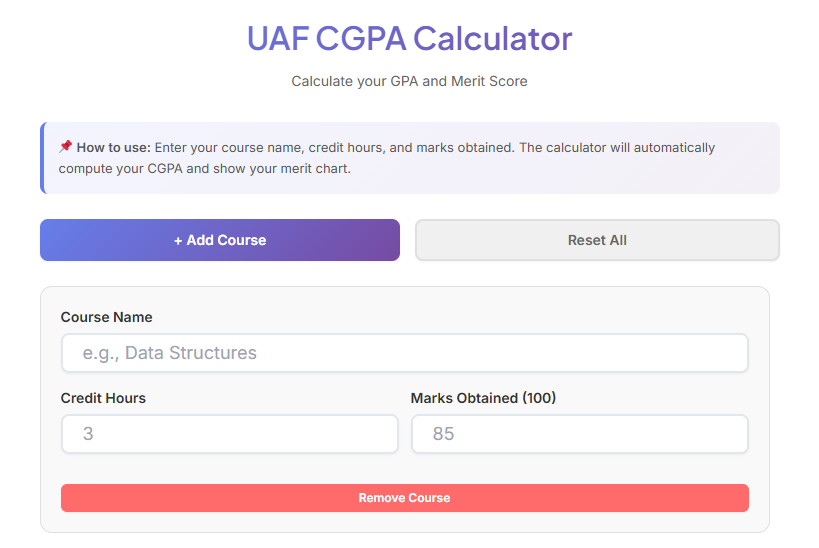
The heart of the CGPA calculator UAF lies in its course management system. To begin, you will use the prominent “+ Add Course” button. This is your gateway to inputting your academic data. Clicking this button dynamically generates a new course entry form on the page. Initially, the area is empty, displaying a message that prompts you to click the button to start. This design choice keeps the interface uncluttered until you are ready to input information.
Each new course entry appears as a self-contained block, which we can call a “course item.” This modular design is visually appealing and highly functional. It separates each course, preventing confusion and making the data for each subject easy to review. Every course item contains three primary input fields, which are the essential components for an accurate calculation.
The Input Fields Explained
- Course Name: This is a simple text field where you can enter the title of your subject, such as “Data Structures” or “Introduction to Soil Science.” While this field is optional for the calculation itself, filling it out is highly recommended. It helps you keep track of which entry corresponds to which subject, especially when you are calculating the GPA for an entire semester with multiple courses. It transforms the calculator from a simple number cruncher into a personalized academic record.
- Credit Hours: This numerical input field is crucial. Here, you enter the number of credit hours assigned to the course. The UAF grading system, like many others, uses credit hours to weight the importance of each course in the final CGPA calculation. A 4-credit-hour course will have a greater impact on your CGPA than a 1-credit-hour lab. The field is designed to accept both whole numbers and decimals (e.g., 3 or 1.5), accommodating various course structures.

- Accuracy in this field is paramount for a correct result from the CGPA calculator UAF.
- Marks Obtained (out of 100): This is the final piece of data required for each course. In this field, you enter the total marks you achieved in the subject, based on a scale of 100. The tool’s internal logic then converts these marks into the corresponding Grade Point (GP) according to the official UAF grading scale. For example, marks of 85 will be converted to a GP of 3.3, while marks of 93 or above will yield a perfect 4.0. This automated conversion is a key feature of the CGPA calculator UAF, as it removes the need for you to manually look up the grading policy for each mark.
Managing Your Entries
As you add more courses, the page populates with more course items. For those semesters with a heavy workload, you can add as many courses as you need. Each item also includes a “Remove Course” button. This allows for easy correction. If you enter a course by mistake or want to remove a subject from the calculation, a single click will delete the entire entry. The interface will instantly update, and the CGPA will be recalculated. This flexibility makes the CGPA calculator UAF a dynamic and user-friendly tool.
Furthermore, a “Reset All” button is located next to the “Add Course” button. This is a powerful feature for when you want to start a completely new calculation, perhaps for a different semester. Clicking it will prompt a confirmation message to prevent accidental data loss. Once confirmed, it clears all course entries from the page, returning the calculator to its initial state. This feature is particularly useful when you want to use the uaf calculator for various scenarios without having to manually remove each course one by one.
The Power of Real-Time Calculation
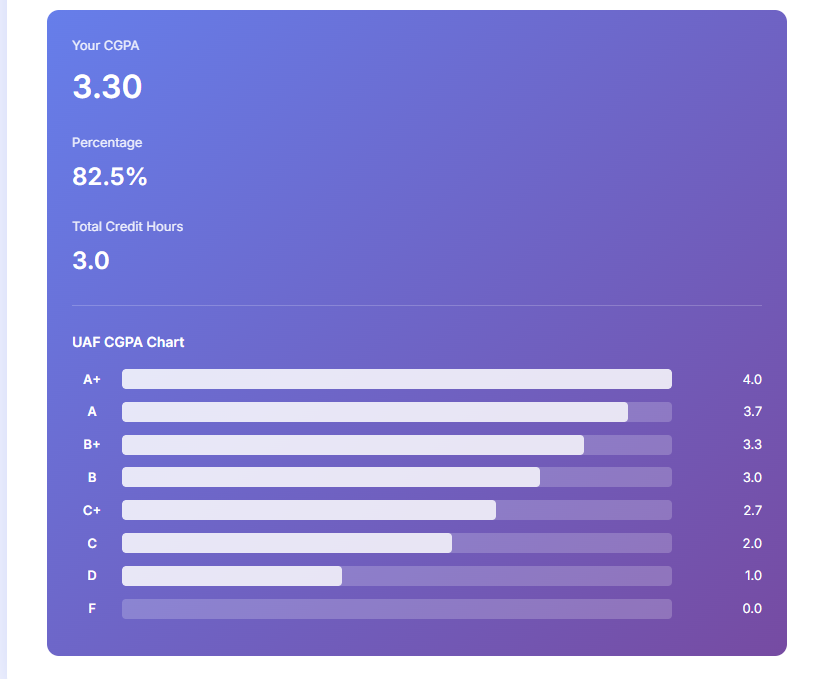
One of the most significant advantages of this CGPA calculator UAF is its ability to perform calculations in real-time. As soon as you enter valid data into the credit hour and marks fields for any course, the results section at the bottom of the page immediately appears and updates. There is no need to click a “Calculate” button after entering your data. This instant feedback loop is incredibly powerful for several reasons.
First, it allows for rapid scenario planning. You can tweak the numbers to see how your potential performance in a course might affect your overall CGPA. For instance, you can enter your expected marks for an upcoming final exam and see the immediate impact on your semester’s GPA. This can be a great motivator, showing you exactly what you need to achieve to reach a target CGPA. Using it as a projection tool transforms the CGPA calculator UAF from a simple reporting tool into a strategic academic planner.
Second, the real-time functionality helps in identifying errors instantly. If you input a number and the resulting CGPA seems wildly incorrect, you can immediately review your entries for typos. This immediacy prevents the frustration of completing a long list of courses only to find out at the end that a single mistake skewed the entire result. The seamless interaction, where your inputs are directly and instantly reflected in the output, makes the tool feel responsive and intelligent. This is a core strength of this uaf gpa calculator.
The experience is smooth and efficient. As you add more courses or adjust the marks on existing ones, you can watch the CGPA, percentage, and total credit hours change dynamically. This makes the CGPA calculator UAF not just a utility, but an interactive dashboard for your academic performance. The constant, live updates ensure that the information displayed is always accurate based on the data you have provided, giving you full confidence in the results. This dynamic nature solidifies its position as a superior uaf cgpa calculator.
Understanding the Results Section
Once you begin entering your course data, a dedicated results section becomes visible. This section is designed to present the calculated metrics in a clear, digestible format. It has a distinct background color, setting it apart from the input area and drawing your attention to the final output. This part of the CGPA calculator UAF consolidates all the key performance indicators you need to understand your academic standing. The section is broken down into three main numerical results and a visual cgpa chart.
Key Performance Metrics
- Your CGPA: This is the most prominent value in the results section, displayed in a large, bold font. It shows your calculated Cumulative Grade Point Average, rounded to two decimal places for standard academic reporting. This number is the weighted average of your grade points, calculated using the total quality points divided by the total credit hours. It is the single most important metric for assessing your overall performance, and its prominent display reflects that. This is the primary output of the CGPA calculator UAF.
- Percentage: Below the CGPA, the calculator displays an equivalent percentage. This is calculated by converting your CGPA (out of 4.0) into a percentage score. For students and parents more accustomed to a percentage-based system, this provides a familiar reference point. It helps in contextualizing the CGPA score, offering another perspective on your academic achievement. This dual representation makes the uaf calculator versatile.
- Total Credit Hours: The third numerical display shows the sum of the credit hours from all the courses you have entered. This is a useful piece of information for cross-verification. You can quickly check if the total matches the credit hours you have registered for in a semester, ensuring that you haven’t missed a course or entered a wrong value. It adds a layer of transparency to the calculation performed by the CGPA calculator UAF.
The combination of these three metrics provides a comprehensive snapshot of your academic performance for the entered courses. The design ensures that you can absorb this vital information at a glance, making the process of tracking your progress efficient and straightforward. Many students rely on an effective CGPA calculator UAF to keep their academic goals in focus.
The Visual CGPA Chart
In addition to the numerical results, the tool includes a visual cgpa chart. This graphical representation of the UAF grading scale serves as a quick reference guide and adds a layer of visual context to your calculated CGPA. Titled “UAF CGPA Chart,” this feature breaks down the relationship between letter grades, grade points, and the marks required to achieve them, although marks are implicitly represented by the grade points.
The chart lists the different letter grades (A+, A, B+, B, C+, C, D, F) along a vertical axis. For each grade, three pieces of information are displayed:
- The Letter Grade: Clearly stated on the left (e.g., “A+”).
- The Grade Point: The corresponding numerical grade point is shown on the right (e.g., “4.0”).
- A Visual Bar: In the middle, a horizontal bar provides a visual representation of the grade point’s value relative to the maximum of 4.0. The “A+” bar is completely full, representing 100% of the possible points, while the bar for a “B” is proportionally shorter.
This cgpa chart is not just a static image; it’s an integrated part of the tool that helps you understand where your performance in each course falls on the official grading scale. When you use the CGPA calculator UAF, you are not just getting a number, but also a visual key to interpret that number.
For students who are visual learners, this chart can be particularly helpful in understanding the grading system. It clarifies the benchmarks for achieving different levels of academic success. For example, it instantly shows that the difference between a ‘B’ (3.0) and a ‘B+’ (3.3) is a significant jump. This visual aid reinforces the information and makes the uaf cgpa calculator a more complete educational tool. The inclusion of the cgpa chart enriches the user experience significantly.
Beyond GPA: A Tool for Merit Calculation
While the primary function is clearly stated in its name, the versatility of the CGPA calculator UAF extends to other important academic calculations. For prospective students or those applying for postgraduate programs, the merit score is a critical number. The tool can be adapted to serve as a uaf merit calculator. The merit formula for admissions at UAF often involves a weighted combination of marks from previous academic records (like F.Sc or B.Sc) and sometimes an entry test score.
To use the tool as a uaf merit calculator, you can creatively use the existing fields. For example, you could treat each component of the merit formula as a “course.” One “course” could be your matriculation marks, another your intermediate marks, and a third your entry test score. You would need to translate the weighting of each component into the “credit hours” field and the actual marks (normalized to 100) into the “marks” field. While this requires a bit of manual setup, it allows you to leverage the powerful calculation engine of the tool to compute a weighted average, which is the essence of a merit calculation.
This adaptability makes the CGPA calculator UAF more than just a GPA tool. It becomes a multi-purpose academic uaf calculator that can assist students at different stages of their educational journey. Whether you are a current student managing your semester’s performance or a prospective student trying to estimate your admission chances, this tool provides the framework to get the numbers you need. Its flexible design is a testament to its thoughtful construction. Using it as a uaf merit calculator showcases its hidden potential beyond its primary function.
The Student’s Digital Companion: Practical Applications
The true value of the CGPA calculator UAF is realized in its everyday application. It is more than a one-time-use tool; it is a digital companion that can support you throughout your entire degree program. Let’s explore some practical scenarios where this tool proves to be indispensable.
1. Semester Planning and Goal Setting: At the beginning of a new semester, you can use the calculator to set clear academic goals. By entering all your registered courses and their credit hours, you can experiment with target marks for each subject. This allows you to see what grades you need to achieve to either maintain your current CGPA or raise it to a desired level. For instance, if you aim for a 3.5 GPA for the semester, the CGPA calculator UAF can help you figure out the combination of grades that will get you there. This transforms abstract goals into concrete targets.
2. Mid-Term Performance Analysis: After your mid-term exams, you have a clearer picture of your standing in each course. You can update the calculator with your mid-term scores and estimated final exam scores to get a projected final grade for the semester. This can act as an early warning system. If your projected GPA is lower than expected, you know you need to intensify your efforts for the remainder of the semester. This proactive use makes the uaf gpa calculator a vital tool for academic management.
3. Final Grade Verification: When your final results are announced, the CGPA calculator UAF can be used to verify the official calculation. While universities have robust systems, having an independent verification provides peace of mind. By entering your final marks for all courses, you can quickly calculate your semester GPA and see if it matches the one on your transcript. This simple check ensures accuracy and empowers you to have an informed conversation with the academic office if you find a discrepancy.
4. Scholarship and Honor Roll Eligibility: Many scholarships, awards, and honor rolls have specific CGPA requirements. This tool helps you track your eligibility in real-time. You can continuously monitor your CGPA to ensure you remain above the required threshold. This is crucial for students who depend on financial aid or who are striving for academic honors. The uaf cgpa calculator is an essential resource in this context.
In essence, the tool integrates seamlessly into the academic life of a UAF student. Its ease of use and instant results encourage regular engagement, promoting a more proactive and informed approach to academic management. The consistent use of this CGPA calculator UAF fosters a sense of ownership over one’s academic journey.
Read also this: CGPA Calculator UAF: 1 Ultimate Tool for Success
A Superior Alternative: Why This UAF GPA Calculator Stands Out
In the digital landscape, students have access to various generic GPA calculators. However, a specialized tool designed specifically for a single institution offers significant advantages. This uaf gpa calculator stands out from the competition for several key reasons, making it the superior choice for any student at the University of Agriculture, Faisalabad.
First and foremost is accuracy. The core of any calculator is its algorithm, and this tool’s algorithm is built on the specific grading policy of UAF. It correctly maps the marks-out-of-100 system to the 4.0 GPA scale as defined by the university. Generic calculators might use different conversion tables, leading to incorrect GPA values and false confidence or unnecessary anxiety. With this tool, you can be certain that the calculation is tailored to your university’s standards. This is the most critical feature of a reliable CGPA calculator UAF.
The second advantage is its user-centric design. The interface is not cluttered with ads or unnecessary features. It focuses purely on the task at hand: calculating your GPA. The real-time updates, easy course management, and clear presentation of results are all designed with the student’s needs in mind. The experience is frictionless, encouraging students to use it regularly. This focus on usability makes it a more effective and pleasant tool to interact with compared to many generic alternatives.
Finally, its feature set is perfectly curated. The inclusion of a visual cgpa chart and the flexibility to be used as a uaf merit calculator add significant value without complicating the primary function. It provides context and extends its utility beyond just a single purpose. It’s a tool that understands the broader academic context of a UAF student, from understanding the grading system to planning for future admissions. This holistic approach is what makes this CGPA calculator UAF an indispensable asset. It is truly a premium uaf cgpa calculator built for the modern student.
FAQs
What is the CGPA calculator UAF, and how does it work?
The CGPA calculator UAF is a specialized tool designed for students at the University of Agriculture, Faisalabad. It helps you calculate your Cumulative Grade Point Average (CGPA) by entering your course names, credit hours, and marks. The tool instantly computes your CGPA, percentage, and total credit hours, making academic tracking simple and accurate.
Can I use the CGPA calculator UAF for merit calculation?
Yes, the CGPA calculator UAF can also be adapted as a merit calculator. By treating each component of the merit formula (e.g., matric marks, intermediate marks, entry test score) as a course, you can calculate a weighted average to estimate your merit score for UAF admissions.
Why should I use the CGPA calculator UAF instead of a generic GPA calculator?
The CGPA calculator UAF is tailored specifically to the grading system of the University of Agriculture, Faisalabad. Unlike generic calculators, it ensures accurate results based on UAF’s grading policies, making it the most reliable and user-friendly option for UAF students.

