
Angle Convert: Your Guide to a Powerful Conversion Tool
Angles are a fundamental concept in our daily lives, even if we don’t always notice them. They are essential in fields ranging from mathematics and physics to engineering and navigation. The ability to perform an accurate angle convert operation is crucial for professionals and students alike. Whether you’re a land surveyor plotting boundaries or a student grappling with trigonometry homework, understanding how to switch between different units of measurement is a necessary skill.
People often need a quick, reliable, and precise way to handle angle conversion without getting bogged down in complex calculations. This is where a dedicated tool becomes invaluable, providing instant and accurate results for any angle convert task.
This guide will walk you through a powerful online tool designed to simplify every aspect of angle conversion. We will explore its features, understand how to use it effectively, and discover its practical applications in various real-world scenarios. The need for a seamless angle convert process is widespread, and having the right utility can save significant time and prevent errors that might arise from manual calculations. From simple classroom exercises to complex professional projects, the ability to perform an angle convert operation with confidence is a game-changer.
Read This : timezone converter
The Angle Convert Tool: An Overview
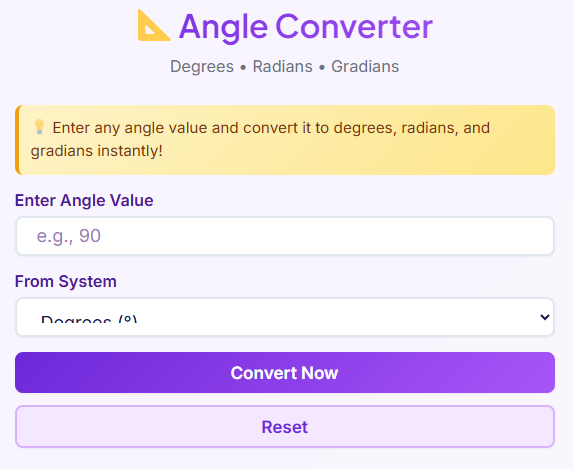
At its core, this angle convert tool is a specialized online calculator created for one purpose: to provide fast, accurate, and user-friendly angle conversions. It eliminates the guesswork and tedious manual steps involved in changing measurements from one unit to another. The tool supports the three most common units of angular measurement: Degrees, Radians, and Gradians. This comprehensive support ensures that no matter what field you are in, your specific angle convert needs are covered.
Designed with the user in mind, the tool is fully responsive and mobile-friendly. You can access it from your desktop computer, tablet, or smartphone, ensuring you have a reliable angle convert solution wherever you are. Results are generated instantly, appearing on the screen the moment you click the “Convert Now” button.
Users trust this angle convert tool because it consistently delivers precise results without any unnecessary complexity. The clean interface and straightforward process make it the go-to choice for anyone needing to perform an angle convert operation quickly and efficiently. It stands as a prime example of how a well-designed utility can simplify a complex task.
Input Section Explained: Starting Your Conversion
The first step in using the angle convert tool is entering your starting value. The input section is designed for simplicity and clarity. You will see a single field labeled “Enter Angle Value,” where you can type the number you wish to convert. The tool is built to handle a wide variety of numerical inputs, making the angle convert process highly flexible.
Entering Your Angle Value

To begin, simply click on the input box and type in the numerical value of your angle. The system supports both whole numbers and decimals. For example, if you need to convert 90 degrees, you would type “90.” If you are working with a more specific measurement like 45.5 degrees, you can enter “45.5” directly. The tool’s ability to handle decimal points is crucial for achieving high precision in any angle convert task.
Common examples that users frequently enter include standard angles like 90, 180, 270, and 360 for degrees. For radians, values like 1.57 (approximately π/2) or 3.14159 (approximately π) are often used. No matter the input, the tool is ready to process it. This initial step is the foundation of every angle convert operation you will perform.
Unit Selection: Choosing Your ‘From’ System

Once you have entered your numerical value, the next step is to specify its current unit. Directly next to the input field, you will find a dropdown menu. This menu allows you to select the unit of the angle you just entered. This is a critical part of the angle convert process, as it tells the tool what measurement system you are starting from. The tool supports Degrees, Radians, and Gradians, covering the most common systems used globally. A successful angle convert depends on correctly identifying this starting unit.
Degrees (°): The Most Common Unit
Degrees are perhaps the most widely recognized unit for measuring angles. A full circle is divided into 360 degrees. This system is used extensively in everyday life, from geometry classes to construction and design. When you see an angle measured with the small circle symbol (°), you are dealing with degrees. Selecting “Degrees” from the dropdown tells the tool that your input value represents a fraction of this 360-part circle, preparing it for the angle convert calculation.
Radians (rad): The Mathematical Standard
Radians are the standard unit of angular measure in mathematics and many branches of science and engineering. One radian is the angle created at the center of a circle by an arc whose length is equal to the circle’s radius. A full circle contains 2π radians. If you are a student tackling calculus or a physicist working on wave mechanics, you will frequently use radians. This unit is essential for topics that involve circles and periodic functions.
Performing a radians to degrees calculator function is a very common need, and this tool handles it effortlessly. Knowing how to convert radians to degrees becomes simple with this utility. This is a key feature for anyone needing a reliable angle convert solution.
Gradians (grad): The Decimal-Based Unit
Gradians, sometimes called “gons,” are a less common but still important unit of angular measurement. In this system, a full circle is divided into 400 gradians. This means a right angle is 100 gradians, which can simplify some calculations by using a base-100 system. Gradians are primarily used in surveying and some specific fields of engineering. While you may not encounter them as often as degrees or radians, having them included ensures that the angle convert tool is truly comprehensive for all users. The ability to execute a perfect angle convert from gradians is a testament to the tool’s versatility.
The ‘Convert Now’ Button: Instant Calculation
After entering your value and selecting its unit, the final action is to click the “Convert Now” button. This button is the trigger for the entire angle convert process. The moment you click it, the tool takes your input and performs the necessary calculations behind the scenes to provide you with the equivalent values in all supported units.
What happens next is a display of pure efficiency. The conversion is practically instantaneous. There is no waiting, no loading screens, and no delays. The system is optimized for speed, ensuring that your workflow is not interrupted. This focus on immediate results is a core part of the user experience.
You can trust that the angle convert results are not only fast but also highly accurate. The tool is engineered to maintain precision, giving you confidence in the numbers it produces. This makes it an indispensable resource for professionals who rely on exact measurements. This swift and accurate angle convert capability is what sets the tool apart.
The ‘Reset’ Button: A Clean Slate
Sometimes you need to start over. You might have made a mistake entering a number, or you might simply want to perform a new, unrelated calculation. This is where the “Reset” button comes in. Located next to the “Convert Now” button, its function is simple and intuitive: it clears all the fields.
Clicking the “Reset” button will instantly remove the value you entered in the input field, clear the results from the screen, and prepare the tool for a fresh start. This feature greatly improves the user experience, especially when you are performing multiple conversions in one session.
Instead of manually deleting your previous entries, a single click gives you a clean slate. This thoughtful addition makes the process of performing a new angle convert operation much smoother and more efficient. For tasks that require a series of different calculations, such as converting a list of coordinates, this function is a significant time-saver. It’s a small detail that makes a big difference in the overall usability of this angle convert tool.
Results Section: Understanding the Output
Once you click “Convert Now,” the results of your angle convert operation appear instantly in a dedicated section below the controls. The layout is designed for maximum clarity and ease of use. The tool doesn’t just give you one result; it provides the converted value in all three supported units simultaneously.
Clear and Organized Result Cards
The output is presented in three distinct “result cards,” one for each unit: Degrees, Radians, and Gradians. Each card clearly labels the unit and displays the corresponding numerical value. For example, if you convert 90 degrees, you will see a card for Degrees showing “90,” a card for Radians showing “1.5708,” and a card for Gradians showing “100.” This parallel display allows you to see all equivalent measurements at a glance, making it a powerful feature for any angle convert task.
High Precision and Readability
The results are displayed with a high degree of precision, typically to several decimal places. This is essential for engineering, scientific, and navigational applications where accuracy is paramount. Furthermore, the results section supports specialized formats. For the Degrees result, the tool also functions as a degrees minutes seconds calculator. It will show the value not just as a decimal but also in the Degrees, Minutes, Seconds (DMS) format. This is incredibly useful for tasks involving dms to decimal conversion or decimal to dms conversion, which are common in cartography and navigation.
The ‘Copy’ Button Feature
Each result card includes a “Copy” button. This small but mighty feature allows you to copy the numerical value to your clipboard with a single click. You can then paste it directly into a spreadsheet, document, or another application. This eliminates the risk of transcription errors and speeds up your workflow significantly. This copy function enhances the utility of every angle convert operation you perform with the tool. Whether you need a simple angle convert or a more complex one involving DMS, the results section delivers.
Error Handling: A Smart and Forgiving System
A well-designed tool anticipates user errors and handles them gracefully. This angle convert tool includes smart error handling to guide you and prevent confusion. The goal is to ensure a smooth user experience, even when the input isn’t perfect. This functionality is crucial for a reliable angle convert service.
If you click the “Convert Now” button without entering any value in the input field, the tool will not crash or show a confusing message. Instead, a helpful prompt will appear, usually right below the input box, reminding you to enter a number to convert. This gentle guidance helps new users understand how the tool works without causing frustration.
Similarly, the tool is designed to handle invalid inputs. If you accidentally type text (like “abc”) or a mix of numbers and non-numeric characters (like “90deg”) into the input field, the system will recognize that it cannot perform a mathematical conversion. It will then display a clear error message, such as “Please enter a valid number.” This prevents incorrect calculations and ensures the integrity of every angle convert result. This robust error handling matters because it builds user trust. It shows that the tool is not just powerful but also thoughtful, making the process of performing an angle convert as seamless as possible.
Real-Life Use Cases for Angle Conversion
The practical applications of an angle convert tool are vast and varied, touching numerous professional fields and academic disciplines. The ability to seamlessly switch between units is not just a convenience; it’s often a necessity for accuracy and interoperability. A student might need a radians to degrees calculator for their physics homework, while a GIS analyst might need to convert dms to decimal for mapping software.
Engineering and Physics
In engineering, especially in mechanical and civil engineering, angles are fundamental to design and construction. While blueprints might use degrees for simplicity, many of the underlying physics calculations, particularly those involving rotational motion or wave mechanics, are performed using radians. An engineer might need to use a radians to degrees calculator to translate theoretical calculations into practical schematics. For example, when analyzing the stress on a rotating shaft, the formulas often use radians. The engineer would perform the calculations and then use an angle convert tool to switch the final result back to degrees for the manufacturing team.
Students and Education
For students learning trigonometry, geometry, or physics, understanding the relationship between different angle units is a core part of the curriculum. Homework assignments frequently require students to practice these conversions. A question might ask how to convert radians to degrees, and while students must learn the manual method, a tool can help them quickly check their work.
Having a reliable angle convert utility allows them to verify their answers and build confidence. It serves as an excellent learning aid, reinforcing concepts without giving away the steps. Advanced calculations, such as those involving complex numbers or vectors, can sometimes be simplified using other mathematical tools. For example, a student might use a Matrix Calculator to solve systems of linear equations that describe geometric transformations.
GIS and Mapping
Geographic Information Systems (GIS) and cartography rely heavily on precise coordinate systems to map the Earth’s surface. Latitude and longitude are often expressed in Degrees, Minutes, and Seconds (DMS). However, many software applications and databases require these coordinates in a decimal format for easier computation.
This creates a constant need for dms to decimal conversion. A GIS analyst might receive a set of survey points in DMS format and need to convert them to decimal degrees to import them into a mapping project. The angle convert tool, with its ability to handle dms to decimal transformations, is invaluable in this context.
Navigation and Astronomy
Similarly, in navigation, both at sea and in the air, positions are traditionally plotted using the DMS system. However, digital navigation systems often use decimal degrees. A navigator might need to perform a decimal to dms conversion to plot a position from their GPS onto a traditional paper chart. In astronomy, the positions of celestial objects are also tracked using a similar coordinate system.
An astronomer might need to perform a decimal to dms conversion to align a telescope. This makes a flexible angle convert tool essential for accuracy. Sometimes, related calculations are also necessary, like finding the distance between two points, which might involve using a Pythagorean Calculator to determine the length of the hypotenuse in a right-triangle model.
Surveying
Land surveyors use specialized instruments to measure angles and distances with extreme precision. These measurements are often recorded in the field using a degrees minutes seconds calculator. Back in the office, these measurements need to be entered into software for creating maps and legal descriptions of property boundaries. The ability of the angle convert tool to interpret and display DMS values makes it a perfect companion for surveyors who need to verify their data or convert it for different software platforms.
For more complex survey calculations, a surveyor might even need a Logarithm Calculator to handle certain types of geodetic formulas. This demonstrates how a simple angle convert function fits into a larger ecosystem of mathematical tools required for professional work. The efficiency of a good angle convert process cannot be overstated in these highly precise fields.
FAQs
What’s the difference between degrees, radians, and gradians?
These are all different units for measuring angles, and you might need a specific one depending on what you’re doing. Here’s a quick guide to help you choose the right one for your angle convert task:
Degrees (°): This is the most common unit. A full circle is divided into 360 degrees. You’ll see degrees used everywhere, from basic geometry to construction and design.
Radians (rad): This unit is the standard in higher-level mathematics and physics. It’s related to the radius of a circle. If you’re a student working on trigonometry or calculus, or an engineer dealing with rotational motion, you will frequently use radians.
Gradians (grad): This is a less common unit where a full circle is divided into 400 gradians. Its main advantage is that a right angle is exactly 100 gradians, which can simplify some calculations. It’s mostly used in specific fields like surveying.
Our tool lets you perform an angle convert between any of these units instantly, so you always have the right measurement for your needs.
Is this angle convert tool free to use?
Yes, absolutely. Our angle convert tool is completely free for everyone to use. There are no hidden fees, subscription costs, or limits on how many times you can use it. You can perform as many conversions as you need, whenever you need them, without any charge. Our goal is to provide a simple and accessible tool for students, professionals, and anyone who needs quick and accurate angle conversions.

