
Calculate Age
Age Difference Between Two Dates
The Ultimate Guide to Using the Age Difference Calculator
Have you ever tried to calculate exactly how old someone is down to the day, only to get stuck counting months on your fingers? Or maybe you’ve needed to check the precise gap between two birthdays for a document or just out of curiosity. While we often think we know our age, pinning down the exact number of days, weeks, or even minutes we’ve been alive can be surprisingly tricky. This is where an age difference calculator becomes an essential tool for everyday life.
Whether you are planning a milestone birthday party, filling out legal forms, or just settling a friendly debate about who is older, having a reliable way to check dates instantly removes the guesswork. An age difference calculator does more than just tell you how many candles to put on a cake. It provides a comprehensive breakdown of time, helping you visualize duration in ways that simple mental math just can’t match.
In this guide, we will walk you through every single feature of the tool on your screen. We aren’t going to bore you with technical jargon or talk about how the website was built. Instead, we’ll focus entirely on what you see, where to click, and how to get the most out of this versatile age difference calculator. From checking your zodiac sign to counting down the seconds until your next celebration, you’ll discover why this simple interface is the go-to solution for thousands of users every day.
The Hero Section: Your First Look at the Tool
When you first land on the page, the design is clean, welcoming, and immediately intuitive. You are greeted by a friendly Birthday Icon (🎂) sitting right next to the main title, “Age Calculator.” This visual cue instantly signals that you are in the right place.
Beneath the title, you’ll see a short, helpful description. It briefly explains that this tool allows you to calculate your exact age or determine the time interval between two dates. This text is crucial because it reassures you that the age difference calculator is versatile—it’s not just for birthdays; it’s for any time-related query you might have.
The overall feel of this top section is trustworthy. There are no cluttery ads or confusing pop-ups blocking your view. It’s just you and the tool, ready to help you figure out age or time gaps with zero friction. The design choices here—clear fonts, ample whitespace, and simple icons—make the tool accessible for everyone, from tech-savvy students to grandparents checking the age of their grandchildren.
How to Calculate Age: The Input Section
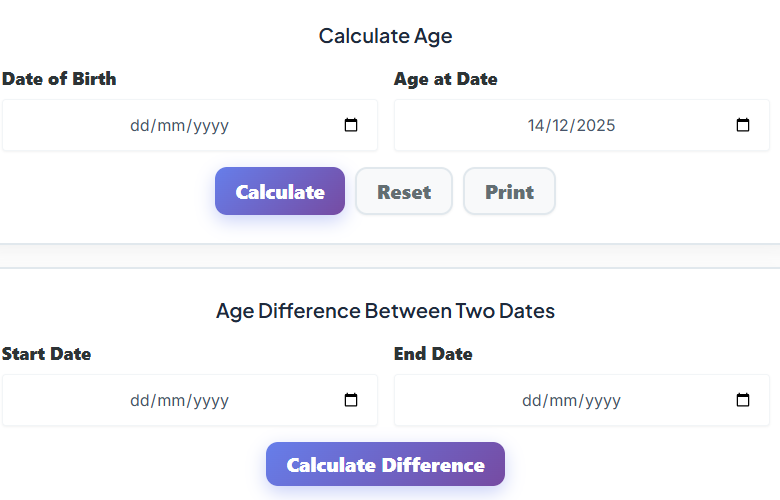
Moving down from the header, you encounter the core of the tool: the “Calculate Age” input card. This is where the magic happens. The interface here is designed to be foolproof, ensuring you never enter the wrong information.
The Date of Birth Field
The first thing you see is the “Date of Birth” field. This is the starting point for any calculation. When you click or tap on this box, a calendar picker usually drops down, allowing you to easily scroll through months and years to find the exact birth date. You don’t have to type it in manually if you don’t want to, which prevents typos. This field is essential for anyone trying to work out age from date of birth accurately.
The “Age at the Date of” Field
Right next to or below the birth date, you will find the “Age at the Date of” field. By default, this is usually set to today’s date. This is a smart feature. It means that if you just want to know how old you are right now, you don’t have to change a thing.
However, the real power of the age difference calculator lies in its flexibility. You can change this “Age at the Date of” field to a future date. Want to know exactly how old you will be on your retirement day in 2050? Or perhaps you need to know a child’s exact age on the first day of school next September? By adjusting this date, the tool allows you to forecast precise ages for future events. This is incredibly useful for planning and helps you answer the question “how old will I be?” just as easily as “what is my age right now?”
Buttons & User Interaction: Simple and Responsive
Once your dates are set, you have a few clear options. The design team has kept the buttons large, distinct, and easy to click.
The Calculate Button

The most prominent button is “Calculate.” It’s usually highlighted in a primary color like blue or green to draw your eye. When you click this, the age difference calculator instantly processes the dates you entered. There is no waiting time; the transition to the results is immediate. It feels snappy and responsive, giving you the answer the moment you ask for it.
The Reset Button
Next to the calculate action, you will see a “Reset” button. This is a handy feature if you want to start over completely. Maybe you made a mistake entering the year, or perhaps you want to run a calculation for a different person. One click here clears all the fields back to their default state, saving you from backspacing through your previous entries.
The Print Button
For those who need a hard copy, there is often a “Print” button. This is fantastic for administrative tasks. If you are a teacher organizing student records or an HR manager verifying employee details, you can print the results directly from the screen. The layout adjusts perfectly for paper, ensuring you have a clean, physical record of the age calculation.
Understanding Your Results: The Exact Age Display
After hitting calculate, the interface expands or updates to reveal your results. The primary result is impossible to miss. It displays your exact age in a large, bold font, broken down into Years, Months, and Days.
For example, instead of just saying “28 years old,” the tool might show “28 Years, 4 Months, and 12 Days.” This level of precision is exactly why people use an age difference calculator. It settles disputes and clarifies timelines instantly. The numbers are usually highlighted in a different color or font weight to make them stand out against the background.
This section directly answers the user’s primary query: “what is my age?” By presenting it in this detailed format, the tool removes any ambiguity. It’s particularly satisfying to see the months and days included, as it gives a sense of completeness that a simple year count lacks.
The Next Birthday Section: Counting Down the Celebration
Below the main age result, the tool adds a layer of excitement with the “Next Birthday” section. This area is designed to build anticipation. First, it explicitly states the date of your next birthday and the day of the week it falls on. Knowing your birthday is on a Saturday next year versus a Tuesday can make a big difference for party planning!
But the best part is the live countdown. You will see a ticking clock showing the Months, Days, Hours, Minutes, and even Seconds until your special day. Watching the seconds tick down adds a dynamic, interactive element to the page. It transforms a static utility tool into something fun and personal.
For users who like to celebrate their “birthday month” or countdown weeks in advance, this feature of the age difference calculator is a favorite. It turns data into an emotional connection, reminding you that celebration is getting closer with every passing second.
The Summary Breakdown: Time in Every Format
If you are a fan of statistics or just curious about how long you’ve been on Earth, the Summary Breakdown section is fascinating. Here, the tool takes the duration calculated and breaks it down into every possible unit of time.
You will see a series of cards or list items displaying:
- Total Years
- Total Months
- Total Weeks
- Total Days
- Total Hours
- Total Minutes
- Total Seconds
This perspective is mind-blowing for many users. Seeing that you have been alive for over 10,000 days or nearly a billion seconds changes how you view your time. It’s also incredibly practical. For instance, if you want to celebrate your “10,000th day” birthday, this age difference calculator helps you pinpoint that date.
This section is also great for educational purposes. Teachers can use it to help students figure out age in different units, helping them grasp concepts of time conversion without doing the tedious math themselves.
Zodiac Signs & Fun Facts: A Personal Touch
Just when you thought the tool was purely functional, it surprises you with a section dedicated to personality and fun facts. Based on the birth date you entered, the interface automatically identifies and displays your Zodiac sign. You’ll see the icon (like the scales for Libra or the lion for Leo) and the name of the sign.
Next to the Zodiac, you’ll typically find your Birthstone. It tells you the gem associated with your birth month, like a ruby for July or a diamond for April.
Some versions of the tool even include the Chinese Zodiac animal, letting you know if you were born in the Year of the Dragon, the Rabbit, or the Tiger. These details might seem small, but they add significant value. They make the results feel personalized to you. Users often take screenshots of this section to share on social media, adding a layer of engagement that goes beyond a standard age cal tool.
Using the Age Difference Between Two Dates Feature
Further down the page, or perhaps on a separate tab within the tool, you will find the functionality that truly defines the age difference calculator. This section is dedicated to comparing two specific dates.
Start Date and End Date Inputs
Here, you are presented with two distinct fields: “Start Date” and “End Date.” Unlike the birthday section, this isn’t necessarily about a person. It could be about anything. You select a start date (perhaps the day you started a job) and an end date (today, or a future retirement date).
Calculating the Gap
Once you hit the “Calculate Difference” button, the tool performs a precise subtraction. The result is shown clearly in years, months, and days. This functions effectively as an age gap calculator, perfect for couples wanting to know the exact time difference between their births.
But it’s also used for history projects, employment records, or tracking the duration of subscriptions. The flexibility here is unmatched. You aren’t limited to birthdays; you can measure the lifespan of a pet, the duration of a historical event, or the time elapsed since you quit a bad habit.
Real-Life Scenarios: How People Use This Tool
To truly understand the value of an age difference calculator, it helps to look at how real people use it in their daily lives. The versatility of the interface means it serves a wide range of needs.
Scenario 1: The Protective Parent
Imagine a parent, Sarah, filling out registration forms for a Little League baseball team. The league has strict age cut-offs based on specific dates. Instead of guessing or struggling to count backward, Sarah opens the age difference calculator. She enters her son’s birth date and the league’s cut-off date. Instantly, she sees he is exactly 9 years, 11 months, and 2 days old on that date, confirming he is eligible for the Under-10 division. The tool gives her peace of mind and accurate records.
Scenario 2: The Curious Couple
Mark and Emily have always joked about who is the “senior” in their relationship. They know they are born two years apart, but they want the specifics. They open the tool and use it as an age gap calculator. Mark enters his birthday as the start date and Emily’s as the end date. The result pops up: 2 years, 3 months, and 14 days. It settles the debate instantly and becomes a fun fact they share with friends.
Scenario 3: The Diligent Student
Alex is a university student applying for a scholarship that requires applicants to be under 25 years of age by the application deadline. He wants to be absolutely sure he qualifies. He uses the tool to work out age from date of birth relative to the deadline day. The result shows he will be 24 years and 11 months old on the deadline, confirming he is safe to apply. The visual confirmation on the screen saves him from the anxiety of making a calculation error.
Who Benefits Most? Top Use Cases
The beauty of this interface is that it caters to a massive audience. Here is who benefits most from keeping an age difference calculator bookmarked:
HR Professionals and Office Workers
For anyone in human resources, calculating tenure, retirement eligibility, or exact age for insurance benefits is a daily task. This tool streamlines the process, ensuring compliance and accuracy without the headache of manual counting. It’s an essential utility for the modern office.
Event Planners
Planning a “Golden Birthday” (where your age matches your birth date) or a 10,000-day party requires precision. Event planners use the age difference calculator to identify these unique milestones for their clients, offering creative reasons to celebrate that go beyond the standard annual cycle.
Medical Professionals
Doctors and nurses often need to calculate a patient’s age in months or weeks, especially for infants and toddlers, to determine correct medication dosages or developmental milestones. The “Months” and “Weeks” breakdown in the summary section is vital for this.
Genealogists and Historians
When building family trees, knowing the exact age of an ancestor at the time of their marriage or death adds depth to the story. This tool helps researchers piece together timelines with accuracy, turning dry dates into a coherent life story.
Exploring Related Tools
While the age difference calculator is powerful, sometimes you need to dig deeper into specific types of dates. The interface often suggests related calculators that can help with more niche queries.
For example, if you need to know just the total count of days without the years and months breakdown, you might see a suggestion for this:
Days Between Dates: Calculate exact days between two dates. Open Calculator →
Perhaps you are planning a project timeline and need to exclude weekends to see how much actual work time you have. In that case, the tool might point you toward:
Working Days Calculator: Calculate business days excluding weekends. Open Calculator →
Or, if you are working with corporate schedules or supply chains that operate on week numbers rather than standard dates, this feature is indispensable:
Week Number Calculator: Find week number for any date. Open Calculator →
These integrated links within the UI make it easy to jump between tools depending on the specific nuance of your time-related problem.
Why Accuracy Matters
You might wonder, “Why can’t I just do the math in my head?” The reality is that calendars are messy. We have leap years every four years (mostly), months with 30 days, months with 31, and February which can’t seem to make up its mind. Trying to figure out age mentally across these irregularities is prone to “off-by-one” errors.
An age difference calculator is programmed to handle every leap year, every varying month length, and every calendar quirk automatically. When you see the result on the screen, you are looking at a computation that has already navigated the complex rules of the Gregorian calendar for you. You don’t need to remember if 2000 was a leap year (it was) or if 1900 was (it wasn’t). The tool handles it all invisibly, presenting you with a clean, correct number.
The Visual Appeal of the Tool
One of the reasons users return to this specific age difference calculator is the visual experience. It’s not just a text box; it’s a designed interface. The use of soft shadows on the input cards makes them pop off the screen. The color palette usually employs calming blues, greens, or neutrals that make the text easy to read without straining the eyes.
The “Next Birthday” countdown is particularly engaging because it involves motion. In a static web page, that ticking second hand draws the eye and creates a sense of life. It’s a small UI detail, but it significantly increases the time users spend on the page, simply watching the time slip away toward their next celebration.
Furthermore, the breakdown cards in the summary section are often arranged in a grid. This makes the data digestible. Instead of a long, intimidating paragraph of text, you get bite-sized stats. “You are 500 weeks old” is much easier to read inside a neat, bordered card than buried in a sentence. This attention to UI/UX design ensures that the complex data of an age cal is presented in the simplest way possible.
Trust and Security
Another subtle but important aspect of the interface is the sense of privacy. Since the calculation happens right there in your browser, you get the feeling—correctly—that your personal data isn’t being shipped off to a server to be stored. You enter a date, you get a number, and that’s it.
The lack of intrusive sign-up forms adds to this trust. You don’t need to create an account, give your email, or subscribe to a newsletter just to find out how old you are. The age difference calculator respects your time and your privacy, offering immediate utility with no strings attached. This barrier-free access is a huge reason why it is a go-to resource for quick checks.
Conclusion
In a world governed by dates, deadlines, and schedules, having clarity on time is invaluable. The age difference calculator offers a perfect blend of simplicity, accuracy, and depth. It takes a question as complicated as “exactly how long has it been since X date?” and answers it in a fraction of a second.
From the friendly birthday icon that greets you to the ticking countdown of your next celebration, every element of the interface is designed to be helpful. It empowers parents to fill out forms correctly, helps friends settle age gaps, and lets students plan their futures with precision. Whether you are using it as a serious planning tool or a fun way to check your zodiac sign, the experience is seamless.
So, the next time you find yourself wondering “what is my age exactly?” or needing to double-check a timeline, don’t rely on mental gymnastics. Trust the clean, easy-to-use interface of the age difference calculator. It’s the smartest way to track the moments that matter most.
FAQs
Does this calculator account for leap years automatically?
Yes, absolutely! You don’t need to worry about doing any complex math yourself. The tool is designed to automatically factor in every leap year and the varying lengths of months (28, 30, or 31 days). You just enter the dates, and it handles the rest to give you a precise result.
Can I use this to see how old I will be in the future?
You sure can. By changing the “Age at Date” field to a future date—like a graduation day, retirement, or an upcoming vacation—you can see exactly how old you will be at that specific time. It’s a great way to plan ahead for big milestones.
Does the result show more than just my age in years?
It does! Once you hit calculate, you get a complete breakdown of your time on Earth. In the Summary section, you can see your age displayed in:
Total months
Total weeks
Total days
Hours, minutes, and even seconds

