
ℹ️ Define your custom grade scale. E.g., 85-100 = A (4.0), 70-84 = B (3.0), etc.
GPA Calculator Bahria University
Navigating your academic journey at Bahria University requires dedication, hard work, and a clear understanding of your performance. Keeping track of your Grade Point Average (GPA) is crucial for monitoring progress, setting goals, and making informed decisions about your studies. To simplify this essential task, we have developed a powerful and user friendly GPA Calculator Bahria University. This tool is designed to provide you with precise and instant calculations, taking the guesswork out of your academic standing. Whether you are a new student trying to understand the grading system or a seasoned senior aiming for a specific cumulative GPA, this guide will walk you through every feature of our premium calculator.
This comprehensive article will serve as your detailed manual, explaining each section of the calculator and demonstrating how to use it effectively. We will cover setting up your grade scale, adding individual courses, and interpreting your final results. Our goal is to empower you with a tool that is not just a calculator, but a complete academic management system. Understanding how to calculate GPA Bahria University is the first step towards academic excellence, and our tool makes that process seamless. Get ready to take control of your academic destiny with the best GPA Calculator Bahria University available online.
Understanding the Tool’s Structure
Before we dive into the specifics, let’s get a general overview of the tool’s layout. The GPA Calculator Bahria University is organized into three distinct, easy to navigate sections. Each section is designed to handle a specific part of the GPA calculation process, ensuring a smooth and logical workflow.
- Setup Grade Scale: This is the foundational section. Here, you can customize the grading system to match the exact scale used by Bahria University or your specific department. It comes preloaded with a standard scale but offers full flexibility for adjustments.
- Add Courses: This is the core data entry section. You will input your course details here, including course names, marks obtained, and the credit hours for each subject.
- Your GPA Results: This is the output section where the magic happens. After you input your data, this area will display your calculated GPA, along with a detailed breakdown of your performance, total credits, and more.
This structured approach ensures that using the Bahria University GPA calculator is an intuitive experience, even for first time users. Now, let’s explore each of these sections in depth.
Section 1: ⚙️ Setup Grade Scale
The first and most critical step in ensuring an accurate GPA calculation is to define the grade scale. The “Setup Grade Scale” section of our GPA Calculator Bahria University is designed with customization in mind. It recognizes that grading policies can vary, and it provides you with the control to match the calculator’s logic to your specific academic requirements.
What is a Grade Scale?
A grade scale is a system that translates the percentage of marks you score in a course into a letter grade (like A, B, C) and a corresponding grade point value (like 4.0, 3.0, 2.0). Bahria University uses its own specific scale, and our tool allows you to replicate it perfectly.
Using the Custom Grade Scale Feature
When you first load the calculator, you will notice it is populated with a default grade scale. This is a common standard, but for the most accurate results, you should adjust it to align with Bahria University’s official grading policy.
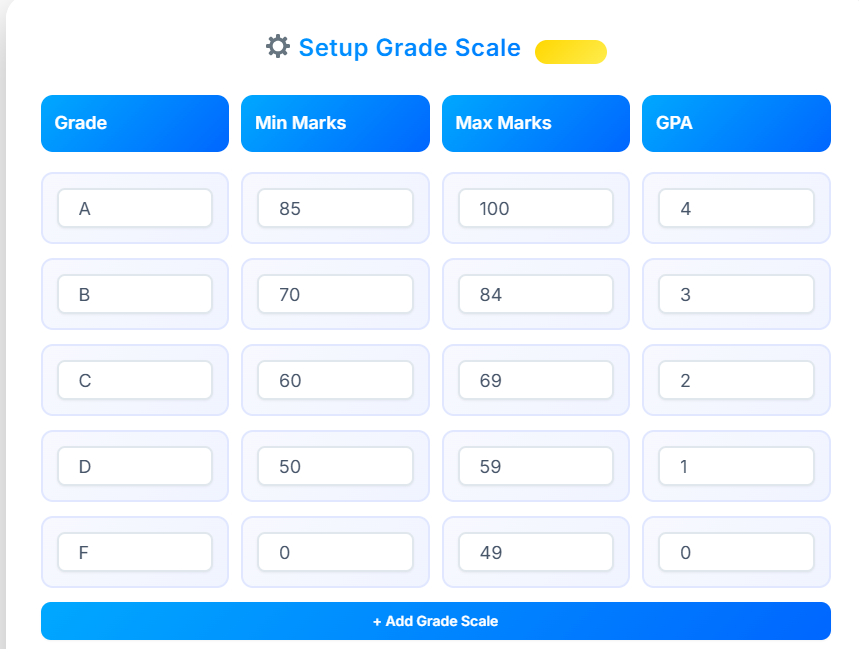
Here is what you will see for each grade entry:
- Grade: A text field where you enter the letter grade (e.g., A, A-, B+, B).
- Min Marks: The minimum percentage of marks required to achieve that grade.
- Max Marks: The maximum percentage of marks for that grade.
- GPA: The grade point value assigned to that letter grade.
For example, if Bahria University assigns an ‘A’ grade for marks between 85 and 100 with a GPA of 4.0, you would ensure one of the rows reflects this exactly. You would input ‘A’ in the grade field, ’85’ in Min Marks, ‘100’ in Max Marks, and ‘4.0’ in the GPA field.
Adding and Customizing Your Scale
The beauty of this section lies in its flexibility.
- Adding a New Grade: Simply click the “+ Add Grade Scale” button. A new, blank row will appear, allowing you to define a new grade bracket. You can add as many as you need to build a complete and detailed scale.
- Editing Existing Grades: All fields are editable. You can click on any input box and type in the correct value. This is useful for fine tuning the preloaded scale or correcting any mistakes.
- No Removal Needed: The tool is designed for adding and editing. You can simply overwrite existing entries if you need to change them. This streamlined approach keeps the interface clean and focused.
Properly setting up this section is the cornerstone of an accurate calculation. Take a moment to find the official grading policy for your program at Bahria University and input it here. Once set, you typically will not need to change it again unless the university updates its policies. This one time setup makes future use of the GPA Calculator Bahria University incredibly fast. While managing your academic finances is different, the principle of using a specialized tool for accuracy is the same, much like using a tax calculator to understand your financial obligations.
Section 2: 📚 Add Courses
Once your grade scale is correctly configured, you can move on to the second section: “Add Courses.” This is where you will input the details of the subjects you have taken during a semester. The interface is designed to be straightforward, allowing you to add multiple courses quickly and efficiently. This section is the heart of the GPA Calculator Bahria University, as it gathers the raw data needed for the calculation.
How to Add a Course
To begin, click the prominent “+ Add Course” button. This action will generate a new course container on the page, ready for your input. Each course container has a clean, organized layout with the following fields:
- Course Name: This is an optional but highly recommended field. Entering the name of your subject (e.g., “Calculus I,” “Object Oriented Programming”) makes the final results summary much easier to read and understand. It helps you quickly identify which course corresponds to which grade.
- Marks Obtained: Here, you will enter the total marks you achieved in that course out of 100. For example, if you scored 78, you would enter “78” into this box. The calculator uses this number to find the corresponding letter grade and GPA from the scale you defined in the first section.
- Credit Hours: This is a crucial field. Enter the number of credit hours assigned to the course. Most courses at Bahria University are typically 3 credit hours, but labs or specialized subjects might be different (e.g., 1, 2, or 4). Accurate credit hours are essential for a correct weighted GPA calculation.
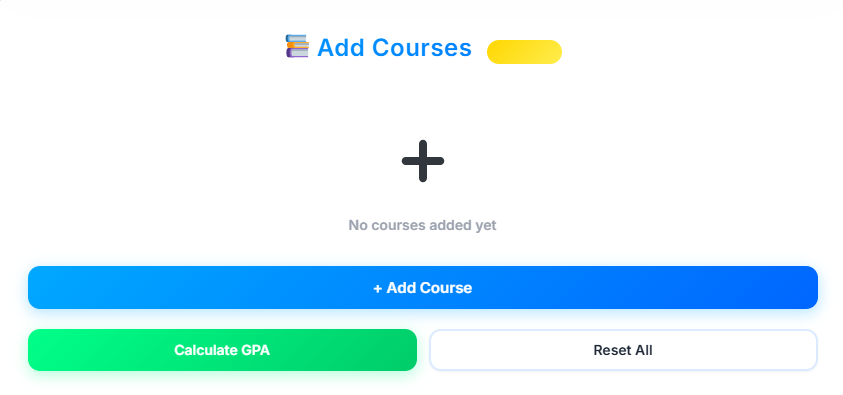
You can add as many courses as you need for the semester. Each time you click the “+ Add Course” button, a new, numbered container will appear. If you add a course by mistake, you can easily remove it by clicking the red “✕” button in the top right corner of that specific course container. This feature of the Bahria University Islamabad GPA calculator ensures you can easily correct any data entry errors.
The Action Buttons
Below the course entry area, you will find two important action buttons:

- Calculate GPA: This is the button you will press after you have entered all your courses. Clicking this will trigger the calculation process. The tool will take all your course data, process it against the grade scale, and display the detailed results in the third section. This is the final step in learning how to calculate GPA Bahria University with our tool.
- Reset All: This button provides a quick way to clear all the courses you have entered. If you want to start a new calculation for a different semester, clicking “Reset All” will wipe the course list clean, allowing you to begin again. Note that this action does not reset the custom grade scale you configured, saving you the effort of setting it up again.
Using this section of the GPA Calculator Bahria University is a simple process of data entry. Its design ensures you can input your semester’s performance accurately, which is the key to getting a reliable result. Precision in financial planning is just as important, and tools like an interest calculator can be indispensable for understanding loan costs or investment returns.
Section 3: 📊 Your GPA Results
After you have meticulously set up your grade scale and entered your course data, the final step is to click the “Calculate GPA” button. This action brings you to the third and final section: “Your GPA Results.” This part of the GPA Calculator Bahria University is designed to present your academic performance in a clear, comprehensive, and visually appealing manner. It transforms the raw numbers you entered into meaningful insights.
The Main GPA Display
The first thing you will see is a large, prominent display box showing your overall GPA for the semester. This is the most important number, and it is presented clearly for immediate understanding.
- Your Overall GPA: This large number is your calculated Grade Point Average, displayed to two decimal places for precision.
- GPA Status: Below your GPA, a helpful status message gives you context about your performance. This message changes based on your GPA, offering feedback like “🌟 Excellent” for high scores or “⚠️ Needs Improvement” for lower scores. This feature turns the GPA Calculator Bahria University from a simple number cruncher into a motivational tool.

Key Performance Statistics
Beneath the main GPA display, the results section provides further statistical context with two stat boxes:
- Total Credits: This box shows the total number of credit hours you entered for the semester. This is useful for cross checking that you have entered all your courses correctly.
- Total Courses: This simply displays the total number of courses you added for the calculation.
These statistics provide a quick summary of the data used in the calculation, adding a layer of transparency to the process.
Detailed Course Breakdown
Perhaps the most useful part of the results section is the “Course Breakdown” summary. This area provides a detailed, course by course summary of your performance, making it easy to see where you excelled and where you might need to improve. For each course you entered, the summary lists:
- The course name (if you entered one).
- The credit hours for that course.
- The marks you obtained.
- The corresponding letter grade that the GPA Calculator Bahria University determined from your grade scale.
- The grade point value (e.g., 4.0, 3.0) for that course.
This detailed breakdown is invaluable. It allows you to see exactly how each course contributed to your final GPA. You can quickly identify high performing and low performing courses, which is essential for future academic planning. This granular detail is what makes this Bahria University GPA calculator a superior planning tool. The clarity it provides for academic goals is similar to how a mortgage calculator offers clarity on loan repayments, helping you plan your financial future with confidence.
Ultimately, the results section of the GPA Calculator Bahria University does more than just give you a number. It provides a complete picture of your academic standing for the semester, empowering you with the information you need to succeed in your studies at Bahria University.
A Step by Step Walkthrough
To bring everything together, let’s walk through a complete example of how a student at Bahria University would use the tool. We will follow a fictional student named Ali, who just finished his first semester.
Step 1: Setting the Grade Scale
Ali’s first task is to ensure the grade scale matches the one in his student handbook. He opens the GPA Calculator Bahria University and looks at the “Setup Grade Scale” section. He finds the official Bahria University scale and adjusts the fields accordingly. For example, he ensures that the row for the ‘B’ grade shows a Min Marks of 70, a Max Marks of 84, and a GPA of 3.0. He does this for all grade brackets from A to F.
Step 2: Adding His Courses
Next, Ali moves to the “Add Courses” section. He clicks the “+ Add Course” button four times, once for each of his subjects. He then fills out the details for each course:
- Course 1:
- Course Name: Introduction to Programming
- Marks Obtained: 88
- Credit Hours: 3
- Course 2:
- Course Name: Communication Skills
- Marks Obtained: 75
- Credit Hours: 3
- Course 3:
- Course Name: Calculus I
- Marks Obtained: 68
- Credit Hours: 3
- Course 4:
- Course Name: Islamic Studies
- Marks Obtained: 92
- Credit Hours: 2
Ali double checks all the numbers to ensure accuracy. This attention to detail is key when using any GPA calculator Bahria University.
Step 3: Calculating and Reviewing the Results
With all his data entered, Ali confidently clicks the “Calculate GPA” button. The page automatically scrolls down to the results section. Here is what he sees:
- Main GPA Display: The calculator shows his overall GPA is 3.42. The status below reads “⭐ Very Good.”
- Statistics: The stat boxes show “Total Credits: 11” and “Total Courses: 4,” confirming he entered everything correctly.
- Course Breakdown: He looks at the detailed summary.
- Introduction to Programming (3cr) – 88/100 -> Grade: A (4.0)
- Communication Skills (3cr) – 75/100 -> Grade: B (3.0)
- Calculus I (3cr) – 68/100 -> Grade: C (2.0)
- Islamic Studies (2cr) – 92/100 -> Grade: A (4.0)
This breakdown gives Ali a complete overview. He can see that his strong performance in Programming and Islamic Studies balanced out his result in Calculus. He now has a clear, accurate understanding of his academic standing and knows which subject might require more focus next semester. This practical application shows the true value of the Bahria University Islamabad GPA calculator.
Conclusion: Empowering Your Academic Journey
Understanding and tracking your GPA should not be a complicated or stressful task. The GPA Calculator Bahria University was built to provide students with a simple, accurate, and powerful tool to manage their academic performance. By offering customizable grade scales, an intuitive interface for adding courses, and a comprehensive results analysis, it removes all ambiguity from the calculation process.
We have walked through each section in detail, from setting up the crucial grade scale to interpreting the final, detailed breakdown of your results. This tool is more than just a calculator; it is a partner in your academic planning. It helps you understand the impact of each course, identify areas of strength and weakness, and set realistic goals for the future. Knowing how to calculate GPA Bahria University accurately gives you a significant advantage in managing your educational path.
Take control of your grades today. Use the GPA Calculator Bahria University to stay informed, motivated, and on track toward achieving your academic aspirations. With clear insights at your fingertips, you are better equipped to make the smart decisions that will define your success at Bahria University and beyond.
FAQS
How accurate is this GPA calculator for Bahria University students?
This tool is highly accurate, provided you enter the correct information. Its precision depends on two key factors: correctly setting up the grade scale to match Bahria University’s official grading policy and accurately inputting your marks and the credit hours for each course. If the data you provide is correct, the calculated GPA will be precise.
Can I use this calculator for my cumulative GPA (CGPA)?
While this tool is designed primarily for calculating your semester GPA, you can use it to estimate your CGPA. To do this, you would need to add all the courses from all your previous semesters, along with your current semester’s courses. However, for an official CGPA, it is always best to refer to your university’s student portal or academic transcript.
Do I have to enter the grade scale every time I use the GPA Calculator Bahria University?
No, you do not. The tool is designed to remember the grade scale you set up during your session. You only need to configure it once when you first visit the page. After that, you can focus on simply adding your courses for a new calculation without having to re-enter the grading rules.

