
Basic Calculator II: Your Simple & Free Online Tool
Math is a part of our daily lives, whether we're splitting a dinner bill, figuring out a discount, or helping with homework. While smartphones and computers have built-in calculators, they can sometimes be clunky or buried under other apps. What you often need is something quick, simple, and reliable. This is where a dedicated online tool shines, providing instant access to calculations without any fuss.
Enter the Basic Calculator II, a clean, modern, and user-friendly online calculator designed for your everyday mathematical needs. It strips away the overwhelming complexity of scientific calculators to offer a streamlined experience. You don't need to download an app, create an account, or navigate confusing menus. The Basic Calculator II is built for speed and simplicity, making it the perfect companion for anyone who needs to perform quick arithmetic on the fly. This tool proves that sometimes, the most effective solution is the most straightforward one.
What This Basic Calculator II Tool Does
At its core, the Basic Calculator II is designed to be intuitive. From the moment the page loads, you are greeted with a tool that is both visually appealing and functionally direct. It’s built to look good and work even better, ensuring your focus remains on your calculations. Let's explore the key elements that make this tool so effective.
A Clear and Modern Interface
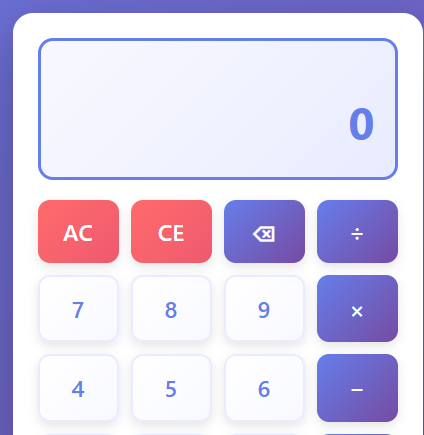
The first thing you'll notice is the clean header section, proudly displaying the title "Basic Calculator." This simple heading sets the stage for a no-nonsense experience. The entire tool is set against a subtle, beautiful gradient background that is easy on the eyes, making it pleasant to use for extended periods. This modern user interface (UI) avoids the clutter and outdated designs of many other online tools, presenting a professional and polished look.
Large, Responsive Display
Your numbers are the most important part of any calculation, and the Basic Calculator II gives them the attention they deserve. The display area is large, clear, and responsive, showing your inputs and results in a bold, easy-to-read font. As you type, the numbers appear instantly. When you perform a calculation, the answer is displayed prominently. This responsive design means the calculator looks and works great on any device, from a large desktop monitor to a small smartphone screen.
Helpful History Panel
Ever finish a calculation and immediately forget the numbers you used? The built-in history panel solves this problem. Located conveniently next to the main calculator, this panel automatically keeps a running log of your recent calculations. Each entry shows the full equation and its result, allowing you to review your work, check for errors, or reuse a previous result without re-typing everything. It’s a simple feature that adds a tremendous amount of convenience.
Classic Button Grid
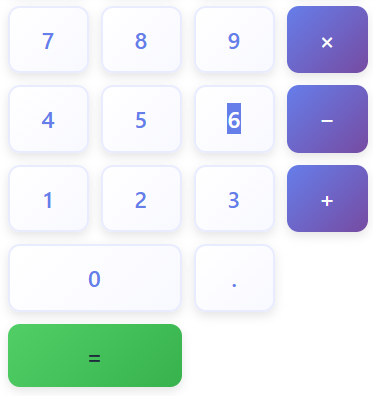
The calculator features a familiar 4x4 button grid layout that feels instantly recognizable. This design is time-tested and efficient, allowing your fingers to find the right buttons without a second thought. The layout includes all the essential functions you need for everyday arithmetic.
Essential Control Buttons
The tool includes critical control buttons like AC, CE, and backspace.

- AC (All Clear): Wipes the entire slate clean, clearing the current input and any ongoing operation, ready for a fresh start.
- CE (Clear Entry): Erases only the most recent number you typed, which is perfect for correcting a small mistake without losing your entire calculation.
- Backspace: Deletes the last digit you entered, offering precise control over your input.
Core Arithmetic Operators
You’ll find the four fundamental operators of math: addition (+), subtraction (−), multiplication (×), and division (÷). These buttons are clearly marked and placed for easy access, enabling you to perform any standard calculation effortlessly.
Decimal and Keyboard Support
For calculations involving money or precise measurements, decimal support is essential. The decimal button (.) lets you work with fractional numbers just as easily as whole numbers. Furthermore, the Basic Calculator II offers full keyboard support. You can type numbers and operators directly from your computer's keyboard, making data entry faster and more comfortable for those who prefer a tactile experience.
Smart Error Handling
The calculator is also smart enough to handle common mathematical errors. For instance, if you attempt to divide a number by zero—a mathematical impossibility—the tool won't crash or freeze. Instead, it will display a clear "Error" message, allowing you to correct your input and continue with your work.
Calculator Buttons Explained: A Section-by-Section Breakdown
Understanding the layout of the Basic Calculator II is key to using it efficiently. Every button has a specific purpose and is placed logically to create a smooth workflow. Let’s break down the interface section by section.
The Number Buttons (0–9)
These are the foundation of any calculator. The tool features ten buttons for the digits 0 through 9. They are arranged in a standard three-by-three grid for numbers 1-9, with the zero button positioned below. The buttons are large and clearly labeled, minimizing the chance of hitting the wrong one. When you press a number button, the digit is immediately added to the current value shown on the display.
The Decimal Button (.)
Located near the number pad, the decimal button is crucial for any non-integer calculation. Pressing it inserts a decimal point into your current number, allowing you to enter values like 12.5 or 0.75. The calculator intelligently prevents you from entering more than one decimal point in a single number, which helps avoid input errors.
The Operator Buttons (+, −, ×, ÷)
Positioned to the right of the number grid, the operator buttons handle all the arithmetic.
- + (Addition): Adds the next number to the current one.
- − (Subtraction): Subtracts the next number from the current one.
- × (Multiplication): Multiplies the two numbers.
- ÷ (Division): Divides the current number by the next.
When you press an operator, the calculator knows you are ready to enter the second part of your equation. This allows for chaining multiple operations together, such as 5 * 2 + 10.
The Equals Button (=)
The equals button is the final step. After you have entered your numbers and chosen your operator, pressing = tells the calculator to compute and display the final result. The answer instantly appears on the main display, and the complete operation is logged in the history panel.
The Control Trio: AC, CE, and Backspace
These three buttons give you full control over your inputs.
- AC (All Clear): Think of this as the master reset. It clears everything—the current number, the previous number, and the selected operator. Use it when you want to start a completely new calculation from scratch.
- CE (Clear Entry): This is your "oops" button for the current number. If you're calculating
50 + 25but accidentally type50 + 26, you don't need to start over. Simply pressCEto clear the26, and then you can type25and continue. - Backspace (←): For more surgical corrections, the backspace key removes the last digit you entered. If you meant to type
123but typed1234, one press of the backspace key corrects it to123.
Unique Layout Features
You might notice the zero button spans two columns at the bottom of the grid. This makes the most commonly used digit easier to press, especially on touchscreens. This thoughtful design choice enhances usability. The entire grid is also fully responsive. On a mobile device, the buttons resize and rearrange perfectly to fit the smaller screen, ensuring the calculator is just as easy to use on the go as it is on a desktop.
An Auto-Updating Display
The display doesn’t just show the final answer. It updates in real-time as you press each button. This immediate feedback confirms your inputs and lets you see the numbers you are working with at all times, reducing the likelihood of errors and making the entire process feel more interactive and dynamic.
How Basic Calculator II Works: A User's Perspective
Using the Basic Calculator II is designed to be as natural as using a physical calculator, but with the added benefits of a digital interface. There's no learning curve; you can start performing calculations instantly. Here's a look at the user experience from start to finish.
Entering Your Numbers and Operations
To begin a calculation, you simply click the number buttons or type them using your keyboard. For example, to calculate 345 + 15, you would first press 3, 4, and 5. The number 345 appears on the large display. Next, you press the + button. The display remains unchanged, but the calculator has now stored 345 and is waiting for the second number. You then type 1 and 5. The display will now show 15.
Chaining Calculations Together
The Basic Calculator II handles chained operations smoothly. Let's say you want to calculate 10 * 5 - 20. You would type 10, press *, type 5, and then press -. At this point, the calculator automatically computes 10 * 5 and displays the result, 50. It's now ready to subtract the next number. You type 20 and press =. The final answer, 30, appears. This sequential logic makes it easy to perform multi-step calculations without having to press equals after each step.
Getting Your Final Result
The equals (=) button is the command to complete the calculation. Once you press it, the final answer is shown clearly on the display. For example, after inputting 99 / 3, pressing = will replace the input on the screen with the result, 33.
Watching Your History Unfold
Simultaneously, the moment you press equals, the entire equation and its result are added to the top of the history panel. If you calculated 99 / 3 = 33, an entry 99 ÷ 3 = 33 appears in the log. This is incredibly useful for double-checking your work or tracking a series of calculations, like when you're managing a budget.
A Visually Pleasing Experience
The user experience is enhanced by subtle visual touches. The smooth animations on button presses provide satisfying feedback, confirming that your click was registered. The soft, elegant gradient background makes the tool feel modern and professional, turning a mundane task into a more pleasant one.
Keyboard Shortcuts for Power Users
For those who prefer using a keyboard, the Basic Calculator II offers a full suite of shortcuts.
- Number Keys (0-9): Input numbers directly.
- *Operator Keys (+, -, , /): Use
+,-,*(asterisk for multiplication), and/(forward slash for division). - Enter Key: Functions as the
=button to calculate the result. - Backspace Key: Deletes the last digit entered.
- Delete Key: Functions as the
CE(Clear Entry) button. - Escape Key: Functions as the
AC(All Clear) button.
These shortcuts make the tool incredibly efficient for desktop users, allowing for rapid data entry without ever needing to move your hands from the keyboard to the mouse.
Core Features for Everyday Math
The Basic Calculator II focuses on the four operations that form the bedrock of daily arithmetic. It masters these essentials to provide a reliable and efficient tool.
- Addition (+): Perfect for totaling expenses, adding up scores, or combining any quantities. Whether you're balancing your checkbook or figuring out a grocery bill, the addition function is fundamental.
- Subtraction (-): Use this to calculate discounts, determine the remaining balance on a loan, or find the difference between any two numbers. It’s essential for budgeting and financial planning.
- Multiplication (×): Ideal for calculating area, figuring out costs for multiple items, or scaling a recipe. For instance, if you need to find the total price of 5 items that cost $15 each, multiplication gives you the answer instantly.
- Division (÷): Split bills among friends, calculate averages, or determine fuel efficiency. For more advanced work, you might need our Calculus Calculator, but for daily division, this tool is perfect.
These four features are the heart of the Basic Calculator II. By focusing on doing these simple things exceptionally well, the tool ensures you can handle the vast majority of your daily mathematical tasks with confidence and ease.
Why Use This Online Basic Calculator II?
With so many options available, you might wonder what makes this particular online calculator the right choice. The Basic Calculator II stands out by prioritizing user experience and accessibility. Here are some of the most compelling reasons to make it your go-to tool for quick math.
It's Completely Free
There are no hidden costs, subscriptions, or premium features. The Basic Calculator II is free to use for everyone, anytime. You get full functionality without ever having to pay a dime.
Fully Browser-Based
There is nothing to download or install. This means no worrying about viruses, no taking up precious storage space on your device, and no waiting for installations. You can access it from any web browser—Chrome, Firefox, Safari, or Edge—on any operating system. Just navigate to the page, and it’s ready to go.
Instant Calculations
The tool is lightweight and optimized for speed. It loads almost instantly, and calculations happen in real-time. This responsiveness is crucial when you just need a quick answer and don't want to be slowed down by a sluggish app or website.
Mobile-Friendly and Responsive
The calculator's design adapts seamlessly to any screen size. It’s as easy to use on your smartphone while you’re out shopping as it is on your laptop at your desk. The buttons are large enough for easy tapping on a touch screen, and the layout remains intuitive on a smaller display.
No Login or Registration Required
Your privacy and time are respected. You don't need to create an account, provide an email address, or go through any kind of registration process. This commitment to anonymity and immediate access means you can use the calculator without any barriers. For tasks involving charts and visuals, our Graphing Calculator is also available without any login.
An Incredibly Easy User Interface
Simplicity is its greatest strength. The interface is clean, intuitive, and free of distracting ads or unnecessary features. It’s designed for users of all ages and technical abilities. If you know how to use a standard calculator, you already know how to use the Basic Calculator II.
Ideal for a Wide Range of Users
- Students: Perfect for checking homework in arithmetic, algebra, or even simple science problems. It provides a straightforward tool without the temptation of the more complex functions that might be disallowed in an exam setting.
- Professionals: A great tool for office workers who need to perform quick financial calculations, tally expenses, or work with spreadsheets.
- Homeowners: Useful for budgeting, recipe scaling, project measurements, and other household tasks.
- Shoppers: Quickly calculate discounts, sales tax, and compare prices on the go. If you are dealing with odds and outcomes, you might also find the Probability Calculator useful.
In short, the Basic Calculator II is a versatile tool for anyone who needs to do math.
Conclusion: The Smart Choice for Simple Math
In a world filled with overly complex technology, there is elegance and power in simplicity. The Basic Calculator II embodies this principle. It’s a tool that does one thing and does it exceptionally well: it makes everyday math easy, fast, and accessible for everyone.
By combining a clean, modern design with essential features like a history panel, full keyboard support, and a responsive layout, it offers a superior user experience. It strips away the clutter and focuses on what truly matters—getting you the right answer, right away. Whether you're a student, a professional, or just someone who needs to split a bill, this online tool is the simplest and most efficient solution. Bookmark it today and experience the convenience of having a reliable calculator just a click away.
FAQS
Can I use the Basic Calculator II on my smartphone?
Absolutely! The Basic Calculator II is fully mobile-friendly and responsive. It adjusts seamlessly to any screen size, making it easy to use on smartphones, tablets, and desktops alike.
Does the Basic Calculator II save my calculation history?
Yes, it does! The tool features a built-in history panel that keeps a log of your recent calculations. This allows you to review, reuse, or double-check your work without re-entering numbers.
Is the Basic Calculator II free to use?
Yes, 100%! The Basic Calculator II is completely free, with no hidden fees, subscriptions, or account requirements. You can access it anytime, anywhere, directly from your browser.

