
Your Ultimate Guide to Using a Fraction Calculator
Fractions are a fundamental part of mathematics, yet they can often feel like a puzzle. From dividing a pizza among friends to calculating recipe ingredients, fractions appear in many aspects of our daily lives. While the concepts of numerators and denominators are straightforward, performing operations like addition, subtraction, multiplication, and division can become complex. This is where a powerful online tool, the fraction calculator, comes to the rescue.
A fraction calculator is a specialized digital tool designed to perform arithmetic on fractions effortlessly. It saves you from the tedious process of finding common denominators, simplifying complex results, or converting between different number formats. People use these calculators for a wide range of reasons, from students tackling homework to professionals needing quick and accurate calculations. In fields like engineering, carpentry, and cooking, precision is key, and a reliable calculator makes all the difference.
While many might reach for a scientific calculator with fractions, a dedicated online fraction calculator often provides a more intuitive and detailed experience. It’s built specifically for these numbers, presenting results in multiple formats and simplifying the process from start to finish. This guide will walk you through everything you need to know about using a fraction calculator, explaining its features and demonstrating how it can become your go-to tool for all things fractional. We will cover basic operations, simplification, conversions, and more, all without getting bogged down in complex mathematical theory.
An Overview of the Tool’s User Interface
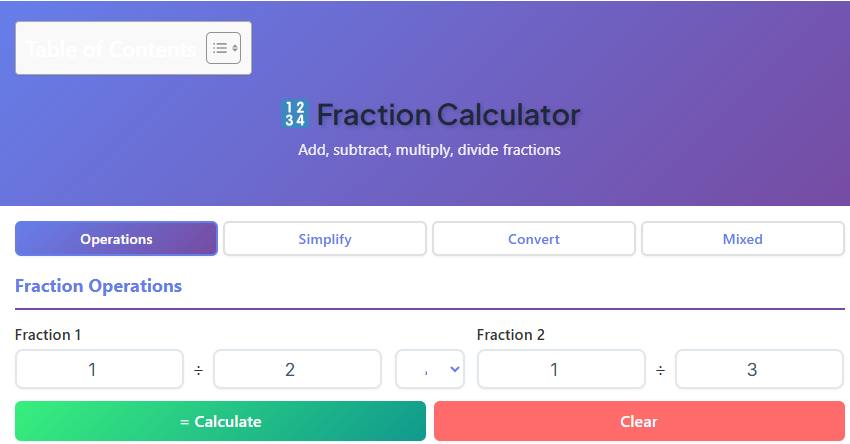
The first thing you’ll notice about this fraction calculator is its clean and user-friendly interface. It’s designed to be intuitive, ensuring that anyone can use it without a steep learning curve. The layout is clear, with a prominent header that displays the tool’s title, “Fraction Calculator,” and a helpful subtitle that explains its purpose. This immediate clarity sets the stage for a smooth user experience.
The core of the tool’s design is its powerful tab system. This feature organizes the calculator’s different functions into distinct sections, preventing clutter and helping you find the exact function you need quickly. Let’s take a brief look at each tab:
- Operations: This is the main tab where you can perform the four basic arithmetic operations: addition, subtraction, multiplication, and division between two fractions.
- Simplify: This tab is dedicated to reducing a single fraction to its simplest form. It’s incredibly useful for making large, unwieldy fractions more manageable.
- Convert: Here, you can easily switch between fractions and decimals. This is perfect for when you need to see a number in a different format.
- Mixed Numbers: This section handles the conversion between improper fractions (where the numerator is larger than the denominator) and mixed numbers (a whole number with a fraction).
This organized structure makes the fraction calculator incredibly efficient. Instead of navigating complex menus like you might on a physical scientific calculator with fractions, everything is laid out logically in front of you.
How to Use the Operations Tab
The Operations tab is the heart of the fraction calculator. It’s where you will likely spend most of your time, performing calculations for homework, recipes, or professional projects. The layout is designed for a simple, step-by-step process that delivers comprehensive results instantly.
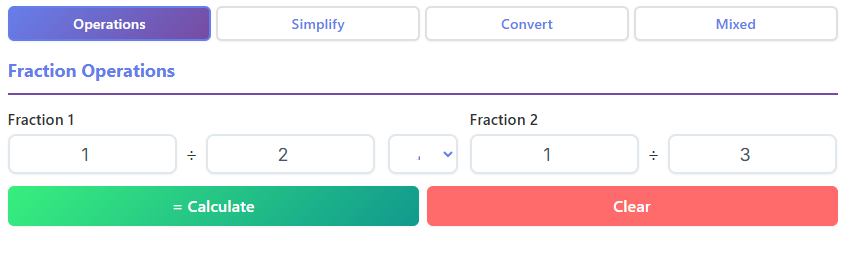
Here’s how you can use it:
- Enter Fraction 1: You’ll see two input boxes labeled “Numerator” and “Denominator” for the first fraction. If you want to calculate a fraction of 2 by 3, you would type “2” into the first numerator box and “3” into the first denominator box.
- Enter Fraction 2: Similarly, there is a second set of input boxes for your second fraction. Let’s say you want to add 1 3 4 (which is 7/4) to your first fraction. You would enter “7” as the numerator and “4” as the denominator.
- Select the Operation: Between the two fraction inputs, you’ll find a dropdown menu. This menu allows you to choose the mathematical operation you wish to perform. The options are addition (+), subtraction (−), multiplication (×), and division (÷).
- Calculate: Once your fractions and the desired operation are set, simply click the “Calculate” button. The tool processes your request instantly.
- Clear the Fields: If you make a mistake or want to start a new calculation, the “Clear” button is conveniently located next to the “Calculate” button. Clicking it resets all the input fields, giving you a clean slate.
After you click “Calculate,” a result card appears below the input section. This is a major advantage of using a dedicated fraction calculator over a standard one. The result card doesn’t just give you a single answer; it provides a complete breakdown:
- Fraction Result: This shows the direct result of the operation in fractional form.
- Decimal Value: The result is also displayed as a decimal, which is useful for practical applications where whole numbers are needed.
- Simplified Fraction: The calculator automatically simplifies the resulting fraction to its lowest terms. This saves you the extra step of finding the greatest common divisor yourself.
- Percentage: For added context, the result is also converted into a percentage.
This multi-faceted output makes the fraction calculator an incredibly versatile and educational tool, providing a deeper understanding of the numbers you are working with.
Simplifying Fractions with Ease
The Simplify tab is another powerful feature of this fraction calculator. Often, after performing a calculation or when working with large numbers, you end up with a fraction that is difficult to interpret. Simplifying a fraction means reducing it to its lowest possible terms without changing its value. This tab automates that process.
Using the Simplify tab is incredibly straightforward:
- Enter the Fraction: You will find two input fields: one for the numerator and one for the denominator of the fraction you wish to simplify.
- View the Results: As soon as you enter the fraction, the tool automatically calculates and displays the simplified version. There is no need to even click a button.
For example, let’s say you are dealing with a complex measurement from a technical drawing, like a 1 16 1 4 fraction. This might represent a fraction like 116/14. Entering “116” as the numerator and “14” as the denominator will instantly provide the results.
The output on this tab is just as detailed as on the Operations tab:
- Greatest Common Divisor (GCD): The tool shows you the GCD, which is the largest number that divides both the numerator and the denominator. This is a great educational feature, as it shows you how the fraction was simplified.
- Simplified Fraction: This is the main result—the fraction reduced to its simplest form.
- Decimal Conversion: The tab also provides the decimal equivalent of the fraction for easy comparison and practical use.
This feature is invaluable for students learning about GCD and simplification, as well as for anyone who needs to express a fractional value in its most concise form. It’s another reason why this online fraction calculator is a superior choice for these specific tasks.
Converting Between Fractions and Decimals
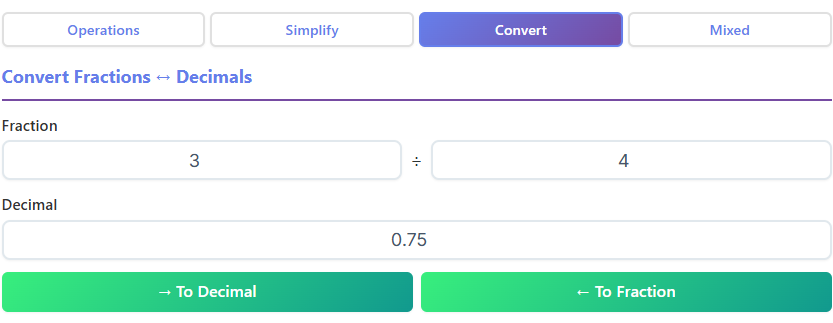
The Convert tab is designed to bridge the gap between two of the most common ways to represent parts of a whole: fractions and decimals. The ability to switch between these formats is essential in many fields, from finance to science. This fraction calculator makes the conversion process seamless.
The tab is split into two primary functions:
1. Fraction to Decimal Conversion
To convert a fraction to a decimal, you simply enter the numerator and denominator into their respective fields. The tool instantly displays the decimal equivalent. For example, if you enter the fraction 3/4, the decimal field will automatically update to show 0.75.
2. Decimal to Fraction Conversion
This function is just as easy. You type a decimal number into its designated field, and the tool converts it into a fraction. For instance, entering 0.8 will produce the fraction 4/5. A fantastic feature here is that the tool also provides the simplified fraction, ensuring the result is in its most usable form.
The fields in the Convert tab are auto-updating. This means you don’t need to press a “Calculate” button. As you type, the conversion happens in real-time, providing immediate feedback. This interactive element makes the tool feel responsive and highly efficient. Whether you need to convert a measurement for a school project or interpret a statistical report, this feature of the fraction calculator is incredibly handy.
Working with Mixed Numbers
Mixed numbers, which combine a whole number and a fraction, are common in everyday life, especially in activities like baking and carpentry. The Mixed Numbers tab on this fraction calculator is specifically designed to handle conversions involving these numbers, simplifying what can be a confusing process.
The main function of this tab is to convert an improper fraction (where the numerator is greater than or equal to the denominator) into a mixed number.
Here’s how it works:
- Input the Improper Fraction: Enter the numerator and denominator of your improper fraction. For example, if you want to convert the improper fraction 7/4 (which is equivalent to the mixed number 1 3 4), you would enter “7” as the numerator and “4” as the denominator.
- View the Conversion: The tool instantly processes the input and displays the result as a mixed number.
The result card is very clear, breaking down the mixed number into its components:
- Whole Number Part: The integer part of the mixed number. For 7/4, this would be “1”.
- Fractional Part: The remaining proper fraction. For 7/4, this would be “3/4”.
- Decimal Representation: The decimal equivalent is also shown for complete clarity.
This tab also supports reverse conversion. You can see how a mixed number translates back into an improper fraction, providing a complete picture of the relationship between the two formats. This functionality is particularly useful for students learning about number forms and for anyone who needs to switch between them for different types of calculations. This dedicated feature further solidifies the tool as a comprehensive fraction calculator.
Practical Uses of the Fraction Calculator
The applications of a fraction calculator extend far beyond the classroom. It is a practical tool that serves a diverse range of users in their daily tasks, making complex calculations simple and accessible.
- For Students and Teachers: This is perhaps the most obvious use. Students can use the fraction calculator to check their homework, understand simplification, and visualize how different operations work. Teachers can use it to create examples for lessons and quickly verify answers.
- For Engineering and Technical Fields: Engineers, architects, and machinists frequently work with fractions when dealing with measurements, blueprints, and material specifications. An accurate fraction calculator ensures precision and saves valuable time.
- For Cooking and Baking: Recipes often list ingredients in fractional amounts. When you need to double a recipe or cut it in half, calculating the new measurements can be tricky. This tool removes the guesswork.
- For Exams and Standardized Tests: While some exams may not allow online tools, using a fraction calculator for practice can build confidence and speed. It helps you get comfortable with how fractions behave so you can solve problems more efficiently during a test.
- For Everyday Math: Whether you’re splitting a bill, measuring for a DIY project, or trying to understand a discount, fractions pop up unexpectedly. Having a reliable tool on hand makes these situations much less stressful. It’s especially useful for converting strange-looking fractions, such as the 1 16 1 4 fraction example, into something more understandable.
This digital tool is far more than a simple homework helper; it is a versatile assistant for anyone who interacts with numbers. The power of a good fraction calculator lies in its ability to provide quick, accurate, and easy-to-understand results for a variety of real-world problems.
Benefits of Using Our Online Fraction Calculator
With numerous options available, you might wonder what makes this particular fraction calculator stand out. The benefits are rooted in its thoughtful design, which prioritizes user experience and comprehensive results.
- Clean and Intuitive Inputs: The user interface is free of clutter. Input fields are clearly labeled, so you know exactly where to put your numbers. This simplicity reduces errors and makes the tool accessible to everyone, regardless of their tech-savviness.
- Instant and Accurate Calculations: The tool provides results in real-time. There’s no waiting for pages to load or for complex calculations to process. You get the answers you need the moment you need them.
- Visual Fraction Format: The calculator displays fractions in a clear, vertical format rather than a single line with a slash (e.g., 3/4). This visual representation is easier to read and aligns with how fractions are taught in school, reinforcing learning.
- Multiple Modes in a Single Tool: With dedicated tabs for operations, simplification, conversion, and mixed numbers, this tool is a one-stop shop. You don’t need to search for different calculators for different tasks; everything is integrated into one convenient package.
- A Perfect Alternative to a Scientific Calculator with Fractions: While a physical scientific calculator with fractions is useful, it can be cumbersome. The button sequences can be confusing, and the small screens limit how much information is displayed. This online fraction calculator offers a superior experience with a large, clear display and detailed, multi-format results that a handheld device often cannot match.
In essence, this fraction calculator combines power with simplicity, making it an indispensable tool for a wide range of applications.
Conclusion
Navigating the world of fractions no longer has to be a source of confusion or frustration. With the right tool, anyone can master fractional arithmetic and conversions with confidence. This online tool has been designed to be the ultimate assistant for all your fraction-related needs, providing a seamless and intuitive experience from start to finish.
By offering dedicated functions for operations, simplification, conversion, and mixed numbers, this tool stands as a comprehensive solution. Its clear interface, instant results, and detailed output make it an ideal choice for students, educators, professionals, and anyone needing to perform quick and accurate calculations. It’s a powerful, modern replacement for clunky handheld devices and a far more intuitive solution than a standard scientific calculator with fractions. Empower your mathematical journey and make fractions your friend with this exceptional fraction calculator.
FAQs
Can I use this calculator for mixed numbers, or does it only work with simple fractions?
You can absolutely use it for both! Our calculator has a dedicated “Mixed Numbers” tab designed specifically for this purpose. You can easily input mixed numbers (like 1 ½) to convert them into improper fractions, or perform calculations directly. It handles the math for you so you don’t have to worry about converting them manually first.
Does the calculator show the decimal value along with the fraction result?
Yes, it does. We know that sometimes you need a fraction and sometimes you need a decimal, so we provide both automatically. Whenever you calculate an answer, the result card displays the fraction, the simplified fraction, and the precise decimal equivalent (e.g., displaying 0.75 alongside 3/4) so you have all the information you need in one place.
Is this tool helpful for checking homework answers?
It is a fantastic tool for checking your work! Because the calculator breaks down the results—showing you the simplified version, the percentage, and the decimal—it helps you verify that you’ve arrived at the correct answer in the right format. It’s a great way to build confidence in your math skills before turning in an assignment.

