
Your Ultimate Guide to the Online Scientific Calculator
Navigating complex mathematical problems often requires more than simple addition and subtraction. When calculations involve trigonometry, logarithms, or advanced functions, a standard calculator just won’t do. This is where a scientific calculator becomes an indispensable tool. It’s designed to handle the sophisticated operations needed in fields like science, engineering, and higher mathematics.
While physical devices have been the standard for decades, the rise of powerful web-based tools has changed the game. An online scientific calculator offers unparalleled accessibility and functionality, allowing you to solve complex equations directly from your browser without needing any special hardware. This guide will walk you through every feature of our versatile online tool, helping you master its capabilities for any task, from homework to professional projects.
An Overview of the Scientific Calculator Interface
Before diving into complex problem-solving, it’s helpful to understand the layout of our online scientific calculator. The interface is designed to be intuitive, ensuring you can find the functions you need quickly and efficiently. It mirrors the familiar layout of physical calculators while adding the convenience of a digital environment.
At the very top, you’ll find the header, which clearly labels the tool. Below that is the most critical part of the calculator: the display. This large screen shows both your input as you type it and the final output once you hit the equals button. This dual view helps you catch any typing errors before you calculate, ensuring accuracy.
Just beneath the display is the mode toggle bar. This is where you can switch between the different panels of the scientific calculator: Basic, Trigonometry, Logarithm, and Advanced. Each mode reconfigures the button layout to provide specialized functions, which we will explore in detail.
The main area of the calculator is occupied by the button panels themselves. Finally, to the side, you’ll find the Calculation History panel. This feature keeps a running log of your recent calculations, making it easy to review your work or reuse a previous result. This thoughtful design ensures that our scientific calculator is both powerful and easy to use.
Section 1: Your Guide to the Basic Mode
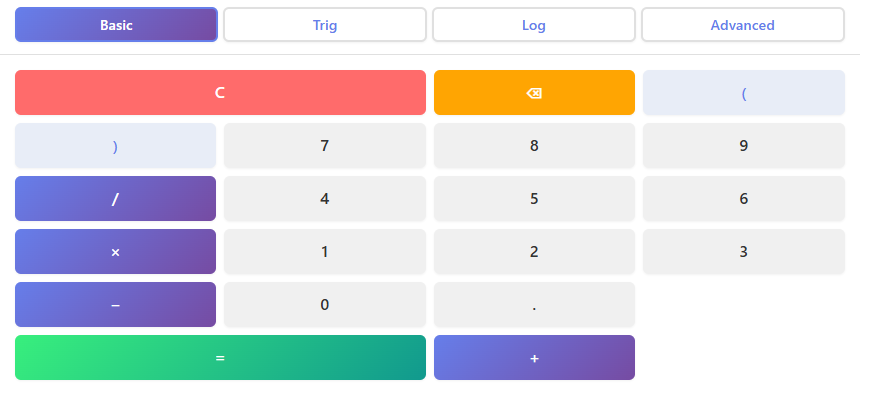
Every mathematical journey begins with the fundamentals, and the Basic mode of our scientific calculator is the perfect starting point. This mode covers all the essential functions you would expect from any calculator, presented in a clean and straightforward layout. It’s ideal for everyday arithmetic or as the foundation for more complex equations.
The panel includes the digit buttons from 0 to 9, a decimal point for handling non-integers, and parentheses to control the order of operations. The basic arithmetic operators—addition (+), subtraction (−), multiplication (×), and division (÷)—are prominently displayed for easy access.
If you make a mistake, you have two options: the ‘C’ (Clear) button, which erases the entire current entry, and the ‘DEL’ (Delete) button, which removes the last character you typed. This allows for quick corrections without having to start over.
Once your expression is entered correctly, pressing the equals (=) button performs the calculation, and the answer instantly appears on the screen. The user experience is designed to be seamless.
You don’t need to worry about any backend processes; simply type your problem as you would write it on paper, and the calculator handles the rest. For simple math, you might also find our Basic Calculator – Open Calculator → useful, but for anything more advanced, the functions in our scientific calculator are essential.
Section 2: Mastering the Trigonometry Mode
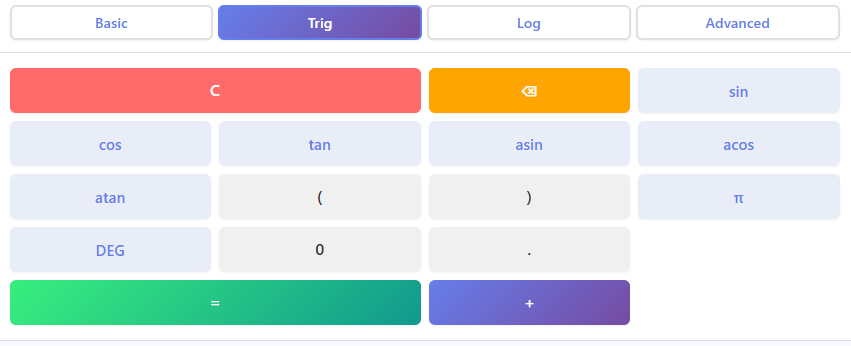
Trigonometry is a cornerstone of many scientific and engineering disciplines, and our tool is equipped to handle it with ease. By switching to the Trigonometry mode, you unlock a new set of functions specifically for calculating angles and ratios. This panel is essential for students tackling geometry or professionals working on physics problems.
This mode features buttons for the primary trigonometric functions: sine (sin), cosine (cos), and tangent (tan). It also includes their inverse counterparts—arcsin (sin⁻¹), arccos (cos⁻¹), and arctan (tan⁻¹)—which are crucial for finding an angle when you know the ratio.
One of the most important features in this mode is the DEG/RAD toggle. This switch allows you to choose whether your calculations are performed in degrees or radians, which is a common source of error if set incorrectly. Always double-check this setting before you begin.
The panel also includes a dedicated button for π (pi), saving you the trouble of memorizing and typing its approximate value. These features are incredibly practical. Imagine you’re an architect calculating the slope of a roof or an astronomer tracking the position of a celestial body.
This is where a reliable scientific calculator shines. While our tool focuses on numerical solutions, if you need to visualize these functions, a graph calculator can be a great companion. Visualizing a sine wave on a grapher online, for example, can provide deeper insight into your calculations. For those needing to visualize data points, the ability to plot online is also invaluable.
Section 3: Exploring the Logarithm Mode
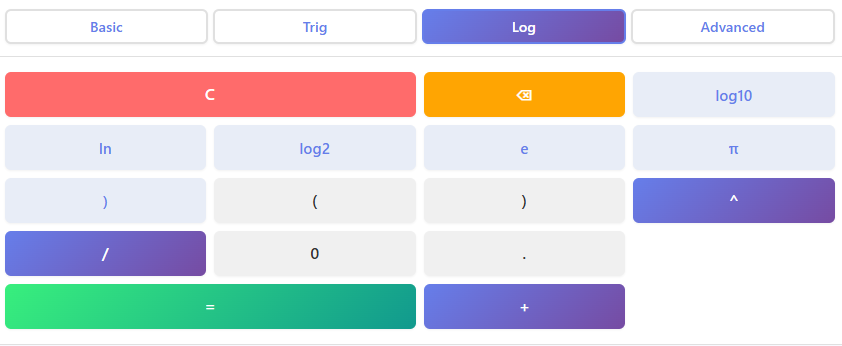
Logarithms and exponential functions are fundamental in fields ranging from finance to computer science. The Logarithm mode of our scientific calculator provides the specialized tools needed to work with these concepts effortlessly. This mode is perfect for solving problems involving growth, decay, or scales that span several orders of magnitude, like the pH or Richter scales.
In this panel, you will find buttons for common logarithms. This includes the base-10 logarithm (log10), the natural logarithm (ln), which has a base of ‘e’, and the base-2 logarithm (log2), which is particularly useful in information theory and computer science. The constants ‘e’ and ‘π’ are also available here for direct use in your equations. The power operator (xʸ) is another key feature in this mode, allowing you to raise any number to any power, which is the inverse operation of finding a logarithm.
The real-life applications are endless. A financial analyst might use the natural logarithm to calculate compound interest over time. A scientist could use the base-10 logarithm to measure the acidity of a solution. With our scientific calculator, these complex calculations become simple button presses. The intuitive layout means you can focus on the problem you’re trying to solve rather than getting bogged down in the mechanics of the calculation.
Section 4: Unleashing the Advanced Mode
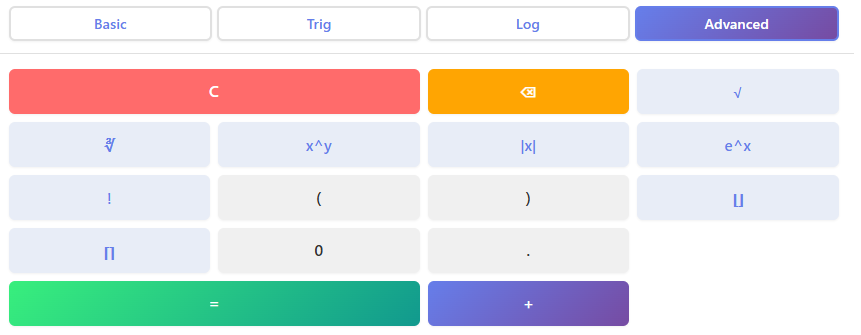
When your problems require an extra layer of mathematical complexity, the Advanced mode is where you’ll find the necessary functions. This panel extends the capabilities of the scientific calculator to include a range of operations that are common in higher-level mathematics and engineering.
Here, you can easily find the square root (√) and cube root (∛) of any number. For more complex calculations involving combinatorics, the factorial function (x!) is available at your fingertips. This mode also includes functions for rounding and value manipulation, such as the absolute value (|x|), which gives you the non-negative value of a number, and floor and ceil functions, which round a number down or up to the nearest integer, respectively.
Exponential functions (eˣ and 10ˣ) are also housed in this panel, providing a quick way to perform calculations related to natural and common exponential growth. This mode is designed to handle complex problems gracefully.
Whether you are a student working through a challenging calculus problem or an engineer designing a complex system, the Advanced mode provides the robust functionality you need. For students in statistics courses, our Statistics Calculator – Open Calculator → offers another layer of specialized tools. This powerful scientific calculator centralizes many functions you might otherwise need separate tools for.
Section 5: How the History Panel Improves Your Workflow
One of the standout features of our online scientific calculator is the History Panel. This simple yet powerful component fundamentally improves how you work by keeping a detailed record of your calculations. Unlike a physical calculator where past results disappear once you start a new problem, our tool remembers your work.
As you perform calculations, each one—both the input expression and the final result—appears as a new item in the history list. This creates a running log that you can refer back to at any time. Did you get a result a few steps ago that you now need for a new equation? Simply find it in the history panel.
The best part is how you can reuse these past calculations. Clicking on a history item instantly brings it back to the input display, ready to be edited or used in a new problem. This eliminates the need to manually re-type long numbers or complex expressions, which not only saves time but also significantly reduces the risk of making a mistake.
For anyone working on multi-step problems, this feature is a game-changer. It transforms the scientific calculator from a simple calculation device into a dynamic workspace that supports a fluid and efficient workflow.
Section 6: When to Use an Online Scientific Calculator
A powerful online scientific calculator is an incredibly versatile tool, but its advantages are most apparent in certain situations. Its ability to handle complex functions makes it essential for anyone engaged in technical or academic work.
For students studying trigonometry, our tool is indispensable. It simplifies the process of working with sine, cosine, and tangent, making homework and exam preparation much more manageable. The ability to switch between degrees and radians with a single click prevents common errors that can derail an entire problem.
Similarly, students in higher-level college math courses, such as calculus or algebra, will find the advanced functions for logarithms, factorials, and roots to be crucial.
Engineers across all disciplines rely on the functions found in a scientific calculator for their daily work. Whether they are calculating structural loads, analyzing electrical circuits, or modeling fluid dynamics, the precision and power of our tool are vital. Even for complex daily calculations, such as budgeting with compound interest or converting complex units, having a capable scientific calculator bookmarked in your browser is incredibly convenient.
The accessibility of an online tool means you always have the right functions available, no matter where you are or what device you’re using. Another option to visualize functions is a grapher online, which helps turn abstract equations into understandable visuals. With our tool, you won’t need a separate graph calculator for many numerical tasks.
Section 7: Online vs. Traditional Calculators
For years, the handheld scientific calculator was a mandatory item for students and professionals in technical fields. However, the emergence of high-quality calculators online has presented a compelling alternative with several distinct advantages.
First and foremost is speed and accessibility. An online scientific calculator is available on any device with an internet connection—be it a laptop, tablet, or smartphone. There is no need to remember to bring a physical device with you or worry about its batteries running out at a critical moment. This instant access streamlines your workflow, as the tool is always just a browser tab away.
Accuracy is another key benefit. Our online tool is built on robust software, eliminating the risk of the hardware glitches or button failures that can sometimes affect aging physical calculators. The clear, large display also makes it easier to spot and correct typos in long equations. Furthermore, our online scientific calculator includes extra modes and a history panel, features that are often limited or nonexistent on many traditional models.
While a dedicated graph calculator is great for plotting, our tool integrates many functions into one interface. The convenience and enhanced features of calculators online make them a superior choice for modern users. When you need to plot online a series of data, some specialized tools might be better, but for numerical problem-solving, our calculator excels.
Section 8: Real-Life Scenarios and Examples
To truly appreciate the power of a scientific calculator, let’s walk through a few real-life scenarios. These stories show how different people might use the tool to solve practical problems without getting bogged down in complex formulas.
Imagine Sarah, an interior design student, who needs to calculate the length of a slanted ceiling for a custom bookshelf. She knows the height of the wall (8 feet) and the distance from the wall to the base of the bookshelf (4 feet).
Using the Trigonometry mode, she can find the angle of the slant with the arctan function. Then, using the sine or cosine function, she can calculate the exact length of the slanted ceiling. With the scientific calculator, she gets the precise measurement in seconds.
Next, consider Ben, a hobbyist rocket builder. He wants to estimate the peak altitude of his latest model. He has data on the rocket’s burn time and thrust. Using the advanced functions for exponents and roots in our scientific calculator, he can plug his values into a simplified physics equation to get a close estimate.
He doesn’t need to perform the tedious calculations by hand; the calculator does the heavy lifting. Finding the square root of a complex number is as simple as using our Square Root Calculator – Open Calculator →, but for the entire equation, the scientific calculator is his go-to.
Finally, think of Maria, who is saving for retirement. She wants to see how her investment will grow over 30 years with compound interest. Using the Logarithm mode, she can use the power function to model the exponential growth of her savings. She can easily adjust the interest rate or the number of years to see different outcomes, helping her plan for the future.
These examples highlight how a versatile scientific calculator is a practical tool for people from all walks of life. Whether you need to visualize data with a grapher online, plot online your findings, or just crunch some numbers, having a powerful calculator is key. The best calculators online, including this one, make these tasks much simpler.
FAQs
Can I use this scientific calculator on my mobile phone or tablet?
Absolutely. Our online scientific calculator is fully responsive and designed to work seamlessly on all devices. Whether you are using a smartphone, tablet, laptop, or desktop computer, the interface automatically adjusts to fit your screen size. This means you can solve complex equations or handle trigonometry homework from anywhere, without needing to download a separate app.
How do I switch between degrees and radians for trigonometry calculations?
Switching modes is simple and located right on the main interface. In the Trigonometry panel, look for the button labeled “DEG” or “RAD.” Clicking this toggle allows you to instantly switch your input mode. It is always a good idea to check this setting before starting your calculation to ensure your results—especially for sine, cosine, and tangent functions—are accurate for the specific problem you are solving.
Is there a way to view or retrieve my previous calculations?
Yes, the calculator features a built-in History Panel designed to improve your workflow. Every calculation you perform is automatically saved in a list on the side of the interface. If you need to reuse a previous result or double-check an earlier entry, simply click on that item in the history list. It will instantly populate into the main display, allowing you to edit it or use it as part of a new equation.

