
Discount Setup
How to Use a Double Discount Calculator: The Complete Guide to Smart Savings
Meta Title: Double Discount Calculator Guide: How to Stack Savings
Meta Description: Learn how to use our double discount calculator to determine final prices when stacking multiple offers. A complete guide for shoppers and business owners.
Shopping today often involves more than just a single red sticker on a price tag. Retailers love to layer deals. You might see a clearance item marked down by 20%, but the store also offers an extra 15% off at the checkout. Or perhaps you are a business owner trying to figure out if your promotional strategy is eating into your margins too heavily. In these scenarios, simple math often fails us. We assume 20% plus 15% equals 35%, but the register tells a different story. This is where a double discount calculator becomes an essential tool for clarity and accuracy.
Whether you are budgeting for a major purchase or setting prices for your ecommerce store, understanding how multiple discounts interact is crucial. This guide walks you through every feature of our tool, ensuring you never have to guess at the final price again.
What Is a Double Discount Calculator?
A double discount calculator is a specialized digital tool designed to compute the final price of an item after multiple price reductions have been applied sequentially. Unlike a standard calculator where you might simply subtract a total percentage, this tool respects the order of operations that most retailers and businesses use.
Most people assume that stacking discounts is additive. If you have a 10% coupon and a 20% sale, it feels natural to expect 30% off. However, in the real world, the first discount is applied to the original price, creating a new, lower subtotal. The second discount is then applied to that new subtotal, not the original price. This results in a slightly smaller total savings than the additive method suggests.
A double discount calculator handles this “compounding” logic automatically. It takes the guesswork out of the equation. You input the original price and the various discount layers, and the tool provides the exact final figure. This is distinct from a basic discount calculator, which usually only handles one variable. By accounting for multiple tiers of savings, a double discount calculator provides a true reflection of what you will actually pay or charge.
How Discounts Work in Real Life
To truly appreciate the utility of a double discount calculator, it helps to understand the math it performs in the background. When stores apply multiple discounts, they almost always use a “cascade” or “chain” method.
Imagine a jacket costs $100. It is on sale for 20% off.
- Step 1: $100 – 20% ($20) = $80.
- Now, you have an extra 10% off coupon.
- Step 2: The 10% comes off the $80, not the $100.
- $80 – 10% ($8) = $72.
If you had simply added 20% and 10% to get 30% off, you would expect the price to be $70. The $2 difference might seem small here, but on large orders or bulk business purchases, this gap widens significantly. This is why knowing how to work out percentage off correctly matters. It prevents budget surprises.
A double discount calculator is built on this specific logic. It ensures that when you are planning an expense or analyzing a promotion, you are seeing the reality of the transaction, not just a rough estimate.
Product Information Section
The first step in using our double discount calculator involves setting the baseline for your calculation. The “Product Information” section is straightforward but critical for accurate record-keeping.
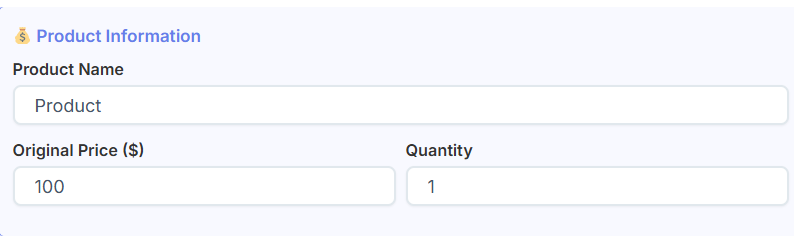
Product Name
The tool allows you to input a product name. While this doesn’t change the math, it is incredibly useful when you are comparing multiple items. If you are a business owner using our Pricing Calculator to determine your broader pricing strategy, keeping track of specific product scenarios here helps maintain organization. You can label one calculation “Winter Coat” and another “Summer Scarf” to compare how deep discounts affect different inventory items.
Original Price
This is the starting point. You enter the full retail price before any sales or deductions. The double discount calculator uses this figure as the foundation for all subsequent math. Accuracy here is vital; even a small error in the base price will skew the final result after compounding percentages are applied.
Quantity
Often, you aren’t just buying one thing. You might be stocking up on five shirts or buying materials in bulk. The quantity field allows you to scale the calculation instantly. Instead of running the math for one item and multiplying it yourself, the tool adjusts the total savings and final price based on the volume you enter. This feature is particularly helpful for visualizing bulk savings.
Discount Type Selection
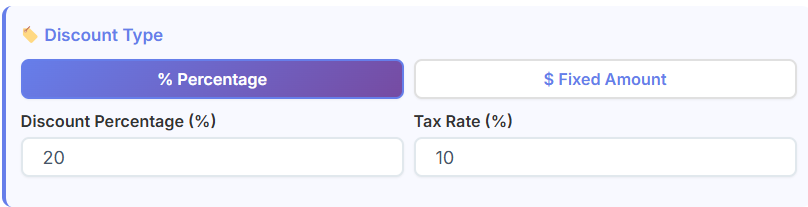
Flexibility is key when calculating costs. Not all deals are percentages. Sometimes you get “$10 off,” and other times you get “15% off.” Our tool accommodates both through the Discount Type selection.
Percentage Discount Option
This is the most common setting for a percent off calculator. You select this when the deal is phrased as “20% Off” or “Half Price.” When selected, the tool expects you to enter a number between 0 and 100 in the value fields. The double discount calculator will then apply this percentage to the price at the specific stage of the calculation where it belongs.
Fixed Amount Discount Option
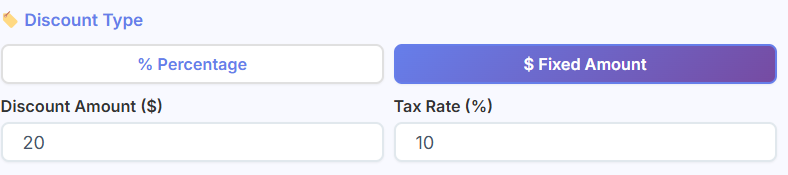
Sometimes, a promotion is a flat currency value, such as “Take $50 off your order.” By selecting the Fixed Amount option, you change how the math works. The calculator will subtract a specific dollar amount rather than a percentage. Understanding when to use which option is vital. A fixed discount can sometimes be more valuable than a percentage discount on lower-priced items, while percentages usually win on high-ticket items. This toggle lets you experiment with both scenarios.
Primary Discount Input
Once you have established your product details and chosen your discount type, you move to the Primary Discount Input. This is the first layer of savings applied to your original price.
Discount Percentage Field
Here, you enter the value of the main sale. If the store sign says “25% Off,” you enter “25” into this field. The double discount calculator treats this as the “Tier 1” discount. It is the first reduction applied to the original price. It mimics exactly what happens at a cash register: the primary sale is scanned first.
Tax Rate Field
Taxes are an unavoidable reality of commerce, yet many simple tools ignore them. This calculator includes a dedicated field for the tax rate percentage. Why is this here? Because taxes are usually calculated on the final discounted price (depending on local laws), or sometimes the pre-discount price. By inputting your local tax rate, the double discount calculator can give you the true “out-the-door” price, not just the subtotal. This is helpful for consumers managing a strict budget and essential for businesses managing Cash Flow Calculator projections, where every dollar of tax liability impacts the bottom line.
Additional Discount Tiers
This section is the heart of the tool. This is what makes it a true double discount calculator rather than just a basic percentage discount calculator.
What Discount Tiers Are
In retail, a “tier” represents a subsequent level of savings. The first tier is the primary sale (e.g., Black Friday Sale). The second tier is the additional incentive (e.g., Member’s Discount).
How Multiple Discounts Stack
When you enter a value in the “Additional Discount” field, the tool applies it to the price after the primary discount has been deducted.
Let’s look at a practical shopping example using the double discount calculator:
- Original Price: $200
- Primary Discount: 50%
- Price becomes: $100
- Additional Discount Tier: Extra 20% off
The tool takes the new $100 price and removes 20% from it ($20), resulting in a final price of $80. A standard calculator might incorrectly tell you the price is $60 (70% off $200). The ability to add these tiers accurately is why this tool is indispensable for savvy shoppers and store managers alike.
Coupon Code & Promo Discounts
Beyond standard sales, we often have specific codes to enter at checkout. The “Coupon Code” section of the double discount calculator handles this third layer of complexity.
Coupon Code Input
You can type in the name of the code you are using, such as “SAVE10” or “FREESHIP.” Like the product name, this is for your reference. It appears on the final breakdown, helping you remember exactly which combination of codes yielded the specific price.
Coupon Discount Percentage
This field works similarly to the previous discount tiers but represents the final layer of deduction. Often, coupons are applied last, after store-wide sales and member discounts. By entering the percentage here, the double discount calculator performs the final subtraction from the already reduced price. This granular control allows users to simulate complex checkout scenarios where a clearance item (Tier 1) gets a weekend discount (Tier 2) and a loyalty coupon (Tier 3).
Calculate Button & User Action
After filling in the fields, the user interacts with the “Calculate Discount” button.
What Happens When You Click
Clicking this button triggers the tool’s engine. It instantly processes the sequence: Original Price ➔ Primary Discount ➔ Additional Discount ➔ Coupon Code ➔ Quantity Adjustment ➔ Tax Calculation.
Why This Beats Manual Calculation
Trying to perform this chain of math in your head or on a scratchpad is prone to error. Did you remember to apply the tax to the final price or the original? Did you subtract the second percentage from the right subtotal? The double discount calculator eliminates these variables. It provides an instantaneous, error-free result. This speed is particularly valuable for businesses running multiple pricing scenarios to estimate Customer Lifetime Value. Knowing exactly how deep discounts impact your margins helps you decide if a loyalty strategy is sustainable long-term.
Discount Summary Results Section
Once the calculation is complete, the tool presents a clear “Discount Summary.” This section breaks down the final numbers into easily digestible metrics.
Original Price
This reiterates your starting point, confirming the base value used for the math.
Final Sale Price
This is the number you care about most. It is the cost per item after all discounts have been stripped away.
Total Discount Amount
The double discount calculator sums up the total monetary value of all savings combined. Seeing “You saved $45.50” is often more impactful than seeing abstract percentages.
Percentage Saved
This is a fascinating metric. It calculates the effective total percentage off. Remember our earlier example where 20% + 10% equaled 28% actual savings? This field displays that “28%,” giving you the true scope of the deal. It answers the question of how to calculate percent off in a holistic way.
Tax Amount
This shows exactly how much tax is being added to the final bill, separating government fees from store pricing.
Final Total Payable
This is the bottom line—literally. It combines the discounted price, multiplied by the quantity, plus the taxes. It is the exact amount that will leave your bank account.
Discount Breakdown Table
For those who want to see the “why” behind the “what,” the Discount Breakdown Table offers transparency.
Line-by-Line Price Breakdown
This table lists every step the double discount calculator took.
- Row 1: Starting Price
- Row 2: Less Primary Discount (shows amount subtracted)
- Row 3: New Subtotal
- Row 4: Less Additional Discount (shows amount subtracted)
- …and so on.
Verifying Savings
This transparency builds trust. You can verify that the store’s register is correct. If the store’s final price is higher than what our double discount calculator shows in this table, you know a mistake has been made or a hidden fee applied.
Visual Chart Explanation
Numbers can be dry. To make the data instant and intuitive, the tool generates a Visual Chart, typically a doughnut or pie chart.
Doughnut Chart Meaning
The chart is divided into segments representing the Final Price, the Total Discount, and the Tax.
Sale Price vs. Discount vs. Tax
By seeing these proportions visually, you grasp the value of the deal instantly. If the “Discount” slice of the chart is larger than the “Sale Price” slice, you know you are getting a massive deal (over 50% off). This visual aid improves understanding for visual learners who might get lost in rows of numbers. It turns the output of the double discount calculator into a clear picture of value.
PDF Download Feature
The final utility feature of the tool is the ability to export your results.
Receipt-Style PDF
Clicking the “Download PDF” button generates a professional, receipt-style document. It captures every input, every calculation step, the summary, and the breakdown table.
Use Cases for Record Keeping
For personal shoppers, this is a great way to save a “quote” before heading to the store. You can show the clerk exactly what price you expect. For business owners, these PDFs serve as excellent records for potential promotion plans. You can print out five different scenarios from the double discount calculator to present in a strategy meeting, showing clearly how different discount structures affect the final price.
Practical Use Cases
Understanding the theory is great, but how does the double discount calculator help in daily life?
Online Shopping
Ecommerce stores are notorious for complex coupon stacking. You might have a “New Customer” code and a “Summer Sale” auto-applied discount. Before you reach the checkout page where shipping info is required, you can use our tool to verify if the deal is within your budget. It acts as a personal discount calculator to vet carts before commitment.
Seasonal Sales
Black Friday and Cyber Monday are prime times for stacked discounts. Retailers often increase the “extra off” percentages as the day goes on. Using a double discount calculator helps you decide if waiting for that extra 5% tier is worth the risk of the item selling out.
Bulk Buying
Wholesalers often provide tiered pricing based on volume (e.g., “Buy 10 get 5% off, Buy 50 get 10% off”) plus prompt payment discounts (e.g., “2% off if paid in 10 days”). These are classic double discount scenarios. A business buyer can use the calculator to see the exact unit cost difference between buying 40 units vs. 50 units, ensuring maximum efficiency in procurement.
Ecommerce Pricing
For shop owners, setting prices is a delicate balance. If you offer too many stacked coupons, you might accidentally sell items below cost. By running your proposed promotions through the double discount calculator, you can safeguard your margins. You will see exactly how low the price goes when a savvy customer combines every available code.
Business Promotions
When marketing a sale, clarity helps conversion. If you are running a “20% + 20% off” promo, you can use the calculator to generate examples for your marketing emails. You can legally and accurately say, “Get this $100 item for just $64!” because you have verified the math.
Summary
In a marketplace filled with complex offers and tiered pricing, clarity is your best asset. The double discount calculator offers that clarity. It transforms confusing strings of percentages into hard, accurate numbers. Whether you are a shopper trying to ensure you aren’t overpaying or a business owner protecting your profit margins, this tool bridges the gap between rough estimates and financial reality.
By understanding how multiple discounts stack—and seeing the line-by-line breakdown—you make smarter financial decisions. You stop guessing and start knowing. Use the double discount calculator to prevent pricing mistakes, verify receipts, and plan your purchases with confidence. In the end, the smartest buyer is the informed buyer.
FAQs
Is a 20% discount plus another 10% discount the same as a 30% discount?
No, they are not the same, and this is a common point of confusion. A 20% discount plus an additional 10% discount results in a smaller total saving than a single 30% discount. Retailers apply discounts sequentially. First, 20% is taken off the original price. Then, the 10% discount is applied to that new, lower subtotal. A double discount calculator handles this tiered math automatically to show you the true final price and effective percentage saved, which in this case would be 28%, not 30%.
How does a double discount calculator help business owners?
For business owners, a double discount calculator is a crucial tool for protecting profit margins. When planning promotions, you can simulate how stacking different offers—like a seasonal sale, a loyalty coupon, and a bulk discount—affects the final sale price. This helps you avoid accidentally pricing products below cost. It allows you to test promotional strategies and set clear, profitable discount rules before launching a campaign, ensuring your sales events are both attractive to customers and financially sustainable for your business.
When should I use the ‘fixed amount’ vs. ‘percentage’ discount option?
You should choose the discount option that matches the deal you’re evaluating. Select ‘percentage’ for offers like “15% off” or “half price,” where the saving is a portion of the total cost. Use the ‘fixed amount’ option for deals like “$10 off your purchase” or a “$25 gift card,” where the saving is a specific dollar value. On low-priced items, a fixed amount discount can sometimes offer better value than a percentage, while on expensive items, a percentage discount usually provides a larger saving. Our calculator lets you test both scenarios to see which is more beneficial.

