
The Ultimate Torque Converter Guide for Mechanics & Engineers
Torque is the invisible force that drives our world forward. Whether you are tightening a bolt on a cylinder head, calibrating a robotic arm in a manufacturing plant, or simply trying to understand the specifications of a new sports car, rotational force is the defining metric. However, the world of engineering does not speak a single language. Different regions and industries rely on vastly different standards of measurement, creating a complex web of numbers that can lead to critical errors if misunderstood. This is why having a reliable digital solution is essential for anyone working with machinery.
Our specialized tool bridges the gap between these conflicting standards. It is designed to take the guesswork out of mechanical specifications, ensuring that you have the precise numbers you need, exactly when you need them. While the term often refers to the fluid coupling in an automatic transmission, in the context of calculation, a torque converter is your digital assistant for translating force across international boundaries. By eliminating manual math, we empower mechanics, engineers, and enthusiasts to focus on what really matters: performance and precision.
What Is a Torque Converter?
To understand the necessity of this tool, we must first look at the concept of torque itself. In simple terms, torque is a twisting force that causes rotation. It is distinct from horsepower, which measures how fast work is done. Torque measures how much work can be done. When you use a wrench to loosen a lug nut, the force you apply to the handle is torque. In an automotive context, this force is what accelerates a vehicle from a standstill. It is the “grunt” of the engine.
However, the question “what does a torque converter do” often has two answers depending on the context. In a physical vehicle, it is a fluid coupling device that transfers rotating power from a prime mover, like an internal combustion engine, to a rotating driven load. It takes the place of a mechanical clutch in an automatic vehicle. It allows the engine to spin somewhat independently of the transmission. If the engine is turning slowly, such as when the car is idling at a stoplight, the amount of torque passed through the fluid coupling is very small, so keeping the car still requires only a light pressure on the brake pedal.
In the context of digital utilities and engineering mathematics, the answer to “what does a torque converter do” shifts to data translation. It acts as a bridge between the Metric system, the Imperial system, and older gravitational metric units. A mechanic in the United States might be working on a German vehicle where all specifications are in Newton-meters. Without a reliable method to translate those figures into Pound-feet, they run the risk of under-tightening a bolt or stripping a thread.
Understanding what a torque converter does in this digital sense is about understanding globalization. Manufacturers source parts from Japan, assemble engines in America, and sell vehicles in Europe. The specifications travel with the parts. A transmission converter calculation is often necessary when comparing the output of a Japanese engine (rated in kg-m) to an American counterpart. The relationship between automatic transmissions and these calculations is intimate; to rebuild a transmission, one must adhere strictly to the manufacturer’s torque specs, regardless of the unit printed in the manual.
Torque Converter Tool Overview
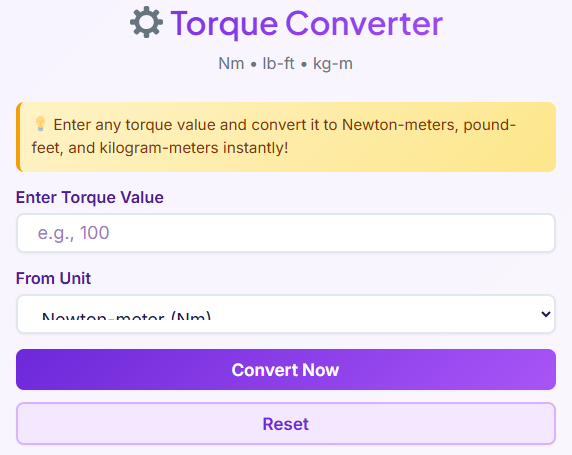
The primary purpose of our tool is to provide immediate, error-free conversions between the three most dominant units of rotational force measurement used today. It is built with a user-first philosophy, prioritizing speed and clarity over complex interfaces. We understand that our users are often in the middle of a job. You might have grease on your hands, looking at a tablet on a workbench, or quickly checking a specification on your phone while standing in a parts store. You do not have time to navigate through clunky menus or decipher complex code.
This tool supports the industry-standard units: Newton-meter (Nm), Pound-feet (lb-ft), and Kilogram-meter (kg-m). These three units cover the vast majority of automotive, aerospace, and industrial machinery applications. The tool is designed for accuracy. In high-stakes engineering, rounding errors can be catastrophic. Our system processes the input values with high-precision algorithms to ensure the output remains faithful to the physics of the calculation.
Who should use this tool? It is indispensable for professional automotive technicians who encounter diverse vehicle makes and models daily. It is equally vital for mechanical engineers designing components that must integrate with international systems. Even DIY car enthusiasts who are upgrading their vehicles will find it necessary when reading aftermarket part instructions that may not match their local unit system. Just as you might need a 🌐 Timezone Converter Open Converter → when coordinating with international engineering teams, you need this tool to coordinate international mechanical standards.
Enter Torque Value

The first step in using the tool is the input phase. We have designed the “Enter Torque Value” field to be as intuitive as possible. You simply click or tap into the input box and type the number you wish to convert. There is no need to format the number in a specific way; just type the raw figures.
We recognize that precision engineering rarely deals in whole numbers. Therefore, our input field fully supports decimal values. Whether you need to convert a massive 5000 units or a microscopic 0.05 units, the tool accepts the input without complaint. This flexibility is crucial for applications ranging from heavy diesel machinery, which deals in massive force, to delicate electronic assembly robotics, where torque is measured in tiny fractions.
Consider the real-world example of a mechanic working on a cylinder head. The specification sheet might read “45.5 Nm.” The user can enter “45.5” directly. There is no need to round up to 46 or down to 45. Maintaining that decimal point can be the difference between a perfectly sealed gasket and a blown engine. This level of detail ensures that the torque converter serves the user’s need for exactness.
Unit Selection Explained

Once the value is entered, the user must select the starting unit. This is done via a dropdown or selection menu that lists the three supported formats. Understanding when to use each unit is key to utilizing the tool effectively.
Newton-meter (Nm): This is the modern standard for the metric system and is the primary unit used by the International System of Units (SI). You will select this unit if you are working on almost any vehicle manufactured in Europe or modern Asia. It is also the standard for scientific and academic engineering contexts. If you are reading a service manual for a BMW, Mercedes, or a newer Ford, you will likely be inputting Nm.
Pound-feet (lb-ft): This is the standard unit in the United States and the United Kingdom for measuring torque in engines and heavy machinery. It is famously used to describe the output of American muscle cars and trucks. If you are tuning a classic Chevy V8 or working on agricultural equipment manufactured in the US, this is your starting point. It is worth noting that people often confuse “foot-pounds” with “pound-feet,” but in the context of torque, they are generally referring to the same vector quantity.
Kilogram-meter (kg-m): While slightly older, this unit is still prevalent in many Asian markets and in older technical documentation. It is a gravitational metric unit. You might encounter this when working on older Toyota or Nissan engines, or when dealing with legacy industrial equipment specifications.
Choosing the correct starting unit is critical. It is similar to how a shopper uses a 👕 Clothing Size Converter Open Converter → to ensure they are buying the right fit across different brand standards; selecting the wrong input unit here will result in a measurement that doesn’t “fit” your mechanical application.
Convert Now Button
The “Convert Now” button is the engine of our tool. Once you have entered your value and selected your starting unit, this button triggers the calculation process. We have designed this interaction to be satisfying and instantaneous. There is no loading screen, no waiting for server responses, and no complex page reloads.
When you click “Convert Now,” the tool immediately processes the mathematical relationship between the input unit and the target units. The speed of this reaction is vital. In a busy workshop environment, efficiency is currency. A mechanic cannot afford to wait ten seconds for a simple number conversion. The immediate feedback loop allows for a seamless workflow where the digital tool feels like a natural extension of the physical workspace.
This button represents the transformation of data. It takes the “what does a torque converter do” query and answers it with action. It turns confusion into clarity. By clicking this single button, you are ensuring that the specifications you are about to apply to a physical machine are accurate, safe, and verified.
Reset Button
Adjacent to the conversion trigger is the “Reset” button. While it may seem like a minor feature, its utility cannot be overstated for power users. When a user is performing multiple calculations in succession—perhaps converting a full list of bolt specs for an engine rebuild—manually deleting the numbers in the input field can be tedious.
Clicking the Reset button instantly clears the input field, resets the unit selection to its default state, and wipes the result cards. This returns the tool to a clean slate, ready for the next task. It is designed for reusability. We anticipate that users will not just visit the page for a single number; they will likely have a list of specifications to work through.
The Reset functionality improves the overall user experience by reducing the number of clicks and keystrokes required to perform a new task. It prevents data contamination, ensuring that you don’t accidentally leave a stray digit from a previous calculation in the input field. This focus on a clean interface allows for rapid-fire usage without frustration.
Results Section
Upon clicking “Convert Now,” the results appear in a dedicated section below the controls. We have organized the output into separate result cards for each supported unit. This layout is intentional. Rather than a cluttered list, each value is given its own space, making it highly readable at a glance.
If you input a value in Newton-meters, the results section will display the equivalent values in Pound-feet and Kilogram-meters clearly. Each card features the numeric value prominently, along with the unit label. This visual separation prevents the user from misreading the data, which is a common error when numbers are bunched together in dense text.
Furthermore, we have integrated a “Copy” feature into each result card. With a single click, the user can copy the specific converted value to their clipboard. This is immensely useful for engineers who are compiling reports or mechanics who are creating digital service logs. You can simply copy the precise figure and paste it into your document or repair order software. Precision is key, much like a chef using a 🍳 Cooking Converter Open Converter → to get a recipe perfect; you need the exact ingredients (or data) to get the desired outcome.
The results section is where the value of the torque converter is fully realized. It provides the answers in a format that is immediately usable, highly visible, and easily transferable.
Error Handling
A robust tool must be able to handle unexpected inputs. Our error handling system is designed to guide the user back to the correct path without frustration. If a user attempts to click “Convert Now” without entering a value, the tool will display a clear message indicating that the input field cannot be empty. This prevents the confusion of seeing “0” or “NaN” (Not a Number) in the results.
Similarly, we handle negative values with specific logic. In most general automotive specifications, torque is expressed as a positive magnitude. If a user enters a negative number, the tool will alert them to verify their input. While vector physics allows for negative torque (indicating direction), for the purpose of a standard wrench setting or engine spec, negative numbers are usually a typo.
We also validate against invalid characters. If a user accidentally types a letter or a special symbol into the numeric field, the system will flag this as an invalid entry. This validation is important because it protects the integrity of the calculation. It ensures that the torque converter only processes valid, meaningful data, giving the user confidence that the results they see are based on solid math, not on a parsing error.
Real-Life Applications
The applications for this tool extend far beyond simple curiosity. In the world of automotive diagnostics, understanding torque is everything. Mechanics frequently use a transmission converter calculation when swapping engines between vehicles from different markets. For instance, putting a Japanese JDM engine into an American chassis requires a deep understanding of the torque ratings to ensure the driveshaft and rear differential can handle the force.
Engine performance comparison is another major area where “what a torque converter does” becomes relevant. Enthusiasts often argue about the merits of diesel versus gasoline engines. Diesel engines generally produce high torque at low RPMs, while gasoline engines might rely on high horsepower at high RPMs. To compare a European diesel truck (rated in Nm) with an American gas truck (rated in lb-ft), one must normalize the data using our tool. This allows for an apples-to-apples comparison of towing capacity and acceleration potential.
Furthermore, consider the international nature of modern manufacturing. An engineer in Germany designing a wind turbine might specify bolt tightness in Nm. The maintenance crew in Texas assembling that turbine needs those specs in lb-ft to match their calibrated tools. A torque converter is the critical link in this supply chain, preventing structural failures caused by loose hardware.
Ultimately, whether you are trying to understand torque converter what does it do in a transmission, or simply trying to set your torque wrench correctly for a wheel change, this tool is an essential utility. It translates the language of physics into the language of your tools. By providing accurate, instant conversions, we ensure that your mechanical projects are built to the correct specifications, regardless of where the parts—or the instructions—originated.
FAQS
What is the difference between horsepower and torque?
Think of torque as the force that gets you moving, and horsepower as the speed that keeps you going. Torque is the raw muscle or “grunt” of your engine—it’s what you feel when you step on the gas at a stoplight and get pushed back into your seat. It’s crucial for towing heavy loads or climbing steep hills.
Horsepower, on the other hand, determines how fast you can go once you’re already moving. While they work together to power your vehicle, torque is about strength, while horsepower is about speed.
Why are there different torque units like Nm and lb-ft?
It mostly comes down to where your vehicle or machine was manufactured. The United States typically uses the Imperial system, meaning you will see torque listed in pound-feet (lb-ft). Most of the rest of the world (including Europe and modern Asia) uses the Metric system, where Newton-meters (Nm) is the standard.
Because repair manuals are written for specific regions, you often need to convert these numbers to match the scale on your specific torque wrench. This ensures you apply the exact amount of force required, preventing stripped threads or loose parts.
What happens if I don’t use the correct torque specification?
Precision is critical in mechanics. If you simply guess the conversion and get it wrong, you risk two main issues:
Undertightening: The bolt or nut may vibrate loose over time. In a vehicle, this could mean a wheel coming loose or a gasket leaking fluids.
Overtightening: Applying too much force can stretch the bolt beyond its limit, strip the metal threads, or even crack the component you are installing.
Using an accurate converter helps you stick exactly to the manufacturer’s safety standards, ensuring your repair holds up under pressure.

