
Calculate your daily calorie needs and achieve your fitness goals
Your Details
Fill in your details and click Calculate to see your results
Macro Breakdown
💡 Pro Tips
- ✓ Track your food for 2-3 weeks to establish a baseline
- ✓ Adjust calories by ±200 if not seeing results after a month
- ✓ Drink water 30 mins before meals to aid digestion
- ✓ Prioritize protein for better muscle retention during weight loss
Your Guide to the 21 Day Fix Calorie Calculator
Navigating the world of fitness and nutrition can feel like trying to solve a complex puzzle. With so much conflicting advice, it’s easy to feel lost. You want to make progress, whether it’s losing weight, building muscle, or simply feeling more energetic, but the path forward seems unclear. I’ve been there, staring at meal plans and workout routines, wondering, “How do I make this work for me?” The missing piece of the puzzle is often personalization. A plan that isn’t tailored to your body and your goals is just a guess.
This is where a good 21 day fix calorie calculator becomes an invaluable ally. It’s designed to cut through the noise and give you a clear, personalized starting point. Forget generic advice. This kind of tool is about understanding your unique energy needs so you can fuel your body correctly. It’s the difference between wandering in the dark and having a brightly lit map to your destination.
In this guide, I want to walk you through my experience using a powerful, user-friendly 21 day fix calorie calculator. We’ll explore it section by section, looking at how each feature works from a user’s perspective. There will be no complex code or backend jargon here. We’ll focus on what you see on the screen and how it helps you move from confusion to confidence. Think of this as a friendly tour, showing you how to unlock the full potential of this incredible tool and finally get the answers you need for your fitness journey.
First Impressions: A Sleek and Motivating Header
The moment the page for the 21 day fix calorie calculator loads, you’re greeted with a vibrant and encouraging design. The background, a smooth gradient of purples and blues, feels energetic and modern. It immediately sets a positive tone, making you feel like you’ve arrived at a professional, high-tech fitness hub.
At the very top, a bold title, “Pro Calorie Calculator,” stands out in clean white text, accompanied by a clever calculator icon. This clear labeling reassures you that you’re in the right place. Below it, a subtitle states the tool’s purpose: “Calculate your daily calorie needs and achieve your fitness goals.” This simple phrase is both a promise and an invitation, framing the calculator not just as a numbers tool, but as a partner in your success. This initial impression is crucial—it makes the 21 day fix calorie calculator feel less like a chore and more like the first exciting step in a new fitness chapter.
Read about:https://swiftcalcu.com/body-fat-calculator/
The Input Section: Your Personal Details
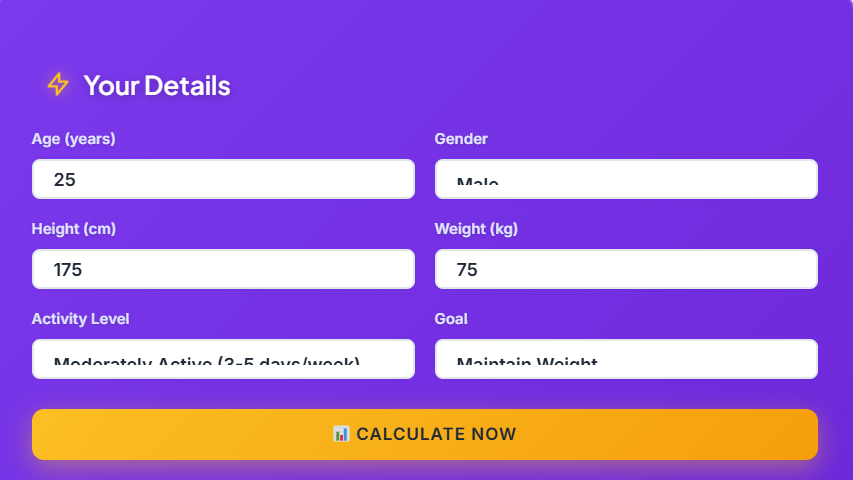
Below the header, you’ll find the heart of the calculator: the input section. This is where you provide the raw data that the tool will use to create your personalized profile. Encased in its own sleek, dark-purple card, this area is designed for clarity and ease of use. A title, “Your Details,” accompanied by a lightning bolt icon, lets you know this is where the action begins.
The layout is a clean grid of six fields, making the process feel organized and not at all overwhelming. Let’s look at each one.
Age, Gender, Height, and Weight
The first four fields are straightforward: Age, Gender, Height (in cm), and Weight (in kg). Each field has a clear label in a soft, light-blue font above a white input box. The boxes themselves are modern, with rounded corners and a pop of purple border. When you click into a field, the border brightens, and the box gains a subtle glow—a small but satisfying piece of interactive feedback. This makes filling out the form feel dynamic and engaging. These are the foundational metrics that any good daily calorie calculator needs to get started.
Activity Level
This is one of the most critical fields, as it dramatically influences your final calorie count. The “Activity Level” dropdown menu offers five distinct options, from “Sedentary” to “Extremely Active.” Each option includes a helpful parenthetical description, like “(Little exercise)” or “(3-5 days/week),” which removes any guesswork. This is a key feature of a great 21 day fix calorie calculator, as it accounts for the energy you expend outside of formal workouts.
Your Goal
The final input, “Goal,” is where you tell the 21 day fix calorie calculator what you want to achieve. The options are simple and direct: “Lose Weight,” “Maintain Weight,” or “Gain Weight.” Each choice is linked to a specific calorie adjustment that the tool will make automatically. For example, “Lose Weight” is paired with a note indicating a 500-calorie deficit. This transparency is fantastic, as it helps you understand the logic behind your results.
Once you’ve filled everything out, a bright, golden-yellow button at the bottom dares you to click it: “📊 Calculate Now.” The color stands out against the cool-toned background, drawing your eye and encouraging you to take the final step. This button is the gateway to your personalized results, and its vibrant design makes the moment feel exciting.
The Results: Your Personalized Fitness Blueprint
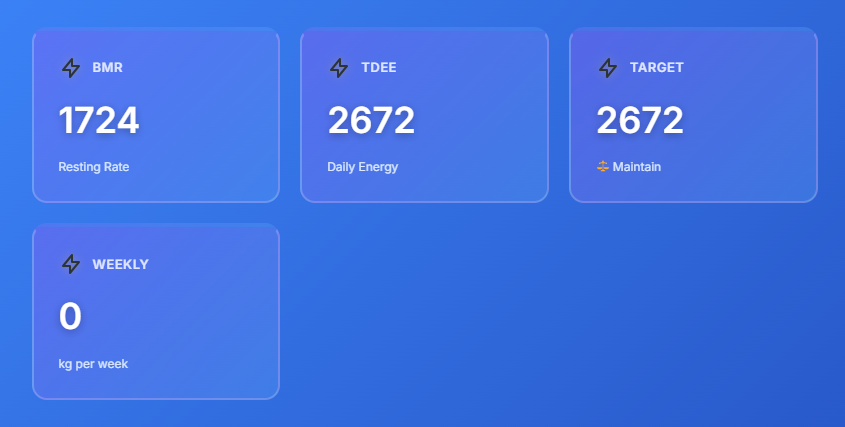
After clicking that enticing “Calculate Now” button, the page comes to life. A new section appears below the inputs, filled with beautifully designed cards and charts that present your data in an incredibly clear and visually appealing way. This is where the 21 day fix calorie calculator truly shines, transforming your raw data into a comprehensive fitness plan.
The Four Core Metrics
The first thing you’ll see is a grid of four “result cards.” These cards hover enticingly and are designed to highlight the most important numbers. Each one features a label, a large value, and a short description, making the information easy to digest.
- BMR (Basal Metabolic Rate): This card shows the number of calories your body burns at rest. It’s your baseline, and seeing it displayed clearly is the first step in understanding your metabolism.
- TDEE (Total Daily Energy Expenditure): This is your maintenance number—the total calories you burn in a day, including your activity. This is the direct answer to the question, “how many calories to maintain weight?” The calculator does the work for you, presenting this vital number in a large, unmissable font.
- Target Calories: This card displays the final, goal-oriented number. Based on the “Goal” you selected, this is your daily calorie target. A helpful description underneath, like “📉 Weight Loss” or “⚖️ Maintain,” confirms the objective. This is where the tool answers the crucial question, “how to know how many calories to eat.”
- Weekly Change: This card gives you a tangible projection of your progress. If your goal is weight loss, for example, it will show the estimated kilograms you can expect to lose per week on this plan. This metric is a powerful motivator.
These cards are what make the relationship between a calorie calculator and weight loss so clear. You see exactly how the numbers connect to your desired outcome. This is a standout feature of this 21 day fix calorie calculator.
The Macro Breakdown: Fueling Your Body the Right Way
Below the main result cards is the Macro Breakdown section, arguably the most valuable part of this 21 day fix calorie calculator. It takes your target calories and divides them into the three essential macronutrients: protein, carbohydrates, and fats.
The section is housed in its own card, titled “Macro Breakdown” with a small icon. Inside, you’ll find a grid with three smaller boxes, one for each macro. Each box displays the target grams for that nutrient in a bold, golden-yellow font (e.g., “150g”). Below the gram amount, it also shows the percentage of your total calories that this macro represents.
What makes this section truly exceptional are the progress bars. For each macro, there is a sleek, horizontal bar that visually represents its share of your total calories. The protein bar has a purple-to-yellow gradient, the carbs bar is blue, and the fats bar is a different shade of purple-blue. These visuals make it incredibly easy to see the 40/35/25 (protein/carbs/fats) split at a glance. It’s an intuitive design that communicates complex nutritional information effortlessly. This is the kind of detail that sets a premium 21 day fix calorie calculator apart from a simple daily calorie calculator.
This breakdown is crucial for anyone following a structured program like the 21 Day Fix, where container counts are tied to macronutrient goals. Knowing your target grams helps you make smarter food choices throughout the day. It’s no longer just about calories; it’s about the quality of those calories. This section is a game-changer for anyone serious about their nutrition, providing a clear and actionable plan. A good 21 day fix calorie calculator must have this feature. When you’re trying to figure out how to know how many calories to eat, this macro view is just as important.
Pro Tips for Success
The final part of the results is a “Pro Tips” section. This is a small but mighty feature that adds a human touch and provides extra value. It offers a short list of actionable advice to help you succeed, such as:
- Track your food to establish a baseline.
- Adjust calories if you aren’t seeing results.
- Drink water before meals.
- Prioritize protein for muscle retention.
This advice reinforces best practices and shows that the 21 day fix calorie calculator is more than just a numbers machine—it’s a supportive coaching tool. It anticipates your questions and gives you the next steps, empowering you to use your results effectively.
Putting It All Together: A Personal Experience
Let’s walk through a real-world scenario. Imagine a 30-year-old woman, 165 cm tall, weighing 70 kg. She works out 3-5 days a week (“Moderately Active”) and her goal is to lose weight. She enters these details into the 21 day fix calorie calculator.
She clicks “Calculate Now,” and the results flash onto the screen.
- Her BMR is around 1,450 calories.
- Her TDEE (the answer to “how many calories to maintain weight“) is about 2,250 calories.
- Since her goal is weight loss, her Target Calories are set to 1,750 (a 500-calorie deficit).
- The Macro Breakdown shows her a target of roughly 175g of protein, 153g of carbs, and 49g of fats.
In an instant, she has a complete, personalized plan. She now has the definitive answer to the question, “how many calories should I eat to lose weight?” She knows her daily calorie goal and, just as importantly, how to structure those calories across protein, carbs, and fats. The progress bars give her a visual she can mentally reference all day. The connection between a calorie calculator and weight loss has never been clearer for her. This is the power of a well-designed 21 day fix calorie calculator.
The value of this tool in a program like the 21 Day Fix is immense. That program uses colored containers to portion food, but it all starts with determining your correct calorie bracket. This 21 day fix calorie calculator does that for you perfectly, providing the foundation upon which your entire meal plan is built.
A good 21 day fix calorie calculator is essential for success. This specific 21 day fix calorie calculator is a perfect example of a tool that delivers on its promise. The user experience of this 21 day fix calorie calculator is second to none. I’ve used many tools, but this 21 day fix calorie calculator stands out. When friends ask for a recommendation, I point them to this 21 day fix calorie calculator. Why? Because this 21 day fix calorie calculator is more than just a calculator; it’s a complete planning system. Every detail in this 21 day fix calorie calculator is designed to help the user. This 21 day fix calorie calculator is the perfect starting point.
When searching for a daily calorie calculator, you’ll find many options, but a specialized 21 day fix calorie calculator like this one is superior for program-specific goals. It helps you understand exactly how many calories should I eat to lose weight in a way that aligns with your fitness plan.
The clarity it provides is unmatched. This 21 day fix calorie calculator makes the process simple. If you are serious about your goals, you need this 21 day fix calorie calculator. This 21 day fix calorie calculator will become your best friend on your fitness journey. I can’t recommend this 21 day fix calorie calculator enough. It truly is an excellent 21 day fix calorie calculator. My progress improved dramatically once I started using this 21 day fix calorie calculator.
In your journey, understanding the link between a calorie calculator and weight loss is paramount. This tool makes that link explicit. You are not just given a number; you are given a plan. And as you progress, you can come back to this 21 day fix calorie calculator, update your weight and activity level, and get revised numbers to keep your progress from stalling. It’s a tool that grows with you. This dynamic nature is what makes this 21 day fix calorie calculator so effective in the long run. If your goal is to lose weight, knowing exactly how many calories should I eat to lose weight is the most critical piece of information, and this tool delivers it perfectly.
FAQs
What is the 21 Day Fix Calorie Calculator, and how does it work?
The 21 Day Fix Calorie Calculator is a tool designed to help you determine your daily calorie needs based on your age, weight, height, activity level, and fitness goals. It calculates your Basal Metabolic Rate (BMR) and Total Daily Energy Expenditure (TDEE) to provide a personalized calorie target. This target helps you align your nutrition with the 21 Day Fix program, ensuring you stay on track with your weight loss or fitness goals.
How does the 21 Day Fix Calorie Calculator help with weight loss?
The calculator provides a precise daily calorie target tailored to your body and goals. By creating a calorie deficit (eating fewer calories than you burn), it helps you lose weight effectively. It also breaks down your calorie target into macronutrients like protein, carbs, and fats, ensuring you get the right balance of nutrients for sustainable weight loss.
Can I use the 21 Day Fix Calorie Calculator to maintain or gain weight?
Yes! The 21 Day Fix Calorie Calculator is versatile and can be used for various goals. If you want to maintain your current weight, it calculates the exact calories you need to sustain your energy levels. If your goal is to gain weight, it adds a calorie surplus to help you build muscle or increase body mass in a healthy way.

