
GST Calculator
Professional Tax Calculator with Multi-Currency Support
Updated 2025Input Details
Enter amount and select calculation optionsCalculation Results
Detailed GST breakdown and analysisItem-wise Calculation
Add multiple items for detailed invoice| # | Item Name | Quantity | Price | GST % | Total | Action |
|---|---|---|---|---|---|---|
| Grand Total: | ₹0.00 | |||||
Mastering Real Estate Taxes with the EA Tax Calculator: A Comprehensive Guide
Real estate transactions are often a whirlwind of emotions and financial decisions. Whether you’re selling your first home, transferring property to a loved one, or navigating the complexities of closing costs, taxes are an inevitable part of the process. For many, the thought of calculating taxes—prorated property taxes, transfer taxes, or closing cost taxes—can feel overwhelming. But what if there was a way to simplify it all? Enter the EA Tax Calculator.
This tool is designed to take the guesswork out of real estate tax calculations. It’s not just a calculator; it’s a financial ally that helps you understand your obligations, plan ahead, and reduce stress. In this guide, we’ll explore how the EA Tax Calculator works, using real-life scenarios to demonstrate its value. We’ll also dive into practical examples of home sales, property transfers, and closing statements to show how this tool can make a difference in your financial journey.
Why Real Estate Tax Calculations Matter
Imagine this: You’ve just sold your family home. It’s a bittersweet moment, filled with memories of birthdays, holidays, and quiet Sunday mornings. But as you sit down to review the closing statement, you’re hit with a wave of confusion. What are these prorated taxes? Why is there a transfer tax? And how do these costs impact your net proceeds?
This is where the EA Tax Calculator becomes your financial ally. It’s not just a tool; it’s a guide that helps you understand the tax implications of your decisions. Whether you’re calculating property tax prorations for a mid-year sale or estimating transfer taxes in Iowa, this calculator provides precise, user-friendly results.
Taxes are often the most misunderstood part of real estate transactions. Many sellers and buyers are unaware of how taxes are calculated, leading to confusion and stress during the closing process. For example, a seller might not realize that they are responsible for prorated property taxes up to the date of sale, while the buyer takes over from that point forward. Similarly, transfer taxes—fees imposed by state or local governments when property changes hands—can come as a surprise if not accounted for in advance.
The EA Tax Calculator eliminates these uncertainties by providing clear, accurate calculations. It’s a tool that empowers you to make informed decisions, whether you’re selling a home, buying a new property, or simply trying to understand your financial obligations.
Real-Life Scenarios: How the EA Tax Calculator Helps
1. Selling Your Home Mid-Year: Tax Proration Made Simple
Let’s say you’re selling your home in June. Property taxes are typically paid annually, but since you’ve lived in the house for half the year, you’re responsible for six months of taxes. The buyer will cover the rest. This is called tax proration.
Here’s how the EA Tax Calculator simplifies this process:
- Input the annual property tax amount: Let’s assume it’s $6,000.
- Specify the sale date: June 30th.
- Calculate your share: The calculator instantly shows that you owe $3,000 for the first half of the year.
This clarity ensures a smooth closing process and avoids disputes with the buyer. Without the calculator, you might rely on rough estimates or leave the calculation to others, risking errors that could cost you money.
For example, consider Sarah, a homeowner in Texas. She sold her home in July but didn’t realize she was responsible for prorated taxes. At closing, she was blindsided by a $2,800 tax bill. If Sarah had used the EA Tax Calculator, she could have planned for this expense and avoided the last-minute stress.
2. Understanding Transfer Taxes: A Hidden Cost
Transfer taxes are often a surprise expense for sellers. These taxes vary by state and are based on the property’s sale price. For example, in Iowa, the Iowa transfer tax calculator helps determine the exact amount owed.
Here’s a scenario:
- You’re selling a property for $250,000 in Iowa.
- The transfer tax rate is $1.60 per $1,000 of the sale price.
Using the EA Tax Calculator, you’ll see that your transfer tax is $400. This transparency allows you to budget accurately and avoid last-minute financial stress. Without this tool, you might overlook this cost entirely, leading to unpleasant surprises at closing.
Now, let’s look at a real-world example. John, a homeowner in Iowa, sold his property for $300,000. He didn’t account for the transfer tax and was shocked to learn he owed $480 at closing. By using the EA Tax Calculator, John could have included this expense in his budget and avoided the financial strain.
3. Closing Costs: Breaking Down the Numbers
Closing costs can include a mix of fees—escrow, title insurance, and taxes. For sellers, understanding these costs is essential to calculate net proceeds. The closing cost tax calculator within the EA Tax Calculator simplifies this process.
Imagine you’re selling a property for $300,000. After deducting agent commissions, escrow fees, and prorated taxes, you’re left wondering about your net profit. By entering these details into the calculator, you’ll get a clear breakdown of:
- Total closing costs.
- Tax obligations.
- Final net proceeds.
This level of detail empowers you to plan your next steps, whether it’s buying a new home or investing the proceeds.
For instance, consider Lisa, a homeowner in California. She sold her home for $500,000 but didn’t realize how much closing costs would eat into her profits. After using the EA Tax Calculator, Lisa discovered that her net proceeds would be $460,000 after accounting for agent commissions, escrow fees, and taxes. This information allowed her to adjust her budget and make informed decisions about her next home purchase.
Exploring the EA Tax Calculator Interface
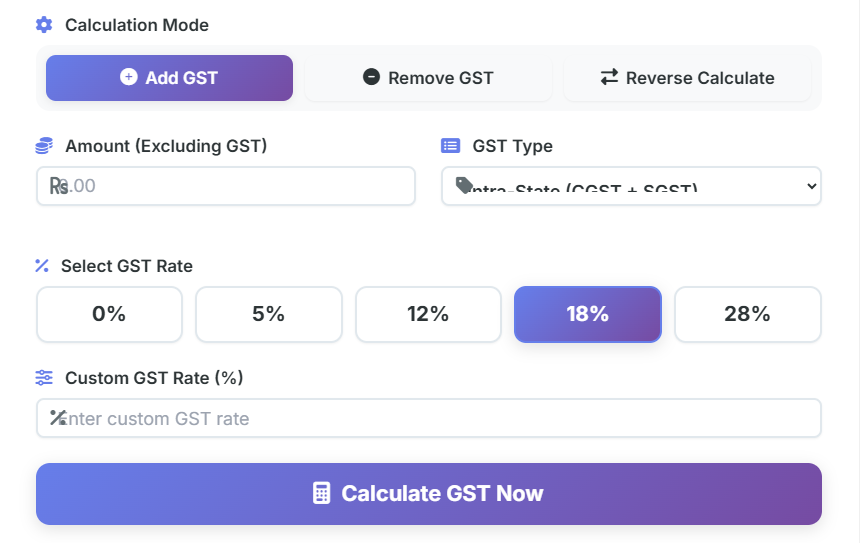
The EA Tax Calculator is designed with simplicity and functionality in mind. Here’s what you’ll see when you use it:
Input Fields

The calculator features intuitive input fields where you can enter:
- Property sale price.
- Annual property tax amount.
- Sale date.
- State-specific tax rates (e.g., Iowa transfer tax rate).
These fields are clearly labeled, ensuring you know exactly what information to provide.
Rate Fields

For calculations like transfer taxes or prorated taxes, the calculator includes rate fields. You can select predefined rates or enter custom rates based on your state’s requirements.
Calculation Button
Once you’ve entered the necessary details, a prominent Calculate button initiates the process. This button is designed to be highly visible, making it easy to use even for first-time users.
Results Area
The results area displays a detailed breakdown of your calculations, including:
- Prorated tax amounts.
- Transfer tax totals.
- Closing cost summaries.
Each result is presented in a clear, easy-to-read format, reducing confusion and enhancing understanding.

Totals Section
At the bottom of the results area, you’ll find the Totals Section, which highlights the final amounts. This includes:
- Total taxes owed.
- Net proceeds from the sale.
- Any additional fees or deductions.
User Interface
The overall user interface is clean and modern, with a focus on usability. The design incorporates:
- Responsive layouts for mobile and desktop use.
- Clear labels and tooltips for guidance.
- A visually appealing color scheme that enhances readability.
Real-World Example: Closing Statement Breakdown
To illustrate the EA Tax Calculator’s value, let’s revisit our earlier scenario of selling a $300,000 property. Here’s a detailed breakdown of the closing statement:
- Sale Price: $300,000
- Agent Commission: $18,000 (6%)
- Prorated Taxes: $1,500 (based on a $6,000 annual tax and a mid-year sale)
- Transfer Tax: $480 (Iowa rate of $1.60 per $1,000)
- Escrow Fees: $1,200
- Net Proceeds: $279,820
Using the EA Tax Calculator, you can input these details and instantly see the final net proceeds. This transparency eliminates guesswork and ensures you’re financially prepared.
Emotional and Practical Benefits of the EA Tax Calculator
Selling a home is more than a financial transaction; it’s an emotional journey. The EA Tax Calculator acknowledges this by providing clarity and reducing stress. Here’s how it helps:
- Empowerment: By understanding your tax obligations, you gain control over your finances.
- Accuracy: The calculator eliminates errors, ensuring precise results.
- Time-Saving: Automated calculations save hours of manual work.
- Peace of Mind: Knowing your financial position reduces anxiety during a stressful process.
Actionable Tax-Planning Guidance
As you navigate your real estate journey, here are some tips to maximize the benefits of the EA Tax Calculator:
- Gather Accurate Data: Ensure you have all necessary details, including property value, tax rates, and sale dates.
- Plan for Closing Costs: Include prorated taxes, transfer taxes, and escrow fees in your budget.
- Consult Professionals: While the calculator provides accurate estimates, consulting a tax advisor ensures compliance with local laws.
- Review Regularly: Tax laws and rates can change. Use the calculator periodically to stay updated.
For broader financial planning, tools like the Simple Interest Calculator can help you understand how your proceeds might grow if invested, while the Compound Interest Calculator shows the power of reinvesting your earnings. If you’re considering a new mortgage, the EMI Calculator can help you plan monthly payments effectively. And for long-term savings, the FD Calculator and Inflation Calculator are invaluable resources.
Conclusion
The EA Tax Calculator is more than a tool; it’s a trusted companion in your real estate journey. By simplifying complex calculations, it empowers you to make informed decisions, reduce stress, and achieve financial clarity. Whether you’re selling a home, transferring property, or planning for closing costs, this calculator is your key to success.
Start using the EA Tax Calculator today and take control of your financial future. With the right tools and guidance, you can navigate the complexities of real estate with confidence and ease.
FAQs
1. What is the EA Tax Calculator, and how does it help with real estate taxes?
The EA Tax Calculator is a user-friendly tool designed to simplify real estate tax calculations. It helps you determine prorated property taxes, transfer taxes, and closing costs with precision. Whether you’re selling a home mid-year or planning for closing, this calculator provides accurate results, saving you time and reducing financial stress.
2. How does the EA Tax Calculator handle prorated property taxes?
The calculator allows you to input the annual property tax amount and the sale date. It then calculates the seller’s share of taxes up to the sale date and the buyer’s share for the remainder of the year. This ensures a fair and accurate division of property taxes during real estate transactions.
3. Can the EA Tax Calculator be used for transfer taxes in different states?
Yes, the EA Tax Calculator is versatile and can handle transfer taxes for various states, including Iowa. By entering the property sale price and the state-specific tax rate, the calculator provides an exact transfer tax amount, helping you budget effectively for closing costs.
4. Is the EA Tax Calculator suitable for first-time home sellers?
Absolutely! The EA Tax Calculator is designed to be intuitive and easy to use, even for first-time sellers. It breaks down complex tax calculations into simple steps, providing clear results that help you understand your financial obligations and plan ahead.
5. What other costs can the EA Tax Calculator help me calculate?
In addition to prorated property taxes and transfer taxes, the EA Tax Calculator can estimate closing costs, including escrow fees and agent commissions. It provides a detailed breakdown of all expenses, giving you a clear picture of your net proceeds from the sale.

